<?xml version="1.0" encoding="utf-8"?><feed xmlns="http://www.w3.org/2005/Atom" ><generator uri="https://jekyllrb.com/" version="3.10.0">Jekyll</generator><link href="https://www.embeddedinn.com/feed.xml" rel="self" type="application/atom+xml" /><link href="https://www.embeddedinn.com/" rel="alternate" type="text/html" /><updated>2025-12-23T08:34:44+00:00</updated><id>https://www.embeddedinn.com/feed.xml</id><title type="html">embeddedinn</title><subtitle>EmbeddedInn is Vysakh P Pillai&apos;s personal blog with tutorials, experiment updates, general write-ups, tips&amp;tricks etc. .</subtitle><author><name>Vysakh P Pillai</name></author><entry><title type="html">Building a RISC-V Processor with Chipyard: Debugging the Halt Failure</title><link href="https://www.embeddedinn.com/articles/tutorial/RISCV-with-Chipyard/" rel="alternate" type="text/html" title="Building a RISC-V Processor with Chipyard: Debugging the Halt Failure" /><published>2025-12-23T04:49:06+00:00</published><updated>2025-12-23T04:49:06+00:00</updated><id>https://www.embeddedinn.com/articles/tutorial/RISCV-with-Chipyard</id><content type="html" xml:base="https://www.embeddedinn.com/articles/tutorial/RISCV-with-Chipyard/"><![CDATA[<style>
div {
  text-align: justify;
  text-justify: inter-word;
}
</style>

<p>Chipyard is an open-source framework for designing, simulating, and testing RISC-V processors and systems-on-chip (SoCs). It comes with a few flavors of RISC-V cores, including Rocket, BOOM, and others. It also comes with a lot of pre-built components and tools to help you get started quickly. Because Chipyard supports building production-grade core configurations that can work with industry standard EDA tools, as well as hobbyist-grade verilator models and FPGA targets, it is a great choice for both learning and professional development. However, this also makes the learning curve a bit steep for beginners.</p>

<p>When I initially started working with Chipyard, I made the naive assumption that I could simply clone the repository, run a few commands, and have a working RISC-V processor in no time. Little did I know that I will have to go implement a fix deep within the RocketCore CSRs to get this running. That was a fun learning experience though, and I am documenting the entire journey here for anyone else who might be interested in replicating this setup.</p>

<h2 id="tldr-incident-report">TL;DR Incident report</h2>

<p><strong>Problem</strong>: OpenOCD could not halt the Rocket Core, showing “Hart failed to halt” error, completely blocking all JTAG debugging.</p>

<p><strong>Root Cause</strong>: A timing race condition where the TLB checked debug status one cycle before it was updated, causing it to deny access to the Chipyard debug ROM at address 0x800.</p>

<p><strong>Fix</strong>: Changed <code class="language-plaintext highlighter-rouge">io.status.debug</code> from being driven by a registered signal (<code class="language-plaintext highlighter-rouge">reg_debug</code>) to a combinational signal (<code class="language-plaintext highlighter-rouge">trapToDebug</code>), making debug status visible in the same cycle as the debug exception.</p>

<p><strong>Impact</strong>: Enables JTAG debugging to work correctly. The fix is minimal (one line), has no performance cost, and aligns with the architectural intent that debug mode should be visible immediately when a debug exception is taken.</p>

<p>I will go into more details of how I fixed this issue later in the post.</p>

<h2 id="objectives-and-background">Objectives and Background</h2>

<p>The objective we are setting out to achieve is to:</p>

<ol>
  <li>Build a simple RISC-V processor using Chipyard.</li>
  <li>Simulate it using verilator.</li>
  <li>Write, and build a custom test program to run on our core.</li>
  <li>Run the test program on the simulated core.</li>
  <li>Attach a debugger to the running core.</li>
  <li>Step through the program using the debugger.</li>
</ol>

<p>Yeah, as I stated earlier, I was naive. But hey, where is the fun in taking the easy route ?</p>

<p>I thought I knew how RISC-V debug works. But I had to learn a lot more about how RISC-V debug works in order to get everything working with Chipyard.</p>

<p>When I first brought up a rocket core back in 2020 on an FPGA to boot linux, Chipyard was in its infancy and I used the rocket core repo directly.  You can find my old blog post about that <a href="https://embeddedinn.com/articles/tutorial/booting-my-first-RISC-V-core-on-an-FPGA/">here</a>. Since then, Chipyard has matured a lot and now provides a much better framework for building RISC-V processors and systems.</p>

<p>Chipyard is built on top of several other open-source projects. The documentation says:</p>

<blockquote>
  <p>Chipyard is a framework for designing and evaluating full-system hardware using agile teams. It is composed of a collection of tools and libraries designed to provide an integration between open-source and commercial tools for the development of systems-on-chip</p>
</blockquote>

<p>It is essentially a one-stop-shop for RISC-V SoC design. It integrates with several other projects including Rocket Chip, BOOM, FireSim, and more.</p>

<h2 id="environment-setup">Environment setup</h2>

<p>To install dependencies with the following steps:</p>

<div class="language-bash highlighter-rouge"><div class="highlight"><pre class="highlight"><code><span class="c"># Update System</span>
<span class="nb">sudo </span>apt-get update
<span class="nb">sudo </span>apt-get upgrade <span class="nt">-y</span>

<span class="c"># Install Build Tools</span>
<span class="nb">sudo </span>apt-get <span class="nb">install</span> <span class="nt">-y</span> build-essential bison flex software-properties-common curl git <span class="se">\</span>
    libgmp-dev libmpfr-dev libmpc-dev zlib1g-dev vim device-tree-compiler <span class="se">\</span>
    libboost-regex-dev libboost-system-dev <span class="se">\</span>
    libtool libtool-bin autoconf automake pkg-config texinfo gperf libusb-1.0-0-dev
</code></pre></div></div>

<p>Chipyard uses Conda to manage its dependencies.</p>

<div class="language-bash highlighter-rouge"><div class="highlight"><pre class="highlight"><code><span class="c"># Download Miniforge (conda alternative)</span>
curl <span class="nt">-L</span> <span class="nt">-O</span> <span class="s2">"https://github.com/conda-forge/miniforge/releases/latest/download/Miniforge3-</span><span class="si">$(</span><span class="nb">uname</span><span class="si">)</span><span class="s2">-</span><span class="si">$(</span><span class="nb">uname</span> <span class="nt">-m</span><span class="si">)</span><span class="s2">.sh"</span>

<span class="c"># Install</span>
bash Miniforge3-<span class="si">$(</span><span class="nb">uname</span><span class="si">)</span>-<span class="si">$(</span><span class="nb">uname</span> <span class="nt">-m</span><span class="si">)</span>.sh <span class="nt">-b</span>

<span class="c"># Initialize conda</span>
<span class="nb">source</span> ~/miniforge3/bin/activate
conda init

<span class="c"># IMPORTANT: Restart your terminal after this step</span>
</code></pre></div></div>

<p><strong>After restarting terminal:</strong></p>

<div class="language-bash highlighter-rouge"><div class="highlight"><pre class="highlight"><code><span class="c"># Install conda-lock (CRITICAL for Chipyard build-setup)</span>
conda <span class="nb">install</span> <span class="nt">-n</span> base <span class="nt">-c</span> conda-forge conda-lock
</code></pre></div></div>

<p>Next, clone the Chipyard repository and initialize the submodules:</p>

<div class="language-bash highlighter-rouge"><div class="highlight"><pre class="highlight"><code>git clone <span class="o">[</span>https://github.com/ucb-bar/chipyard.git]<span class="o">(</span>https://github.com/ucb-bar/chipyard.git<span class="o">)</span>
<span class="nb">cd </span>chipyard
git checkout 1.13.0


<span class="c"># Initialize Submodules and build setup</span>
./build-setup.sh riscv-tools

<span class="c">#build openocd</span>
./scripts/build-openocd.sh

<span class="c"># Source the environment variables</span>
<span class="nb">source </span>env.sh
</code></pre></div></div>

<p>This script will take a while to complete as it downloads dependencies and submodules and builds a few.</p>

<h2 id="understanding-chipyard-structure-and-configurations">Understanding Chipyard structure and configurations</h2>

<p>Before we proceed to build our RISC-V processor, it’s important to understand the structure of the Chipyard repository. Understanding the directory layout helped me navigate a few issues I ran into later on.</p>

<p>I am not doing an extensive walkthrough of the entire repo, but here are some of the directories I looked into to get a sense of how things are organized:</p>

<ul>
  <li><code class="language-plaintext highlighter-rouge">generators/</code>: Contains the scala code for generating RISC-V cores and SoCs.
    <ul>
      <li><code class="language-plaintext highlighter-rouge">rocket-chip/</code>: The heavily parametrized rocket core generator code written in scala that is passed on to chisel to generate verilog.
        <ul>
          <li><code class="language-plaintext highlighter-rouge">/src/main/scala/rocket/</code>: Contains the rocket core specific code. <code class="language-plaintext highlighter-rouge">CSR.scala</code> is a good example to start.</li>
        </ul>
      </li>
      <li><code class="language-plaintext highlighter-rouge">rocket-chip-blocks/</code>: Contains peripheral blocks for the rocket core.
        <ul>
          <li><code class="language-plaintext highlighter-rouge">src/main/scala/devices/uart/</code>: Contains the UART peripheral scala code.</li>
        </ul>
      </li>
      <li><code class="language-plaintext highlighter-rouge">chipyard/src/main/scala/config</code>: Contains the configuration files for different SoC builds.
        <ul>
          <li><code class="language-plaintext highlighter-rouge">RocketConfigs.scala</code>: Contains various rocket core configurations. More on this later below.</li>
        </ul>
      </li>
    </ul>
  </li>
  <li><code class="language-plaintext highlighter-rouge">toolchains/</code>: Contains the RISC-V toolchain installation setup during build-setup.</li>
  <li><code class="language-plaintext highlighter-rouge">sims/verilator/</code>: Contains verilator simulation environment setup and testbenches.</li>
</ul>

<p>The RocketConfigs.scala file contains various configurations for the rocket core. Each configuration is a class that extends from a base configuration class and overrides certain parameters to customize the core. This is used by the build system to generate different core variants.</p>

<p>For instance the <code class="language-plaintext highlighter-rouge">RocketConfig</code> class is defined as follows:</p>

<div class="language-scala highlighter-rouge"><div class="highlight"><pre class="highlight"><code>
<span class="nc">RocketConfig</span>
<span class="o">├──</span> <span class="nc">Rocket</span> <span class="nc">Tile</span> <span class="o">(</span><span class="mi">1</span><span class="n">x</span> <span class="nc">Large</span> <span class="nc">Core</span><span class="o">)</span>
<span class="o">│</span>   <span class="o">├──</span> <span class="mi">64</span><span class="o">-</span><span class="n">bit</span> <span class="nc">RISC</span><span class="o">-</span><span class="n">V</span> <span class="nc">ISA</span> <span class="o">(</span><span class="nc">RV64IMAFDC</span><span class="o">)</span>
<span class="o">│</span>   <span class="o">├──</span> <span class="n">L1</span> <span class="nc">Instruction</span> <span class="nc">Cache</span> <span class="o">(</span><span class="n">I$</span><span class="o">)</span>
<span class="o">│</span>   <span class="o">├──</span> <span class="n">L1</span> <span class="nc">Data</span> <span class="nc">Cache</span> <span class="o">(</span><span class="n">D$</span><span class="o">)</span>
<span class="o">│</span>   <span class="o">├──</span> <span class="nc">Hardware</span> <span class="nc">FPU</span>
<span class="o">│</span>   <span class="o">├──</span> <span class="nc">Hardware</span> <span class="nc">Multiply</span><span class="o">/</span><span class="nc">Divide</span>
<span class="o">│</span>   <span class="o">└──</span> <span class="nc">MMU</span> <span class="k">with</span> <span class="nc">Virtual</span> <span class="nc">Memory</span>
<span class="o">│</span>
<span class="o">├──</span> <span class="nc">Memory</span> <span class="nc">Hierarchy</span>
<span class="o">│</span>   <span class="o">├──</span> <span class="n">L2</span> <span class="nc">Cache</span> <span class="o">(</span><span class="nc">SiFive</span> <span class="nc">Inclusive</span> <span class="nc">Cache</span><span class="o">)</span>
<span class="o">│</span>   <span class="o">├──</span> <span class="mi">64</span> <span class="nc">KiB</span> <span class="nc">On</span><span class="o">-</span><span class="n">chip</span> <span class="nc">Scratchpad</span> <span class="o">(</span><span class="k">@</span> <span class="mh">0x08000000</span><span class="o">)</span>
<span class="o">│</span>   <span class="o">├──</span> <span class="mi">1</span><span class="n">x</span> <span class="nc">AXI4</span> <span class="nc">Memory</span> <span class="nc">Channel</span>
<span class="o">│</span>   <span class="o">└──</span> <span class="nc">Serial</span> <span class="nc">TileLink</span> <span class="nc">Interface</span>
<span class="o">│</span>
<span class="o">├──</span> <span class="nc">Bus</span> <span class="nc">Interconnect</span> <span class="o">(</span><span class="nc">Coherent</span><span class="o">,</span> <span class="nc">Hierarchical</span><span class="o">)</span>
<span class="o">│</span>   <span class="o">├──</span> <span class="nc">SBUS</span> <span class="o">-</span> <span class="nc">System</span> <span class="nc">Bus</span> <span class="o">(</span><span class="mi">500</span> <span class="nc">MHz</span><span class="o">)</span>
<span class="o">│</span>   <span class="o">├──</span> <span class="nc">MBUS</span> <span class="o">-</span> <span class="nc">Memory</span> <span class="nc">Bus</span> <span class="o">(</span><span class="mi">500</span> <span class="nc">MHz</span><span class="o">)</span>
<span class="o">│</span>   <span class="o">├──</span> <span class="nc">PBUS</span> <span class="o">-</span> <span class="nc">Peripheral</span> <span class="nc">Bus</span> <span class="o">(</span><span class="mi">500</span> <span class="nc">MHz</span><span class="o">)</span>
<span class="o">│</span>   <span class="o">├──</span> <span class="nc">FBUS</span> <span class="o">-</span> <span class="nc">Front</span> <span class="nc">Bus</span> <span class="o">(</span><span class="mi">500</span> <span class="nc">MHz</span><span class="o">)</span>
<span class="o">│</span>   <span class="o">└──</span> <span class="nc">CBUS</span> <span class="o">-</span> <span class="nc">Control</span> <span class="nc">Bus</span> <span class="o">(</span><span class="mi">500</span> <span class="nc">MHz</span><span class="o">)</span>
<span class="o">│</span>
<span class="o">├──</span> <span class="nc">Peripherals</span> <span class="o">&amp;</span> <span class="n">I</span><span class="o">/</span><span class="n">O</span>
<span class="o">│</span>   <span class="o">├──</span> <span class="nc">UART</span>
<span class="o">│</span>   <span class="o">├──</span> <span class="nc">Boot</span> <span class="nc">ROM</span>
<span class="o">│</span>   <span class="o">├──</span> <span class="nc">GPIO</span>
<span class="o">│</span>   <span class="o">├──</span> <span class="nc">SPI</span> <span class="nc">Flash</span> <span class="nc">Interface</span>
<span class="o">│</span>   <span class="o">└──</span> <span class="nc">Boot</span> <span class="nc">Address</span> <span class="nc">Register</span>
<span class="o">│</span>
<span class="o">└──</span> <span class="nc">Debug</span> <span class="nc">Infrastructure</span>
    <span class="o">├──</span> <span class="nc">JTAG</span> <span class="nc">Debug</span> <span class="nc">Module</span>
    <span class="o">├──</span> <span class="nc">System</span> <span class="nc">Bus</span> <span class="nc">Access</span> <span class="o">(</span><span class="nc">SBA</span><span class="o">)</span>
    <span class="o">└──</span> <span class="nc">Debug</span> <span class="nc">Memory</span> <span class="o">(</span><span class="mi">8</span> <span class="n">data</span> <span class="n">words</span><span class="o">)</span>
</code></pre></div></div>

<p>Since we will be using verilator to simulate our core, our starting point is the <code class="language-plaintext highlighter-rouge">Makefile</code> in the <code class="language-plaintext highlighter-rouge">sims/verilator</code> directory. Verilator is a great tool for simulating hardware designs as it converts Verilog code into C++ code, which can then be compiled and executed. This allows for fast simulation speeds and allows easy software control over the simulation. The preferred configuration for verilator simulations in Chipyard is the <code class="language-plaintext highlighter-rouge">FastRTLSimRocketConfig</code>, which is optimized for fast simulation speeds by removing the TileLink protocol checkers/monitors to reduce simulation overhead and improve simulation speed.</p>

<blockquote>
  <p><strong>Note:</strong> I faced some additional issues when using the <code class="language-plaintext highlighter-rouge">RocketConfig</code> configuration with the TileLink monitors asserting when when OpenOCD performs byte-level memory writes. Using the <code class="language-plaintext highlighter-rouge">FastRTLSimRocketConfig</code> configuration resolved these issues without needing any additional code changes.</p>
</blockquote>

<p>The next step is to build the verilator simulation using the desired configuration.</p>

<h2 id="chipyard-design-hierarchy-and-boot-flow">Chipyard design hierarchy and boot flow</h2>

<h3 id="sim-hirearchy-and-testbench-structure">Sim hirearchy and testbench structure</h3>

<p>To build the verilator simulation, we issue a make command from within the <code class="language-plaintext highlighter-rouge">sims/verilator</code> directory. We can pass the <code class="language-plaintext highlighter-rouge">CONFIG</code> variable to the make to point the build to <code class="language-plaintext highlighter-rouge">FastRTLSimRocketConfig</code> configuration for our simulation.</p>

<p>Since Verilator simulates the hardware design, the makefile is setup to wrap the design in a testbench that provides the necessary stimulus and environment for the design to operate correctly. Understanding the design hierarchy is important to understand how the testbench interacts with the core.</p>

<p>The makefile first invokes the Chisel build system to generate the Verilog code for the specified configuration. The generated Verilog code is then compiled by Verilator along with the testbench code to create the final simulation binary.</p>

<p>The Chisel build command used in the makefile looks like this:</p>

<div class="language-bash highlighter-rouge"><div class="highlight"><pre class="highlight"><code>java <span class="nt">-cp</span> &lt;classpath&gt; chipyard.Generator <span class="se">\</span>
  <span class="nt">--target-dir</span> &lt;build_dir&gt; <span class="se">\</span>
  <span class="nt">--name</span> chipyard.harness.FastRTLSimRocketConfig <span class="se">\</span>
  <span class="nt">--top-module</span> chipyard.harness.TestHarness <span class="se">\</span>
  <span class="nt">--legacy-configs</span> chipyard:FastRTLSimRocketConfig
</code></pre></div></div>

<p>The overall module hirearchy of the generated design looks like this:</p>

<div class="mermaid">
graph TD
    A[TestDriver.v<br />Verilog Testbench] --&gt; B[TestHarness<br />Chisel Module]
    B --&gt; C[ChipTop<br />LazyModule]
    B --&gt; H[Harness Binders<br />Simulation Models]

    C --&gt; D[system<br />DigitalTop]
    D --&gt; E[tile_prci_domain]
    E --&gt; F[RocketTile]
    F --&gt; G1[Rocket Core<br />CPU Pipeline]
    F --&gt; G2[Frontend<br />Instruction Fetch]
    F --&gt; G3[DCache]

    H --&gt; H1[SimDRAM<br />Memory Model]
    H --&gt; H2[SimTSI<br />Program Loader]
    H --&gt; H3[SimJTAG<br />Debug Interface]
    H --&gt; H4[UARTAdapter<br />Console I/O]
    H --&gt; H5[Clock Generators]

    style C fill:#e1f5ff
    style F fill:#fff4e1
    style H fill:#f0f0f0
</div>

<p>These are some pointers to the Code organisation resulting in this hireacrchy:</p>

<ul>
  <li><code class="language-plaintext highlighter-rouge">generators/chipyard/src/main/scala/harness/TestHarness.scala</code>: Defines the <code class="language-plaintext highlighter-rouge">TestHarness</code> module that instantiates <code class="language-plaintext highlighter-rouge">ChipTop</code> and connects the simulation models.</li>
  <li><code class="language-plaintext highlighter-rouge">generators/chipyard/src/main/scala/ChipTop.scala</code>: Defines the <code class="language-plaintext highlighter-rouge">ChipTop</code> module that instantiates the <code class="language-plaintext highlighter-rouge">DigitalTop</code> system.</li>
</ul>

<h3 id="boot-and-execution-flow-in-the-chipyard-verilator-sim">Boot and execution flow in the Chipyard Verilator sim</h3>

<p>When we run a Verilator simulation, the core starts in reset, executes a bootrom, waits for code to be loaded via TSI (Test Serial Interface), and then jumps to execute that code.</p>

<p><code class="language-plaintext highlighter-rouge">generators/rocket-chip/src/main/resources/vsrc/TestDriver.v</code> is the top-level Verilog testbench that instantiates the <code class="language-plaintext highlighter-rouge">TestHarness</code> module and provides clock/reset generation, memory model, TSI interface, JTAG interface, and UART console. This is how the hardware hireatcgy looks like:</p>

<div class="language-bash highlighter-rouge"><div class="highlight"><pre class="highlight"><code>TestDriver <span class="o">(</span>Verilog wrapper<span class="o">)</span>
└─ TestHarness <span class="o">(</span>Chisel Module<span class="o">)</span>
    ├─ ChipTop <span class="o">(</span>LazyModule - the DUT<span class="o">)</span>
    │   ├─ system <span class="o">(</span>DigitalTop<span class="o">)</span>
    │   │   ├─ bootrom <span class="o">(</span>at address 0x10000<span class="o">)</span>
    │   │   │   └─ Contains boot code <span class="k">in </span>bootrom.img
    │   │   ├─ bootaddr_reg <span class="o">(</span>at address 0x1000<span class="o">)</span>
    │   │   │   └─ Holds boot address <span class="o">(</span>default: 0x80000000<span class="o">)</span>
    │   │   ├─ tile_prci_domain
    │   │   │   └─ tile <span class="o">(</span>RocketTile with Rocket core<span class="o">)</span>
    │   │   │       └─ Starts at reset vector <span class="o">(</span>0x10000<span class="o">)</span>
    │   │   └─ fbus <span class="o">(</span>Front bus <span class="k">for </span>serial TileLink<span class="o">)</span>
    │   └─ Ports <span class="o">(</span>serial_tl, uart, debug, etc.<span class="o">)</span>
    │
    └─ Harness Components <span class="o">(</span>simulation models<span class="o">)</span>
        ├─ SerialRAM <span class="o">(</span>harness-side memory<span class="o">)</span>
        │   ├─ TSIToTileLink converter
        │   └─ TL RAM/ROM models
        └─ SimTSI <span class="o">(</span>C++ DPI module<span class="o">)</span>
            └─ Connects to SerialTL port
</code></pre></div></div>

<p>The Boot Address Register is set in <code class="language-plaintext highlighter-rouge">generators/testchipip/src/main/scala/boot/BootAddrReg.scala</code> and is memory-mapped at address <code class="language-plaintext highlighter-rouge">0x1000</code>. It holds the address where the core will jump to after the bootrom execution. By default, it is set to <code class="language-plaintext highlighter-rouge">0x80000000</code>, which is the start of DRAM.</p>

<p><code class="language-plaintext highlighter-rouge">generators/testchipip/src/main/resources/testchipip/bootrom/bootrom.S</code> contains the assembly code for the bootrom. Core immediately goes into a wait-for-interrupt (WFI) loop. It’s waiting for an MSIP (Machine Software Interrupt) to wake it up.</p>

<div class="language-s highlighter-rouge"><div class="highlight"><pre class="highlight"><code><span class="err">_</span><span class="n">hang</span><span class="o">:</span><span class="w">  </span><span class="o">//</span><span class="w"> </span><span class="n">Reset</span><span class="w"> </span><span class="n">vector</span><span class="w"> </span><span class="n">entry</span><span class="w"> </span><span class="n">point</span><span class="w">
  </span><span class="n">la</span><span class="w"> </span><span class="n">a0</span><span class="p">,</span><span class="w"> </span><span class="err">_</span><span class="n">start</span><span class="w">          </span><span class="o">//</span><span class="w"> </span><span class="n">Load</span><span class="w"> </span><span class="n">address</span><span class="w"> </span><span class="n">of</span><span class="w"> </span><span class="err">_</span><span class="n">start</span><span class="w">
  </span><span class="n">csrw</span><span class="w"> </span><span class="n">mtvec</span><span class="p">,</span><span class="w"> </span><span class="n">a0</span><span class="w">         </span><span class="o">//</span><span class="w"> </span><span class="n">Set</span><span class="w"> </span><span class="n">trap</span><span class="w"> </span><span class="n">vector</span><span class="w"> </span><span class="n">to</span><span class="w"> </span><span class="err">_</span><span class="n">start</span><span class="w">
  </span><span class="n">li</span><span class="w"> </span><span class="n">a0</span><span class="p">,</span><span class="w"> </span><span class="m">8</span><span class="w">               </span><span class="o">//</span><span class="w"> </span><span class="n">MSIP</span><span class="w"> </span><span class="n">bit</span><span class="w"> </span><span class="p">(</span><span class="n">Machine</span><span class="w"> </span><span class="n">Software</span><span class="w"> </span><span class="n">Interrupt</span><span class="w"> </span><span class="n">Pending</span><span class="p">)</span><span class="w">
  </span><span class="n">csrw</span><span class="w"> </span><span class="n">mie</span><span class="p">,</span><span class="w"> </span><span class="n">a0</span><span class="w">           </span><span class="o">//</span><span class="w"> </span><span class="n">Enable</span><span class="w"> </span><span class="n">MSIP</span><span class="w"> </span><span class="k">in</span><span class="w"> </span><span class="n">mie</span><span class="w"> </span><span class="n">CSR</span><span class="w">
  </span><span class="n">csrs</span><span class="w"> </span><span class="n">mstatus</span><span class="p">,</span><span class="w"> </span><span class="n">a0</span><span class="w">       </span><span class="o">//</span><span class="w"> </span><span class="n">Enable</span><span class="w"> </span><span class="n">interrupts</span><span class="w"> </span><span class="k">in</span><span class="w"> </span><span class="n">mstatus</span><span class="w">

</span><span class="n">wfi_loop</span><span class="o">:</span><span class="w">                </span><span class="o">//</span><span class="w"> </span><span class="n">WAIT</span><span class="w"> </span><span class="n">FOR</span><span class="w"> </span><span class="n">INTERRUPT</span><span class="w">
  </span><span class="n">wfi</span><span class="w">                    </span><span class="o">//</span><span class="w"> </span><span class="n">Core</span><span class="w"> </span><span class="n">goes</span><span class="w"> </span><span class="n">to</span><span class="w"> </span><span class="n">sleep</span><span class="w"> </span><span class="n">here</span><span class="w">
  </span><span class="n">j</span><span class="w"> </span><span class="n">wfi_loop</span><span class="w">
</span></code></pre></div></div>

<p>When we execute the sim, we will be passing an elf file to parse and load into the memory through a commandline argument. The code in <code class="language-plaintext highlighter-rouge">chipyard/generators/testchipip/src/main/resources/testchipip/csrc/testchip_tsi.cc</code> implements the TSI protocol to load the elf file into the simulated memory.</p>

<p>The boot sequence looks like this:</p>

<div class="mermaid">
sequenceDiagram
    participant TSI as SimTSI/HTIF
    participant Core as Rocket Core
    participant BootROM as BootROM<br />0x10000
    participant BootReg as BootAddr Reg<br />0x1000
    participant CLINT as CLINT<br />0x2000000
    participant DRAM as DRAM<br />0x80000000

    Note over Core: Reset
    Core-&gt;&gt;BootROM: Jump to 0x10000
    BootROM-&gt;&gt;BootROM: Setup trap handler
    BootROM-&gt;&gt;BootROM: Enable MSIP interrupt
    BootROM-&gt;&gt;BootROM: Enter WFI loop

    Note over TSI: Load program via TSI
    TSI-&gt;&gt;DRAM: Write ELF to 0x80000000
    TSI-&gt;&gt;BootReg: Write boot address
    TSI-&gt;&gt;CLINT: Trigger MSIP (wake core)

    CLINT--&gt;&gt;Core: MSIP interrupt
    Core-&gt;&gt;BootROM: Handle interrupt (_start)
    BootROM-&gt;&gt;CLINT: Clear MSIP
    BootROM-&gt;&gt;BootReg: Read boot address
    BootROM-&gt;&gt;Core: Set mepc = 0x80000000
    BootROM-&gt;&gt;Core: mret (jump to program)

    Core-&gt;&gt;DRAM: Execute program at 0x80000000
</div>

<p>The key steps are:</p>

<ol>
  <li>Loads your program into DRAM (at <code class="language-plaintext highlighter-rouge">0x80000000</code>) via TSI write commands</li>
  <li>Writes boot address to bootaddr_reg (<code class="language-plaintext highlighter-rouge">0x1000</code>) via +init_write or automatically</li>
  <li>Triggers MSIP for hart 0 (writes to CLINT at <code class="language-plaintext highlighter-rouge">0x2000000</code>) to wake up the core that is waiting in WFI loop in the bootrom.</li>
</ol>

<div class="language-s highlighter-rouge"><div class="highlight"><pre class="highlight"><code><span class="err">_</span><span class="n">start</span><span class="o">:</span><span class="w">  </span><span class="o">//</span><span class="w"> </span><span class="n">Interrupt</span><span class="w"> </span><span class="n">handler</span><span class="w"> </span><span class="p">(</span><span class="n">set</span><span class="w"> </span><span class="n">as</span><span class="w"> </span><span class="n">mtvec</span><span class="p">)</span><span class="w">
  </span><span class="n">li</span><span class="w"> </span><span class="n">a1</span><span class="p">,</span><span class="w"> </span><span class="mh">0x2000000</span><span class="w">       </span><span class="o">//</span><span class="w"> </span><span class="n">CLINT</span><span class="w"> </span><span class="n">base</span><span class="w"> </span><span class="n">address</span><span class="w">
  </span><span class="n">csrr</span><span class="w"> </span><span class="n">a0</span><span class="p">,</span><span class="w"> </span><span class="n">mhartid</span><span class="w">       </span><span class="o">//</span><span class="w"> </span><span class="n">Get</span><span class="w"> </span><span class="n">hart</span><span class="w"> </span><span class="n">ID</span><span class="w">
  </span><span class="n">bnez</span><span class="w"> </span><span class="n">a0</span><span class="p">,</span><span class="w"> </span><span class="n">boot_core</span><span class="w">     </span><span class="o">//</span><span class="w"> </span><span class="n">Multi</span><span class="o">-</span><span class="n">hart</span><span class="w"> </span><span class="n">handling</span><span class="w">

</span><span class="n">boot_core_hart0</span><span class="o">:</span><span class="w">
  </span><span class="n">sw</span><span class="w"> </span><span class="n">zero</span><span class="p">,</span><span class="w"> </span><span class="m">0</span><span class="p">(</span><span class="n">a1</span><span class="p">)</span><span class="w">         </span><span class="o">//</span><span class="w"> </span><span class="n">Clear</span><span class="w"> </span><span class="n">the</span><span class="w"> </span><span class="n">MSIP</span><span class="w"> </span><span class="n">interrupt</span><span class="w">
  </span><span class="n">li</span><span class="w"> </span><span class="n">a0</span><span class="p">,</span><span class="w"> </span><span class="n">BOOTADDR_REG</span><span class="w">    </span><span class="o">//</span><span class="w"> </span><span class="n">Load</span><span class="w"> </span><span class="mh">0x1000</span><span class="w">
  </span><span class="n">ld</span><span class="w"> </span><span class="n">a0</span><span class="p">,</span><span class="w"> </span><span class="m">0</span><span class="p">(</span><span class="n">a0</span><span class="p">)</span><span class="w">           </span><span class="o">//</span><span class="w"> </span><span class="n">Read</span><span class="w"> </span><span class="n">boot</span><span class="w"> </span><span class="n">address</span><span class="w"> </span><span class="n">from</span><span class="w"> </span><span class="n">bootaddr_reg</span><span class="w">
  </span><span class="n">csrw</span><span class="w"> </span><span class="n">mepc</span><span class="p">,</span><span class="w"> </span><span class="n">a0</span><span class="w">          </span><span class="o">//</span><span class="w"> </span><span class="n">Set</span><span class="w"> </span><span class="n">return</span><span class="w"> </span><span class="n">address</span><span class="w"> </span><span class="n">to</span><span class="w"> </span><span class="n">boot</span><span class="w"> </span><span class="n">addr</span><span class="w"> </span><span class="p">(</span><span class="mh">0x80000000</span><span class="p">)</span><span class="w">
  </span><span class="n">csrr</span><span class="w"> </span><span class="n">a0</span><span class="p">,</span><span class="w"> </span><span class="n">mhartid</span><span class="w">       </span><span class="o">//</span><span class="w"> </span><span class="n">hartid</span><span class="w"> </span><span class="k">for</span><span class="w"> </span><span class="n">bootloader</span><span class="w"> </span><span class="p">(</span><span class="n">a0</span><span class="w"> </span><span class="n">arg</span><span class="p">)</span><span class="w">
  </span><span class="n">la</span><span class="w"> </span><span class="n">a1</span><span class="p">,</span><span class="w"> </span><span class="err">_</span><span class="n">dtb</span><span class="w">            </span><span class="o">//</span><span class="w"> </span><span class="n">DTB</span><span class="w"> </span><span class="n">address</span><span class="w"> </span><span class="k">for</span><span class="w"> </span><span class="n">bootloader</span><span class="w"> </span><span class="p">(</span><span class="n">a1</span><span class="w"> </span><span class="n">arg</span><span class="p">)</span><span class="w">
  </span><span class="n">li</span><span class="w"> </span><span class="n">a2</span><span class="p">,</span><span class="w"> </span><span class="mh">0x80</span><span class="w">
  </span><span class="n">csrc</span><span class="w"> </span><span class="n">mstatus</span><span class="p">,</span><span class="w"> </span><span class="n">a2</span><span class="w">       </span><span class="o">//</span><span class="w"> </span><span class="n">Clear</span><span class="w"> </span><span class="n">MPIE</span><span class="w">
  </span><span class="n">mret</span><span class="w">                   </span><span class="o">//</span><span class="w"> </span><span class="n">Return</span><span class="w"> </span><span class="n">from</span><span class="w"> </span><span class="n">interrupt</span><span class="w"> </span><span class="o">-&gt;</span><span class="w"> </span><span class="n">jumps</span><span class="w"> </span><span class="n">to</span><span class="w"> </span><span class="mh">0x80000000</span><span class="o">!</span><span class="w">
</span></code></pre></div></div>

<p>The code executing from the <code class="language-plaintext highlighter-rouge">0x80000000</code> address is your custom test program that you compiled and passed to the simulator. The core will now execute your program. To indicate program completion, you can use the mtohost csr to write a value back to the simulation environment.</p>

<div class="language-c highlighter-rouge"><div class="highlight"><pre class="highlight"><code><span class="c1">// In your test program:</span>
<span class="n">write_csr</span><span class="p">(</span><span class="n">mtohost</span><span class="p">,</span> <span class="mi">1</span><span class="p">);</span>  <span class="c1">// Exit code 1 = success</span>
<span class="c1">// SimTSI detects this and returns exit code to the simulator</span>
</code></pre></div></div>

<p>We can alternatively use the DMI/JTAG interface for program load, debugging etc. That is what we will use for our debugging setup with OpenOCD and GDB. <code class="language-plaintext highlighter-rouge">WithSimJTAGDebug extends HarnessBinder</code> in <code class="language-plaintext highlighter-rouge">generators/chipyard/src/main/scala/harness/HarnessBinders.scala</code> enables this mode.</p>

<blockquote>
  <p>The <code class="language-plaintext highlighter-rouge">1.13.0</code> release of Chipyard (Current Latest) has a bug in the RocketCore CSR code that prevents OpenOCD from halting the core correctly. We will need to apply a small fix to the RocketCore CSR code before building the simulation. Let’s dive into that debug story next. It also gives an idea of how to debug such issues in the future.</p>
</blockquote>

<h2 id="fixing-the-debugger-halt-issue-with-a-patch">Fixing the debugger halt issue with a patch</h2>

<h3 id="tldr--dont-bore-me-with-details">Tl;DR / dont bore me with details</h3>

<p>Apply this fix before building the verilator simulation. If you don’t want to go through the detals, skip the rest of this section.</p>

<p><strong>To apply the fix automatically:</strong></p>

<div class="language-bash highlighter-rouge"><div class="highlight"><pre class="highlight"><code><span class="nb">cd</span> /generators/rocket-chip

<span class="c"># Backup original file</span>
<span class="nb">cp </span>src/main/scala/rocket/CSR.scala src/main/scala/rocket/CSR.scala.orig

<span class="c"># Apply the fix</span>
<span class="nb">sed</span> <span class="nt">-i</span> <span class="s1">'1004s/io.status.debug := reg_debug/io.status.debug := trapToDebug/'</span> <span class="se">\</span>
    src/main/scala/rocket/CSR.scala

<span class="c"># Add comment above (optional, for documentation)</span>
<span class="nb">sed</span> <span class="nt">-i</span> <span class="s1">'1005i\  // FIX: Set debug status combinationally when taking debug exception\n  // This allows TLB to recognize debug mode BEFORE instruction fetch to debug ROM\n  // Without this, TLB denies access to debug ROM (0x800) causing halt failure'</span> <span class="se">\</span>
    src/main/scala/rocket/CSR.scala
</code></pre></div></div>

<p><strong>Verify the change:</strong></p>

<div class="language-bash highlighter-rouge"><div class="highlight"><pre class="highlight"><code><span class="nb">grep</span> <span class="nt">-A</span> 3 <span class="s2">"io.status.debug :="</span> src/main/scala/rocket/CSR.scala
</code></pre></div></div>

<p>Expected output:</p>

<div class="language-plaintext highlighter-rouge"><div class="highlight"><pre class="highlight"><code>  io.status.debug := trapToDebug
  io.status.isa := reg_misa
</code></pre></div></div>

<h3 id="the-debug-journey">The debug Journey</h3>

<p class="notice--warning">It might be better to skip this section if you are not interested in the nitty-gritty details of the debugging process. This section also jumps ahead and uses some commands that are explained later in the post. Maybe you can come back to this section after reading the rest of the post.</p>

<p>While I Was trying to set up GDB and OpenOCD to debug my RISC-V core, I ran into an issue that took me a while to figure out. It started manifesting as TileLink monitor assertion failures during memory write operations initiated by OpenOCD and when unblocked by moving to <code class="language-plaintext highlighter-rouge">FastRTLSimRocketConfig</code> started showing the cores not halting when requested by openocd/gdb.</p>

<p>This is how it manifested:</p>

<div class="language-bash highlighter-rouge"><div class="highlight"><pre class="highlight"><code>Open On-Chip Debugger 0.12.0+dev-03904-gc8b0535b6 <span class="o">(</span>2025-12-19-23:42<span class="o">)</span>
Licensed under GNU GPL v2
Info : JTAG tap: riscv.cpu tap/device found: 0x00000001 <span class="o">(</span>mfg: 0x000 <span class="o">(</span>&lt;invalid&gt;<span class="o">)</span>, part: 0x0000, ver: 0x0<span class="o">)</span>
Info : <span class="o">[</span>riscv.cpu] <span class="nv">datacount</span><span class="o">=</span>8 <span class="nv">progbufsize</span><span class="o">=</span>16
Error: <span class="o">[</span>riscv.cpu] Unable to halt. <span class="nv">dmcontrol</span><span class="o">=</span>0x80000001, <span class="nv">dmstatus</span><span class="o">=</span>0x00030ca2
Error: <span class="o">[</span>riscv.cpu] Fatal: Hart 0 failed to halt during examine
</code></pre></div></div>

<p>From my previous experience with RocketCore, I had some idea of where to look for this. Like with all other hardware simulation debug, dumping the waveforms during simulation to look at the <code class="language-plaintext highlighter-rouge">io_status_debug</code> and related signals in the CSR module helped me understand what was going on.</p>

<h4 id="capturing-vcd-waveforms">Capturing VCD Waveforms</h4>

<p>To capture waveforms, I rebuilt the simulator with debug symbols and VCD support:</p>

<div class="language-bash highlighter-rouge"><div class="highlight"><pre class="highlight"><code><span class="nb">cd </span>sims/verilator
make <span class="nv">CONFIG</span><span class="o">=</span>FastRTLSimRocketConfig debug
</code></pre></div></div>

<p>Then ran it with VCD dumping enabled:</p>

<div class="language-bash highlighter-rouge"><div class="highlight"><pre class="highlight"><code>./simulator-chipyard.harness-FastRTLSimRocketConfig-debug <span class="se">\</span>
    main.elf <span class="se">\</span>
    +jtag_rbb_enable<span class="o">=</span>1 <span class="se">\</span>
    +vcdfile<span class="o">=</span>debug_halt.vcd <span class="se">\</span>
    +max-cycles<span class="o">=</span>300000
</code></pre></div></div>

<p>The <code class="language-plaintext highlighter-rouge">+max-cycles</code> flag is important because WFI would cause an infinite loop otherwise.</p>

<h4 id="analyzing-the-waveforms">Analyzing the Waveforms</h4>

<p>Opening the VCD in GTKWave, I focused on these signals:</p>

<ul>
  <li><code class="language-plaintext highlighter-rouge">trapToDebug</code> - When debug exception is taken</li>
  <li><code class="language-plaintext highlighter-rouge">reg_debug</code> - The registered debug status</li>
  <li><code class="language-plaintext highlighter-rouge">io_status_debug</code> - What the TLB sees</li>
  <li><code class="language-plaintext highlighter-rouge">io_ptw_status_debug</code> - TLB’s specific view</li>
  <li><code class="language-plaintext highlighter-rouge">core_PC</code> - Program counter</li>
</ul>

<p>When PC jumped to 0x800, <code class="language-plaintext highlighter-rouge">trapToDebug</code> went HIGH immediately, but <code class="language-plaintext highlighter-rouge">io_status_debug</code> was still LOW because it was driven by <code class="language-plaintext highlighter-rouge">reg_debug</code> which updates one cycle later.</p>

<p>The TLB checks debug status <strong>in the same cycle</strong> as the PC change. Seeing <code class="language-plaintext highlighter-rouge">io_status_debug = 0</code>, it denied access to the debug ROM region at 0x800, causing an instruction access fault.</p>

<p>Here’s the timing issue visualized:</p>

<div class="mermaid">
%%{init: {'theme':'base'}}%%
sequenceDiagram
    participant OpenOCD
    participant Core
    participant CSR
    participant TLB
    participant DebugROM as Debug ROM<br />0x800

    Note over OpenOCD,DebugROM: BUGGY BEHAVIOR (Before Fix)
    OpenOCD-&gt;&gt;Core: Send halt request
    Core-&gt;&gt;CSR: trapToDebug = 1
    Note over CSR: reg_debug still 0<br />(updates next cycle)
    CSR-&gt;&gt;TLB: io_status_debug = 0
    Core-&gt;&gt;TLB: Fetch from 0x800
    TLB-&gt;&gt;TLB: Check debug status = 0
    TLB--&gt;&gt;Core: Access Denied!
    Note over Core: Instruction Fault<br />Halt FAILS

    Note over OpenOCD,DebugROM: FIXED BEHAVIOR (After Fix)
    OpenOCD-&gt;&gt;Core: Send halt request
    Core-&gt;&gt;CSR: trapToDebug = 1
    CSR-&gt;&gt;TLB: io_status_debug = trapToDebug = 1
    Core-&gt;&gt;TLB: Fetch from 0x800
    TLB-&gt;&gt;TLB: Check debug status = 1
    TLB-&gt;&gt;DebugROM: Access Granted
    DebugROM--&gt;&gt;Core: Debug code
    Note over Core: Halt SUCCESS ✓
</div>

<h4 id="building-the-verilator-simulation">Building the verilator simulation</h4>

<p>Once the patch is applied, we can proceed to build the verilator simulation using the <code class="language-plaintext highlighter-rouge">FastRTLSimRocketConfig</code> configuration using the following commands:</p>

<div class="language-bash highlighter-rouge"><div class="highlight"><pre class="highlight"><code><span class="nb">cd </span>sims/verilator
make <span class="nv">CONFIG</span><span class="o">=</span>FastRTLSimRocketConfig <span class="nt">-j</span><span class="si">$(</span><span class="nb">nproc</span><span class="si">)</span>
</code></pre></div></div>

<p>This generates the verilator simulation binary named <code class="language-plaintext highlighter-rouge">simulator-chipyard.harness-FastRTLSimRocketConfig</code> in the<code class="language-plaintext highlighter-rouge">sims/verilator/</code> directory.</p>

<h4 id="the-fix">The Fix</h4>

<p>Looking at <code class="language-plaintext highlighter-rouge">generators/rocket-chip/src/main/scala/rocket/CSR.scala</code> around line 1004:</p>

<div class="language-scala highlighter-rouge"><div class="highlight"><pre class="highlight"><code><span class="c1">// Original buggy code:</span>
<span class="nv">io</span><span class="o">.</span><span class="py">status</span><span class="o">.</span><span class="py">debug</span> <span class="o">:=</span> <span class="n">reg_debug</span>  <span class="c1">// ← Uses registered signal!</span>

<span class="c1">// The fix:</span>
<span class="nv">io</span><span class="o">.</span><span class="py">status</span><span class="o">.</span><span class="py">debug</span> <span class="o">:=</span> <span class="n">trapToDebug</span>  <span class="c1">// ← Use combinational signal!</span>
</code></pre></div></div>

<p>The signal <code class="language-plaintext highlighter-rouge">trapToDebug</code> is already computed and goes HIGH immediately when the debug exception is taken. By routing it directly to <code class="language-plaintext highlighter-rouge">io.status.debug</code>, the TLB sees the correct debug status in the same cycle.</p>

<!-- reference from : https://superdevresources.com/image-caption-jekyll/-->
<style>
.image-wrapper {
  text-align: center;
}    

.image-wrapper .image-caption {
  color: gray;
  margin-top: em / 3;
}

</style>

<!-- _includes/image.html -->
<div class="image-wrapper">
    <a href="https://www.embeddedinn.com/images/posts/chipyard_rocketcore/wave_debug_postfix.png" title="After the fix `io.status.debug` goes HIGH in the same cycle as `trapToDebug`, allowing TLB to grant access to debug ROM." target="_blank">
    
    <img src="https://www.embeddedinn.com/images/posts/chipyard_rocketcore/wave_debug_postfix.png" alt="After the fix `io.status.debug` goes HIGH in the same cycle as `trapToDebug`, allowing TLB to grant access to debug ROM." width="800" />
    
    </a>

    
        <p class="image-caption">After the fix `io.status.debug` goes HIGH in the same cycle as `trapToDebug`, allowing TLB to grant access to debug ROM.</p>
    
</div>

<h4 id="wfi-limitation">WFI Limitation</h4>

<p>After applying the CSR fix and rebuilding, I started running ingo another issue where the OpenOCD still could not halt the core. But the verbose logging was showing slightly different behavior now.</p>

<p>The error was the same:</p>

<div class="language-bash highlighter-rouge"><div class="highlight"><pre class="highlight"><code>Error: <span class="o">[</span>riscv.cpu] Unable to halt
</code></pre></div></div>

<p>In the simulation, when verbose logging is enabled, I saw the core was stuck at a specific PC:</p>

<div class="language-bash highlighter-rouge"><div class="highlight"><pre class="highlight"><code>C0: 54 <span class="o">[</span>1] <span class="nv">pc</span><span class="o">=[</span>0000000000010034] <span class="nv">inst</span><span class="o">=[</span>10500073] DASM<span class="o">(</span>10500073<span class="o">)</span>
</code></pre></div></div>

<p>That instruction is WFI in the bootrom.</p>

<h4 id="bootrom-waiting-for-msip-interrupt-in-wfi-loop">BootROM waiting for MSIP interrupt in WFI loop</h4>

<p>Taking a closer look at the bootrom code, I realized the core was stuck in the WFI loop waiting for an MSIP interrupt to wake it up. This works well when using TSI to load programs, as TSI triggers the MSIP after loading the program. But with JTAG debug, there is no automatic MSIP trigger.</p>

<p>When we run with a normal program with</p>

<div class="language-bash highlighter-rouge"><div class="highlight"><pre class="highlight"><code>  ./simulator-chipyard.harness-FastRTLSimRocketConfig main.elf +jtag_rbb_enable<span class="o">=</span>1
</code></pre></div></div>

<p>The sequence is:</p>

<ol>
  <li>Core boots, enters bootrom at 0x10000</li>
  <li>Bootrom sets up trap handler</li>
  <li>Bootrom enters WFI loop waiting for MSIP from HTIF/TSI</li>
  <li>HTIF/TSI would normally:
    - Load your program to 0x80000000
    - Write boot address register
    - Send MSIP interrupt to wake core</li>
  <li>Core wakes from WFI, takes MSIP interrupt, handler jumps to 0x80000000</li>
</ol>

<p>But with JTAG debug:</p>

<ol>
  <li>Core boots, enters bootrom</li>
  <li>Bootrom enters WFI waiting for MSIP</li>
  <li>User tries to attach debugger</li>
  <li>Debug interrupt arrives</li>
  <li>PROBLEM: HTIF never sent MSIP because you’re trying to use JTAG instead!</li>
  <li>Bootrom is waiting for MSIP specifically</li>
  <li>Even though debug interrupt might wake from WFI temporarily, the bootrom code just… stays in its WFI loop forever</li>
</ol>

<p>The solution is to pass <code class="language-plaintext highlighter-rouge">BINARY=none</code> when runnning the simulation and manually load the program via GDB after attaching. This way, the test harness TSI immediately triggers the MSIP after reset, allowing the core to exit WFI and be ready for debugging.</p>

<h2 id="building-the-verilator-simulation-1">Building the Verilator Simulation</h2>

<blockquote>
  <p><strong>Important:</strong> Before building, make sure you’ve applied the CSR fix described in the previous section. The fix must be in place before you build, as it’s compiled into the simulator binary.</p>
</blockquote>

<p>Once the patch is applied, we can proceed to build the verilator simulation using the <code class="language-plaintext highlighter-rouge">FastRTLSimRocketConfig</code> configuration using the following commands:</p>

<div class="language-bash highlighter-rouge"><div class="highlight"><pre class="highlight"><code><span class="nb">cd </span>sims/verilator
make <span class="nv">CONFIG</span><span class="o">=</span>FastRTLSimRocketConfig <span class="nt">-j</span><span class="si">$(</span><span class="nb">nproc</span><span class="si">)</span>
</code></pre></div></div>

<h2 id="building-source-code-test-programs">Building Source Code Test Programs</h2>

<p>To build test programs to run on our RISC-V core, we can use the RISC-V toolchain that was installed during the Chipyard setup. The toolchain includes <code class="language-plaintext highlighter-rouge">riscv64-unknown-elf-gcc</code> for compiling C code into RISC-V binaries.</p>

<div class="language-bash highlighter-rouge"><div class="highlight"><pre class="highlight"><code><span class="nb">mkdir</span> <span class="nt">-p</span> ~/riscv-test
<span class="nb">cd</span> ~/riscv-test
<span class="c"># Create a simple test program</span>
</code></pre></div></div>

<p>This is out test ptogram <code class="language-plaintext highlighter-rouge">main.c</code>:</p>

<div class="language-c highlighter-rouge"><div class="highlight"><pre class="highlight"><code><span class="cp">#include</span> <span class="cpf">&lt;stdint.h&gt;</span><span class="cp">
</span>
<span class="c1">// --- Magic Symbols for Chipyard/HTIF ---</span>
<span class="c1">// The harness looks for these to know the CPU is alive and to handle exit codes.</span>
<span class="k">volatile</span> <span class="kt">uint64_t</span> <span class="n">tohost</span> <span class="nf">__attribute__</span><span class="p">((</span><span class="n">section</span><span class="p">(</span><span class="s">".htif"</span><span class="p">)));</span>
<span class="k">volatile</span> <span class="kt">uint64_t</span> <span class="n">fromhost</span> <span class="nf">__attribute__</span><span class="p">((</span><span class="n">section</span><span class="p">(</span><span class="s">".htif"</span><span class="p">)));</span>
<span class="c1">// ---------------------------------------</span>

<span class="k">volatile</span> <span class="kt">int</span> <span class="n">counter</span> <span class="o">=</span> <span class="mi">0</span><span class="p">;</span>

<span class="kt">int</span> <span class="nf">main</span><span class="p">()</span> <span class="p">{</span>
    <span class="kt">int</span> <span class="n">a</span> <span class="o">=</span> <span class="mi">5</span><span class="p">;</span>
    <span class="kt">int</span> <span class="n">b</span> <span class="o">=</span> <span class="mi">10</span><span class="p">;</span>

    <span class="k">while</span><span class="p">(</span><span class="mi">1</span><span class="p">)</span> <span class="p">{</span>
        <span class="n">counter</span><span class="o">++</span><span class="p">;</span>
        <span class="n">a</span> <span class="o">=</span> <span class="n">a</span> <span class="o">+</span> <span class="n">b</span><span class="p">;</span>
        <span class="k">if</span> <span class="p">(</span><span class="n">counter</span> <span class="o">&gt;</span> <span class="mi">100</span><span class="p">)</span> <span class="p">{</span>
            <span class="n">counter</span> <span class="o">=</span> <span class="mi">0</span><span class="p">;</span>
        <span class="p">}</span>
    <span class="p">}</span>
    <span class="k">return</span> <span class="mi">0</span><span class="p">;</span>
<span class="p">}</span>
</code></pre></div></div>

<p>To build it, we can use the following command:</p>

<div class="language-bash highlighter-rouge"><div class="highlight"><pre class="highlight"><code><span class="nb">cd</span> ~/chipyard/chipyard
<span class="nb">source </span>env.sh  <span class="c"># Always source first!</span>

<span class="nb">cd</span> ~/riscv-test

<span class="c"># Compile main program (with debug symbols)</span>
riscv64-unknown-elf-gcc <span class="nt">-O0</span> <span class="nt">-g</span> <span class="nt">-static</span> <span class="nt">-specs</span><span class="o">=</span>nano.specs <span class="se">\</span>
    <span class="nt">-Wl</span>,-Ttext<span class="o">=</span>0x80000000 <span class="nt">-o</span> main.elf main.c
</code></pre></div></div>

<p>We intentionally skipped using uart or printing a message to keep things simple. The program just increments a counter in an infinite loop taht we can observe in the debugger in the next steps.</p>

<h2 id="running-the-simulation-with-openocd-and-gdb">Running the simulation with OpenOCD and GDB</h2>

<p>To enable debugging with OpenOCD and GDB, we need to configure OpenOCD to connect to the verilator simulation’s JTAG interface. We will create a configuration file named <code class="language-plaintext highlighter-rouge">jtag_sim.cfg</code> with the following content adjested for our source code location:</p>

<div class="language-plaintext highlighter-rouge"><div class="highlight"><pre class="highlight"><code># Adapter configuration
adapter speed 10000
adapter driver remote_bitbang
remote_bitbang host localhost
# !!! UPDATE THIS PORT FROM SIMULATOR OUTPUT !!!
remote_bitbang port 12345

# RISC-V target configuration
set _CHIPNAME riscv
jtag newtap $_CHIPNAME cpu -irlen 5

set _TARGETNAME $_CHIPNAME.cpu
target create $_TARGETNAME riscv -chain-position $_TARGETNAME

# With BINARY=none, CPU can halt properly during init
# No need to defer examination
# $_TARGETNAME configure -defer-examine

# --- Debug Configuration ---
# Force hardware breakpoints (no memory writes needed)
gdb breakpoint_override hard

# Use sysbus for memory access (faster, supports all memory regions)
# System bus access is enabled via WithDebugSBA in Chipyard config
riscv set_mem_access sysbus

# Disable virtual memory lookup (prevents random page table walks)
riscv set_enable_virt2phys off

# 5 second timeout for simulator latency
riscv set_command_timeout_sec 5

# Note: set_prefer_sba is not available in OpenOCD 0.12.0
# System bus will be used automatically via set_mem_access sysbus

init

# With BINARY=none, halt should work during init
halt
</code></pre></div></div>

<blockquote>
  <p><strong>Note:</strong> The <code class="language-plaintext highlighter-rouge">riscv set_mem_access sysbus</code> setting is critical. Without it, GDB’s <code class="language-plaintext highlighter-rouge">load</code> command will fail with “Failed to write memory” errors. Chipyard’s <code class="language-plaintext highlighter-rouge">AbstractConfig</code> includes <code class="language-plaintext highlighter-rouge">WithDebugSBA</code> which enables system bus access in hardware.</p>
</blockquote>

<p>We will also create a <code class="language-plaintext highlighter-rouge">gdb_init.gdb</code> file to automate GDB commands:</p>

<div class="language-plaintext highlighter-rouge"><div class="highlight"><pre class="highlight"><code># GDB initialization script for Chipyard debugging
# Usage: riscv64-unknown-elf-gdb ~/riscv-test/main.elf -x ~/riscv-test/gdb_init.gdb

echo \n=== Chipyard RISC-V GDB Setup ===\n\n

# Increase timeout for slow simulator
set remotetimeout 300

# Connect using extended-remote (recommended by OpenOCD)
target extended-remote localhost:3333

echo Resetting and halting CPU...\n
monitor reset halt

echo Loading program...\n
load

echo \nProgram loaded. Entry point at 0x80000026\n

# Skip C runtime startup  and jump directly to main
echo Skipping C runtime startup, jumping directly to main...\n

# Set PC to main
set $pc = 0x800000b6

# Set up stack
set $sp = 0x80010000
set $fp = 0x80010000

# Set arguments to 0
set $a0 = 0
set $a1 = 0

echo \nNow at main():\n
info registers pc
x/5i $pc

echo \nSetting breakpoint in main loop...\n
hbreak *0x800000c2

echo \n=== Ready to debug! ===\n
echo Type 'continue' to run to breakpoint\n
echo Type 'stepi' to step one instruction\n
echo Type 'next' to step one source line\n
echo Type 'print counter' to examine variables\n\n
</code></pre></div></div>

<p>We can now run and attach the debugger. This requires a three terminal setup:</p>

<!-- reference from : https://superdevresources.com/image-caption-jekyll/-->
<style>
.image-wrapper {
  text-align: center;
}    

.image-wrapper .image-caption {
  color: gray;
  margin-top: em / 3;
}

</style>

<!-- _includes/image.html -->
<div class="image-wrapper">
    <a href="https://www.embeddedinn.com/images/posts/chipyard_rocketcore/three_terminal_setup.png" title="Three terminal setup: 1) Verilator sim, 2) OpenOCD, 3) GDB" target="_blank">
    
    <img src="https://www.embeddedinn.com/images/posts/chipyard_rocketcore/three_terminal_setup.png" alt="Three terminal setup: 1) Verilator sim, 2) OpenOCD, 3) GDB" width="800" />
    
    </a>

    
        <p class="image-caption">Three terminal setup: 1) Verilator sim, 2) OpenOCD, 3) GDB</p>
    
</div>

<ol>
  <li>
    <p>Terminal 1: Run the Verilator simulation</p>

    <div class="language-bash highlighter-rouge"><div class="highlight"><pre class="highlight"><code> <span class="nb">cd </span>chipyard
 <span class="nb">source </span>env.sh

 <span class="nb">cd </span>sims/verilator
 ./simulator-chipyard.harness-FastRTLSimRocketConfig <span class="se">\</span>
   none <span class="se">\</span>
   +verbose <span class="se">\</span>
   +jtag_rbb_enable<span class="o">=</span>1
</code></pre></div>    </div>

    <p>Expected output:</p>

    <div class="language-bash highlighter-rouge"><div class="highlight"><pre class="highlight"><code>
 <span class="o">[</span>UART] UART0 is here <span class="o">(</span>stdin/stdout<span class="o">)</span><span class="nb">.</span>

 This emulator compiled with JTAG Remote Bitbang client. To <span class="nb">enable</span>, use +jtag_rbb_enable<span class="o">=</span>1.
 Listening on port 37823
 Attempting to accept client socket

</code></pre></div>    </div>
  </li>
  <li>
    <p>Terminal 2: Run OpenOCD to connect to the simulation</p>

    <div class="language-bash highlighter-rouge"><div class="highlight"><pre class="highlight"><code>
 <span class="nb">cd </span>chipyard
 <span class="nb">source </span>env.sh

 <span class="nb">cd</span> ~/riscv-test

 <span class="c"># IMPORTANT: Update the port in jtag_sim.cfg first</span>
 <span class="c"># Edit the file and change remote_bitbang_port to match the simulator's port</span>

 vi jtag_sim.cfg  <span class="c"># or use your preferred editor</span>

 <span class="c"># Start OpenOCD</span>

 openocd <span class="nt">-f</span> jtag_sim.cfg
</code></pre></div>    </div>

    <p>Expected output:</p>

    <div class="language-bash highlighter-rouge"><div class="highlight"><pre class="highlight"><code> Open On-Chip Debugger 0.12.0+dev-04007-g3bed4c801 <span class="o">(</span>2025-12-20-15:48<span class="o">)</span>
 Licensed under GNU GPL v2
 For bug reports, <span class="nb">read</span>
         &lt;http://openocd.org/doc/doxygen/bugs.html&gt;
 Info : auto-selecting first available session transport <span class="s2">"jtag"</span><span class="nb">.</span> To override use <span class="s1">'transport select &lt;transport&gt;'</span><span class="nb">.</span>
 force hard breakpoints
 Info : Initializing remote_bitbang driver
 Info : Connecting to localhost:34321
 Info : remote_bitbang driver initialized
 Info : Note: The adapter <span class="s2">"remote_bitbang"</span> doesn<span class="s1">'t support configurable speed
 Info : JTAG tap: riscv.cpu tap/device found: 0x00000001 (mfg: 0x000 (&lt;invalid&gt;), part: 0x0000, ver: 0x0)
 Info : [riscv.cpu] datacount=8 progbufsize=16
 Info : [riscv.cpu] Disabling abstract command reads from CSRs.
 Info : [riscv.cpu] Disabling abstract command writes to CSRs.
 Info : [riscv.cpu] Examined RISC-V core
 Info : [riscv.cpu]  XLEN=64, misa=0x800000000094112d
 [riscv.cpu] Target successfully examined.
 Info : [riscv.cpu] Examination succeed
 Info : [riscv.cpu] starting gdb server on 3333
 Info : Listening on port 3333 for gdb connections
 riscv.cpu halted due to debug-request.
 Info : Listening on port 6666 for tcl connections
 Info : Listening on port 4444 for telnet connections
</span></code></pre></div>    </div>
  </li>
  <li>
    <p>Terminal 3: Run GDB to connect to OpenOCD and debug the core</p>

    <div class="language-bash highlighter-rouge"><div class="highlight"><pre class="highlight"><code>   <span class="nb">cd </span>chipyard
   <span class="nb">source </span>env.sh

   <span class="nb">cd</span> ~/riscv-test

   riscv64-unknown-elf-gdb main.elf <span class="nt">-x</span> gdb_init.gdb
</code></pre></div>    </div>

    <p>Expected output:</p>

    <div class="language-bash highlighter-rouge"><div class="highlight"><pre class="highlight"><code>   GNU gdb <span class="o">(</span>GDB<span class="o">)</span> 14.1

   Copyright <span class="o">(</span>C<span class="o">)</span> 2023 Free Software Foundation, Inc.
   License GPLv3+: GNU GPL version 3 or later &lt;http://gnu.org/licenses/gpl.html&gt;
   This is free software: you are free to change and redistribute it.
   There is NO WARRANTY, to the extent permitted by law.
   Type <span class="s2">"show copying"</span> and <span class="s2">"show warranty"</span> <span class="k">for </span>details.
   This GDB was configured as <span class="s2">"--host=x86_64-pc-linux-gnu --target=riscv64-unknown-elf"</span><span class="nb">.</span>
   Type <span class="s2">"show configuration"</span> <span class="k">for </span>configuration details.
   For bug reporting instructions, please see:
   &lt;https://www.gnu.org/software/gdb/bugs/&gt;.
   Find the GDB manual and other documentation resources online at:
       &lt;http://www.gnu.org/software/gdb/documentation/&gt;.

   For <span class="nb">help</span>, <span class="nb">type</span> <span class="s2">"help"</span><span class="nb">.</span>
   Type <span class="s2">"apropos word"</span> to search <span class="k">for </span>commands related to <span class="s2">"word"</span>...
   Reading symbols from main.elf...

   <span class="o">===</span> Chipyard RISC-V GDB Setup <span class="o">===</span>
</code></pre></div>    </div>
  </li>
</ol>]]></content><author><name>Vysakh P Pillai</name></author><category term="Articles" /><category term="Tutorial" /><category term="RISCV" /><category term="Chipyard" /><category term="Processor Design" /><summary type="html"><![CDATA[I thought building a RISC-V processor with Chipyard would be straightforward - clone, build, run. Instead, I spent days debugging a halt failure that took me deep into RocketCore's CSR implementation. Here's everything I learned along the way, including the fix you'll need to actually get debugging working.]]></summary></entry><entry><title type="html">Building a load-balanced production infrastructure in AWS</title><link href="https://www.embeddedinn.com/articles/tutorial/Building-a-loadbalanced-production-infrastructure-in-aws/" rel="alternate" type="text/html" title="Building a load-balanced production infrastructure in AWS" /><published>2024-08-26T04:49:06+00:00</published><updated>2024-08-26T04:49:06+00:00</updated><id>https://www.embeddedinn.com/articles/tutorial/Building-a-loadbalanced-production-infrastructure-in-aws</id><content type="html" xml:base="https://www.embeddedinn.com/articles/tutorial/Building-a-loadbalanced-production-infrastructure-in-aws/"><![CDATA[<style>
div {
  text-align: justify;
  text-justify: inter-word;
}
</style>

<p>There are hundreds if not thousands of tutorials on how to set up a load-balanced infrastructure in AWS. This post is just my notes from when I set up a load-balanced infrastructure in AWS. Needless to say that the details of the real production app has been changed for confidentiality. So, you might see a silly application being load balanced. But the concepts are the same.</p>

<p>Note that this is not one of those ultra high scale applications. But it is a good starting point to build a scalable and production-ready infrastructure in AWS that could serve a few million users.</p>

<p class="notice--info"><b>NOTE:</b> The Cloud Formation Template and Code for this article is available in GitHub at <a href="https://github.com/embeddedinn/aws_production_lb">embeddedinn/aws_production_lb</a></p>

<h2 id="requirements">Requirements</h2>

<ul>
  <li>Application development has been in Docker containers in GitHub and we will be using the same for deployment.
    <ul>
      <li>The app exposes services on two ports. One for the frontend and one for the backend.</li>
    </ul>
  </li>
  <li>The application should be able to scale horizontally.</li>
  <li>Multiple availability zones should be supported. But to save cost, they will be brought up only when needed.</li>
  <li>VPCs and securoty groups should be setup to isolate the internal resources and expose them only to the load balancer.
    <ul>
      <li>The load balancer is configured as a VPC link on the API Gateway that exposes the services to the public.</li>
    </ul>
  </li>
  <li>A load balancer and API Gateway should be used to distribute the traffic.</li>
</ul>

<p>The complete setup as seen in AWS application composer would look like this:</p>

<!-- reference from : https://superdevresources.com/image-caption-jekyll/-->
<style>
.image-wrapper {
  text-align: center;
}    

.image-wrapper .image-caption {
  color: gray;
  margin-top: em / 3;
}

</style>

<!-- _includes/image.html -->
<div class="image-wrapper">
    <a href="https://www.embeddedinn.com/images/posts/aws_production_lb/fullSetup.png" title="AWS Application Composer view of the setup" target="_blank">
    
    <img src="https://www.embeddedinn.com/images/posts/aws_production_lb/fullSetup.png" alt="AWS Application Composer view of the setup" width="800" />
    
    </a>

    
        <p class="image-caption">AWS Application Composer view of the setup</p>
    
</div>

<h2 id="architecture">Architecture</h2>

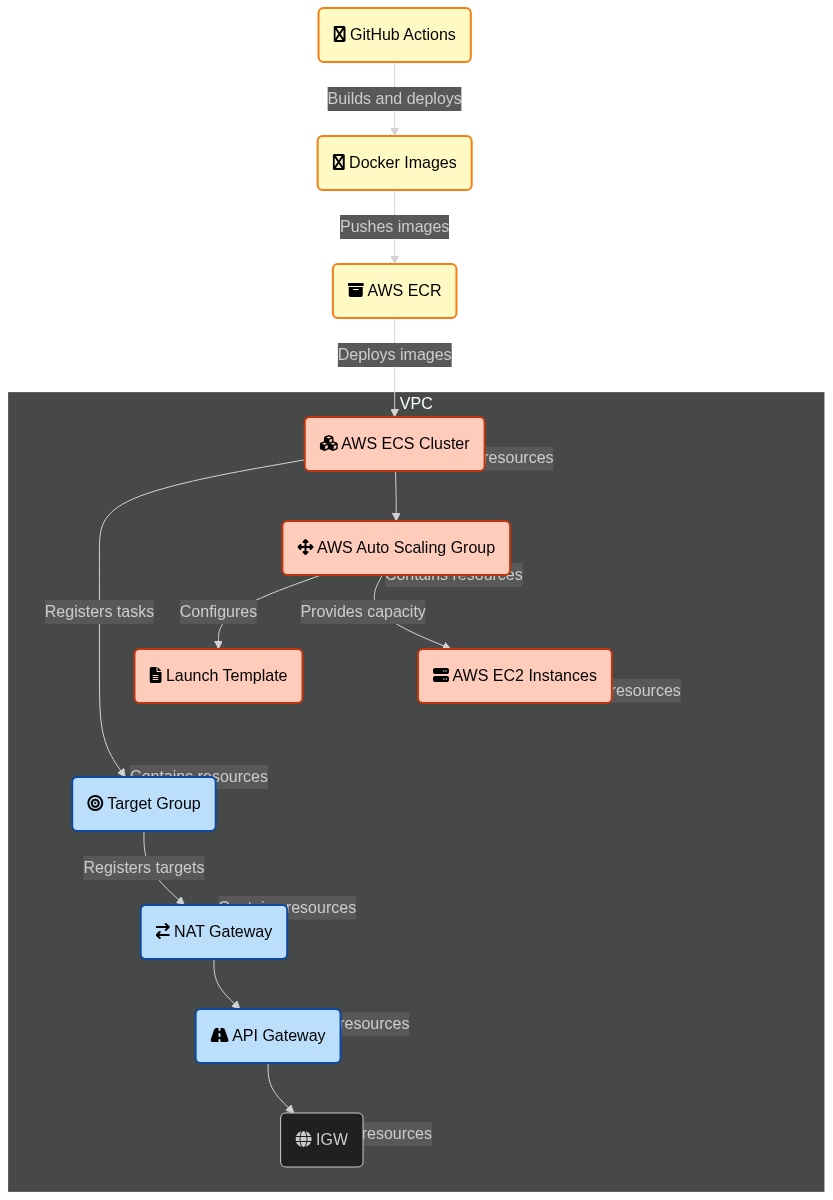
<p>The Diagram below shows an approximation of the architecture that we will be setting up. Details will be discussed in the following sections.</p>

<p><a href="https://mermaid.live/edit#pako:eNqVVm1r4kAQ_itDSuUOIlhrW87CgYkvV-iVUuUKh1_WzaiLcTfsbmql9r_fbhLXjbYc9VMy88wzMzvPbHwLqEgw6AbzVGzokkgNk_6Ug_mdn8OD8anybcT0r3zWo5oJrr5NgznpzklzwfQynzVJqisAVIhp8L2M6wu6Qnm3Jgs8hCWFsfJB6XQRvefxIH5yWCLpkr2gNYOxe7BBPHYoms9QVZgxxGmuNEqfspdrMaYkZXzhUUuxUUX1NtJCoMLASIo8q9fUdoEK5YspvEzXhjuuNOHU68FY70nO6XKC6ywlGl3onKXY1PiqoQTAHuFiJ0QuUBf5XdQsT1OFW6ycR9U93EcOia9minyB8NCbwMjwbsj20MbjXWVyeClIYu0n2LvR82HMqZihtTjvn8fYeTnqjZCr5oZJTKynQDkRDRJTDRWcYykNmBk8Igdu1WVBHygMms2fsItyliYKCE8gwSwVW7WrCepUYmXcY66W5pkVpl2lKF9dJaxfcno4Ix5PXQWqrp2P9FTllOKF2YYoyQhlelvlbX8eEgs-Z4tc2twnijmuY_eEC2ZVrUATtTIhnlBOlHMaYl0myGjFiabsz2niWCOF2w59P3FXtSbMjMjULXJJqxP2u2tUrRcPtoFGrbZGkbzhp2qUiZxoxnp7OG6aEqX6OAdCKXJtbyUwe5R2z4bDQXQZhUpLsULzGsWtdr96NXpM9LLbzl5DKlIhu2etVuv2iDGZeWxRKxrEV46tc3XVu-58ha3aBJ8y6g-GhwJb_c5N7-IrlFSss1xjrec4jmJHGQ0vr1vxVyiFXqKsEQ5_xJ3DIV7dDC9u_kPoUZYjDsuJhyc6Do-04TXkF1Zf_9Df6bDaWVd3Lc4TVmhkFXqi8sZx62mrwDpxqXy2kCRbwjQorq7SCpCY26woBibR3uZdEPDhxQC1nYfPthpOdxcOmwknOwmHNUSeBGGwRrkmLDHf7TdrngbmaNbmE9I1jwmRK9vGu8HlWWJ4BgnTQgbmrjYfkTAgtuotp0FXyxz3oD4j5hzWeyMWMb_LPwfFf4QwyAj_K8S6Inr_B_JOo3U"><img src="https://mermaid.ink/img/pako:eNqVVm1r4kAQ_itDSuUOIlhrW87CgYkvV-iVUuUKh1_WzaiLcTfsbmql9r_fbhLXjbYc9VMy88wzMzvPbHwLqEgw6AbzVGzokkgNk_6Ug_mdn8OD8anybcT0r3zWo5oJrr5NgznpzklzwfQynzVJqisAVIhp8L2M6wu6Qnm3Jgs8hCWFsfJB6XQRvefxIH5yWCLpkr2gNYOxe7BBPHYoms9QVZgxxGmuNEqfspdrMaYkZXzhUUuxUUX1NtJCoMLASIo8q9fUdoEK5YspvEzXhjuuNOHU68FY70nO6XKC6ywlGl3onKXY1PiqoQTAHuFiJ0QuUBf5XdQsT1OFW6ycR9U93EcOia9minyB8NCbwMjwbsj20MbjXWVyeClIYu0n2LvR82HMqZihtTjvn8fYeTnqjZCr5oZJTKynQDkRDRJTDRWcYykNmBk8Igdu1WVBHygMms2fsItyliYKCE8gwSwVW7WrCepUYmXcY66W5pkVpl2lKF9dJaxfcno4Ix5PXQWqrp2P9FTllOKF2YYoyQhlelvlbX8eEgs-Z4tc2twnijmuY_eEC2ZVrUATtTIhnlBOlHMaYl0myGjFiabsz2niWCOF2w59P3FXtSbMjMjULXJJqxP2u2tUrRcPtoFGrbZGkbzhp2qUiZxoxnp7OG6aEqX6OAdCKXJtbyUwe5R2z4bDQXQZhUpLsULzGsWtdr96NXpM9LLbzl5DKlIhu2etVuv2iDGZeWxRKxrEV46tc3XVu-58ha3aBJ8y6g-GhwJb_c5N7-IrlFSss1xjrec4jmJHGQ0vr1vxVyiFXqKsEQ5_xJ3DIV7dDC9u_kPoUZYjDsuJhyc6Do-04TXkF1Zf_9Df6bDaWVd3Lc4TVmhkFXqi8sZx62mrwDpxqXy2kCRbwjQorq7SCpCY26woBibR3uZdEPDhxQC1nYfPthpOdxcOmwknOwmHNUSeBGGwRrkmLDHf7TdrngbmaNbmE9I1jwmRK9vGu8HlWWJ4BgnTQgbmrjYfkTAgtuotp0FXyxz3oD4j5hzWeyMWMb_LPwfFf4QwyAj_K8S6Inr_B_JOo3U?type=png" alt="" /></a></p>

<h2 id="network-architecture-overview-and-setup">Network Architecture Overview and Setup</h2>

<p>This section provides a detailed explanation of the network architecture designed to securely and efficiently handle web traffic for an application deployed in AWS. The architecture leverages a VPC with public and private subnets, a NAT Gateway, and an internal NLB, with traffic routed through an API Gateway. This setup ensures that only the API Gateway is exposed to the internet, while all other resources remain securely isolated within the private subnet of the VPC.</p>

<h3 id="virtual-private-cloud-vpc">Virtual Private Cloud (VPC)</h3>

<p>The foundation of this architecture is a Virtual Private Cloud (VPC), that is logically isolated to deploy resources. The VPC is configured with a CIDR block of 10.0.0.0/16, providing a large address space (65,536 IP addresses) that can be further subdivided into smaller subnets. The VPC allows us to segment and secure the infrastructure by placing different components in either public or private subnets.</p>

<h3 id="subnets">Subnets</h3>

<ul>
  <li>A public subnet (10.0.1.0/24) is a portion of the VPC’s address range that is exposed to the internet. Instances in this subnet can communicate directly with the outside world. The public subnet is also where the NAT Gateway and API Gateway are typically placed.</li>
  <li>A private subnet (10.0.2.0/24) is another segment within the VPC, but unlike the public subnet, it is isolated from direct internet access. Resources in the private subnet, such as the ECS tasks, EC2 instances, and the internal Load Balancer (NLB), do not have direct access to or from the internet. This enhances security by keeping your backend infrastructure hidden from the public internet.</li>
</ul>

<h3 id="internet-gateway-igw">Internet Gateway (IGW)</h3>

<p>The Internet Gateway allows instances in the public subnet to communicate with the internet. It is attached to the VPC and enables outbound traffic from the public subnet to reach the internet. However, in this architecture, the Internet Gateway is used primarily for the NAT Gateway and the API Gateway, rather than directly exposing application resources.</p>

<h3 id="nat-gateway">NAT Gateway</h3>

<p>The NAT Gateway is deployed in the public subnet to provide outbound internet access for resources in the private subnet. Instances in the private subnet cannot be accessed directly from the internet, but they can initiate outbound connections (e.g., to download software updates or access external APIs) through the NAT Gateway. This ensures that backend resources remain secure while still having access to necessary external services.</p>

<h3 id="route-tables">Route Tables</h3>

<ul>
  <li>
    <p>The <code class="language-plaintext highlighter-rouge">Public Route Table</code> is associated with the public subnet. It contains a route that directs all outbound traffic (0.0.0.0/0) to the Internet Gateway, allowing instances in the public subnet (like the NAT Gateway and API Gateway) to communicate with the internet.</p>
  </li>
  <li>
    <p>The <code class="language-plaintext highlighter-rouge">Private Route Table</code> is associated with the private subnet. It directs outbound traffic to the NAT Gateway, enabling instances in the private subnet to access the internet indirectly, without exposing them to inbound internet traffic. This ensures that sensitive components like the ECS tasks and the Load Balancer remain isolated.</p>
  </li>
</ul>

<h3 id="internal-network-load-balancer-nlb">Internal Network Load Balancer (NLB)</h3>

<p>The NLB is placed in the private subnet and configured as an internal load balancer (Scheme: “internal”). This means it is not exposed to the internet and can only be accessed from within the VPC or through other AWS services like the API Gateway. The internal NLB distributes incoming traffic across multiple backend resources (e.g., ECS tasks, EC2 instances) running in the private subnet. By keeping the NLB internal, the architecture adds a layer of security, ensuring that only authorized traffic (routed through the API Gateway) can reach the backend services.</p>

<h3 id="api-gateway">API Gateway</h3>

<p>The API Gateway is the sole internet-facing component in this architecture. It is deployed in the public subnet and acts as a reverse proxy, handling all incoming HTTP requests from the internet. The API Gateway is configured to forward these requests to the internal NLB, which then routes the traffic to the appropriate backend services. This setup ensures that the backend services are not directly exposed to the internet, enhancing security and providing a single entry point for all external traffic.</p>

<h3 id="security-groups">Security Groups</h3>

<ul>
  <li>
    <p>The Load Balancer Security Group is configured to accept incoming traffic only from the API Gateway. This ensures that only requests routed through the API Gateway can reach the Load Balancer and, subsequently, the backend services.</p>
  </li>
  <li>
    <p>The API Gateway Security Group allows traffic from any IP address (i.e., the public internet) but restricts outgoing traffic to the internal NLB. This ensures that only the API Gateway can forward traffic to the Load Balancer, maintaining a secure and controlled flow of data.</p>
  </li>
  <li>
    <p>The EC2 Security Group allows incoming traffic from the Load Balancer Security Group, enabling communication between the Load Balancer and the EC2 instances. Outgoing traffic is allowed to any IP address, as the EC2 instances may need to access external resources.</p>
  </li>
  <li>
    <p>The ECS Security Group is similar to the EC2 Security Group but is specifically designed for ECS tasks. It allows incoming traffic from the Load Balancer Security Group and outgoing traffic to any IP address.</p>
  </li>
</ul>

<h3 id="traffic-flow">Traffic Flow</h3>

<ul>
  <li><strong>Inbound Traffic</strong> : External requests from clients on the internet are directed to the API Gateway, which serves as the front door for the application. The API Gateway processes and proxies these requests, forwarding them to the internal NLB within the private subnet.</li>
  <li><strong>Load Balancing</strong> : The NLB receives the traffic from the API Gateway and distributes it across multiple instances or containers running in the private subnet. This ensures that the application can handle varying loads by automatically scaling the number of backend resources.</li>
  <li><strong>Outbound Traffic</strong> : Instances in the private subnet can initiate outbound connections to the internet via the NAT Gateway. This allows backend services to access external resources (such as downloading updates) without exposing themselves to inbound internet traffic.</li>
</ul>

<p>The CloudFormation template below can be used to set up the network described here. Once created , you can see it in the console like this:</p>

<!-- reference from : https://superdevresources.com/image-caption-jekyll/-->
<style>
.image-wrapper {
  text-align: center;
}    

.image-wrapper .image-caption {
  color: gray;
  margin-top: em / 3;
}

</style>

<!-- _includes/image.html -->
<div class="image-wrapper">
    <a href="https://www.embeddedinn.com/images/posts/aws_production_lb/network.png" title="Generated Netwpork in AWS Console" target="_blank">
    
    <img src="https://www.embeddedinn.com/images/posts/aws_production_lb/network.png" alt="Generated Netwpork in AWS Console" width="800" />
    
    </a>

    
        <p class="image-caption">Generated Netwpork in AWS Console</p>
    
</div>

<div class="language-yaml highlighter-rouge"><div class="highlight"><pre class="highlight"><code><span class="na">AWSTemplateFormatVersion</span><span class="pi">:</span> <span class="s2">"</span><span class="s">2010-09-09"</span>
<span class="na">Description</span><span class="pi">:</span> <span class="s2">"</span><span class="s">CloudFormation</span><span class="nv"> </span><span class="s">template</span><span class="nv"> </span><span class="s">to</span><span class="nv"> </span><span class="s">set</span><span class="nv"> </span><span class="s">up</span><span class="nv"> </span><span class="s">VPC,</span><span class="nv"> </span><span class="s">Subnets,</span><span class="nv"> </span><span class="s">NAT</span><span class="nv"> </span><span class="s">Gateway,</span><span class="nv"> </span><span class="s">and</span><span class="nv"> </span><span class="s">Internal</span><span class="nv"> </span><span class="s">Load</span><span class="nv"> </span><span class="s">Balancer."</span>

<span class="na">Resources</span><span class="pi">:</span>
  <span class="c1"># VPC</span>
  <span class="na">VPC</span><span class="pi">:</span>
    <span class="na">Type</span><span class="pi">:</span> <span class="s2">"</span><span class="s">AWS::EC2::VPC"</span>
    <span class="na">Properties</span><span class="pi">:</span>
      <span class="na">CidrBlock</span><span class="pi">:</span> <span class="s2">"</span><span class="s">10.0.0.0/16"</span>
      <span class="na">EnableDnsSupport</span><span class="pi">:</span> <span class="no">true</span>
      <span class="na">EnableDnsHostnames</span><span class="pi">:</span> <span class="no">true</span>
      <span class="na">Tags</span><span class="pi">:</span>
        <span class="pi">-</span> <span class="na">Key</span><span class="pi">:</span> <span class="s2">"</span><span class="s">Name"</span>
          <span class="na">Value</span><span class="pi">:</span> <span class="s2">"</span><span class="s">appVPC"</span>

  <span class="c1"># Internet Gateway</span>
  <span class="na">InternetGateway</span><span class="pi">:</span>
    <span class="na">Type</span><span class="pi">:</span> <span class="s2">"</span><span class="s">AWS::EC2::InternetGateway"</span>
    <span class="na">Properties</span><span class="pi">:</span>
      <span class="na">Tags</span><span class="pi">:</span>
        <span class="pi">-</span> <span class="na">Key</span><span class="pi">:</span> <span class="s2">"</span><span class="s">Name"</span>
          <span class="na">Value</span><span class="pi">:</span> <span class="s2">"</span><span class="s">InternetGateway"</span>

  <span class="c1"># Attach Internet Gateway to VPC</span>
  <span class="na">AttachGateway</span><span class="pi">:</span>
    <span class="na">Type</span><span class="pi">:</span> <span class="s2">"</span><span class="s">AWS::EC2::VPCGatewayAttachment"</span>
    <span class="na">Properties</span><span class="pi">:</span>
      <span class="na">VpcId</span><span class="pi">:</span> <span class="kt">!Ref</span> <span class="s">VPC</span>
      <span class="na">InternetGatewayId</span><span class="pi">:</span> <span class="kt">!Ref</span> <span class="s">InternetGateway</span>

  <span class="c1"># Public Subnet</span>
  <span class="na">PublicSubnet</span><span class="pi">:</span>
    <span class="na">Type</span><span class="pi">:</span> <span class="s2">"</span><span class="s">AWS::EC2::Subnet"</span>
    <span class="na">Properties</span><span class="pi">:</span>
      <span class="na">VpcId</span><span class="pi">:</span> <span class="kt">!Ref</span> <span class="s">VPC</span>
      <span class="na">CidrBlock</span><span class="pi">:</span> <span class="s2">"</span><span class="s">10.0.1.0/24"</span>
      <span class="na">AvailabilityZone</span><span class="pi">:</span> <span class="kt">!Select</span> <span class="pi">[</span><span class="nv">0</span><span class="pi">,</span> <span class="kt">!GetAZs</span> <span class="s2">"</span><span class="s">"</span><span class="pi">]</span>
      <span class="na">MapPublicIpOnLaunch</span><span class="pi">:</span> <span class="no">true</span>
      <span class="na">Tags</span><span class="pi">:</span>
        <span class="pi">-</span> <span class="na">Key</span><span class="pi">:</span> <span class="s2">"</span><span class="s">Name"</span>
          <span class="na">Value</span><span class="pi">:</span> <span class="s2">"</span><span class="s">PublicSubnet"</span>

  <span class="c1"># Private Subnet</span>
  <span class="na">PrivateSubnet</span><span class="pi">:</span>
    <span class="na">Type</span><span class="pi">:</span> <span class="s2">"</span><span class="s">AWS::EC2::Subnet"</span>
    <span class="na">Properties</span><span class="pi">:</span>
      <span class="na">VpcId</span><span class="pi">:</span> <span class="kt">!Ref</span> <span class="s">VPC</span>
      <span class="na">CidrBlock</span><span class="pi">:</span> <span class="s2">"</span><span class="s">10.0.2.0/24"</span>
      <span class="na">AvailabilityZone</span><span class="pi">:</span> <span class="kt">!Select</span> <span class="pi">[</span><span class="nv">0</span><span class="pi">,</span> <span class="kt">!GetAZs</span> <span class="s2">"</span><span class="s">"</span><span class="pi">]</span>
      <span class="na">Tags</span><span class="pi">:</span>
        <span class="pi">-</span> <span class="na">Key</span><span class="pi">:</span> <span class="s2">"</span><span class="s">Name"</span>
          <span class="na">Value</span><span class="pi">:</span> <span class="s2">"</span><span class="s">PrivateSubnet"</span>

  <span class="c1"># Route Table for Public Subnet</span>
  <span class="na">PublicRouteTable</span><span class="pi">:</span>
    <span class="na">Type</span><span class="pi">:</span> <span class="s2">"</span><span class="s">AWS::EC2::RouteTable"</span>
    <span class="na">Properties</span><span class="pi">:</span>
      <span class="na">VpcId</span><span class="pi">:</span> <span class="kt">!Ref</span> <span class="s">VPC</span>
      <span class="na">Tags</span><span class="pi">:</span>
        <span class="pi">-</span> <span class="na">Key</span><span class="pi">:</span> <span class="s2">"</span><span class="s">Name"</span>
          <span class="na">Value</span><span class="pi">:</span> <span class="s2">"</span><span class="s">PublicRouteTable"</span>

  <span class="c1"># Route Table for Public Subnet</span>
  <span class="na">PublicRoute</span><span class="pi">:</span>
    <span class="na">Type</span><span class="pi">:</span> <span class="s2">"</span><span class="s">AWS::EC2::Route"</span>
    <span class="na">Properties</span><span class="pi">:</span>
      <span class="na">RouteTableId</span><span class="pi">:</span> <span class="kt">!Ref</span> <span class="s">PublicRouteTable</span>
      <span class="na">DestinationCidrBlock</span><span class="pi">:</span> <span class="s2">"</span><span class="s">0.0.0.0/0"</span>
      <span class="na">GatewayId</span><span class="pi">:</span> <span class="kt">!Ref</span> <span class="s">InternetGateway</span>

  <span class="c1"># Associate Public Subnet with Route Table</span>
  <span class="na">PublicSubnetRouteTableAssociation</span><span class="pi">:</span>
    <span class="na">Type</span><span class="pi">:</span> <span class="s2">"</span><span class="s">AWS::EC2::SubnetRouteTableAssociation"</span>
    <span class="na">Properties</span><span class="pi">:</span>
      <span class="na">SubnetId</span><span class="pi">:</span> <span class="kt">!Ref</span> <span class="s">PublicSubnet</span>
      <span class="na">RouteTableId</span><span class="pi">:</span> <span class="kt">!Ref</span> <span class="s">PublicRouteTable</span>

  <span class="c1"># NAT Gateway</span>
  <span class="na">NatEIP</span><span class="pi">:</span>
    <span class="na">Type</span><span class="pi">:</span> <span class="s2">"</span><span class="s">AWS::EC2::EIP"</span>
    <span class="na">Properties</span><span class="pi">:</span>
      <span class="na">Domain</span><span class="pi">:</span> <span class="s2">"</span><span class="s">vpc"</span>

  <span class="c1"># NAT Gateway</span>
  <span class="na">NatGateway</span><span class="pi">:</span>
    <span class="na">Type</span><span class="pi">:</span> <span class="s2">"</span><span class="s">AWS::EC2::NatGateway"</span>
    <span class="na">Properties</span><span class="pi">:</span>
      <span class="na">AllocationId</span><span class="pi">:</span> <span class="kt">!GetAtt</span> <span class="s">NatEIP.AllocationId</span>
      <span class="na">SubnetId</span><span class="pi">:</span> <span class="kt">!Ref</span> <span class="s">PublicSubnet</span>
      <span class="na">Tags</span><span class="pi">:</span>
        <span class="pi">-</span> <span class="na">Key</span><span class="pi">:</span> <span class="s2">"</span><span class="s">Name"</span>
          <span class="na">Value</span><span class="pi">:</span> <span class="s2">"</span><span class="s">natGateway"</span>

  <span class="c1"># Route Table for Private Subnet</span>
  <span class="na">PrivateRouteTable</span><span class="pi">:</span>
    <span class="na">Type</span><span class="pi">:</span> <span class="s2">"</span><span class="s">AWS::EC2::RouteTable"</span>
    <span class="na">Properties</span><span class="pi">:</span>
      <span class="na">VpcId</span><span class="pi">:</span> <span class="kt">!Ref</span> <span class="s">VPC</span>
      <span class="na">Tags</span><span class="pi">:</span>
        <span class="pi">-</span> <span class="na">Key</span><span class="pi">:</span> <span class="s2">"</span><span class="s">Name"</span>
          <span class="na">Value</span><span class="pi">:</span> <span class="s2">"</span><span class="s">PrivateRouteTable"</span>

  <span class="c1"># Route Table for Private Subnet</span>
  <span class="na">PrivateRoute</span><span class="pi">:</span>
    <span class="na">Type</span><span class="pi">:</span> <span class="s2">"</span><span class="s">AWS::EC2::Route"</span>
    <span class="na">Properties</span><span class="pi">:</span>
      <span class="na">RouteTableId</span><span class="pi">:</span> <span class="kt">!Ref</span> <span class="s">PrivateRouteTable</span>
      <span class="na">DestinationCidrBlock</span><span class="pi">:</span> <span class="s2">"</span><span class="s">0.0.0.0/0"</span>
      <span class="na">NatGatewayId</span><span class="pi">:</span> <span class="kt">!Ref</span> <span class="s">NatGateway</span>

  <span class="c1"># Associate Private Subnet with Route Table</span>
  <span class="na">PrivateSubnetRouteTableAssociation</span><span class="pi">:</span>
    <span class="na">Type</span><span class="pi">:</span> <span class="s2">"</span><span class="s">AWS::EC2::SubnetRouteTableAssociation"</span>
    <span class="na">Properties</span><span class="pi">:</span>
      <span class="na">SubnetId</span><span class="pi">:</span> <span class="kt">!Ref</span> <span class="s">PrivateSubnet</span>
      <span class="na">RouteTableId</span><span class="pi">:</span> <span class="kt">!Ref</span> <span class="s">PrivateRouteTable</span>

  <span class="c1"># Internal Load Balancer (Private)</span>
  <span class="na">LoadBalancer</span><span class="pi">:</span>
    <span class="na">Type</span><span class="pi">:</span> <span class="s2">"</span><span class="s">AWS::ElasticLoadBalancingV2::LoadBalancer"</span>
    <span class="na">Properties</span><span class="pi">:</span>
      <span class="na">Name</span><span class="pi">:</span> <span class="s2">"</span><span class="s">internalLoadBalancer"</span>
      <span class="na">Subnets</span><span class="pi">:</span>
        <span class="pi">-</span> <span class="kt">!Ref</span> <span class="s">PrivateSubnet</span>
      <span class="na">Scheme</span><span class="pi">:</span> <span class="s2">"</span><span class="s">internal"</span>
      <span class="na">LoadBalancerAttributes</span><span class="pi">:</span>
        <span class="pi">-</span> <span class="na">Key</span><span class="pi">:</span> <span class="s2">"</span><span class="s">deletion_protection.enabled"</span>
          <span class="na">Value</span><span class="pi">:</span> <span class="s2">"</span><span class="s">false"</span>
      <span class="na">SecurityGroups</span><span class="pi">:</span>
        <span class="pi">-</span> <span class="kt">!Ref</span> <span class="s">LoadBalancerSecurityGroup</span>
      <span class="na">Type</span><span class="pi">:</span> <span class="s2">"</span><span class="s">network"</span>
      <span class="na">IpAddressType</span><span class="pi">:</span> <span class="s2">"</span><span class="s">ipv4"</span>
      <span class="na">EnforceSecurityGroupInboundRulesOnPrivateLinkTraffic</span><span class="pi">:</span> <span class="s2">"</span><span class="s">off"</span>
      <span class="na">Tags</span><span class="pi">:</span>
        <span class="pi">-</span> <span class="na">Key</span><span class="pi">:</span> <span class="s2">"</span><span class="s">Name"</span>
          <span class="na">Value</span><span class="pi">:</span> <span class="s2">"</span><span class="s">internalLoadBalancer"</span>

  <span class="c1"># Security Group for Load Balancer</span>
  <span class="na">LoadBalancerSecurityGroup</span><span class="pi">:</span>
    <span class="na">Type</span><span class="pi">:</span> <span class="s2">"</span><span class="s">AWS::EC2::SecurityGroup"</span>
    <span class="na">Properties</span><span class="pi">:</span>
      <span class="na">GroupDescription</span><span class="pi">:</span> <span class="s2">"</span><span class="s">Allow</span><span class="nv"> </span><span class="s">inbound</span><span class="nv"> </span><span class="s">traffic</span><span class="nv"> </span><span class="s">to</span><span class="nv"> </span><span class="s">Load</span><span class="nv"> </span><span class="s">Balancer"</span>
      <span class="na">VpcId</span><span class="pi">:</span> <span class="kt">!Ref</span> <span class="s">VPC</span>
      <span class="na">SecurityGroupIngress</span><span class="pi">:</span>
        <span class="pi">-</span> <span class="na">IpProtocol</span><span class="pi">:</span> <span class="s">tcp</span>
          <span class="na">FromPort</span><span class="pi">:</span> <span class="m">80</span>
          <span class="na">ToPort</span><span class="pi">:</span> <span class="m">80</span>
          <span class="na">SourceSecurityGroupId</span><span class="pi">:</span> <span class="kt">!GetAtt</span> <span class="s">ApiGatewaySecurityGroup.GroupId</span>
        <span class="pi">-</span> <span class="na">IpProtocol</span><span class="pi">:</span> <span class="s">tcp</span>
          <span class="na">FromPort</span><span class="pi">:</span> <span class="m">8000</span>
          <span class="na">ToPort</span><span class="pi">:</span> <span class="m">8000</span>
          <span class="na">SourceSecurityGroupId</span><span class="pi">:</span> <span class="kt">!GetAtt</span> <span class="s">ApiGatewaySecurityGroup.GroupId</span>
      <span class="na">SecurityGroupEgress</span><span class="pi">:</span>
        <span class="pi">-</span> <span class="na">IpProtocol</span><span class="pi">:</span> <span class="s2">"</span><span class="s">-1"</span>
          <span class="na">CidrIp</span><span class="pi">:</span> <span class="s2">"</span><span class="s">0.0.0.0/0"</span>
      <span class="na">Tags</span><span class="pi">:</span>
        <span class="pi">-</span> <span class="na">Key</span><span class="pi">:</span> <span class="s2">"</span><span class="s">Name"</span>
          <span class="na">Value</span><span class="pi">:</span> <span class="s2">"</span><span class="s">LoadBalancerSecurityGroup"</span>

  <span class="c1"># Security Group for API Gateway</span>
  <span class="na">ApiGatewaySecurityGroup</span><span class="pi">:</span>
    <span class="na">Type</span><span class="pi">:</span> <span class="s2">"</span><span class="s">AWS::EC2::SecurityGroup"</span>
    <span class="na">Properties</span><span class="pi">:</span>
      <span class="na">GroupDescription</span><span class="pi">:</span> <span class="s2">"</span><span class="s">Allow</span><span class="nv"> </span><span class="s">traffic</span><span class="nv"> </span><span class="s">from</span><span class="nv"> </span><span class="s">API</span><span class="nv"> </span><span class="s">Gateway</span><span class="nv"> </span><span class="s">to</span><span class="nv"> </span><span class="s">Load</span><span class="nv"> </span><span class="s">Balancer"</span>
      <span class="na">VpcId</span><span class="pi">:</span> <span class="kt">!Ref</span> <span class="s">VPC</span>
      <span class="na">SecurityGroupIngress</span><span class="pi">:</span>
        <span class="pi">-</span> <span class="na">IpProtocol</span><span class="pi">:</span> <span class="s">tcp</span>
          <span class="na">FromPort</span><span class="pi">:</span> <span class="m">80</span>
          <span class="na">ToPort</span><span class="pi">:</span> <span class="m">80</span>
          <span class="na">CidrIp</span><span class="pi">:</span> <span class="s2">"</span><span class="s">0.0.0.0/0"</span>
        <span class="pi">-</span> <span class="na">IpProtocol</span><span class="pi">:</span> <span class="s">tcp</span>
          <span class="na">FromPort</span><span class="pi">:</span> <span class="m">8000</span>
          <span class="na">ToPort</span><span class="pi">:</span> <span class="m">8000</span>
          <span class="na">CidrIp</span><span class="pi">:</span> <span class="s2">"</span><span class="s">0.0.0.0/0"</span>
      <span class="na">SecurityGroupEgress</span><span class="pi">:</span>
        <span class="pi">-</span> <span class="na">IpProtocol</span><span class="pi">:</span> <span class="s2">"</span><span class="s">-1"</span>
          <span class="na">CidrIp</span><span class="pi">:</span> <span class="s2">"</span><span class="s">0.0.0.0/0"</span>
      <span class="na">Tags</span><span class="pi">:</span>
        <span class="pi">-</span> <span class="na">Key</span><span class="pi">:</span> <span class="s2">"</span><span class="s">Name"</span>
          <span class="na">Value</span><span class="pi">:</span> <span class="s2">"</span><span class="s">ApiGatewaySecurityGroup"</span>

  <span class="c1"># Security Group for ECS Tasks</span>
  <span class="na">ECSSecurityGroup</span><span class="pi">:</span>
    <span class="na">Type</span><span class="pi">:</span> <span class="s2">"</span><span class="s">AWS::EC2::SecurityGroup"</span>
    <span class="na">Properties</span><span class="pi">:</span>
      <span class="na">GroupDescription</span><span class="pi">:</span> <span class="s2">"</span><span class="s">Allow</span><span class="nv"> </span><span class="s">traffic</span><span class="nv"> </span><span class="s">from</span><span class="nv"> </span><span class="s">Load</span><span class="nv"> </span><span class="s">Balancer</span><span class="nv"> </span><span class="s">to</span><span class="nv"> </span><span class="s">ECS</span><span class="nv"> </span><span class="s">Tasks"</span>
      <span class="na">VpcId</span><span class="pi">:</span> <span class="kt">!Ref</span> <span class="s">VPC</span>
      <span class="na">SecurityGroupIngress</span><span class="pi">:</span>
        <span class="pi">-</span> <span class="na">IpProtocol</span><span class="pi">:</span> <span class="s">tcp</span>
          <span class="na">FromPort</span><span class="pi">:</span> <span class="m">80</span>
          <span class="na">ToPort</span><span class="pi">:</span> <span class="m">80</span>
          <span class="na">SourceSecurityGroupId</span><span class="pi">:</span> <span class="kt">!GetAtt</span> <span class="s">LoadBalancerSecurityGroup.GroupId</span>
        <span class="pi">-</span> <span class="na">IpProtocol</span><span class="pi">:</span> <span class="s">tcp</span>
          <span class="na">FromPort</span><span class="pi">:</span> <span class="m">8000</span>
          <span class="na">ToPort</span><span class="pi">:</span> <span class="m">8000</span>
          <span class="na">SourceSecurityGroupId</span><span class="pi">:</span> <span class="kt">!GetAtt</span> <span class="s">LoadBalancerSecurityGroup.GroupId</span>
      <span class="na">SecurityGroupEgress</span><span class="pi">:</span>
        <span class="pi">-</span> <span class="na">IpProtocol</span><span class="pi">:</span> <span class="s2">"</span><span class="s">-1"</span>
          <span class="na">CidrIp</span><span class="pi">:</span> <span class="s2">"</span><span class="s">0.0.0.0/0"</span>
      <span class="na">Tags</span><span class="pi">:</span>
        <span class="pi">-</span> <span class="na">Key</span><span class="pi">:</span> <span class="s2">"</span><span class="s">Name"</span>
          <span class="na">Value</span><span class="pi">:</span> <span class="s2">"</span><span class="s">ECSSecurityGroup"</span>

  <span class="c1"># Security Group for EC2 Instances</span>
  <span class="na">EC2SecurityGroup</span><span class="pi">:</span>
    <span class="na">Type</span><span class="pi">:</span> <span class="s2">"</span><span class="s">AWS::EC2::SecurityGroup"</span>
    <span class="na">Properties</span><span class="pi">:</span>
      <span class="na">GroupDescription</span><span class="pi">:</span> <span class="s2">"</span><span class="s">Allow</span><span class="nv"> </span><span class="s">traffic</span><span class="nv"> </span><span class="s">from</span><span class="nv"> </span><span class="s">Load</span><span class="nv"> </span><span class="s">Balancer</span><span class="nv"> </span><span class="s">to</span><span class="nv"> </span><span class="s">EC2</span><span class="nv"> </span><span class="s">Instances"</span>
      <span class="na">VpcId</span><span class="pi">:</span> <span class="kt">!Ref</span> <span class="s">VPC</span>
      <span class="na">SecurityGroupIngress</span><span class="pi">:</span>
        <span class="pi">-</span> <span class="na">IpProtocol</span><span class="pi">:</span> <span class="s">tcp</span>
          <span class="na">FromPort</span><span class="pi">:</span> <span class="m">80</span>
          <span class="na">ToPort</span><span class="pi">:</span> <span class="m">80</span>
          <span class="na">SourceSecurityGroupId</span><span class="pi">:</span> <span class="kt">!GetAtt</span> <span class="s">LoadBalancerSecurityGroup.GroupId</span>
        <span class="pi">-</span> <span class="na">IpProtocol</span><span class="pi">:</span> <span class="s">tcp</span>
          <span class="na">FromPort</span><span class="pi">:</span> <span class="m">8000</span>
          <span class="na">ToPort</span><span class="pi">:</span> <span class="m">8000</span>
          <span class="na">SourceSecurityGroupId</span><span class="pi">:</span> <span class="kt">!GetAtt</span> <span class="s">LoadBalancerSecurityGroup.GroupId</span>
      <span class="na">SecurityGroupEgress</span><span class="pi">:</span>
        <span class="pi">-</span> <span class="na">IpProtocol</span><span class="pi">:</span> <span class="s2">"</span><span class="s">-1"</span>
          <span class="na">CidrIp</span><span class="pi">:</span> <span class="s2">"</span><span class="s">0.0.0.0/0"</span>
      <span class="na">Tags</span><span class="pi">:</span>
        <span class="pi">-</span> <span class="na">Key</span><span class="pi">:</span> <span class="s2">"</span><span class="s">Name"</span>
          <span class="na">Value</span><span class="pi">:</span> <span class="s2">"</span><span class="s">EC2SecurityGroup"</span>
</code></pre></div></div>

<h2 id="application-deployment---local-setup">Application Deployment - Local Setup</h2>

<p>Now that we have setup the network, we can deploy the application. But before that , we must be able to test it locally.</p>

<p>The application is a simple web app that consists of a HTML frontend and a python backend. The frontend is a simple HTML page that calls a backend API to show the API status. The application is containerized using Docker. The frontend will be served on port <code class="language-plaintext highlighter-rouge">80</code>, and the backend will be served on port <code class="language-plaintext highlighter-rouge">8000</code>.</p>

<p>This is a trivial application that we will use to demonstrate the setup of a multi-component production infrastructure. The actual application will be more complex and will have additional services and components.</p>

<h3 id="frontend">Frontend</h3>

<p>The <code class="language-plaintext highlighter-rouge">index.html</code> file contains the following content:</p>

<div class="language-html highlighter-rouge"><div class="highlight"><pre class="highlight"><code><span class="cp">&lt;!DOCTYPE html&gt;</span>
<span class="nt">&lt;html</span> <span class="na">lang=</span><span class="s">"en"</span><span class="nt">&gt;</span>
<span class="nt">&lt;head&gt;</span>
    <span class="nt">&lt;meta</span> <span class="na">charset=</span><span class="s">"UTF-8"</span><span class="nt">&gt;</span>
    <span class="nt">&lt;meta</span> <span class="na">http-equiv=</span><span class="s">"X-UA-Compatible"</span> <span class="na">content=</span><span class="s">"IE=edge"</span><span class="nt">&gt;</span>
    <span class="nt">&lt;meta</span> <span class="na">name=</span><span class="s">"viewport"</span> <span class="na">content=</span><span class="s">"width=device-width, initial-scale=1.0"</span><span class="nt">&gt;</span>
    <span class="nt">&lt;title&gt;</span>Frontend<span class="nt">&lt;/title&gt;</span>
<span class="nt">&lt;/head&gt;</span>

<span class="nt">&lt;body&gt;</span>
    <span class="nt">&lt;h1&gt;</span>Frontend<span class="nt">&lt;/h1&gt;</span>
    <span class="nt">&lt;p</span> <span class="na">id=</span><span class="s">"data"</span><span class="nt">&gt;&lt;/p&gt;</span>

    <span class="nt">&lt;script&gt;</span>
        <span class="c1">// Set the API host to wherever the page is loaded from</span>
        <span class="kd">const</span> <span class="nx">api_host</span> <span class="o">=</span> <span class="s2">`</span><span class="p">${</span><span class="nb">window</span><span class="p">.</span><span class="nx">location</span><span class="p">.</span><span class="nx">origin</span><span class="p">}</span><span class="s2">:8000/status`</span><span class="p">;</span>

        <span class="nx">fetch</span><span class="p">(</span><span class="nx">api_host</span><span class="p">)</span>
            <span class="p">.</span><span class="nx">then</span><span class="p">(</span><span class="nx">response</span> <span class="o">=&gt;</span> <span class="nx">response</span><span class="p">.</span><span class="nx">json</span><span class="p">())</span>
            <span class="p">.</span><span class="nx">then</span><span class="p">(</span><span class="nx">data</span> <span class="o">=&gt;</span> <span class="p">{</span>
                <span class="nb">document</span><span class="p">.</span><span class="nx">getElementById</span><span class="p">(</span><span class="dl">'</span><span class="s1">data</span><span class="dl">'</span><span class="p">).</span><span class="nx">innerText</span> <span class="o">=</span> <span class="dl">"</span><span class="s2">API STATUS: </span><span class="dl">"</span> <span class="o">+</span> <span class="nx">data</span><span class="p">.</span><span class="nx">STATUS</span><span class="p">;</span>
            <span class="p">})</span>
            <span class="p">.</span><span class="k">catch</span><span class="p">(</span><span class="nx">error</span> <span class="o">=&gt;</span> <span class="p">{</span>
                <span class="nx">console</span><span class="p">.</span><span class="nx">error</span><span class="p">(</span><span class="dl">'</span><span class="s1">Error:</span><span class="dl">'</span><span class="p">,</span> <span class="nx">error</span><span class="p">);</span>
            <span class="p">});</span>
    <span class="nt">&lt;/script&gt;</span>
<span class="nt">&lt;/body&gt;</span>
<span class="nt">&lt;/html&gt;</span>

</code></pre></div></div>

<p><strong>Note</strong>: We will later change the backend URL to the API gateway resource URL during deployment.</p>

<h3 id="backend">Backend</h3>

<p>The backend exposes a simple FastAPI based API endpoint that is used by the frontend. The file structure of the backend service that we will setup in docker is as follows:</p>

<div class="language-plaintext highlighter-rouge"><div class="highlight"><pre class="highlight"><code>.
├── app
│   ├── __init__.py
│   └── main.py
└── static
    └── index.html
└── requirements.txt
</code></pre></div></div>

<p><code class="language-plaintext highlighter-rouge">__init.py</code> is blank, and <code class="language-plaintext highlighter-rouge">main.py</code> contains the FastAPI code:</p>

<div class="language-python highlighter-rouge"><div class="highlight"><pre class="highlight"><code><span class="c1">#main.py
</span><span class="kn">from</span> <span class="nn">typing</span> <span class="kn">import</span> <span class="n">Union</span>
<span class="kn">from</span> <span class="nn">fastapi</span> <span class="kn">import</span> <span class="n">FastAPI</span>
<span class="kn">from</span> <span class="nn">fastapi.middleware.cors</span> <span class="kn">import</span> <span class="n">CORSMiddleware</span>
<span class="kn">from</span> <span class="nn">fastapi.staticfiles</span> <span class="kn">import</span> <span class="n">StaticFiles</span>
<span class="kn">import</span> <span class="nn">threading</span>
<span class="kn">import</span> <span class="nn">uvicorn</span>

<span class="n">backend</span> <span class="o">=</span> <span class="n">FastAPI</span><span class="p">()</span>
<span class="n">frontend</span> <span class="o">=</span> <span class="n">FastAPI</span><span class="p">()</span>

<span class="c1"># CORS settings for the backend
</span><span class="n">backend</span><span class="p">.</span><span class="n">add_middleware</span><span class="p">(</span>
    <span class="n">CORSMiddleware</span><span class="p">,</span>
    <span class="n">allow_origins</span><span class="o">=</span><span class="p">[</span><span class="s">"*"</span><span class="p">],</span>  <span class="c1"># Allow all origins
</span>    <span class="n">allow_credentials</span><span class="o">=</span><span class="bp">True</span><span class="p">,</span>
    <span class="n">allow_methods</span><span class="o">=</span><span class="p">[</span><span class="s">"GET"</span><span class="p">],</span>  <span class="c1"># Allow only GET methods
</span>    <span class="n">allow_headers</span><span class="o">=</span><span class="p">[</span><span class="s">"*"</span><span class="p">],</span>  <span class="c1"># Allow all headers
</span><span class="p">)</span>

<span class="o">@</span><span class="n">backend</span><span class="p">.</span><span class="n">get</span><span class="p">(</span><span class="s">"/status"</span><span class="p">)</span>
<span class="k">def</span> <span class="nf">read_status</span><span class="p">():</span>
    <span class="k">return</span> <span class="p">{</span><span class="s">"STATUS"</span><span class="p">:</span> <span class="s">"UP"</span><span class="p">}</span>

<span class="o">@</span><span class="n">backend</span><span class="p">.</span><span class="n">get</span><span class="p">(</span><span class="s">"/items/{item_id}"</span><span class="p">)</span>
<span class="k">def</span> <span class="nf">read_item</span><span class="p">(</span><span class="n">item_id</span><span class="p">:</span> <span class="nb">int</span><span class="p">,</span> <span class="n">q</span><span class="p">:</span> <span class="n">Union</span><span class="p">[</span><span class="nb">str</span><span class="p">,</span> <span class="bp">None</span><span class="p">]</span> <span class="o">=</span> <span class="bp">None</span><span class="p">):</span>
    <span class="k">return</span> <span class="p">{</span><span class="s">"item_id"</span><span class="p">:</span> <span class="n">item_id</span><span class="p">,</span> <span class="s">"q"</span><span class="p">:</span> <span class="n">q</span><span class="p">}</span>

<span class="n">frontend</span><span class="p">.</span><span class="n">mount</span><span class="p">(</span><span class="s">"/"</span><span class="p">,</span> <span class="n">StaticFiles</span><span class="p">(</span><span class="n">directory</span><span class="o">=</span><span class="s">"static"</span><span class="p">,</span> <span class="n">html</span><span class="o">=</span><span class="bp">True</span><span class="p">),</span> <span class="n">name</span><span class="o">=</span><span class="s">"static"</span><span class="p">)</span>

<span class="k">def</span> <span class="nf">run_backend</span><span class="p">():</span>
    <span class="n">uvicorn</span><span class="p">.</span><span class="n">run</span><span class="p">(</span><span class="n">backend</span><span class="p">,</span> <span class="n">host</span><span class="o">=</span><span class="s">"0.0.0.0"</span><span class="p">,</span> <span class="n">port</span><span class="o">=</span><span class="mi">8000</span><span class="p">)</span>

<span class="k">def</span> <span class="nf">run_frontend</span><span class="p">():</span>
    <span class="n">uvicorn</span><span class="p">.</span><span class="n">run</span><span class="p">(</span><span class="n">frontend</span><span class="p">,</span> <span class="n">host</span><span class="o">=</span><span class="s">"0.0.0.0"</span><span class="p">,</span> <span class="n">port</span><span class="o">=</span><span class="mi">80</span><span class="p">)</span>

<span class="k">if</span> <span class="n">__name__</span> <span class="o">==</span> <span class="s">"__main__"</span><span class="p">:</span>
    <span class="n">backend_thread</span> <span class="o">=</span> <span class="n">threading</span><span class="p">.</span><span class="n">Thread</span><span class="p">(</span><span class="n">target</span><span class="o">=</span><span class="n">run_backend</span><span class="p">)</span>
    <span class="n">frontend_thread</span> <span class="o">=</span> <span class="n">threading</span><span class="p">.</span><span class="n">Thread</span><span class="p">(</span><span class="n">target</span><span class="o">=</span><span class="n">run_frontend</span><span class="p">)</span>

    <span class="n">backend_thread</span><span class="p">.</span><span class="n">start</span><span class="p">()</span>
    <span class="n">frontend_thread</span><span class="p">.</span><span class="n">start</span><span class="p">()</span>

    <span class="n">backend_thread</span><span class="p">.</span><span class="n">join</span><span class="p">()</span>
    <span class="n">frontend_thread</span><span class="p">.</span><span class="n">join</span><span class="p">()</span>

</code></pre></div></div>

<p>The requirements.txt file contains the following dependencies:</p>

<div class="language-plaintext highlighter-rouge"><div class="highlight"><pre class="highlight"><code>fastapi[standard]&gt;=0.112.2
pydantic&gt;=2.8.2
uvicorn&gt;=0.30.6
</code></pre></div></div>

<p>The backend app can be run locally using the following commands:</p>

<div class="language-bash highlighter-rouge"><div class="highlight"><pre class="highlight"><code>python3 app/main.py
</code></pre></div></div>

<h2 id="docker-setup">Docker Setup</h2>

<p>Now that we have the frontend and backend components, we can create a docker image for them. We will wrap both the frontend and backend in a single Dockerfile. The Dockerfile is as follows:</p>

<div class="language-Dockerfile highlighter-rouge"><div class="highlight"><pre class="highlight"><code><span class="k">FROM</span><span class="s"> python:3.12-slim</span>
<span class="k">WORKDIR</span><span class="s"> /code</span>
<span class="k">COPY</span><span class="s"> ./requirements.txt /code/requirements.txt</span>
<span class="k">RUN </span>pip <span class="nb">install</span> <span class="nt">--no-cache-dir</span> <span class="nt">--upgrade</span> <span class="nt">-r</span> /code/requirements.txt
<span class="k">COPY</span><span class="s"> ./app /code/app</span>
<span class="k">COPY</span><span class="s"> ./index.html /code/static/index.html</span>
<span class="k">CMD</span><span class="s"> ["python3", "app/main.py"]</span>
<span class="k">EXPOSE</span><span class="s"> 80</span>
<span class="k">EXPOSE</span><span class="s"> 8000</span>
</code></pre></div></div>

<p>the docker container can be built and run using the following commands:</p>

<div class="language-bash highlighter-rouge"><div class="highlight"><pre class="highlight"><code>docker build <span class="nb">.</span> <span class="nt">-t</span> app
docker run <span class="nt">-p</span> 80:80 <span class="nt">-p</span> 8000:8000 app:latest
</code></pre></div></div>

<h2 id="aws-deployment">AWS Deployment</h2>

<p>Now that we have a working version of the application, we can deploy it to AWS. We will use AWS ECS to deploy the application in a scalable and fault-tolerant manner. The application will be deployed as a service in an ECS cluster. The docker image will be built and pushed to AWS ECR, and the ECS service will be configured to use this image.</p>

<p>Add the following statements to the cloudformation template to setup a private ECR repo to host the docker images.</p>

<div class="language-yaml highlighter-rouge"><div class="highlight"><pre class="highlight"><code>  <span class="c1"># ECR Repository</span>
  <span class="na">ECRRepository</span><span class="pi">:</span>
    <span class="na">Type</span><span class="pi">:</span> <span class="s2">"</span><span class="s">AWS::ECR::Repository"</span>
    <span class="na">Properties</span><span class="pi">:</span>
      <span class="na">RepositoryName</span><span class="pi">:</span> <span class="s2">"</span><span class="s">app_repository"</span>
      <span class="na">ImageScanningConfiguration</span><span class="pi">:</span>
        <span class="na">ScanOnPush</span><span class="pi">:</span> <span class="no">true</span>
      <span class="na">Tags</span><span class="pi">:</span>
        <span class="pi">-</span> <span class="na">Key</span><span class="pi">:</span> <span class="s2">"</span><span class="s">Name"</span>
          <span class="na">Value</span><span class="pi">:</span> <span class="s2">"</span><span class="s">appRepository"</span>
</code></pre></div></div>

<p>Update the stack with the following command:</p>

<div class="language-bash highlighter-rouge"><div class="highlight"><pre class="highlight"><code>aws cloudformation update-stack <span class="nt">--stack-name</span> App-Stack <span class="nt">--template-body</span> file://temlpate.yml  <span class="nt">--profile</span> embeddedinn
</code></pre></div></div>

<p>To push the image to the repository manually, navigate to ECR from the console and follow the steps under “View push commands”.</p>

<p>In later sections, we will setup a GitHub action to version control the application files and automate this process.</p>

<h2 id="capacity-provisioning">Capacity Provisioning</h2>

<p>The next step is to provision the capacity for the ECS cluster. We will use an Auto Scaling Group to manage the EC2 instances that will run the ECS tasks. The Auto Scaling Group will be configured to launch instances in the private subnet of the VPC, ensuring that the backend services are isolated from the public internet.</p>

<p>The launch template will pull in Amazon Linux image optimized for ECS. This image runs the ECS agent and is pre-configured to work with ECS. The launch template will also specify the instance type, key pair, and security group for the EC2 instances. The template also defines the availability zone and subnet for the instances.</p>

<p>Using the launch template, we will define the Auto Scaling Group. We will set the max capacity to 10 instances, with a desired capacity of 0. This will ensure that no instances are running initially, and the Auto Scaling Group will scale up based on the demand from ECS tasks.</p>

<p>The autoscaling group will be then wrapped into a capacity provider. The capacity provider will be used by the ECS service to manage the capacity of the ECS cluster.</p>

<p>We will omit attaching a key pair to the instances as we will be using the ECS service to manage the instances.</p>

<p>The following CloudFormation template can be used to setup these items:</p>

<div class="language-yaml highlighter-rouge"><div class="highlight"><pre class="highlight"><code>
  <span class="c1"># IAM Role for ECS Instance</span>
  <span class="na">ECSInstanceRole</span><span class="pi">:</span>
    <span class="na">Type</span><span class="pi">:</span> <span class="s2">"</span><span class="s">AWS::IAM::Role"</span>
    <span class="na">Properties</span><span class="pi">:</span>
      <span class="na">RoleName</span><span class="pi">:</span> <span class="s2">"</span><span class="s">ecsInstanceRole"</span>
      <span class="na">AssumeRolePolicyDocument</span><span class="pi">:</span>
        <span class="na">Version</span><span class="pi">:</span> <span class="s2">"</span><span class="s">2012-10-17"</span>
        <span class="na">Statement</span><span class="pi">:</span>
          <span class="pi">-</span> <span class="na">Effect</span><span class="pi">:</span> <span class="s2">"</span><span class="s">Allow"</span>
            <span class="na">Principal</span><span class="pi">:</span>
              <span class="na">Service</span><span class="pi">:</span>
                <span class="pi">-</span> <span class="s2">"</span><span class="s">ec2.amazonaws.com"</span>
            <span class="na">Action</span><span class="pi">:</span>
              <span class="pi">-</span> <span class="s2">"</span><span class="s">sts:AssumeRole"</span>
      <span class="na">ManagedPolicyArns</span><span class="pi">:</span>
        <span class="pi">-</span> <span class="s2">"</span><span class="s">arn:aws:iam::aws:policy/service-role/AmazonEC2ContainerServiceforEC2Role"</span>
        <span class="pi">-</span> <span class="s2">"</span><span class="s">arn:aws:iam::aws:policy/service-role/AmazonECSTaskExecutionRolePolicy"</span>
        <span class="pi">-</span> <span class="s2">"</span><span class="s">arn:aws:iam::aws:policy/CloudWatchLogsFullAccess"</span>

  <span class="c1"># IAM Instance Profile for ECS Instance</span>
  <span class="na">ECSInstanceProfile</span><span class="pi">:</span>
    <span class="na">Type</span><span class="pi">:</span> <span class="s2">"</span><span class="s">AWS::IAM::InstanceProfile"</span>
    <span class="na">Properties</span><span class="pi">:</span>
      <span class="na">InstanceProfileName</span><span class="pi">:</span> <span class="s2">"</span><span class="s">ecsInstanceProfile"</span>
      <span class="na">Roles</span><span class="pi">:</span>
        <span class="pi">-</span> <span class="kt">!Ref</span> <span class="s">ECSInstanceRole</span>

  <span class="c1"># Launch Template for ECS Instance</span>
  <span class="na">ECSLaunchTemplate</span><span class="pi">:</span>
    <span class="na">Type</span><span class="pi">:</span> <span class="s2">"</span><span class="s">AWS::EC2::LaunchTemplate"</span>
    <span class="na">Properties</span><span class="pi">:</span>
      <span class="na">LaunchTemplateName</span><span class="pi">:</span> <span class="s2">"</span><span class="s">ecsLaunchTemplate"</span>
      <span class="na">LaunchTemplateData</span><span class="pi">:</span>
        <span class="na">ImageId</span><span class="pi">:</span> <span class="s2">"</span><span class="s">ami-09f63ae8e9b15e9b2"</span>
        <span class="na">InstanceType</span><span class="pi">:</span> <span class="s2">"</span><span class="s">t2.micro"</span>
        <span class="na">Monitoring</span><span class="pi">:</span>
          <span class="na">Enabled</span><span class="pi">:</span> <span class="no">true</span>
        <span class="na">TagSpecifications</span><span class="pi">:</span>
          <span class="pi">-</span> <span class="na">ResourceType</span><span class="pi">:</span> <span class="s2">"</span><span class="s">instance"</span>
            <span class="na">Tags</span><span class="pi">:</span>
              <span class="pi">-</span> <span class="na">Key</span><span class="pi">:</span> <span class="s2">"</span><span class="s">Name"</span>
                <span class="na">Value</span><span class="pi">:</span> <span class="s2">"</span><span class="s">appInstance"</span>
        <span class="na">NetworkInterfaces</span><span class="pi">:</span>
          <span class="pi">-</span> <span class="na">AssociatePublicIpAddress</span><span class="pi">:</span> <span class="no">false</span>
            <span class="na">DeleteOnTermination</span><span class="pi">:</span> <span class="no">true</span>
            <span class="na">DeviceIndex</span><span class="pi">:</span> <span class="m">0</span>
            <span class="na">Groups</span><span class="pi">:</span>
              <span class="pi">-</span> <span class="kt">!GetAtt</span> <span class="s">EC2SecurityGroup.GroupId</span>
        <span class="na">IamInstanceProfile</span><span class="pi">:</span>
          <span class="na">Arn</span><span class="pi">:</span> <span class="kt">!GetAtt</span> <span class="s">ECSInstanceProfile.Arn</span>
        <span class="na">UserData</span><span class="pi">:</span> <span class="kt">!Base64</span> <span class="pi">|</span>
          <span class="s">#!/bin/bash</span>
          <span class="s">echo ECS_CLUSTER=appCluster &gt;&gt; /etc/ecs/ecs.config</span>

  <span class="c1"># ECS Auto Scaling Group</span>
  <span class="na">ECSAutoScalingGroup</span><span class="pi">:</span>
    <span class="na">Type</span><span class="pi">:</span> <span class="s2">"</span><span class="s">AWS::AutoScaling::AutoScalingGroup"</span>
    <span class="na">Properties</span><span class="pi">:</span>
      <span class="na">AutoScalingGroupName</span><span class="pi">:</span> <span class="s2">"</span><span class="s">ecsAutoScalingGroup"</span>
      <span class="na">LaunchTemplate</span><span class="pi">:</span>
        <span class="na">LaunchTemplateId</span><span class="pi">:</span> <span class="kt">!Ref</span> <span class="s">ECSLaunchTemplate</span>
        <span class="na">Version</span><span class="pi">:</span> <span class="kt">!GetAtt</span> <span class="s">ECSLaunchTemplate.LatestVersionNumber</span>
      <span class="na">MinSize</span><span class="pi">:</span> <span class="m">0</span>
      <span class="na">MaxSize</span><span class="pi">:</span> <span class="m">10</span>
      <span class="na">HealthCheckType</span><span class="pi">:</span> <span class="s2">"</span><span class="s">EC2"</span>
      <span class="na">AvailabilityZones</span><span class="pi">:</span>
        <span class="pi">-</span> <span class="kt">!Select</span> <span class="pi">[</span><span class="nv">0</span><span class="pi">,</span> <span class="kt">!GetAZs</span> <span class="s2">"</span><span class="s">"</span><span class="pi">]</span>
      <span class="na">TerminationPolicies</span><span class="pi">:</span>
        <span class="pi">-</span> <span class="s">Default</span>
      <span class="na">HealthCheckGracePeriod</span><span class="pi">:</span> <span class="m">0</span>
      <span class="na">DesiredCapacity</span><span class="pi">:</span> <span class="m">0</span>
      <span class="na">VPCZoneIdentifier</span><span class="pi">:</span>
        <span class="pi">-</span> <span class="kt">!Ref</span> <span class="s">PrivateSubnet</span>
      <span class="na">Tags</span><span class="pi">:</span>
        <span class="pi">-</span> <span class="na">Key</span><span class="pi">:</span> <span class="s2">"</span><span class="s">Name"</span>
          <span class="na">Value</span><span class="pi">:</span> <span class="s2">"</span><span class="s">ecsAutoScalingGroup"</span>
          <span class="na">PropagateAtLaunch</span><span class="pi">:</span> <span class="no">true</span>
      <span class="na">ServiceLinkedRoleARN</span><span class="pi">:</span> <span class="kt">!Sub</span> <span class="s2">"</span><span class="s">arn:aws:iam::${AWS::AccountId}:role/aws-service-role/autoscaling.amazonaws.com/AWSServiceRoleForAutoScaling"</span>

  <span class="c1"># ECS Capacity Provider</span>
  <span class="na">ECSCapacityProvider</span><span class="pi">:</span>
    <span class="na">Type</span><span class="pi">:</span> <span class="s2">"</span><span class="s">AWS::ECS::CapacityProvider"</span>
    <span class="na">Properties</span><span class="pi">:</span>
      <span class="na">Name</span><span class="pi">:</span> <span class="s2">"</span><span class="s">appECSCapacityProvider"</span>
      <span class="na">AutoScalingGroupProvider</span><span class="pi">:</span>
        <span class="na">AutoScalingGroupArn</span><span class="pi">:</span> <span class="kt">!Ref</span> <span class="s">ECSAutoScalingGroup</span>
        <span class="na">ManagedScaling</span><span class="pi">:</span>
          <span class="na">Status</span><span class="pi">:</span> <span class="s2">"</span><span class="s">ENABLED"</span>
          <span class="na">TargetCapacity</span><span class="pi">:</span> <span class="m">100</span>
          <span class="na">MinimumScalingStepSize</span><span class="pi">:</span> <span class="m">1</span>
          <span class="na">MaximumScalingStepSize</span><span class="pi">:</span> <span class="m">10</span>
          <span class="na">InstanceWarmupPeriod</span><span class="pi">:</span> <span class="m">300</span>
        <span class="na">ManagedTerminationProtection</span><span class="pi">:</span> <span class="s2">"</span><span class="s">DISABLED"</span>
        <span class="na">ManagedDraining</span><span class="pi">:</span> <span class="s">ENABLED</span>
</code></pre></div></div>

<p><strong>Note</strong> : Notice the userdata section in the launch template. This is used to configure the ECS agent on the instances. We are hardcoding the cluster name here. This is an item that could be parameterized.</p>

<h2 id="loadbalancer-target-group-and-listner-setup">Loadbalancer Target Group and listner Setup</h2>

<p>A target group in the load balancer is used to route traffic to the backend services. The target group is associated with the ECS tasks that are running the backend services. The target group is configured to use the internal NLB as the load balancer, ensuring that traffic is routed to the backend services running in the private subnet. When ECS clusters scale up or down, the target group will automatically register or deregister the ECS tasks based on the demand.</p>

<p>We will setup two target groups, one for the frontend and one for the backend. The frontend target group will be associated with the frontend service running on port 80, and the backend target group will be associated with the backend service running on port 8000. These target groups will be also added to the load balancer as listeners.</p>

<div class="language-yml highlighter-rouge"><div class="highlight"><pre class="highlight"><code>  <span class="c1"># Target Groups for Load Balancer</span>
  <span class="na">FrontendTargetGroup</span><span class="pi">:</span>
    <span class="na">Type</span><span class="pi">:</span> <span class="s2">"</span><span class="s">AWS::ElasticLoadBalancingV2::TargetGroup"</span>
    <span class="na">Properties</span><span class="pi">:</span>
      <span class="na">Name</span><span class="pi">:</span> <span class="s2">"</span><span class="s">frontendTargetGroup"</span>
      <span class="na">Port</span><span class="pi">:</span> <span class="m">80</span>
      <span class="na">Protocol</span><span class="pi">:</span> <span class="s2">"</span><span class="s">TCP"</span>
      <span class="na">VpcId</span><span class="pi">:</span> <span class="kt">!Ref</span> <span class="s">VPC</span>
      <span class="na">TargetType</span><span class="pi">:</span> <span class="s2">"</span><span class="s">instance"</span>
      <span class="na">HealthCheckEnabled</span><span class="pi">:</span> <span class="no">true</span>
      <span class="na">HealthCheckIntervalSeconds</span><span class="pi">:</span> <span class="m">30</span>
      <span class="na">HealthCheckPath</span><span class="pi">:</span> <span class="s2">"</span><span class="s">/"</span>
      <span class="na">HealthCheckPort</span><span class="pi">:</span> <span class="s2">"</span><span class="s">80"</span>
      <span class="na">HealthCheckProtocol</span><span class="pi">:</span> <span class="s2">"</span><span class="s">HTTP"</span>
      <span class="na">HealthCheckTimeoutSeconds</span><span class="pi">:</span> <span class="m">5</span>
      <span class="na">HealthyThresholdCount</span><span class="pi">:</span> <span class="m">2</span>
      <span class="na">UnhealthyThresholdCount</span><span class="pi">:</span> <span class="m">2</span>

  <span class="c1"># Target Groups for Load Balancer</span>
  <span class="na">BackendTargetGroup</span><span class="pi">:</span>
    <span class="na">Type</span><span class="pi">:</span> <span class="s2">"</span><span class="s">AWS::ElasticLoadBalancingV2::TargetGroup"</span>
    <span class="na">Properties</span><span class="pi">:</span>
      <span class="na">Name</span><span class="pi">:</span> <span class="s2">"</span><span class="s">backendTargetGroup"</span>
      <span class="na">Port</span><span class="pi">:</span> <span class="m">8000</span>
      <span class="na">Protocol</span><span class="pi">:</span> <span class="s2">"</span><span class="s">TCP"</span>
      <span class="na">VpcId</span><span class="pi">:</span> <span class="kt">!Ref</span> <span class="s">VPC</span>
      <span class="na">TargetType</span><span class="pi">:</span> <span class="s2">"</span><span class="s">instance"</span>
      <span class="na">HealthCheckEnabled</span><span class="pi">:</span> <span class="no">true</span>
      <span class="na">HealthCheckIntervalSeconds</span><span class="pi">:</span> <span class="m">30</span>
      <span class="na">HealthCheckPath</span><span class="pi">:</span> <span class="s2">"</span><span class="s">/status"</span>
      <span class="na">HealthCheckPort</span><span class="pi">:</span> <span class="s2">"</span><span class="s">8000"</span>
      <span class="na">HealthCheckProtocol</span><span class="pi">:</span> <span class="s2">"</span><span class="s">HTTP"</span>
      <span class="na">HealthCheckTimeoutSeconds</span><span class="pi">:</span> <span class="m">5</span>
      <span class="na">HealthyThresholdCount</span><span class="pi">:</span> <span class="m">2</span>
      <span class="na">UnhealthyThresholdCount</span><span class="pi">:</span> <span class="m">2</span>

  <span class="c1"># Listeners for Load Balancer</span>
  <span class="na">FrontendListener</span><span class="pi">:</span>
    <span class="na">Type</span><span class="pi">:</span> <span class="s2">"</span><span class="s">AWS::ElasticLoadBalancingV2::Listener"</span>
    <span class="na">Properties</span><span class="pi">:</span>
      <span class="na">DefaultActions</span><span class="pi">:</span>
        <span class="pi">-</span> <span class="na">TargetGroupArn</span><span class="pi">:</span> <span class="kt">!Ref</span> <span class="s">FrontendTargetGroup</span>
          <span class="na">Type</span><span class="pi">:</span> <span class="s2">"</span><span class="s">forward"</span>
      <span class="na">LoadBalancerArn</span><span class="pi">:</span> <span class="kt">!Ref</span> <span class="s">LoadBalancer</span>
      <span class="na">Port</span><span class="pi">:</span> <span class="m">80</span>
      <span class="na">Protocol</span><span class="pi">:</span> <span class="s2">"</span><span class="s">TCP"</span>

  <span class="c1"># Listeners for Load Balancer</span>
  <span class="na">BackendListener</span><span class="pi">:</span>
    <span class="na">Type</span><span class="pi">:</span> <span class="s2">"</span><span class="s">AWS::ElasticLoadBalancingV2::Listener"</span>
    <span class="na">Properties</span><span class="pi">:</span>
      <span class="na">DefaultActions</span><span class="pi">:</span>
        <span class="pi">-</span> <span class="na">TargetGroupArn</span><span class="pi">:</span> <span class="kt">!Ref</span> <span class="s">BackendTargetGroup</span>
          <span class="na">Type</span><span class="pi">:</span> <span class="s2">"</span><span class="s">forward"</span>
      <span class="na">LoadBalancerArn</span><span class="pi">:</span> <span class="kt">!Ref</span> <span class="s">LoadBalancer</span>
      <span class="na">Port</span><span class="pi">:</span> <span class="m">8000</span>
      <span class="na">Protocol</span><span class="pi">:</span> <span class="s2">"</span><span class="s">TCP"</span>
</code></pre></div></div>

<h2 id="ecs-cluster-setup">ECS Cluster Setup</h2>

<p>Now that we have a cluster capacity provider, we can define the tasks, services, and cluster for the ECS setup. A task definition defines the container image and port mappings for the ECS task and uses the default cluster capacity provider. The task definition will be used by the ECS service to run the containers in the ECS cluster.</p>

<p>The ECS service will be configured to use the capacity provider we defined earlier. This will ensure that the service can scale up and down based on the demand from the ECS tasks.</p>

<p>The ECS cluster will be created with the capacity provider and the service. The cluster will be associated with the VPC and the private subnet. The service tasks will register with the NLB listeners.</p>

<p>Note that the cluster name here should match the userdata in the launch template in order for the ECS agent to register the instances with the cluster.</p>

<div class="language-yml highlighter-rouge"><div class="highlight"><pre class="highlight"><code>  <span class="c1"># Create a cluster to run the ECS tasks</span>
  <span class="na">ECSCluster</span><span class="pi">:</span>
    <span class="na">Type</span><span class="pi">:</span> <span class="s2">"</span><span class="s">AWS::ECS::Cluster"</span>
    <span class="na">Properties</span><span class="pi">:</span>
      <span class="na">ClusterName</span><span class="pi">:</span> <span class="s2">"</span><span class="s">appCluster"</span>
      <span class="na">CapacityProviders</span><span class="pi">:</span>
        <span class="pi">-</span> <span class="kt">!Ref</span> <span class="s">ECSCapacityProvider</span>
      <span class="na">DefaultCapacityProviderStrategy</span><span class="pi">:</span>
        <span class="pi">-</span> <span class="na">CapacityProvider</span><span class="pi">:</span> <span class="kt">!Ref</span> <span class="s">ECSCapacityProvider</span>
          <span class="na">Weight</span><span class="pi">:</span> <span class="m">1</span>
          <span class="na">Base</span><span class="pi">:</span> <span class="m">1</span>

  <span class="c1">#EC2 ECS task definition</span>
  <span class="na">ECSTaskDefinition</span><span class="pi">:</span>
    <span class="na">Type</span><span class="pi">:</span> <span class="s2">"</span><span class="s">AWS::ECS::TaskDefinition"</span>
    <span class="na">Properties</span><span class="pi">:</span>
      <span class="na">RequiresCompatibilities</span><span class="pi">:</span>
        <span class="pi">-</span> <span class="s2">"</span><span class="s">EC2"</span>
      <span class="na">ContainerDefinitions</span><span class="pi">:</span>
        <span class="pi">-</span> <span class="na">Name</span><span class="pi">:</span> <span class="s2">"</span><span class="s">appContainer"</span>
          <span class="na">Image</span><span class="pi">:</span> <span class="kt">!GetAtt</span> <span class="s">ECRRepository.RepositoryUri</span>
          <span class="na">PortMappings</span><span class="pi">:</span>
            <span class="pi">-</span> <span class="na">ContainerPort</span><span class="pi">:</span> <span class="m">8000</span>
              <span class="na">HostPort</span><span class="pi">:</span> <span class="m">8000</span>
              <span class="na">Protocol</span><span class="pi">:</span> <span class="s2">"</span><span class="s">tcp"</span>
            <span class="pi">-</span> <span class="na">ContainerPort</span><span class="pi">:</span> <span class="m">80</span>
              <span class="na">HostPort</span><span class="pi">:</span> <span class="m">80</span>
              <span class="na">Protocol</span><span class="pi">:</span> <span class="s2">"</span><span class="s">tcp"</span>
          <span class="na">Essential</span><span class="pi">:</span> <span class="no">true</span>
          <span class="na">Memory</span><span class="pi">:</span> <span class="m">512</span>
      <span class="na">Family</span><span class="pi">:</span> <span class="s2">"</span><span class="s">appTaskDefinition"</span>

  <span class="c1"># ECS Service</span>
  <span class="na">ECSService</span><span class="pi">:</span>
    <span class="na">Type</span><span class="pi">:</span> <span class="s2">"</span><span class="s">AWS::ECS::Service"</span>
    <span class="na">Properties</span><span class="pi">:</span>
      <span class="na">Cluster</span><span class="pi">:</span> <span class="kt">!Ref</span> <span class="s">ECSCluster</span>
      <span class="na">ServiceName</span><span class="pi">:</span> <span class="s2">"</span><span class="s">appService"</span>
      <span class="na">TaskDefinition</span><span class="pi">:</span> <span class="kt">!Ref</span> <span class="s">ECSTaskDefinition</span>
      <span class="na">DesiredCount</span><span class="pi">:</span> <span class="m">2</span>
      <span class="na">DeploymentConfiguration</span><span class="pi">:</span>
        <span class="na">MaximumPercent</span><span class="pi">:</span> <span class="m">100</span>
        <span class="na">MinimumHealthyPercent</span><span class="pi">:</span> <span class="m">50</span>
      <span class="na">LoadBalancers</span><span class="pi">:</span>
        <span class="pi">-</span> <span class="na">ContainerName</span><span class="pi">:</span> <span class="s2">"</span><span class="s">appContainer"</span>
          <span class="na">ContainerPort</span><span class="pi">:</span> <span class="m">8000</span>
          <span class="na">TargetGroupArn</span><span class="pi">:</span> <span class="kt">!Ref</span> <span class="s">BackendTargetGroup</span>
        <span class="pi">-</span> <span class="na">ContainerName</span><span class="pi">:</span> <span class="s2">"</span><span class="s">appContainer"</span>
          <span class="na">ContainerPort</span><span class="pi">:</span> <span class="m">80</span>
          <span class="na">TargetGroupArn</span><span class="pi">:</span> <span class="kt">!Ref</span> <span class="s">FrontendTargetGroup</span>
      <span class="na">SchedulingStrategy</span><span class="pi">:</span> <span class="s2">"</span><span class="s">REPLICA"</span>
      <span class="na">DeploymentController</span><span class="pi">:</span>
        <span class="na">Type</span><span class="pi">:</span> <span class="s2">"</span><span class="s">ECS"</span>
      <span class="na">CapacityProviderStrategy</span><span class="pi">:</span>
        <span class="pi">-</span> <span class="na">CapacityProvider</span><span class="pi">:</span> <span class="kt">!Ref</span> <span class="s">ECSCapacityProvider</span>
          <span class="na">Weight</span><span class="pi">:</span> <span class="m">1</span>
      <span class="na">Tags</span><span class="pi">:</span>
        <span class="pi">-</span> <span class="na">Key</span><span class="pi">:</span> <span class="s2">"</span><span class="s">Name"</span>
          <span class="na">Value</span><span class="pi">:</span> <span class="s2">"</span><span class="s">appService"</span>
        <span class="pi">-</span> <span class="na">Key</span><span class="pi">:</span> <span class="s2">"</span><span class="s">LoadBalancer"</span>
          <span class="na">Value</span><span class="pi">:</span> <span class="kt">!Ref</span> <span class="s">LoadBalancer</span>
</code></pre></div></div>

<p>The tags includes a reference to the load balancer to ensure that the cloudfomration stack waits for the load balancer to be created before creating the service.</p>

<p>At the end of this process, we can see the load balancer in the console like this:</p>

<!-- reference from : https://superdevresources.com/image-caption-jekyll/-->
<style>
.image-wrapper {
  text-align: center;
}    

.image-wrapper .image-caption {
  color: gray;
  margin-top: em / 3;
}

</style>

<!-- _includes/image.html -->
<div class="image-wrapper">
    <a href="https://www.embeddedinn.com/images/posts/aws_production_lb/loadBalancer.png" title="Load Balancer in AWS Console" target="_blank">
    
    <img src="https://www.embeddedinn.com/images/posts/aws_production_lb/loadBalancer.png" alt="Load Balancer in AWS Console" width="800" />
    
    </a>

    
        <p class="image-caption">Load Balancer in AWS Console</p>
    
</div>

<p>Two tasks have been brought up in two different EC2 instances that we configured using the template. The target group performs health checks on the tasks and routes traffic to them based on the health checks.</p>

<h2 id="api-gateway-setup">API Gateway Setup</h2>

<p>All the resources we setup so fas are internal to the VPC. To expose the services to the public, we will use the API Gateway. The API Gateway will be configured to use the internal NLB as a VPC link. This private integration will allow the API Gateway to route traffic to the internal services running in the private subnet of the VPC. Requests coming into the API Gateway will be proxied to the internal NLB, which will then route the traffic to the backend services.</p>

<p>To setup teh API gateway and routes, add the following to the cloudformation template:</p>

<div class="language-yml highlighter-rouge"><div class="highlight"><pre class="highlight"><code>  <span class="c1"># VPC link for REST API and attaching NLB to VPC</span>
  <span class="na">VpcLink</span><span class="pi">:</span>
    <span class="na">Type</span><span class="pi">:</span> <span class="s2">"</span><span class="s">AWS::ApiGateway::VpcLink"</span>
    <span class="na">Properties</span><span class="pi">:</span>
      <span class="na">Name</span><span class="pi">:</span> <span class="s2">"</span><span class="s">appVpcLink"</span>
      <span class="na">Description</span><span class="pi">:</span> <span class="s2">"</span><span class="s">VPC</span><span class="nv"> </span><span class="s">Link</span><span class="nv"> </span><span class="s">for</span><span class="nv"> </span><span class="s">app"</span>
      <span class="na">TargetArns</span><span class="pi">:</span>
        <span class="pi">-</span> <span class="kt">!Ref</span> <span class="s">LoadBalancer</span>

  <span class="c1"># API Gateway</span>
  <span class="na">APIGateway</span><span class="pi">:</span>
    <span class="na">Type</span><span class="pi">:</span> <span class="s2">"</span><span class="s">AWS::ApiGateway::RestApi"</span>
    <span class="na">Properties</span><span class="pi">:</span>
      <span class="na">Name</span><span class="pi">:</span> <span class="s2">"</span><span class="s">appAPI"</span>
      <span class="na">Description</span><span class="pi">:</span> <span class="s2">"</span><span class="s">app</span><span class="nv"> </span><span class="s">API"</span>
      <span class="na">FailOnWarnings</span><span class="pi">:</span> <span class="s2">"</span><span class="s">true"</span>
      <span class="na">EndpointConfiguration</span><span class="pi">:</span>
        <span class="na">Types</span><span class="pi">:</span>
          <span class="pi">-</span> <span class="s2">"</span><span class="s">REGIONAL"</span>
      <span class="na">Tags</span><span class="pi">:</span>
        <span class="pi">-</span> <span class="na">Key</span><span class="pi">:</span> <span class="s2">"</span><span class="s">Name"</span>
          <span class="na">Value</span><span class="pi">:</span> <span class="s2">"</span><span class="s">appAPI"</span>

  <span class="c1"># API Gateway Frontend Resources</span>
  <span class="na">APIGatewayResourceFronetnd</span><span class="pi">:</span>
    <span class="na">Type</span><span class="pi">:</span> <span class="s2">"</span><span class="s">AWS::ApiGateway::Resource"</span>
    <span class="na">Properties</span><span class="pi">:</span>
      <span class="na">RestApiId</span><span class="pi">:</span> <span class="kt">!Ref</span> <span class="s">APIGateway</span>
      <span class="na">ParentId</span><span class="pi">:</span> <span class="kt">!GetAtt</span> <span class="s">APIGateway.RootResourceId</span>
      <span class="na">PathPart</span><span class="pi">:</span> <span class="s2">"</span><span class="s">frontend"</span>

  <span class="c1"># API Gateway Backend Resources</span>
  <span class="na">APIGatewayResourceBackend</span><span class="pi">:</span>
    <span class="na">Type</span><span class="pi">:</span> <span class="s2">"</span><span class="s">AWS::ApiGateway::Resource"</span>
    <span class="na">Properties</span><span class="pi">:</span>
      <span class="na">RestApiId</span><span class="pi">:</span> <span class="kt">!Ref</span> <span class="s">APIGateway</span>
      <span class="na">ParentId</span><span class="pi">:</span> <span class="kt">!GetAtt</span> <span class="s">APIGateway.RootResourceId</span>
      <span class="na">PathPart</span><span class="pi">:</span> <span class="s2">"</span><span class="s">backend"</span>

  <span class="c1"># API Gateway Proxy Resources</span>
  <span class="na">APIGatewayResourceBackendProxy</span><span class="pi">:</span>
    <span class="na">Type</span><span class="pi">:</span> <span class="s2">"</span><span class="s">AWS::ApiGateway::Resource"</span>
    <span class="na">Properties</span><span class="pi">:</span>
      <span class="na">RestApiId</span><span class="pi">:</span> <span class="kt">!Ref</span> <span class="s">APIGateway</span>
      <span class="na">ParentId</span><span class="pi">:</span> <span class="kt">!Ref</span> <span class="s">APIGatewayResourceBackend</span>
      <span class="na">PathPart</span><span class="pi">:</span> <span class="s2">"</span><span class="s">{proxy+}"</span>

  <span class="c1">#Root get method to load the frontend page</span>
  <span class="na">APIGatewayMethodRoot</span><span class="pi">:</span>
    <span class="na">Type</span><span class="pi">:</span> <span class="s2">"</span><span class="s">AWS::ApiGateway::Method"</span>
    <span class="na">Properties</span><span class="pi">:</span>
      <span class="na">RestApiId</span><span class="pi">:</span> <span class="kt">!Ref</span> <span class="s">APIGateway</span>
      <span class="na">ResourceId</span><span class="pi">:</span> <span class="kt">!GetAtt</span> <span class="s">APIGateway.RootResourceId</span>
      <span class="na">HttpMethod</span><span class="pi">:</span> <span class="s2">"</span><span class="s">GET"</span>
      <span class="na">AuthorizationType</span><span class="pi">:</span> <span class="s2">"</span><span class="s">NONE"</span>
      <span class="na">Integration</span><span class="pi">:</span>
        <span class="na">ConnectionType</span><span class="pi">:</span> <span class="s2">"</span><span class="s">VPC_LINK"</span>
        <span class="na">ConnectionId</span><span class="pi">:</span> <span class="kt">!Ref</span> <span class="s">VpcLink</span>
        <span class="na">Type</span><span class="pi">:</span> <span class="s2">"</span><span class="s">HTTP_PROXY"</span>
        <span class="na">IntegrationHttpMethod</span><span class="pi">:</span> <span class="s2">"</span><span class="s">GET"</span>
        <span class="na">Uri</span><span class="pi">:</span> <span class="kt">!Sub</span> <span class="s2">"</span><span class="s">http://${LoadBalancer.DNSName}:80"</span>
        <span class="na">IntegrationResponses</span><span class="pi">:</span>
          <span class="pi">-</span> <span class="na">StatusCode</span><span class="pi">:</span> <span class="m">200</span>
      <span class="na">MethodResponses</span><span class="pi">:</span>
        <span class="pi">-</span> <span class="na">StatusCode</span><span class="pi">:</span> <span class="m">200</span>

  <span class="c1"># API Gateway Method for Frontend</span>
  <span class="na">APIGatewayMethodFrontend</span><span class="pi">:</span>
    <span class="na">Type</span><span class="pi">:</span> <span class="s2">"</span><span class="s">AWS::ApiGateway::Method"</span>
    <span class="na">Properties</span><span class="pi">:</span>
      <span class="na">RestApiId</span><span class="pi">:</span> <span class="kt">!Ref</span> <span class="s">APIGateway</span>
      <span class="na">ResourceId</span><span class="pi">:</span> <span class="kt">!Ref</span> <span class="s">APIGatewayResourceFronetnd</span>
      <span class="na">HttpMethod</span><span class="pi">:</span> <span class="s2">"</span><span class="s">GET"</span>
      <span class="na">AuthorizationType</span><span class="pi">:</span> <span class="s2">"</span><span class="s">NONE"</span>
      <span class="na">Integration</span><span class="pi">:</span>
        <span class="na">ConnectionType</span><span class="pi">:</span> <span class="s2">"</span><span class="s">VPC_LINK"</span>
        <span class="na">ConnectionId</span><span class="pi">:</span> <span class="kt">!Ref</span> <span class="s">VpcLink</span>
        <span class="na">Type</span><span class="pi">:</span> <span class="s2">"</span><span class="s">HTTP_PROXY"</span>
        <span class="na">IntegrationHttpMethod</span><span class="pi">:</span> <span class="s2">"</span><span class="s">GET"</span>
        <span class="na">Uri</span><span class="pi">:</span> <span class="kt">!Sub</span> <span class="s2">"</span><span class="s">http://${LoadBalancer.DNSName}:80"</span>
        <span class="na">IntegrationResponses</span><span class="pi">:</span>
          <span class="pi">-</span> <span class="na">StatusCode</span><span class="pi">:</span> <span class="m">200</span>
      <span class="na">MethodResponses</span><span class="pi">:</span>
        <span class="pi">-</span> <span class="na">StatusCode</span><span class="pi">:</span> <span class="m">200</span>

  <span class="c1"># API Gateway Method for Backend</span>
  <span class="na">APIGatewayMethodBackend</span><span class="pi">:</span>
    <span class="na">Type</span><span class="pi">:</span> <span class="s2">"</span><span class="s">AWS::ApiGateway::Method"</span>
    <span class="na">Properties</span><span class="pi">:</span>
      <span class="na">RestApiId</span><span class="pi">:</span> <span class="kt">!Ref</span> <span class="s">APIGateway</span>
      <span class="na">ResourceId</span><span class="pi">:</span> <span class="kt">!Ref</span> <span class="s">APIGatewayResourceBackendProxy</span>
      <span class="na">HttpMethod</span><span class="pi">:</span> <span class="s2">"</span><span class="s">GET"</span>
      <span class="na">AuthorizationType</span><span class="pi">:</span> <span class="s2">"</span><span class="s">NONE"</span>
      <span class="na">RequestParameters</span><span class="pi">:</span>
        <span class="na">method.request.path.proxy</span><span class="pi">:</span> <span class="no">true</span>
      <span class="na">Integration</span><span class="pi">:</span>
        <span class="na">ConnectionType</span><span class="pi">:</span> <span class="s2">"</span><span class="s">VPC_LINK"</span>
        <span class="na">ConnectionId</span><span class="pi">:</span> <span class="kt">!Ref</span> <span class="s">VpcLink</span>
        <span class="na">Type</span><span class="pi">:</span> <span class="s2">"</span><span class="s">HTTP_PROXY"</span>
        <span class="na">IntegrationHttpMethod</span><span class="pi">:</span> <span class="s2">"</span><span class="s">GET"</span>
        <span class="na">Uri</span><span class="pi">:</span> <span class="kt">!Sub</span> <span class="s2">"</span><span class="s">http://${LoadBalancer.DNSName}:8000/{proxy}"</span>
        <span class="na">RequestParameters</span><span class="pi">:</span>
          <span class="na">integration.request.path.proxy</span><span class="pi">:</span> <span class="s2">"</span><span class="s">method.request.path.proxy"</span>
        <span class="na">IntegrationResponses</span><span class="pi">:</span>
          <span class="pi">-</span> <span class="na">StatusCode</span><span class="pi">:</span> <span class="m">200</span>
      <span class="na">MethodResponses</span><span class="pi">:</span>
        <span class="pi">-</span> <span class="na">StatusCode</span><span class="pi">:</span> <span class="m">200</span>

  <span class="c1"># API Gateway Deployment</span>
  <span class="na">APIGatewayDeployment</span><span class="pi">:</span>
    <span class="na">Type</span><span class="pi">:</span> <span class="s2">"</span><span class="s">AWS::ApiGateway::Deployment"</span>
    <span class="na">Properties</span><span class="pi">:</span>
      <span class="na">RestApiId</span><span class="pi">:</span> <span class="kt">!Ref</span> <span class="s">APIGateway</span>
      <span class="na">StageName</span><span class="pi">:</span> <span class="s2">"</span><span class="s">prod"</span>
    <span class="na">DependsOn</span><span class="pi">:</span> <span class="pi">[</span><span class="nv">APIGatewayMethodFrontend</span><span class="pi">,</span> <span class="nv">APIGatewayMethodBackend</span><span class="pi">]</span>
</code></pre></div></div>

<p>Here we create two resources, one for the frontend and one for the backend. We then create methods for each resource that will route the traffic to the internal NLB. The NLB will then route the traffic to the backend services.</p>

<p>You can see these resources and methods in the console like this:</p>

<!-- reference from : https://superdevresources.com/image-caption-jekyll/-->
<style>
.image-wrapper {
  text-align: center;
}    

.image-wrapper .image-caption {
  color: gray;
  margin-top: em / 3;
}

</style>

<!-- _includes/image.html -->
<div class="image-wrapper">
    <a href="https://www.embeddedinn.com/images/posts/aws_production_lb/apiGateway.png" title="API Gateway in AWS Console" target="_blank">
    
    <img src="https://www.embeddedinn.com/images/posts/aws_production_lb/apiGateway.png" alt="API Gateway in AWS Console" width="400" />
    
    </a>

    
        <p class="image-caption">API Gateway in AWS Console</p>
    
</div>

<p>The deployment API can be seen under the stages section of the API Gateway. It would look something like this: <code class="language-plaintext highlighter-rouge">https://3al3x2812j.execute-api.us-east-2.amazonaws.com/prod</code></p>

<p>You can invoke the frontend HTML page with the following URL: <code class="language-plaintext highlighter-rouge">https://3al3x2812j.execute-api.us-east-2.amazonaws.com/prod/frontend</code>.
The backend <code class="language-plaintext highlighter-rouge">STATUS API</code> can be invoked with the following URL: <code class="language-plaintext highlighter-rouge">https://3al3x2812j.execute-api.us-east-2.amazonaws.com/prod/backend/status</code></p>

<p><strong>Note</strong>: We have not updated the frontend HTML page to use the API resource paths. This is something that can be done in the deployment pipeline using GitHub actions in the following sections.</p>

<h2 id="scaling-and-monitoring">Scaling and Monitoring</h2>

<p>We did not setup CPU load based scaling for the ECS tasks. This can be done by setting up a CloudWatch alarm that triggers an ECS service scaling policy. The scaling policy can be configured to scale up or down based on the CPU load of the ECS tasks.</p>

<p>The ECS tasks can be monitored using CloudWatch logs and metrics. The logs can be viewed in the CloudWatch console, and the metrics can be used to set up alarms and dashboards to monitor the performance of the ECS tasks.</p>

<p>Demand based scaling is a feature of the ECS service that can be used to automatically scale the ECS tasks based on the demand from the backend services. The ECS service will monitor the demand and scale up or down the tasks based on the demand. We are not going into the details of this setup for the time being.</p>

<p>To manually add capacity to the infrastructure, you can update the desired count of the ECS service. This will bring up more tasks in the ECS cluster to handle the load. In the template we setup, the infrastructure is limited to scale up to a maximum of 10 instances. This can be increased based on the requirements.</p>

<h2 id="github-actions-for-cicd">GitHub Actions for CI/CD</h2>

<p>Now that the infrastructure is setup, it is desirable to automate the deployment process in the case of a code change in the application. We will use GitHub actions to automate the deployment process.</p>

<p>I am setting up the repository at <code class="language-plaintext highlighter-rouge">https://github.com/embeddedinn/aws_production_lb</code> to host the code and setup the actions. I will also commit the infrastructure code to this repository.</p>

<h3 id="authentication">Authentication</h3>

<p>Follow the instructions for <a href="https://docs.github.com/en/actions/security-for-github-actions/security-hardening-your-deployments/configuring-openid-connect-in-amazon-web-services">Configuring OpenID Connect in Amazon Web Services</a> to setup the authentication for the GitHub actions.</p>

<p>The openID connect setup can be done with the following in the cloudformation template:</p>

<div class="language-yml highlighter-rouge"><div class="highlight"><pre class="highlight"><code><span class="c1"># OpenID Connect for GitHub</span>
<span class="na">AppGithubOpenIDConnect</span><span class="pi">:</span>
  <span class="na">Type</span><span class="pi">:</span> <span class="s2">"</span><span class="s">AWS::IAM::OIDCProvider"</span>
  <span class="na">Properties</span><span class="pi">:</span>
    <span class="na">Url</span><span class="pi">:</span> <span class="s2">"</span><span class="s">https://token.actions.githubusercontent.com"</span>
    <span class="na">ClientIdList</span><span class="pi">:</span>
      <span class="pi">-</span> <span class="s">sts.amazonaws.com</span> <span class="c1"># since we will be using the official GitHub actions</span>
</code></pre></div></div>

<p>A role for this can be created with the following entry in the cloudformation template:</p>

<div class="language-yml highlighter-rouge"><div class="highlight"><pre class="highlight"><code>  <span class="c1"># IAM Role for GitHub</span>
  <span class="na">AppGithubRole</span><span class="pi">:</span>
    <span class="na">Type</span><span class="pi">:</span> <span class="s2">"</span><span class="s">AWS::IAM::Role"</span>
    <span class="na">Properties</span><span class="pi">:</span>
      <span class="na">RoleName</span><span class="pi">:</span> <span class="s2">"</span><span class="s">appGithubRole"</span>
      <span class="na">AssumeRolePolicyDocument</span><span class="pi">:</span>
        <span class="na">Version</span><span class="pi">:</span> <span class="s2">"</span><span class="s">2012-10-17"</span>
        <span class="na">Statement</span><span class="pi">:</span>
          <span class="pi">-</span> <span class="na">Effect</span><span class="pi">:</span> <span class="s2">"</span><span class="s">Allow"</span>
            <span class="na">Principal</span><span class="pi">:</span>
              <span class="na">Federated</span><span class="pi">:</span> <span class="kt">!GetAtt</span> <span class="s">AppGithubOpenIDConnect.Arn</span>
            <span class="na">Action</span><span class="pi">:</span>
              <span class="pi">-</span> <span class="s2">"</span><span class="s">sts:AssumeRoleWithWebIdentity"</span>
            <span class="na">Condition</span><span class="pi">:</span>
              <span class="na">StringEquals</span><span class="pi">:</span>
                <span class="c1"># allow only a soecific GitHub account, repo and branch</span>
                <span class="s">token.actions.githubusercontent.com:sub: "repo:embeddedinn/aws_production_lb:ref:refs/heads/main"</span>
                <span class="s">token.actions.githubusercontent.com:aud: "sts.amazonaws.com"</span>
      <span class="na">Policies</span><span class="pi">:</span>
        <span class="pi">-</span> <span class="na">PolicyName</span><span class="pi">:</span> <span class="s2">"</span><span class="s">AppGithubPolicy"</span>
          <span class="na">PolicyDocument</span><span class="pi">:</span>
            <span class="na">Version</span><span class="pi">:</span> <span class="s2">"</span><span class="s">2012-10-17"</span>
            <span class="na">Statement</span><span class="pi">:</span>
              <span class="pi">-</span> <span class="na">Sid</span><span class="pi">:</span> <span class="s2">"</span><span class="s">ECSPermissions"</span>
                <span class="na">Effect</span><span class="pi">:</span> <span class="s2">"</span><span class="s">Allow"</span>
                <span class="na">Action</span><span class="pi">:</span>
                  <span class="pi">-</span> <span class="s2">"</span><span class="s">ecs:UpdateCluster"</span>
                  <span class="pi">-</span> <span class="s2">"</span><span class="s">ecs:ListAttributes"</span>
                  <span class="pi">-</span> <span class="s2">"</span><span class="s">ecs:StartTask"</span>
                  <span class="pi">-</span> <span class="s2">"</span><span class="s">ecs:DescribeTaskSets"</span>
                  <span class="pi">-</span> <span class="s2">"</span><span class="s">ecs:UpdateService"</span>
                  <span class="pi">-</span> <span class="s2">"</span><span class="s">ecs:CreateService"</span>
                  <span class="pi">-</span> <span class="s2">"</span><span class="s">ecs:RunTask"</span>
                  <span class="pi">-</span> <span class="s2">"</span><span class="s">ecs:StopTask"</span>
                  <span class="pi">-</span> <span class="s2">"</span><span class="s">ecs:DescribeServices"</span>
                  <span class="pi">-</span> <span class="s2">"</span><span class="s">ecs:DescribeTasks"</span>
                  <span class="pi">-</span> <span class="s2">"</span><span class="s">ecs:UpdateTaskSet"</span>
                  <span class="pi">-</span> <span class="s2">"</span><span class="s">ecs:GetTaskProtection"</span>
                  <span class="pi">-</span> <span class="s2">"</span><span class="s">ecs:DeleteService"</span>
                  <span class="pi">-</span> <span class="s2">"</span><span class="s">ecs:DescribeClusters"</span>
                  <span class="pi">-</span> <span class="s2">"</span><span class="s">ecs:ListTagsForResource"</span>
                  <span class="pi">-</span> <span class="s2">"</span><span class="s">ecs:ListContainerInstances"</span>
                  <span class="pi">-</span> <span class="s2">"</span><span class="s">ecs:RegisterTaskDefinition"</span>
                  <span class="pi">-</span> <span class="s2">"</span><span class="s">ecs:DescribeTaskDefinition"</span>
                <span class="na">Resource</span><span class="pi">:</span>
                  <span class="pi">-</span> <span class="kt">!Sub</span> <span class="s2">"</span><span class="s">arn:aws:ecs:${AWS::Region}:${AWS::AccountId}:cluster/appCluster"</span>
                  <span class="pi">-</span> <span class="kt">!Sub</span> <span class="s2">"</span><span class="s">arn:aws:ecs:${AWS::Region}:${AWS::AccountId}:task-definition/appTaskDefinition/*"</span>
                  <span class="pi">-</span> <span class="kt">!Sub</span> <span class="s2">"</span><span class="s">arn:aws:ecs:${AWS::Region}:${AWS::AccountId}:task/appCluster/*"</span>
                  <span class="pi">-</span> <span class="kt">!Sub</span> <span class="s2">"</span><span class="s">arn:aws:ecs:${AWS::Region}:${AWS::AccountId}:task-set/appCluster/*"</span>
                  <span class="pi">-</span> <span class="kt">!Sub</span> <span class="s2">"</span><span class="s">arn:aws:ecs:${AWS::Region}:${AWS::AccountId}:service/appCluster/*"</span>
                  <span class="pi">-</span> <span class="kt">!Sub</span> <span class="s2">"</span><span class="s">arn:aws:ecs:${AWS::Region}:${AWS::AccountId}:container-instance/appCluster/*"</span>

              <span class="pi">-</span> <span class="na">Sid</span><span class="pi">:</span> <span class="s2">"</span><span class="s">ECRPermissions"</span>
                <span class="na">Effect</span><span class="pi">:</span> <span class="s2">"</span><span class="s">Allow"</span>
                <span class="na">Action</span><span class="pi">:</span>
                  <span class="pi">-</span> <span class="s2">"</span><span class="s">ecr:StartImageScan"</span>
                  <span class="pi">-</span> <span class="s2">"</span><span class="s">ecr:DescribeImageReplicationStatus"</span>
                  <span class="pi">-</span> <span class="s2">"</span><span class="s">ecr:ListTagsForResource"</span>
                  <span class="pi">-</span> <span class="s2">"</span><span class="s">ecr:UploadLayerPart"</span>
                  <span class="pi">-</span> <span class="s2">"</span><span class="s">ecr:BatchGetRepositoryScanningConfiguration"</span>
                  <span class="pi">-</span> <span class="s2">"</span><span class="s">ecr:ListImages"</span>
                  <span class="pi">-</span> <span class="s2">"</span><span class="s">ecr:TagResource"</span>
                  <span class="pi">-</span> <span class="s2">"</span><span class="s">ecr:DescribeRepositories"</span>
                  <span class="pi">-</span> <span class="s2">"</span><span class="s">ecr:CompleteLayerUpload"</span>
                  <span class="pi">-</span> <span class="s2">"</span><span class="s">ecr:BatchCheckLayerAvailability"</span>
                  <span class="pi">-</span> <span class="s2">"</span><span class="s">ecr:GetLifecyclePolicy"</span>
                  <span class="pi">-</span> <span class="s2">"</span><span class="s">ecr:PutLifecyclePolicy"</span>
                  <span class="pi">-</span> <span class="s2">"</span><span class="s">ecr:DescribeImageScanFindings"</span>
                  <span class="pi">-</span> <span class="s2">"</span><span class="s">ecr:GetDownloadUrlForLayer"</span>
                  <span class="pi">-</span> <span class="s2">"</span><span class="s">ecr:DeleteLifecyclePolicy"</span>
                  <span class="pi">-</span> <span class="s2">"</span><span class="s">ecr:PutImage"</span>
                  <span class="pi">-</span> <span class="s2">"</span><span class="s">ecr:UntagResource"</span>
                  <span class="pi">-</span> <span class="s2">"</span><span class="s">ecr:BatchGetImage"</span>
                  <span class="pi">-</span> <span class="s2">"</span><span class="s">ecr:DescribeImages"</span>
                  <span class="pi">-</span> <span class="s2">"</span><span class="s">ecr:StartLifecyclePolicyPreview"</span>
                  <span class="pi">-</span> <span class="s2">"</span><span class="s">ecr:InitiateLayerUpload"</span>
                <span class="na">Resource</span><span class="pi">:</span>
                  <span class="pi">-</span> <span class="kt">!Sub</span> <span class="s2">"</span><span class="s">arn:aws:ecr:${AWS::Region}:${AWS::AccountId}:repository/${ECRRepository}"</span>
                  <span class="pi">-</span> <span class="kt">!Sub</span> <span class="s2">"</span><span class="s">arn:aws:ecr:${AWS::Region}:${AWS::AccountId}:repository/${ECRRepository}:image/*"</span>

              <span class="pi">-</span> <span class="na">Sid</span><span class="pi">:</span> <span class="s2">"</span><span class="s">GithubActionsPermissions"</span>
                <span class="na">Effect</span><span class="pi">:</span> <span class="s2">"</span><span class="s">Allow"</span>
                <span class="na">Action</span><span class="pi">:</span>
                  <span class="pi">-</span> <span class="s2">"</span><span class="s">ecr:GetAuthorizationToken"</span>
                  <span class="pi">-</span> <span class="s2">"</span><span class="s">ecs:DescribeTaskDefinition"</span>
                <span class="na">Resource</span><span class="pi">:</span> <span class="s2">"</span><span class="s">*"</span>

              <span class="pi">-</span> <span class="na">Sid</span><span class="pi">:</span> <span class="s2">"</span><span class="s">VisualEditor3"</span>
                <span class="na">Effect</span><span class="pi">:</span> <span class="s2">"</span><span class="s">Allow"</span>
                <span class="na">Action</span><span class="pi">:</span>
                  <span class="pi">-</span> <span class="s2">"</span><span class="s">iam:PassRole"</span>
                <span class="na">Resource</span><span class="pi">:</span>
                  <span class="pi">-</span> <span class="kt">!Sub</span> <span class="s2">"</span><span class="s">arn:aws:iam::${AWS::AccountId}:role/ecsTaskExecutionRole"</span>
                  <span class="pi">-</span> <span class="kt">!Sub</span> <span class="s2">"</span><span class="s">arn:aws:iam::${AWS::AccountId}:role/ecsServiceRole"</span>
                  <span class="pi">-</span> <span class="kt">!Sub</span> <span class="s2">"</span><span class="s">arn:aws:iam::${AWS::AccountId}:role/aws-service-role/ecs.amazonaws.com/AWSServiceRoleForECS"</span>
                  <span class="pi">-</span> <span class="kt">!Sub</span> <span class="s2">"</span><span class="s">arn:aws:iam::${AWS::AccountId}:role/aws-service-role/ecs-tasks.amazonaws.com/AWSServiceRoleForECSTasks"</span>
                  <span class="pi">-</span> <span class="kt">!Sub</span> <span class="s2">"</span><span class="s">arn:aws:iam::${AWS::AccountId}:role/aws-service-role/ecs.amazonaws.com/AWSServiceRoleForECS"</span>

</code></pre></div></div>

<p>Now, setup a GitHub action to build and push the docker image to the ECR repository. The following is the GitHub action that can be used:</p>

<div class="language-yml highlighter-rouge"><div class="highlight"><pre class="highlight"><code><span class="na">name</span><span class="pi">:</span> <span class="s">Push-to-ecr-deploy-ecs</span>

<span class="na">on</span><span class="pi">:</span>
<span class="c1">#  push:</span>
<span class="c1">#    branches: [ "main" ]</span>
<span class="c1">#  pull_request:</span>
<span class="c1">#    branches: [ "main" ]</span>
  <span class="na">workflow_dispatch</span><span class="pi">:</span>

<span class="na">jobs</span><span class="pi">:</span>
  <span class="na">build</span><span class="pi">:</span>
    <span class="na">runs-on</span><span class="pi">:</span> <span class="s">ubuntu-latest</span>
    <span class="na">permissions</span><span class="pi">:</span>
      <span class="na">id-token</span><span class="pi">:</span> <span class="s">write</span>
      <span class="na">contents</span><span class="pi">:</span> <span class="s">read</span>
    <span class="na">steps</span><span class="pi">:</span>
      <span class="pi">-</span> <span class="na">uses</span><span class="pi">:</span> <span class="s">actions/checkout@v2</span>
      <span class="pi">-</span> <span class="na">name</span><span class="pi">:</span> <span class="s">Configure AWS credentials</span>
        <span class="na">uses</span><span class="pi">:</span> <span class="s">aws-actions/configure-aws-credentials@v3</span>
        <span class="na">with</span><span class="pi">:</span>
          <span class="na">role-to-assume</span><span class="pi">:</span> <span class="s">arn:aws:iam::338186951935:role/appGithubRole</span>
          <span class="na">aws-region</span><span class="pi">:</span> <span class="s">us-east-2</span>

      <span class="pi">-</span> <span class="na">name</span><span class="pi">:</span> <span class="s">Login to Amazon ECR</span>
        <span class="na">id</span><span class="pi">:</span> <span class="s">login-ecr</span>
        <span class="na">uses</span><span class="pi">:</span> <span class="s">aws-actions/amazon-ecr-login@v2</span>

      <span class="pi">-</span> <span class="na">name</span><span class="pi">:</span> <span class="s">Download task definition</span>
        <span class="na">run</span><span class="pi">:</span> <span class="s">aws ecs describe-task-definition --task-definition appTaskDefinition --query taskDefinition &gt; task-definition.json</span>

      <span class="pi">-</span> <span class="na">name</span><span class="pi">:</span> <span class="s">Build, tag, and push docker image to Amazon ECR</span>
        <span class="na">id</span><span class="pi">:</span> <span class="s">build-image</span>
        <span class="na">env</span><span class="pi">:</span>
          <span class="na">REGISTRY</span><span class="pi">:</span> <span class="s">$</span>
          <span class="na">REPOSITORY</span><span class="pi">:</span> <span class="s">app_repository</span>
          <span class="na">IMAGE_TAG</span><span class="pi">:</span> <span class="s">$</span>
        <span class="na">run</span><span class="pi">:</span> <span class="pi">|</span>
          <span class="s">cd src</span>
          <span class="s">docker build -t $REGISTRY/$REPOSITORY:$IMAGE_TAG .</span>
          <span class="s">docker push $REGISTRY/$REPOSITORY:$IMAGE_TAG</span>
          <span class="s">echo "image=$REGISTRY/$REPOSITORY:$IMAGE_TAG" &gt;&gt; $GITHUB_OUTPUT</span>

      <span class="pi">-</span> <span class="na">name</span><span class="pi">:</span> <span class="s">Fill in the new image ID in the Amazon ECS task definition</span>
        <span class="na">id</span><span class="pi">:</span> <span class="s">task-def</span>
        <span class="na">uses</span><span class="pi">:</span> <span class="s">aws-actions/amazon-ecs-render-task-definition@v1</span>
        <span class="na">with</span><span class="pi">:</span>
          <span class="na">task-definition</span><span class="pi">:</span> <span class="s">task-definition.json</span>
          <span class="na">container-name</span><span class="pi">:</span> <span class="s">appContainer</span>
          <span class="na">image</span><span class="pi">:</span> <span class="s">$</span>

      <span class="pi">-</span> <span class="na">name</span><span class="pi">:</span> <span class="s">Deploy Amazon ECS task definition</span>
        <span class="na">uses</span><span class="pi">:</span> <span class="s">aws-actions/amazon-ecs-deploy-task-definition@v2</span>
        <span class="na">with</span><span class="pi">:</span>
          <span class="na">task-definition</span><span class="pi">:</span> <span class="s">$</span>
          <span class="na">service</span><span class="pi">:</span> <span class="s">appService</span>
          <span class="na">cluster</span><span class="pi">:</span> <span class="s">appCluster</span>
          <span class="na">wait-for-service-stability</span><span class="pi">:</span> <span class="no">true</span>

</code></pre></div></div>

<p>Now, once we update the app and commit the changes to Github, we can trigger the action to build and deploy the app to the ECS cluster. Existing tasks will be replaced with the new tasks with the updated image. Since we chose a t2.micro instance that might not be able to host two tasks, we set the <code class="language-plaintext highlighter-rouge">MinimumHealthyPercent</code> of the service to 50. This will ensure that at least one task is running at all times, and lets the deployment process take down one task at a time to replace it.</p>

<h2 id="tracking-resource-outputs">Tracking resource outputs</h2>

<p>The relevant outputs from the cloudformation stack can be tracked using the following command:</p>

<div class="language-yml highlighter-rouge"><div class="highlight"><pre class="highlight"><code><span class="c1"># Outputs</span>
<span class="na">Outputs</span><span class="pi">:</span>
  <span class="na">VPCId</span><span class="pi">:</span>
    <span class="na">Description</span><span class="pi">:</span> <span class="s2">"</span><span class="s">VPC</span><span class="nv"> </span><span class="s">ID"</span>
    <span class="na">Value</span><span class="pi">:</span> <span class="kt">!Ref</span> <span class="s">VPC</span>

  <span class="na">PublicSubnetId</span><span class="pi">:</span>
    <span class="na">Description</span><span class="pi">:</span> <span class="s2">"</span><span class="s">Public</span><span class="nv"> </span><span class="s">Subnet</span><span class="nv"> </span><span class="s">ID"</span>
    <span class="na">Value</span><span class="pi">:</span> <span class="kt">!Ref</span> <span class="s">PublicSubnet</span>

  <span class="na">PrivateSubnetId</span><span class="pi">:</span>
    <span class="na">Description</span><span class="pi">:</span> <span class="s2">"</span><span class="s">Private</span><span class="nv"> </span><span class="s">Subnet</span><span class="nv"> </span><span class="s">ID"</span>
    <span class="na">Value</span><span class="pi">:</span> <span class="kt">!Ref</span> <span class="s">PrivateSubnet</span>

  <span class="na">LoadBalancerDNSName</span><span class="pi">:</span>
    <span class="na">Description</span><span class="pi">:</span> <span class="s2">"</span><span class="s">DNS</span><span class="nv"> </span><span class="s">name</span><span class="nv"> </span><span class="s">of</span><span class="nv"> </span><span class="s">the</span><span class="nv"> </span><span class="s">Load</span><span class="nv"> </span><span class="s">Balancer"</span>
    <span class="na">Value</span><span class="pi">:</span> <span class="kt">!GetAtt</span> <span class="s">LoadBalancer.DNSName</span>

  <span class="na">ECRRepositoryURI</span><span class="pi">:</span>
    <span class="na">Description</span><span class="pi">:</span> <span class="s2">"</span><span class="s">URI</span><span class="nv"> </span><span class="s">of</span><span class="nv"> </span><span class="s">the</span><span class="nv"> </span><span class="s">ECR</span><span class="nv"> </span><span class="s">Repository"</span>
    <span class="na">Value</span><span class="pi">:</span> <span class="kt">!GetAtt</span> <span class="s">ECRRepository.RepositoryUri</span>

  <span class="na">APIGatewayURL</span><span class="pi">:</span>
    <span class="na">Description</span><span class="pi">:</span> <span class="s2">"</span><span class="s">URL</span><span class="nv"> </span><span class="s">of</span><span class="nv"> </span><span class="s">the</span><span class="nv"> </span><span class="s">API</span><span class="nv"> </span><span class="s">Gateway"</span>
    <span class="na">Value</span><span class="pi">:</span> <span class="kt">!Sub</span> <span class="s2">"</span><span class="s">https://${APIGateway}.execute-api.${AWS::Region}.amazonaws.com/prod/"</span>

  <span class="na">AppGithubRoleARN</span><span class="pi">:</span>
    <span class="na">Description</span><span class="pi">:</span> <span class="s2">"</span><span class="s">ARN</span><span class="nv"> </span><span class="s">of</span><span class="nv"> </span><span class="s">the</span><span class="nv"> </span><span class="s">IAM</span><span class="nv"> </span><span class="s">Role</span><span class="nv"> </span><span class="s">for</span><span class="nv"> </span><span class="s">GitHub"</span>
    <span class="na">Value</span><span class="pi">:</span> <span class="kt">!GetAtt</span> <span class="s">AppGithubRole.Arn</span>

  <span class="na">TaskDefinition</span><span class="pi">:</span>
    <span class="na">Description</span><span class="pi">:</span> <span class="s2">"</span><span class="s">ARN</span><span class="nv"> </span><span class="s">of</span><span class="nv"> </span><span class="s">the</span><span class="nv"> </span><span class="s">ECS</span><span class="nv"> </span><span class="s">Task</span><span class="nv"> </span><span class="s">Definition</span><span class="nv"> </span><span class="s">Name"</span>
    <span class="na">Value</span><span class="pi">:</span> <span class="kt">!Ref</span> <span class="s">ECSTaskDefinition</span>
</code></pre></div></div>

<h2 id="conclusion">Conclusion</h2>

<p>In this post, we setup a production ready infrastructure in AWS using CloudFormation. We setup a VPC with public and private subnets, an internal NLB, an ECS cluster, an API Gateway, and a GitHub action to automate the deployment process. We also setup the capacity provisioning, load balancer, and target groups to route traffic to the backend services.</p>

<p>The code and templates used in this article can be found in github at <a href="https://github.com/embeddedinn/aws_production_lb">embeddedinn/aws_production_lb</a>.</p>]]></content><author><name>Vysakh P Pillai</name></author><category term="Articles" /><category term="Tutorial" /><category term="AWS" /><category term="Load Balancer" /><category term="Auto Scaling Groups" /><summary type="html"><![CDATA[My notes from building a scalable and production-ready infrastructure in AWS. This post covers the basics of setting up a load-balanced infrastructure using EC2 instances, Elastic Load Balancer, and Auto Scaling Groups.]]></summary></entry><entry><title type="html">Accessing Complex C Data Structures from Python</title><link href="https://www.embeddedinn.com/articles/tutorial/Accessing-complex-ds-from-python/" rel="alternate" type="text/html" title="Accessing Complex C Data Structures from Python" /><published>2024-08-10T04:49:06+00:00</published><updated>2024-08-10T04:49:06+00:00</updated><id>https://www.embeddedinn.com/articles/tutorial/Accessing-complex-ds-from-python</id><content type="html" xml:base="https://www.embeddedinn.com/articles/tutorial/Accessing-complex-ds-from-python/"><![CDATA[<style>
div {
  text-align: justify;
  text-justify: inter-word;
}
</style>

<h2 id="overview">Overview</h2>

<p>Consider a scenario where a device equipped with a sensor provides data encapsulated within a C structure. The interface to access this data might utilize buses ranging from simple ones like UART or SPI to more complex ones like USB or PCI. When such a device connects to a host (e.g., a PC), the host typically leverages a C library to retrieve sensor data. This C library not only provides APIs to access the sensor but also interfaces with the host’s low-level OS functions to facilitate communication over the designated bus.</p>

<p>Once the data is available on the host, processing often requires a high-level programming language like Python that is easier to work with.</p>

<p>The primary challenge lies in seamlessly interfacing the C library with Python, especially when dealing with complex data structures. This is where <code class="language-plaintext highlighter-rouge">ctypes</code> and SWIG come into play.</p>

<h2 id="ctypes">ctypes</h2>

<p><code class="language-plaintext highlighter-rouge">ctypes</code> is Python’s Foreign Function Interface (FFI) library, enabling direct interaction with C libraries. It offers C-compatible data types and allows Python code to call functions within DLLs or shared libraries. Beyond calling functions, <code class="language-plaintext highlighter-rouge">ctypes</code> facilitates passing simple data types and pointers to data structures between C and Python.</p>

<p>Being a part of the Python standard library, ctypes is universally available across platforms supporting Python, making it a robust choice for interfacing with C libraries.</p>

<h2 id="swig">SWIG</h2>

<p><code class="language-plaintext highlighter-rouge">SWIG</code>, an acronym for Simplified Wrapper and Interface Generator, is a powerful tool that connects C and C++ programs with a multitude of high-level programming languages. It’s compatible with scripting languages such as Perl, PHP, Python, Tcl, Ruby, and PHP, as well as non-scripting languages like C#, Java, Lua, Modula-3, OCAML, Octave, and R.</p>

<p><code class="language-plaintext highlighter-rouge">SWIG</code> stands out when dealing with complex data structures. It not only generates the necessary Python code to interface with C but also creates the requisite shared libraries. Its capability to simplify and maintain interfaces between C code and Python makes it an invaluable tool in the developer’s arsenal.</p>

<h2 id="ctypes-example">ctypes Example</h2>

<p>Let’s start with a simple example of accessing a C data structure from Python using <code class="language-plaintext highlighter-rouge">ctypes</code>. Consider the following <code class="language-plaintext highlighter-rouge">C</code> code:</p>

<div class="language-c highlighter-rouge"><div class="highlight"><pre class="highlight"><code><span class="c1">// point.c</span>
<span class="cp">#include</span> <span class="cpf">&lt;stdio.h&gt;</span><span class="cp">
</span>
<span class="k">typedef</span> <span class="k">struct</span> <span class="p">{</span>
    <span class="kt">int</span> <span class="n">x</span><span class="p">;</span>
    <span class="kt">int</span> <span class="n">y</span><span class="p">;</span>
<span class="p">}</span> <span class="n">Point</span><span class="p">;</span>

<span class="kt">void</span> <span class="nf">print_point</span><span class="p">(</span><span class="n">Point</span> <span class="o">*</span><span class="n">p</span><span class="p">)</span> <span class="p">{</span>
    <span class="n">printf</span><span class="p">(</span><span class="s">"Point: (%d, %d)</span><span class="se">\n</span><span class="s">"</span><span class="p">,</span> <span class="n">p</span><span class="o">-&gt;</span><span class="n">x</span><span class="p">,</span> <span class="n">p</span><span class="o">-&gt;</span><span class="n">y</span><span class="p">);</span>
<span class="p">}</span>
</code></pre></div></div>

<p>This code defines a simple Point structure with two integer fields, <code class="language-plaintext highlighter-rouge">x</code> and <code class="language-plaintext highlighter-rouge">y</code>, and a function <code class="language-plaintext highlighter-rouge">print_point</code> that prints the coordinates.</p>

<p>To build this into a shared library:</p>

<div class="language-bash highlighter-rouge"><div class="highlight"><pre class="highlight"><code>gcc <span class="nt">-shared</span> <span class="nt">-o</span> libpoint.so <span class="nt">-fPIC</span> point.c
</code></pre></div></div>

<p>The <code class="language-plaintext highlighter-rouge">-fPIC</code> flag ensures position-independent code generation, essential for shared libraries, while the <code class="language-plaintext highlighter-rouge">-shared</code> flag specifies the creation of a shared library.</p>

<p>In Python, using <code class="language-plaintext highlighter-rouge">ctypes</code> to interact with this library:</p>

<div class="language-python highlighter-rouge"><div class="highlight"><pre class="highlight"><code><span class="kn">import</span> <span class="nn">ctypes</span>

<span class="k">class</span> <span class="nc">Point</span><span class="p">(</span><span class="n">ctypes</span><span class="p">.</span><span class="n">Structure</span><span class="p">):</span>
    <span class="n">_fields_</span> <span class="o">=</span> <span class="p">[(</span><span class="s">"x"</span><span class="p">,</span> <span class="n">ctypes</span><span class="p">.</span><span class="n">c_int</span><span class="p">),</span>
                <span class="p">(</span><span class="s">"y"</span><span class="p">,</span> <span class="n">ctypes</span><span class="p">.</span><span class="n">c_int</span><span class="p">)]</span>

<span class="n">lib</span> <span class="o">=</span> <span class="n">ctypes</span><span class="p">.</span><span class="n">CDLL</span><span class="p">(</span><span class="s">"./libpoint.so"</span><span class="p">)</span>
<span class="n">lib</span><span class="p">.</span><span class="n">print_point</span><span class="p">.</span><span class="n">argtypes</span> <span class="o">=</span> <span class="p">[</span><span class="n">ctypes</span><span class="p">.</span><span class="n">POINTER</span><span class="p">(</span><span class="n">Point</span><span class="p">)]</span>
<span class="n">lib</span><span class="p">.</span><span class="n">print_point</span><span class="p">.</span><span class="n">restype</span> <span class="o">=</span> <span class="bp">None</span>

<span class="n">p</span> <span class="o">=</span> <span class="n">Point</span><span class="p">(</span><span class="mi">10</span><span class="p">,</span> <span class="mi">20</span><span class="p">)</span>
<span class="n">lib</span><span class="p">.</span><span class="n">print_point</span><span class="p">(</span><span class="n">ctypes</span><span class="p">.</span><span class="n">byref</span><span class="p">(</span><span class="n">p</span><span class="p">))</span>
</code></pre></div></div>

<p>Here, we define the <code class="language-plaintext highlighter-rouge">Point</code> class mirroring the <code class="language-plaintext highlighter-rouge">C</code> structure. The shared library is loaded, and the print_point function’s argument and return types are specified. Finally, a Point instance is created and passed to the C function.</p>

<h2 id="handling-more-complex-structures-with-ctypes">Handling More Complex Structures with ctypes</h2>

<p>When dealing with intricate data structures, direct interaction via ctypes becomes more involved. Let’s enhance our C code:</p>

<div class="language-c highlighter-rouge"><div class="highlight"><pre class="highlight"><code><span class="c1">// point.c</span>
<span class="cp">#include</span> <span class="cpf">&lt;stdio.h&gt;</span><span class="cp">
#include</span> <span class="cpf">&lt;stdlib.h&gt;</span><span class="cp">
</span>
<span class="k">typedef</span> <span class="k">struct</span> <span class="p">{</span>
    <span class="kt">int</span> <span class="n">x</span><span class="p">;</span>
    <span class="kt">int</span> <span class="n">y</span><span class="p">;</span>
    <span class="k">struct</span> <span class="p">{</span>
        <span class="kt">int</span> <span class="n">a</span><span class="p">;</span>
        <span class="kt">int</span> <span class="n">b</span><span class="p">;</span>
    <span class="p">}</span> <span class="n">z</span><span class="p">;</span>
    <span class="k">union</span> <span class="p">{</span>
        <span class="kt">int</span> <span class="n">c</span><span class="p">;</span>
        <span class="kt">int</span> <span class="n">d</span><span class="p">;</span>
    <span class="p">}</span> <span class="n">w</span><span class="p">;</span>
<span class="p">}</span> <span class="n">Point</span><span class="p">;</span>

<span class="n">Point</span> <span class="o">*</span><span class="nf">create_point</span><span class="p">(</span><span class="kt">int</span> <span class="n">x</span><span class="p">,</span> <span class="kt">int</span> <span class="n">y</span><span class="p">,</span> <span class="kt">int</span> <span class="n">a</span><span class="p">,</span> <span class="kt">int</span> <span class="n">b</span><span class="p">,</span> <span class="kt">int</span> <span class="n">c</span><span class="p">)</span> <span class="p">{</span>
    <span class="n">Point</span> <span class="o">*</span><span class="n">p</span> <span class="o">=</span> <span class="p">(</span><span class="n">Point</span> <span class="o">*</span><span class="p">)</span><span class="n">malloc</span><span class="p">(</span><span class="k">sizeof</span><span class="p">(</span><span class="n">Point</span><span class="p">));</span>
    <span class="n">p</span><span class="o">-&gt;</span><span class="n">x</span> <span class="o">=</span> <span class="n">x</span><span class="p">;</span>
    <span class="n">p</span><span class="o">-&gt;</span><span class="n">y</span> <span class="o">=</span> <span class="n">y</span><span class="p">;</span>
    <span class="n">p</span><span class="o">-&gt;</span><span class="n">z</span><span class="p">.</span><span class="n">a</span> <span class="o">=</span> <span class="n">a</span><span class="p">;</span>
    <span class="n">p</span><span class="o">-&gt;</span><span class="n">z</span><span class="p">.</span><span class="n">b</span> <span class="o">=</span> <span class="n">b</span><span class="p">;</span>
    <span class="n">p</span><span class="o">-&gt;</span><span class="n">w</span><span class="p">.</span><span class="n">c</span> <span class="o">=</span> <span class="n">c</span><span class="p">;</span>
    <span class="k">return</span> <span class="n">p</span><span class="p">;</span>
<span class="p">}</span>

<span class="kt">void</span> <span class="nf">update_point</span><span class="p">(</span><span class="n">Point</span> <span class="o">*</span><span class="n">p</span><span class="p">,</span> <span class="kt">int</span> <span class="n">x</span><span class="p">,</span> <span class="kt">int</span> <span class="n">y</span><span class="p">,</span> <span class="kt">int</span> <span class="n">a</span><span class="p">,</span> <span class="kt">int</span> <span class="n">b</span><span class="p">,</span> <span class="kt">int</span> <span class="n">c</span><span class="p">)</span> <span class="p">{</span>
    <span class="n">p</span><span class="o">-&gt;</span><span class="n">x</span> <span class="o">=</span> <span class="n">x</span><span class="p">;</span>
    <span class="n">p</span><span class="o">-&gt;</span><span class="n">y</span> <span class="o">=</span> <span class="n">y</span><span class="p">;</span>
    <span class="n">p</span><span class="o">-&gt;</span><span class="n">z</span><span class="p">.</span><span class="n">a</span> <span class="o">=</span> <span class="n">a</span><span class="p">;</span>
    <span class="n">p</span><span class="o">-&gt;</span><span class="n">z</span><span class="p">.</span><span class="n">b</span> <span class="o">=</span> <span class="n">b</span><span class="p">;</span>
    <span class="n">p</span><span class="o">-&gt;</span><span class="n">w</span><span class="p">.</span><span class="n">c</span> <span class="o">=</span> <span class="n">c</span><span class="p">;</span>
<span class="p">}</span>

</code></pre></div></div>

<p>We build this into a shared library using the following command:</p>

<div class="language-bash highlighter-rouge"><div class="highlight"><pre class="highlight"><code>gcc <span class="nt">-shared</span> <span class="nt">-o</span> libpoint.so <span class="nt">-fPIC</span> point.c
</code></pre></div></div>

<p>After building the shared library similarly as before, the corresponding Python code using ctypes would be:</p>

<div class="language-python highlighter-rouge"><div class="highlight"><pre class="highlight"><code><span class="kn">import</span> <span class="nn">ctypes</span>

<span class="k">class</span> <span class="nc">Point</span><span class="p">(</span><span class="n">ctypes</span><span class="p">.</span><span class="n">Structure</span><span class="p">):</span>
    <span class="n">_fields_</span> <span class="o">=</span> <span class="p">[(</span><span class="s">"x"</span><span class="p">,</span> <span class="n">ctypes</span><span class="p">.</span><span class="n">c_int</span><span class="p">),</span>
                <span class="p">(</span><span class="s">"y"</span><span class="p">,</span> <span class="n">ctypes</span><span class="p">.</span><span class="n">c_int</span><span class="p">),</span>
                <span class="p">(</span><span class="s">"z"</span><span class="p">,</span> <span class="n">ctypes</span><span class="p">.</span><span class="n">c_int</span> <span class="o">*</span> <span class="mi">2</span><span class="p">),</span>
                <span class="p">(</span><span class="s">"w"</span><span class="p">,</span> <span class="n">ctypes</span><span class="p">.</span><span class="n">c_int</span><span class="p">)]</span>

<span class="n">lib</span> <span class="o">=</span> <span class="n">ctypes</span><span class="p">.</span><span class="n">CDLL</span><span class="p">(</span><span class="s">"./libpoint.so"</span><span class="p">)</span>
<span class="n">lib</span><span class="p">.</span><span class="n">create_point</span><span class="p">.</span><span class="n">argtypes</span> <span class="o">=</span> <span class="p">[</span><span class="n">ctypes</span><span class="p">.</span><span class="n">c_int</span><span class="p">,</span> <span class="n">ctypes</span><span class="p">.</span><span class="n">c_int</span><span class="p">,</span> <span class="n">ctypes</span><span class="p">.</span><span class="n">c_int</span><span class="p">,</span> <span class="n">ctypes</span><span class="p">.</span><span class="n">c_int</span><span class="p">,</span> <span class="n">ctypes</span><span class="p">.</span><span class="n">c_int</span><span class="p">]</span>
<span class="n">lib</span><span class="p">.</span><span class="n">create_point</span><span class="p">.</span><span class="n">restype</span> <span class="o">=</span> <span class="n">ctypes</span><span class="p">.</span><span class="n">POINTER</span><span class="p">(</span><span class="n">Point</span><span class="p">)</span>

<span class="n">lib</span><span class="p">.</span><span class="n">update_point</span><span class="p">.</span><span class="n">argtypes</span> <span class="o">=</span> <span class="p">[</span><span class="n">ctypes</span><span class="p">.</span><span class="n">POINTER</span><span class="p">(</span><span class="n">Point</span><span class="p">),</span> <span class="n">ctypes</span><span class="p">.</span><span class="n">c_int</span><span class="p">,</span> <span class="n">ctypes</span><span class="p">.</span><span class="n">c_int</span><span class="p">,</span> <span class="n">ctypes</span><span class="p">.</span><span class="n">c_int</span><span class="p">,</span> <span class="n">ctypes</span><span class="p">.</span><span class="n">c_int</span><span class="p">,</span> <span class="n">ctypes</span><span class="p">.</span><span class="n">c_int</span><span class="p">]</span>
<span class="n">lib</span><span class="p">.</span><span class="n">update_point</span><span class="p">.</span><span class="n">restype</span> <span class="o">=</span> <span class="bp">None</span>

<span class="n">p</span> <span class="o">=</span> <span class="n">lib</span><span class="p">.</span><span class="n">create_point</span><span class="p">(</span><span class="mi">10</span><span class="p">,</span> <span class="mi">20</span><span class="p">,</span> <span class="mi">30</span><span class="p">,</span> <span class="mi">40</span><span class="p">,</span> <span class="mi">50</span><span class="p">)</span>
<span class="k">print</span><span class="p">(</span><span class="s">"Point: (%d, %d, %d, %d, %d)"</span> <span class="o">%</span> <span class="p">(</span><span class="n">p</span><span class="p">.</span><span class="n">contents</span><span class="p">.</span><span class="n">x</span><span class="p">,</span> <span class="n">p</span><span class="p">.</span><span class="n">contents</span><span class="p">.</span><span class="n">y</span><span class="p">,</span> <span class="n">p</span><span class="p">.</span><span class="n">contents</span><span class="p">.</span><span class="n">z</span><span class="p">[</span><span class="mi">0</span><span class="p">],</span> <span class="n">p</span><span class="p">.</span><span class="n">contents</span><span class="p">.</span><span class="n">z</span><span class="p">[</span><span class="mi">1</span><span class="p">],</span> <span class="n">p</span><span class="p">.</span><span class="n">contents</span><span class="p">.</span><span class="n">w</span><span class="p">))</span>

<span class="n">lib</span><span class="p">.</span><span class="n">update_point</span><span class="p">(</span><span class="n">p</span><span class="p">,</span> <span class="mi">100</span><span class="p">,</span> <span class="mi">200</span><span class="p">,</span> <span class="mi">300</span><span class="p">,</span> <span class="mi">400</span><span class="p">,</span> <span class="mi">500</span><span class="p">)</span>
<span class="k">print</span><span class="p">(</span><span class="s">"Point: (%d, %d, %d, %d, %d)"</span> <span class="o">%</span> <span class="p">(</span><span class="n">p</span><span class="p">.</span><span class="n">contents</span><span class="p">.</span><span class="n">x</span><span class="p">,</span> <span class="n">p</span><span class="p">.</span><span class="n">contents</span><span class="p">.</span><span class="n">y</span><span class="p">,</span> <span class="n">p</span><span class="p">.</span><span class="n">contents</span><span class="p">.</span><span class="n">z</span><span class="p">[</span><span class="mi">0</span><span class="p">],</span> <span class="n">p</span><span class="p">.</span><span class="n">contents</span><span class="p">.</span><span class="n">z</span><span class="p">[</span><span class="mi">1</span><span class="p">],</span> <span class="n">p</span><span class="p">.</span><span class="n">contents</span><span class="p">.</span><span class="n">w</span><span class="p">))</span>
</code></pre></div></div>

<p>In this code, we define a more complex <code class="language-plaintext highlighter-rouge">Point</code> structure with nested structures and unions. We define two functions in the C code: <code class="language-plaintext highlighter-rouge">create_point</code> that allocates and initializes a <code class="language-plaintext highlighter-rouge">Point</code> structure and <code class="language-plaintext highlighter-rouge">update_point</code> that updates the fields of a <code class="language-plaintext highlighter-rouge">Point</code> structure. We then access these functions from Python using ctypes.</p>

<h2 id="swig-example">SWIG Example</h2>

<p>While <code class="language-plaintext highlighter-rouge">ctypes</code> is powerful, redefining complex structures in Python can be tedious and error-prone. <code class="language-plaintext highlighter-rouge">SWIG</code> streamlines this process by auto-generating the necessary Python wrappers.</p>

<p>First, let’s externalize our data structure definition into a header file, <code class="language-plaintext highlighter-rouge">point.h</code>:</p>

<div class="language-c highlighter-rouge"><div class="highlight"><pre class="highlight"><code><span class="c1">// point.h</span>
<span class="cp">#ifndef POINT_H
#define POINT_H
</span>
<span class="k">typedef</span> <span class="k">struct</span> <span class="p">{</span>
    <span class="kt">int</span> <span class="n">x</span><span class="p">;</span>
    <span class="kt">int</span> <span class="n">y</span><span class="p">;</span>
    <span class="k">struct</span> <span class="p">{</span>
        <span class="kt">int</span> <span class="n">a</span><span class="p">;</span>
        <span class="kt">int</span> <span class="n">b</span><span class="p">;</span>
    <span class="p">}</span> <span class="n">z</span><span class="p">;</span>
    <span class="k">union</span> <span class="p">{</span>
        <span class="kt">int</span> <span class="n">c</span><span class="p">;</span>
        <span class="kt">int</span> <span class="n">d</span><span class="p">;</span>
    <span class="p">}</span> <span class="n">w</span><span class="p">;</span>
<span class="p">}</span> <span class="n">Point</span><span class="p">;</span>

<span class="n">Point</span> <span class="o">*</span><span class="nf">create_point</span><span class="p">(</span><span class="kt">int</span> <span class="n">x</span><span class="p">,</span> <span class="kt">int</span> <span class="n">y</span><span class="p">,</span> <span class="kt">int</span> <span class="n">a</span><span class="p">,</span> <span class="kt">int</span> <span class="n">b</span><span class="p">,</span> <span class="kt">int</span> <span class="n">c</span><span class="p">);</span>
<span class="kt">void</span> <span class="nf">update_point</span><span class="p">(</span><span class="n">Point</span> <span class="o">*</span><span class="n">p</span><span class="p">,</span> <span class="kt">int</span> <span class="n">x</span><span class="p">,</span> <span class="kt">int</span> <span class="n">y</span><span class="p">,</span> <span class="kt">int</span> <span class="n">a</span><span class="p">,</span> <span class="kt">int</span> <span class="n">b</span><span class="p">,</span> <span class="kt">int</span> <span class="n">c</span><span class="p">);</span>

<span class="cp">#endif
</span>
</code></pre></div></div>

<p>Next, we create a SWIG interface file <code class="language-plaintext highlighter-rouge">point.i</code>. This interface definition can be done directly in the headerfile as well. However, we will keep it separate for extensibility. The interface file defines the functions that need to be exposed to Python:</p>

<div class="language-c highlighter-rouge"><div class="highlight"><pre class="highlight"><code><span class="o">%</span><span class="n">module</span> <span class="n">point</span>

<span class="o">%</span><span class="p">{</span>
<span class="cp">#include</span> <span class="cpf">"point.h"</span><span class="cp">
</span><span class="o">%</span><span class="p">}</span>

<span class="o">%</span><span class="n">include</span> <span class="s">"point.h"</span>
</code></pre></div></div>

<p>This interface file exposes all the functions and data structures defined in the <code class="language-plaintext highlighter-rouge">point.h</code> file.</p>

<p>The next step requires SWIG to be installed on the system. SWIG can be installed using the following command:</p>

<div class="language-bash highlighter-rouge"><div class="highlight"><pre class="highlight"><code><span class="nb">sudo </span>apt <span class="nb">install </span>swig
</code></pre></div></div>

<p>We can now generate the Python code and the shared library using the following command:</p>

<div class="language-bash highlighter-rouge"><div class="highlight"><pre class="highlight"><code>swig <span class="nt">-python</span> point.i
</code></pre></div></div>

<p>This step generates a <code class="language-plaintext highlighter-rouge">point_wrap.c</code> file that contains the interface code that be used to generate the shared library. It also generates the <code class="language-plaintext highlighter-rouge">point.py</code> file that contains the Python code that interfaces with the shared library.</p>

<p>To build the shared library, we use the following command:</p>

<div class="language-bash highlighter-rouge"><div class="highlight"><pre class="highlight"><code>gcc <span class="nt">-shared</span> <span class="nt">-o</span> _point.so <span class="nt">-fPIC</span> point.c point_wrap.c <span class="nt">-I</span>/usr/include/python3.11
</code></pre></div></div>

<p>Note that the <code class="language-plaintext highlighter-rouge">-I</code> flag is used to specify the path to the Python header files. You need the python development files installed on your system to build the shared library. You can install it with</p>

<div class="language-bash highlighter-rouge"><div class="highlight"><pre class="highlight"><code><span class="nb">sudo </span>apt <span class="nb">install </span>python3-dev
</code></pre></div></div>

<p>The shared library is named <code class="language-plaintext highlighter-rouge">_point.so</code> because it is a Python extension module. It is linked to the <code class="language-plaintext highlighter-rouge">point.c</code> file and the <code class="language-plaintext highlighter-rouge">point_wrap.c</code> file generated by SWIG.</p>

<p>Now, we can import the <code class="language-plaintext highlighter-rouge">point</code> module in Python and access the functions and data structures defined in the C code:</p>

<div class="language-python highlighter-rouge"><div class="highlight"><pre class="highlight"><code><span class="kn">import</span> <span class="nn">point</span>

<span class="n">p</span> <span class="o">=</span> <span class="n">point</span><span class="p">.</span><span class="n">create_point</span><span class="p">(</span><span class="mi">10</span><span class="p">,</span> <span class="mi">20</span><span class="p">,</span> <span class="mi">30</span><span class="p">,</span> <span class="mi">40</span><span class="p">,</span> <span class="mi">50</span><span class="p">)</span>
<span class="k">print</span><span class="p">(</span><span class="s">"Point: (%d, %d, %d, %d, %d)"</span> <span class="o">%</span> <span class="p">(</span><span class="n">p</span><span class="p">.</span><span class="n">x</span><span class="p">,</span> <span class="n">p</span><span class="p">.</span><span class="n">y</span><span class="p">,</span> <span class="n">p</span><span class="p">.</span><span class="n">z</span><span class="p">.</span><span class="n">a</span><span class="p">,</span> <span class="n">p</span><span class="p">.</span><span class="n">z</span><span class="p">.</span><span class="n">b</span><span class="p">,</span> <span class="n">p</span><span class="p">.</span><span class="n">w</span><span class="p">.</span><span class="n">c</span><span class="p">))</span>

<span class="n">point</span><span class="p">.</span><span class="n">update_point</span><span class="p">(</span><span class="n">p</span><span class="p">,</span> <span class="mi">100</span><span class="p">,</span> <span class="mi">200</span><span class="p">,</span> <span class="mi">300</span><span class="p">,</span> <span class="mi">400</span><span class="p">,</span> <span class="mi">500</span><span class="p">)</span>
<span class="k">print</span><span class="p">(</span><span class="s">"Point: (%d, %d, %d, %d, %d)"</span> <span class="o">%</span> <span class="p">(</span><span class="n">p</span><span class="p">.</span><span class="n">x</span><span class="p">,</span> <span class="n">p</span><span class="p">.</span><span class="n">y</span><span class="p">,</span> <span class="n">p</span><span class="p">.</span><span class="n">z</span><span class="p">.</span><span class="n">a</span><span class="p">,</span> <span class="n">p</span><span class="p">.</span><span class="n">z</span><span class="p">.</span><span class="n">b</span><span class="p">,</span> <span class="n">p</span><span class="p">.</span><span class="n">w</span><span class="p">.</span><span class="n">d</span><span class="p">))</span>
</code></pre></div></div>

<p>In this code, we import the <code class="language-plaintext highlighter-rouge">point</code> module generated by SWIG and access the <code class="language-plaintext highlighter-rouge">create_point</code> and <code class="language-plaintext highlighter-rouge">update_point</code> functions. We also access the fields of the <code class="language-plaintext highlighter-rouge">Point</code> structure directly.</p>

<p>As we can see, SWIG simplifies the process of interfacing C code with Python and makes it easier to maintain the code. It also generates the Python code that interfaces with the C code and the shared library that can be used by Python.</p>

<h2 id="advanced-swig">Advanced SWIG</h2>

<p>We can now look at some advanced features of SWIG that can be used to implement some complex use cases. SWIG provides a lot of features that can be used to customize the interface between C and Python.</p>

<h3 id="typemaps">Typemaps</h3>

<p><code class="language-plaintext highlighter-rouge">Typemaps</code> are used to convert data between C and Python. SWIG provides a lot of built-in <code class="language-plaintext highlighter-rouge">typemaps</code> that can be used to convert data between C and Python. <code class="language-plaintext highlighter-rouge">Typemaps</code> can be used to convert simple data types, pointers, arrays, structures, and classes between C and Python.</p>

<p>For example, consider the following C code:</p>

<div class="language-c highlighter-rouge"><div class="highlight"><pre class="highlight"><code><span class="c1">// point.h</span>
<span class="cp">#ifndef POINT_H
#define POINT_H
</span>
<span class="k">typedef</span> <span class="k">struct</span> <span class="p">{</span>
    <span class="kt">int</span> <span class="n">x</span><span class="p">;</span>
    <span class="kt">int</span> <span class="n">y</span><span class="p">;</span>
<span class="p">}</span> <span class="n">Point</span><span class="p">;</span>

<span class="n">Point</span> <span class="o">*</span><span class="nf">create_point</span><span class="p">(</span><span class="kt">int</span> <span class="n">x</span><span class="p">,</span> <span class="kt">int</span> <span class="n">y</span><span class="p">);</span>
<span class="kt">int</span> <span class="nf">update_point</span><span class="p">(</span><span class="n">Point</span> <span class="o">*</span><span class="n">p</span><span class="p">,</span> <span class="n">Point</span> <span class="n">data</span><span class="p">);</span>

<span class="cp">#endif
</span></code></pre></div></div>

<div class="language-c highlighter-rouge"><div class="highlight"><pre class="highlight"><code><span class="c1">// point.c</span>
<span class="cp">#include</span> <span class="cpf">&lt;stdio.h&gt;</span><span class="cp">
#include</span> <span class="cpf">&lt;stdlib.h&gt;</span><span class="cp">
#include</span> <span class="cpf">"point.h"</span><span class="cp">
</span>
<span class="n">Point</span> <span class="o">*</span><span class="nf">create_point</span><span class="p">(</span><span class="kt">int</span> <span class="n">x</span><span class="p">,</span> <span class="kt">int</span> <span class="n">y</span><span class="p">)</span> <span class="p">{</span>
    <span class="n">Point</span> <span class="o">*</span><span class="n">p</span> <span class="o">=</span> <span class="p">(</span><span class="n">Point</span> <span class="o">*</span><span class="p">)</span><span class="n">malloc</span><span class="p">(</span><span class="k">sizeof</span><span class="p">(</span><span class="n">Point</span><span class="p">));</span>
    <span class="n">p</span><span class="o">-&gt;</span><span class="n">x</span> <span class="o">=</span> <span class="n">x</span><span class="p">;</span>
    <span class="n">p</span><span class="o">-&gt;</span><span class="n">y</span> <span class="o">=</span> <span class="n">y</span><span class="p">;</span>
    <span class="k">return</span> <span class="n">p</span><span class="p">;</span>
<span class="p">}</span>

<span class="kt">int</span> <span class="nf">update_point</span><span class="p">(</span><span class="n">Point</span> <span class="o">*</span><span class="n">p</span><span class="p">,</span> <span class="n">Point</span> <span class="n">data</span><span class="p">)</span> <span class="p">{</span>
    <span class="n">p</span><span class="o">-&gt;</span><span class="n">x</span> <span class="o">=</span> <span class="n">data</span><span class="p">.</span><span class="n">x</span><span class="p">;</span>
    <span class="n">p</span><span class="o">-&gt;</span><span class="n">y</span> <span class="o">=</span> <span class="n">data</span><span class="p">.</span><span class="n">y</span><span class="p">;</span>
    <span class="k">return</span> <span class="mi">0</span><span class="p">;</span>
<span class="p">}</span>
</code></pre></div></div>

<p>We can define a <code class="language-plaintext highlighter-rouge">typemap</code> in the SWIG interface file to convert the <code class="language-plaintext highlighter-rouge">Point</code> structure to a Python tuple and vice versa in the <code class="language-plaintext highlighter-rouge">point.i</code> file:</p>

<div class="language-c highlighter-rouge"><div class="highlight"><pre class="highlight"><code><span class="o">%</span><span class="n">module</span> <span class="n">point</span>

<span class="o">%</span><span class="p">{</span>
<span class="cp">#include</span> <span class="cpf">"point.h"</span><span class="cp">
</span><span class="o">%</span><span class="p">}</span>

<span class="o">%</span><span class="n">include</span> <span class="s">"point.h"</span>

<span class="o">%</span><span class="n">typemap</span><span class="p">(</span><span class="n">in</span><span class="p">)</span> <span class="n">Point</span> <span class="p">{</span>
    <span class="err">$</span><span class="mi">1</span> <span class="o">=</span> <span class="p">(</span><span class="n">Point</span> <span class="o">*</span><span class="p">)</span><span class="n">malloc</span><span class="p">(</span><span class="k">sizeof</span><span class="p">(</span><span class="n">Point</span><span class="p">));</span>
    <span class="err">$</span><span class="mi">1</span><span class="o">-&gt;</span><span class="n">x</span> <span class="o">=</span> <span class="n">PyLong_AsLong</span><span class="p">(</span><span class="n">PyTuple_GetItem</span><span class="p">(</span><span class="err">$</span><span class="n">input</span><span class="p">,</span> <span class="mi">0</span><span class="p">));</span>
    <span class="err">$</span><span class="mi">1</span><span class="o">-&gt;</span><span class="n">y</span> <span class="o">=</span> <span class="n">PyLong_AsLong</span><span class="p">(</span><span class="n">PyTuple_GetItem</span><span class="p">(</span><span class="err">$</span><span class="n">input</span><span class="p">,</span> <span class="mi">1</span><span class="p">));</span>
<span class="p">}</span>

<span class="o">%</span><span class="n">typemap</span><span class="p">(</span><span class="n">argout</span><span class="p">)</span> <span class="n">Point</span> <span class="p">{</span>
    <span class="err">$</span><span class="n">result</span> <span class="o">=</span> <span class="n">PyTuple_Pack</span><span class="p">(</span><span class="mi">2</span><span class="p">,</span> <span class="n">PyLong_FromLong</span><span class="p">(</span><span class="err">$</span><span class="mi">1</span><span class="o">-&gt;</span><span class="n">x</span><span class="p">),</span> <span class="n">PyLong_FromLong</span><span class="p">(</span><span class="err">$</span><span class="mi">1</span><span class="o">-&gt;</span><span class="n">y</span><span class="p">));</span>
<span class="p">}</span>

<span class="o">%</span><span class="n">typemap</span><span class="p">(</span><span class="n">freearg</span><span class="p">)</span> <span class="n">Point</span> <span class="p">{</span>
    <span class="n">free</span><span class="p">(</span><span class="err">$</span><span class="mi">1</span><span class="p">);</span>
<span class="p">}</span>
</code></pre></div></div>

<p>In this code, we define an <code class="language-plaintext highlighter-rouge">in</code> <code class="language-plaintext highlighter-rouge">typemap</code> that converts a Python tuple to a <code class="language-plaintext highlighter-rouge">Point</code> structure. We also define an <code class="language-plaintext highlighter-rouge">argout</code> <code class="language-plaintext highlighter-rouge">typemap</code> that converts a <code class="language-plaintext highlighter-rouge">Point</code> structure to a Python tuple. We also define a <code class="language-plaintext highlighter-rouge">freearg</code> <code class="language-plaintext highlighter-rouge">typemap</code> that frees the memory allocated for the <code class="language-plaintext highlighter-rouge">Point</code> structure.</p>

<p>Now, regenerate the interface code and the shared library using SWIG and the following commands:</p>

<div class="language-bash highlighter-rouge"><div class="highlight"><pre class="highlight"><code>swig <span class="nt">-python</span> point.i
gcc <span class="nt">-shared</span> <span class="nt">-o</span> _point.so <span class="nt">-fPIC</span> point.c point_wrap.c <span class="nt">-I</span>/usr/include/python3.11
</code></pre></div></div>

<p>We test this with the following Python code:</p>

<div class="language-python highlighter-rouge"><div class="highlight"><pre class="highlight"><code><span class="kn">import</span> <span class="nn">point</span>

<span class="n">p</span> <span class="o">=</span> <span class="n">point</span><span class="p">.</span><span class="n">create_point</span><span class="p">(</span><span class="mi">10</span><span class="p">,</span> <span class="mi">20</span><span class="p">)</span>
<span class="k">print</span><span class="p">(</span><span class="s">"Point: (%d, %d)"</span> <span class="o">%</span> <span class="p">(</span><span class="n">p</span><span class="p">.</span><span class="n">x</span><span class="p">,</span> <span class="n">p</span><span class="p">.</span><span class="n">y</span><span class="p">))</span>

<span class="n">p1</span> <span class="o">=</span> <span class="n">point</span><span class="p">.</span><span class="n">create_point</span><span class="p">(</span><span class="mi">30</span><span class="p">,</span> <span class="mi">40</span><span class="p">)</span>
<span class="k">print</span><span class="p">(</span><span class="s">"Point: (%d, %d)"</span> <span class="o">%</span> <span class="p">(</span><span class="n">p1</span><span class="p">.</span><span class="n">x</span><span class="p">,</span> <span class="n">p1</span><span class="p">.</span><span class="n">y</span><span class="p">))</span>

<span class="n">point</span><span class="p">.</span><span class="n">update_point</span><span class="p">(</span><span class="n">p</span><span class="p">,</span> <span class="n">p1</span><span class="p">)</span>
<span class="k">print</span><span class="p">(</span><span class="s">"Point: (%d, %d)"</span> <span class="o">%</span> <span class="p">(</span><span class="n">p</span><span class="p">.</span><span class="n">x</span><span class="p">,</span> <span class="n">p</span><span class="p">.</span><span class="n">y</span><span class="p">))</span>
</code></pre></div></div>

<h2 id="creating-transmittable-data-structure-blobs">creating transmittable data structure blobs</h2>

<p>In some cases, we may need to transmit the data structure over a network or save it to a file. We can create a blob that contains the data structure and then transmit it over the network or save it to a file. We can use the <code class="language-plaintext highlighter-rouge">struct</code> module in Python to create a blob that contains the data structure.</p>

<p>An example of this use case is to generate configuration data stored in the device memory based on user inputs. The tool to generate the configuration data can be written in Python and the configuration data can be transmitted to the device over a configuration interface like UART or SPI. A SWIG based interface can be used to ensure that the configuration data is correctly formatted and transmitted to the device.</p>

<p>The configuration data-structure can be defined in C as follows:</p>

<div class="language-c highlighter-rouge"><div class="highlight"><pre class="highlight"><code><span class="c1">// config.h</span>
<span class="cp">#ifndef CONFIG_H
#define CONFIG_H
</span>
<span class="cp">#include</span> <span class="cpf">&lt;stdint.h&gt;</span><span class="cp">
</span>
<span class="cp">#pragma pack(1)
</span>
<span class="k">typedef</span> <span class="k">struct</span> <span class="p">{</span>
        <span class="kt">uint8_t</span> <span class="n">i2cAddress</span><span class="p">;</span>
        <span class="kt">uint32_t</span> <span class="n">i2cCtrlConfig</span><span class="p">[</span><span class="mi">2</span><span class="p">];</span>
    <span class="p">}</span>  <span class="n">i2cConfig_t</span><span class="p">;</span>

<span class="k">typedef</span> <span class="k">struct</span> <span class="p">{</span>
    <span class="kt">uint32_t</span> <span class="n">config1</span><span class="p">;</span>
    <span class="kt">uint32_t</span> <span class="n">ledConfig</span><span class="p">;</span>
    <span class="n">i2cConfig_t</span> <span class="n">i2cConfig</span><span class="p">;</span>
    <span class="kt">char</span> <span class="n">deviceName</span><span class="p">[</span><span class="mi">256</span><span class="p">];</span>
<span class="p">}</span> <span class="n">config_t</span><span class="p">;</span>

<span class="cp">#endif
</span></code></pre></div></div>
<p>Note that this structure contains a “complex data structure” that swig might not be able to handle directly. We can use some inline functions and extensions to handle this.</p>

<p>The SWIG interface file <code class="language-plaintext highlighter-rouge">config.i</code> can be defined as follows:</p>

<div class="language-c highlighter-rouge"><div class="highlight"><pre class="highlight"><code><span class="o">%</span><span class="n">module</span> <span class="n">config</span>

<span class="o">%</span><span class="p">{</span>
<span class="cp">#include</span> <span class="cpf">"config.h"</span><span class="cp">
</span><span class="o">%</span><span class="p">}</span>

<span class="o">%</span><span class="n">include</span> <span class="s">"config.h"</span>
<span class="o">%</span><span class="n">include</span> <span class="s">"stdint.i"</span>


<span class="o">%</span><span class="kr">inline</span> <span class="o">%</span><span class="p">{</span>
<span class="c1">// inline function to set device name</span>
<span class="kt">void</span> <span class="n">setDeviceName</span><span class="p">(</span><span class="n">config_t</span> <span class="o">*</span><span class="n">configData</span><span class="p">,</span> <span class="k">const</span> <span class="kt">char</span> <span class="o">*</span><span class="n">name</span><span class="p">)</span> <span class="p">{</span>
    <span class="c1">//error if name is longer than 256</span>
    <span class="k">if</span><span class="p">(</span><span class="n">strlen</span><span class="p">(</span><span class="n">name</span><span class="p">)</span> <span class="o">&gt;</span> <span class="mi">256</span><span class="p">)</span> <span class="p">{</span>
        <span class="n">fprintf</span><span class="p">(</span><span class="n">stderr</span><span class="p">,</span> <span class="s">"Device name is too long</span><span class="se">\n</span><span class="s">"</span><span class="p">);</span>
        <span class="k">return</span><span class="p">;</span>
    <span class="p">}</span>
    <span class="n">strncpy</span><span class="p">(</span><span class="n">configData</span><span class="o">-&gt;</span><span class="n">deviceName</span><span class="p">,</span> <span class="p">(</span><span class="kt">char</span><span class="o">*</span><span class="p">)</span><span class="n">name</span><span class="p">,</span> <span class="mi">256</span><span class="p">);</span>
<span class="p">}</span>

<span class="c1">// inline function to get device name</span>
<span class="k">const</span> <span class="kt">char</span> <span class="o">*</span><span class="n">getDeviceName</span><span class="p">(</span><span class="n">config_t</span> <span class="o">*</span><span class="n">configData</span><span class="p">)</span> <span class="p">{</span>
    <span class="k">return</span> <span class="n">configData</span><span class="o">-&gt;</span><span class="n">deviceName</span><span class="p">;</span>
<span class="p">}</span>

<span class="o">%</span><span class="p">}</span>

<span class="o">%</span><span class="n">extend</span> <span class="n">i2cConfig_t</span> <span class="p">{</span>
    <span class="kt">void</span> <span class="n">setI2cCtrlConfig</span><span class="p">(</span><span class="kt">int</span> <span class="n">index</span><span class="p">,</span> <span class="kt">uint32_t</span> <span class="n">value</span><span class="p">)</span> <span class="p">{</span>
        <span class="err">$</span><span class="n">self</span><span class="o">-&gt;</span><span class="n">i2cCtrlConfig</span><span class="p">[</span><span class="n">index</span><span class="p">]</span> <span class="o">=</span> <span class="n">value</span><span class="p">;</span>
    <span class="p">}</span>
    <span class="kt">uint32_t</span> <span class="n">getI2cCtrlConfig</span><span class="p">(</span><span class="kt">int</span> <span class="n">index</span><span class="p">)</span> <span class="p">{</span>
        <span class="k">return</span> <span class="err">$</span><span class="n">self</span><span class="o">-&gt;</span><span class="n">i2cCtrlConfig</span><span class="p">[</span><span class="n">index</span><span class="p">];</span>
    <span class="p">}</span>
<span class="p">}</span>

<span class="c1">//implement a serialization function in c to serialize the config_t struct to a file</span>
<span class="o">%</span><span class="n">extend</span> <span class="n">config_t</span> <span class="p">{</span>
    <span class="kt">int</span> <span class="n">serialize</span><span class="p">(</span><span class="k">const</span> <span class="kt">char</span> <span class="o">*</span><span class="n">filename</span><span class="p">)</span> <span class="p">{</span>
        <span class="kt">FILE</span> <span class="o">*</span><span class="n">f</span> <span class="o">=</span> <span class="n">fopen</span><span class="p">(</span><span class="n">filename</span><span class="p">,</span> <span class="s">"wb"</span><span class="p">);</span>
        <span class="kt">int</span> <span class="n">len</span><span class="o">=</span><span class="n">fwrite</span><span class="p">(</span><span class="err">$</span><span class="n">self</span><span class="p">,</span> <span class="k">sizeof</span><span class="p">(</span><span class="n">config_t</span><span class="p">),</span> <span class="mi">1</span><span class="p">,</span> <span class="n">f</span><span class="p">);</span>
        <span class="n">fclose</span><span class="p">(</span><span class="n">f</span><span class="p">);</span>
        <span class="k">return</span> <span class="n">len</span><span class="o">*</span><span class="k">sizeof</span><span class="p">(</span><span class="n">config_t</span><span class="p">);</span>
    <span class="p">}</span>
<span class="p">}</span>
</code></pre></div></div>

<p>The Python code to generate the configuration data blob can be written as follows:</p>

<div class="language-python highlighter-rouge"><div class="highlight"><pre class="highlight"><code><span class="c1">#create.py
</span><span class="kn">import</span> <span class="nn">config</span>

<span class="n">configData</span> <span class="o">=</span> <span class="n">config</span><span class="p">.</span><span class="n">config_t</span><span class="p">()</span>
<span class="n">configData</span><span class="p">.</span><span class="n">config1</span> <span class="o">=</span> <span class="mh">0x12345678</span>
<span class="n">configData</span><span class="p">.</span><span class="n">ledConfig</span> <span class="o">=</span> <span class="mh">0x87654321</span>
<span class="n">config</span><span class="p">.</span><span class="n">setDeviceName</span><span class="p">(</span><span class="n">configData</span><span class="p">,</span> <span class="s">"MyDevice"</span><span class="p">)</span>

<span class="n">i2cConfig</span> <span class="o">=</span> <span class="n">config</span><span class="p">.</span><span class="n">i2cConfig_t</span><span class="p">()</span>
<span class="n">i2cConfig</span><span class="p">.</span><span class="n">i2cAddress</span> <span class="o">=</span> <span class="mh">0x50</span>
<span class="n">i2cConfig</span><span class="p">.</span><span class="n">setI2cCtrlConfig</span><span class="p">(</span><span class="mi">0</span><span class="p">,</span> <span class="mh">0x12345678</span><span class="p">)</span>
<span class="n">i2cConfig</span><span class="p">.</span><span class="n">setI2cCtrlConfig</span><span class="p">(</span><span class="mi">1</span><span class="p">,</span> <span class="mh">0x87654321</span><span class="p">)</span>
<span class="n">configData</span><span class="p">.</span><span class="n">i2cConfig</span> <span class="o">=</span> <span class="n">i2cConfig</span>

<span class="c1">#print data being written to file in hex
</span>
<span class="k">print</span><span class="p">(</span><span class="sa">f</span><span class="s">"config1: </span><span class="si">{</span><span class="nb">hex</span><span class="p">(</span><span class="n">configData</span><span class="p">.</span><span class="n">config1</span><span class="p">)</span><span class="si">}</span><span class="s">"</span><span class="p">)</span>
<span class="k">print</span><span class="p">(</span><span class="sa">f</span><span class="s">"ledConfig: </span><span class="si">{</span><span class="nb">hex</span><span class="p">(</span><span class="n">configData</span><span class="p">.</span><span class="n">ledConfig</span><span class="p">)</span><span class="si">}</span><span class="s">"</span><span class="p">)</span>
<span class="k">print</span><span class="p">(</span><span class="sa">f</span><span class="s">"deviceName: </span><span class="si">{</span><span class="n">config</span><span class="p">.</span><span class="n">getDeviceName</span><span class="p">(</span><span class="n">configData</span><span class="p">)</span><span class="si">}</span><span class="s">"</span><span class="p">)</span>
<span class="k">print</span><span class="p">(</span><span class="sa">f</span><span class="s">"i2cAddress: </span><span class="si">{</span><span class="nb">hex</span><span class="p">(</span><span class="n">configData</span><span class="p">.</span><span class="n">i2cConfig</span><span class="p">.</span><span class="n">i2cAddress</span><span class="p">)</span><span class="si">}</span><span class="s">"</span><span class="p">)</span>
<span class="k">print</span><span class="p">(</span><span class="sa">f</span><span class="s">"i2cCtrlConfig0: </span><span class="si">{</span><span class="nb">hex</span><span class="p">(</span><span class="n">configData</span><span class="p">.</span><span class="n">i2cConfig</span><span class="p">.</span><span class="n">getI2cCtrlConfig</span><span class="p">(</span><span class="mi">0</span><span class="p">))</span><span class="si">}</span><span class="s">"</span><span class="p">)</span>
<span class="k">print</span><span class="p">(</span><span class="sa">f</span><span class="s">"i2cCtrlConfig1: </span><span class="si">{</span><span class="nb">hex</span><span class="p">(</span><span class="n">configData</span><span class="p">.</span><span class="n">i2cConfig</span><span class="p">.</span><span class="n">getI2cCtrlConfig</span><span class="p">(</span><span class="mi">1</span><span class="p">))</span><span class="si">}</span><span class="s">"</span><span class="p">)</span>


<span class="n">fileLen</span><span class="o">=</span><span class="n">configData</span><span class="p">.</span><span class="n">serialize</span><span class="p">(</span><span class="s">"config.bin"</span><span class="p">)</span>
<span class="k">print</span><span class="p">(</span><span class="s">"File length: "</span><span class="p">,</span> <span class="n">fileLen</span><span class="p">)</span>
</code></pre></div></div>
<p>In this code we define a <code class="language-plaintext highlighter-rouge">configData</code> object of type <code class="language-plaintext highlighter-rouge">config_t</code> and set its fields. We also define an <code class="language-plaintext highlighter-rouge">i2cConfig</code> object of type <code class="language-plaintext highlighter-rouge">i2cConfig_t</code> and set its fields. We then set the <code class="language-plaintext highlighter-rouge">i2cConfig</code> object as a field of the <code class="language-plaintext highlighter-rouge">configData</code> object. We then print the contents of the <code class="language-plaintext highlighter-rouge">configData</code> object and save it to a file using the <code class="language-plaintext highlighter-rouge">serialize</code> function.</p>

<p class="notice--warning"><b>NOTE:</b> the code aligns the data to 1 byte boundaries using <code class="language-plaintext highlighter-rouge">#pragma pack(1)</code>. This is important as the data structure may be padded by the compiler to align it to 4 byte boundaries. Make sure that you update this to match the alignment of the data structure in your C code.</p>

<p>build the interface and run the code to create the configuration binary with :</p>

<div class="language-bash highlighter-rouge"><div class="highlight"><pre class="highlight"><code>swig <span class="nt">-python</span> config.i
gcc <span class="nt">-shared</span> <span class="nt">-o</span> _config.so <span class="nt">-fPIC</span> config_wrap.c <span class="nt">-I</span>/usr/include/python3.11
python3 create.py
</code></pre></div></div>

<p>We then generate the configuration data blob in Python and save it to a file. The configuration data blob can then be transmitted over the network or saved to a file. To read this in C, we can use the following code:</p>

<div class="language-c highlighter-rouge"><div class="highlight"><pre class="highlight"><code><span class="c1">//read_config.c</span>
<span class="cp">#include</span> <span class="cpf">&lt;stdio.h&gt;</span><span class="cp">
#include</span> <span class="cpf">&lt;stdlib.h&gt;</span><span class="cp">
#include</span> <span class="cpf">&lt;string.h&gt;</span><span class="cp">
#include</span> <span class="cpf">"config.h"</span><span class="cp">
</span>
<span class="kt">int</span> <span class="nf">main</span><span class="p">()</span> <span class="p">{</span>
    <span class="n">config_t</span> <span class="o">*</span><span class="n">configData</span> <span class="o">=</span> <span class="p">(</span><span class="n">config_t</span> <span class="o">*</span><span class="p">)</span><span class="n">malloc</span><span class="p">(</span><span class="k">sizeof</span><span class="p">(</span><span class="n">config_t</span><span class="p">));</span>
    <span class="kt">FILE</span> <span class="o">*</span><span class="n">f</span> <span class="o">=</span> <span class="n">fopen</span><span class="p">(</span><span class="s">"config.bin"</span><span class="p">,</span> <span class="s">"rb"</span><span class="p">);</span>
    <span class="n">fread</span><span class="p">(</span><span class="n">configData</span><span class="p">,</span> <span class="k">sizeof</span><span class="p">(</span><span class="n">config_t</span><span class="p">),</span> <span class="mi">1</span><span class="p">,</span> <span class="n">f</span><span class="p">);</span>
    <span class="n">fclose</span><span class="p">(</span><span class="n">f</span><span class="p">);</span>

    <span class="n">printf</span><span class="p">(</span><span class="s">"config1: 0x%x</span><span class="se">\n</span><span class="s">"</span><span class="p">,</span> <span class="n">configData</span><span class="o">-&gt;</span><span class="n">config1</span><span class="p">);</span>
    <span class="n">printf</span><span class="p">(</span><span class="s">"ledConfig: 0x%x</span><span class="se">\n</span><span class="s">"</span><span class="p">,</span> <span class="n">configData</span><span class="o">-&gt;</span><span class="n">ledConfig</span><span class="p">);</span>
    <span class="n">printf</span><span class="p">(</span><span class="s">"deviceName: %s</span><span class="se">\n</span><span class="s">"</span><span class="p">,</span> <span class="n">configData</span><span class="o">-&gt;</span><span class="n">deviceName</span><span class="p">);</span>
    <span class="n">printf</span><span class="p">(</span><span class="s">"i2cAddress: 0x%x</span><span class="se">\n</span><span class="s">"</span><span class="p">,</span> <span class="n">configData</span><span class="o">-&gt;</span><span class="n">i2cConfig</span><span class="p">.</span><span class="n">i2cAddress</span><span class="p">);</span>
    <span class="n">printf</span><span class="p">(</span><span class="s">"i2cCtrlConfig[0]: 0x%x</span><span class="se">\n</span><span class="s">"</span><span class="p">,</span> <span class="n">configData</span><span class="o">-&gt;</span><span class="n">i2cConfig</span><span class="p">.</span><span class="n">i2cCtrlConfig</span><span class="p">[</span><span class="mi">0</span><span class="p">]);</span>
    <span class="n">printf</span><span class="p">(</span><span class="s">"i2cCtrlConfig[1]: 0x%x</span><span class="se">\n</span><span class="s">"</span><span class="p">,</span> <span class="n">configData</span><span class="o">-&gt;</span><span class="n">i2cConfig</span><span class="p">.</span><span class="n">i2cCtrlConfig</span><span class="p">[</span><span class="mi">1</span><span class="p">]);</span>
    
    <span class="n">free</span><span class="p">(</span><span class="n">configData</span><span class="p">);</span>
    <span class="k">return</span> <span class="mi">0</span><span class="p">;</span>
<span class="p">}</span>
</code></pre></div></div>

<p>We can build and execute the C code using the following command:</p>

<div class="language-bash highlighter-rouge"><div class="highlight"><pre class="highlight"><code>gcc <span class="nt">-o</span> read_config read_config.c
./read_config
</code></pre></div></div>

<p class="notice--warning"><b>NOTE:</b> This example assumes that the systems executing the python code and the C code have similar endianess and data alignment requirements. If the systems have different architectural requirements additional processing or conversion may be required.</p>

<h2 id="packaging-the-python-code">Packaging the Python code</h2>
<p>We can package the interface code and the shared library into a Python package for easy distribution. We will explore two methods - one that involves a build process at install time and one that involves a build process at package creation time.</p>

<p>Performing build at install time lets the interface be compiled on the target system. This is useful when the target system may have different architectures or requirements. The package can be installed on the target system and the interface can be compiled during the installation process.</p>

<p>### Building the interface in the target system at install time</p>

<p>To package the Python code, we need to create a <code class="language-plaintext highlighter-rouge">setup.py</code> file that contains the package information and the build instructions. The <code class="language-plaintext highlighter-rouge">setup.py</code> file can be defined as follows:</p>

<div class="language-python highlighter-rouge"><div class="highlight"><pre class="highlight"><code><span class="c1"># setup.py
</span><span class="kn">from</span> <span class="nn">setuptools</span> <span class="kn">import</span> <span class="n">setup</span><span class="p">,</span> <span class="n">Extension</span>

<span class="n">setup</span><span class="p">(</span>
    <span class="n">name</span><span class="o">=</span><span class="s">'config'</span><span class="p">,</span>
    <span class="n">version</span><span class="o">=</span><span class="s">'1.0'</span><span class="p">,</span>
    <span class="n">ext_modules</span><span class="o">=</span><span class="p">[</span><span class="n">Extension</span><span class="p">(</span><span class="s">'_config'</span><span class="p">,</span> <span class="p">[</span><span class="s">'config.i'</span><span class="p">,</span> <span class="s">'config.c'</span><span class="p">])],</span>
    <span class="n">py_modules</span><span class="o">=</span><span class="p">[</span><span class="s">"config"</span><span class="p">],</span>
<span class="p">)</span>
</code></pre></div></div>

<p>In this code, we define the <code class="language-plaintext highlighter-rouge">config</code> package with the <code class="language-plaintext highlighter-rouge">config</code> module. We also define the shared library <code class="language-plaintext highlighter-rouge">_config</code> with the <code class="language-plaintext highlighter-rouge">config.i</code> and <code class="language-plaintext highlighter-rouge">config.c</code> files. The <code class="language-plaintext highlighter-rouge">config.i</code> file contains the SWIG interface definition and the <code class="language-plaintext highlighter-rouge">config.c</code> file contains the C code.</p>

<p>We can now build the package using the following command:</p>

<div class="language-bash highlighter-rouge"><div class="highlight"><pre class="highlight"><code>python3 setup.py build
</code></pre></div></div>

<p>The python3 setup.py build command will build the shared library and the Python module. The shared library will be built in the build/lib.linux-x86_64-3.11 directory and the Python module will be built in the build/lib directory. The SWIG command will be executed during the build process to generate the interface code as setuptools knows how to handle the .i files mentioned in the Extension object.</p>

<p>The package can be installed using the following command:</p>

<div class="language-bash highlighter-rouge"><div class="highlight"><pre class="highlight"><code>python3 setup.py <span class="nb">install</span>
</code></pre></div></div>

<p class="notice--warning"><b>NOTE:</b> It is adviced that the package be installed in a virtual environment to avoid conflicts with system packages. The package can also be installed using the –user flag to install it in the user’s home directory.</p>

<p>This package can now be distributed and installed on any system. To do this with a package manager like pip, we can create a source distribution using the following command:</p>

<div class="language-bash highlighter-rouge"><div class="highlight"><pre class="highlight"><code>python3 setup.py sdist
</code></pre></div></div>

<p>This command will create a <code class="language-plaintext highlighter-rouge">dist</code> directory with a <code class="language-plaintext highlighter-rouge">.tar.gz</code> file that contains the package. The package can be installed using the following command:</p>

<div class="language-bash highlighter-rouge"><div class="highlight"><pre class="highlight"><code>pip <span class="nb">install </span>dist/config-1.0.tar.gz
</code></pre></div></div>

<h3 id="building-the-interface-in-the-build-system-at-package-creation-time">Building the interface in the build system at package creation time</h3>

<p>We can use the same setup.py file with the bist_wheel command to build a wheel package that contains the shared library and the Python module. The wheel package can be installed on any system without the need to compile the shared library.</p>

<div class="language-bash highlighter-rouge"><div class="highlight"><pre class="highlight"><code>python3 setup.py bdist_wheel
</code></pre></div></div>

<blockquote>
  <p>Note: Make sure that the system has the <code class="language-plaintext highlighter-rouge">wheel</code> package installed. This can be installed with <code class="language-plaintext highlighter-rouge">pip install wheel</code></p>
</blockquote>

<p>This step creates a <code class="language-plaintext highlighter-rouge">dist</code> directory with a <code class="language-plaintext highlighter-rouge">.whl</code> file that contains the package. The package can be installed using the following command:</p>

<div class="language-bash highlighter-rouge"><div class="highlight"><pre class="highlight"><code>pip <span class="nb">install </span>dist/config-1.0-py3-none-any.whl
</code></pre></div></div>

<p>This package can now be distributed and installed on any system without the need to compile the shared library. This is useful when the target system may not have the required build tools or dependencies to compile the shared library.</p>

<h2 id="conclusion">Conclusion</h2>

<p>In this post, we explored how to access complex C data structures from Python using ctypes and SWIG. We also explored how to pass complex data structures between C and Python and perform a few operations on them. The Python infrastructure was also packaged as a shared library / Package for easy distribution. We also explored two methods of packaging the Python code - one that involves a build process at install time and one that involves a build process at package creation time.</p>]]></content><author><name>Vysakh P Pillai</name></author><category term="Articles" /><category term="Tutorial" /><category term="Python" /><category term="C" /><category term="ctypes" /><category term="SWIG" /><summary type="html"><![CDATA[Explore advanced techniques for interfacing complex C data structures with Python using ctypes and SWIG. Learn how to seamlessly pass complex data structures between C and Python, perform operations on them, and package the Python infrastructure as a shared library or package for streamlined distribution.]]></summary></entry><entry><title type="html">Setting up a development environment for RISCV-FreeRTOS on QEMU</title><link href="https://www.embeddedinn.com/articles/tutorial/RISCV-FreeRTOS-QEMU/" rel="alternate" type="text/html" title="Setting up a development environment for RISCV-FreeRTOS on QEMU" /><published>2024-06-04T13:00:06+00:00</published><updated>2024-06-04T13:00:06+00:00</updated><id>https://www.embeddedinn.com/articles/tutorial/RISCV-FreeRTOS-QEMU</id><content type="html" xml:base="https://www.embeddedinn.com/articles/tutorial/RISCV-FreeRTOS-QEMU/"><![CDATA[<style>
div {
  text-align: justify;
  text-justify: inter-word;
}
</style>

<p>FreeRTOS is a popular real-time operating system that is widely used in embedded systems. It is open-source and has a large user base. It is known for its small footprint and ease of use. In this post, we will explore how to setup a development environment for FreeRTOS on RISCV using QEMU. this includes setting up the RISCV toolchain, QEMU, and building and executing FreeRTOS examples. We will also explore some techniques to debug FreeRTOS applications running on QEMU.</p>

<h2 id="setting-up-the-environment">Setting up the Environment</h2>

<h3 id="toolchain">Toolchain</h3>

<p>To get started, we need to set up a RISCV toolchain and QEMU. We will be building the Toolchain from source. The steps to build the toolchain are as follows:</p>

<ol>
  <li>
    <p>Install dependencies. (I am using debian based system, so the commands might be different for other systems)</p>

    <div class="language-bash highlighter-rouge"><div class="highlight"><pre class="highlight"><code> <span class="nb">sudo </span>apt-get <span class="nb">install </span>autoconf automake autotools-dev curl python3 python3-pip libmpc-dev libmpfr-dev libgmp-dev gawk build-essential bison flex texinfo gperf libtool patchutils bc zlib1g-dev libexpat-dev ninja-build git cmake libglib2.0-dev libslirp-dev
</code></pre></div>    </div>
  </li>
  <li>
    <p>Setup the installation directory for the toolchain:</p>

    <div class="language-bash highlighter-rouge"><div class="highlight"><pre class="highlight"><code> <span class="nb">sudo mkdir</span> <span class="nt">-p</span> /opt/riscv
 <span class="nb">sudo chown</span> <span class="nv">$USER</span>:<span class="nv">$USER</span> /opt/riscv
</code></pre></div>    </div>
  </li>
  <li>
    <p>Clone the RISCV toolchain repository from GitHub:</p>

    <div class="language-bash highlighter-rouge"><div class="highlight"><pre class="highlight"><code> git clone https://github.com/riscv/riscv-gnu-toolchain
</code></pre></div>    </div>
  </li>
  <li>
    <p>Build and install the multilib toolchain:</p>

    <div class="language-bash highlighter-rouge"><div class="highlight"><pre class="highlight"><code> <span class="nb">cd </span>riscv-gnu-toolchain
 ./configure <span class="nt">--prefix</span><span class="o">=</span>/opt/riscv <span class="nt">--enable-multilib</span>
 make <span class="nt">-j</span><span class="si">$(</span><span class="nb">nproc</span><span class="si">)</span>
</code></pre></div>    </div>
    <p>`</p>
  </li>
  <li>
    <p>Add the toolchain to your PATH:</p>

    <div class="language-bash highlighter-rouge"><div class="highlight"><pre class="highlight"><code> <span class="nb">export </span><span class="nv">PATH</span><span class="o">=</span><span class="nv">$PATH</span>:/opt/riscv/bin
</code></pre></div>    </div>
  </li>
  <li>
    <p>Verify the installation:</p>

    <div class="language-bash highlighter-rouge"><div class="highlight"><pre class="highlight"><code> which riscv64-unknown-elf-gcc
</code></pre></div>    </div>

    <p>You should see the path to the toolchain binary. You can also verify the version of the toolchain using the following command:</p>

    <div class="language-bash highlighter-rouge"><div class="highlight"><pre class="highlight"><code> riscv64-unknown-elf-gcc <span class="nt">--version</span>
</code></pre></div>    </div>

    <p>At the time of writing, this is the output I get:</p>

    <div class="language-bash highlighter-rouge"><div class="highlight"><pre class="highlight"><code> riscv64-unknown-elf-gcc <span class="o">(</span>gc891d8dc23e<span class="o">)</span> 13.2.0
 Copyright <span class="o">(</span>C<span class="o">)</span> 2023 Free Software Foundation, Inc.
 This is free software<span class="p">;</span> see the <span class="nb">source </span><span class="k">for </span>copying conditions.  There is NO
 warranty<span class="p">;</span> not even <span class="k">for </span>MERCHANTABILITY or FITNESS FOR A PARTICULAR PURPOSE.
</code></pre></div>    </div>
  </li>
</ol>

<h3 id="qemu">Qemu</h3>

<p>Next, we need to install QEMU. We will be building QEMU from source in order to get the latest . The steps to build QEMU are as follows:</p>

<ol>
  <li>
    <p>install dependencies:</p>

    <div class="language-bash highlighter-rouge"><div class="highlight"><pre class="highlight"><code> <span class="nb">sudo </span>apt-get <span class="nb">install </span>libglib2.0-dev libpixman-1-dev
</code></pre></div>    </div>
  </li>
  <li>
    <p>Setup the installation directory for QEMU:</p>

    <div class="language-bash highlighter-rouge"><div class="highlight"><pre class="highlight"><code> <span class="nb">sudo mkdir</span> <span class="nt">-p</span> /opt/qemu
 <span class="nb">sudo chown</span> <span class="nv">$USER</span>:<span class="nv">$USER</span> /opt/qemu
</code></pre></div>    </div>
  </li>
  <li>
    <p>Clone the QEMU repository from GitHub:</p>

    <div class="language-bash highlighter-rouge"><div class="highlight"><pre class="highlight"><code> git clone https://git.qemu.org/git/qemu.git
</code></pre></div>    </div>
  </li>
  <li>
    <p>Build and install QEMU:</p>

    <div class="language-bash highlighter-rouge"><div class="highlight"><pre class="highlight"><code> <span class="nb">cd </span>qemu
 ./configure <span class="nt">--prefix</span><span class="o">=</span>/opt/qemu
 make <span class="nt">-j</span><span class="si">$(</span><span class="nb">nproc</span><span class="si">)</span>
 make <span class="nb">install</span>
</code></pre></div>    </div>
  </li>
  <li>
    <p>Export the QEMU path:</p>

    <div class="language-bash highlighter-rouge"><div class="highlight"><pre class="highlight"><code> <span class="nb">export </span><span class="nv">PATH</span><span class="o">=</span><span class="nv">$PATH</span>:/opt/qemu/bin
</code></pre></div>    </div>
  </li>
  <li>
    <p>Verify the installation:</p>

    <div class="language-bash highlighter-rouge"><div class="highlight"><pre class="highlight"><code> which qemu-system-riscv64
</code></pre></div>    </div>

    <p>You should see the path to the QEMU binary. You can also verify the version of QEMU using the following command:</p>

    <div class="language-bash highlighter-rouge"><div class="highlight"><pre class="highlight"><code> qemu-system-riscv64 <span class="nt">--version</span>
</code></pre></div>    </div>

    <p>At the time of writing, this is the output I get:</p>

    <div class="language-bash highlighter-rouge"><div class="highlight"><pre class="highlight"><code> QEMU emulator version 9.0.50 <span class="o">(</span>v9.0.0-1157-g121e47c8bf<span class="o">)</span>
 Copyright <span class="o">(</span>c<span class="o">)</span> 2003-2024 Fabrice Bellard and the QEMU Project developers
</code></pre></div>    </div>
  </li>
</ol>

<h3 id="freertos">FreeRTOS</h3>

<div class="language-plaintext highlighter-rouge"><div class="highlight"><pre class="highlight"><code>Next, we need to clone the FreeRTOS repository from GitHub:

```bash
git config --global core.symlinks true
git clone https://github.com/FreeRTOS/FreeRTOS.git --recurse-submodules
```
</code></pre></div></div>

<h2 id="building-and-executing-freertos-examples">Building and executing FreeRTOS examples</h2>

<div class="language-plaintext highlighter-rouge"><div class="highlight"><pre class="highlight"><code>FreeRTOS provides a set of examples that can be used to understand the working of the OS. We will be using the example under `FreeRTOS/Demo/RISC-V_RV32_QEMU_VIRT_GCC` as a starting point to build and execute FreeRTOS for RISCV on QEMU. 

The example includes a readme file that provides instructions on how to build the example. The key steps are as follows:
</code></pre></div></div>

<ol>
  <li>
    <p>Build the example:</p>

    <div class="language-bash highlighter-rouge"><div class="highlight"><pre class="highlight"><code> <span class="nb">cd </span>FreeRTOS/Demo/RISC-V_RV32_QEMU_VIRT_GCC
 make <span class="nt">-C</span> build/gcc <span class="nv">DEBUG</span><span class="o">=</span>1
</code></pre></div>    </div>

    <p>This generates the output binary <code class="language-plaintext highlighter-rouge">make -C build/gcc</code></p>
  </li>
  <li>
    <p>Execute the binary using QEMU:</p>

    <div class="language-bash highlighter-rouge"><div class="highlight"><pre class="highlight"><code> qemu-system-riscv32 <span class="nt">-nographic</span> <span class="nt">-machine</span> virt <span class="nt">-net</span> none <span class="se">\</span>
 <span class="nt">-chardev</span> stdio,id<span class="o">=</span>con,mux<span class="o">=</span>on <span class="nt">-serial</span> chardev:con <span class="se">\</span>
 <span class="nt">-mon</span> <span class="nv">chardev</span><span class="o">=</span>con,mode<span class="o">=</span>readline <span class="nt">-bios</span> none <span class="se">\</span>
 <span class="nt">-smp</span> 4 <span class="nt">-kernel</span> ./build/gcc/output/RTOSDemo.elf
</code></pre></div>    </div>

    <p>The output looks like this:</p>

    <div class="language-bash highlighter-rouge"><div class="highlight"><pre class="highlight"><code> FreeRTOS Demo Start
 FreeRTOS Demo SUCCESS: : 5033
 FreeRTOS Demo SUCCESS: : 10034
 FreeRTOS Demo SUCCESS: : 15033
 FreeRTOS Demo SUCCESS: : 20034
 FreeRTOS Demo SUCCESS: : 25033
 FreeRTOS Demo SUCCESS: : 30034
 FreeRTOS Demo SUCCESS: : 35033
 FreeRTOS Demo SUCCESS: : 40033
 FreeRTOS Demo SUCCESS: : 45034
 FreeRTOS Demo SUCCESS: : 50033
 FreeRTOS Demo SUCCESS: : 55034
 FreeRTOS Demo SUCCESS: : 60033
 FreeRTOS Demo SUCCESS: : 65033
 FreeRTOS Demo SUCCESS: : 70033
 FreeRTOS Demo SUCCESS: : 75033
 FreeRTOS Demo SUCCESS: : 80033
 FreeRTOS Demo SUCCESS: : 85033
</code></pre></div>    </div>
  </li>
</ol>

<h2 id="debugging-the-application">Debugging the application</h2>

<p>We will use the GDB capabilities of QEMU and VScode to debug the application. To do this, we need to start QEMU with the GDB server enabled. The steps are as follows:</p>

<ol>
  <li>
    <p>Start QEMU with the GDB server enabled by adding the <code class="language-plaintext highlighter-rouge">-s</code> flag. <code class="language-plaintext highlighter-rouge">-S</code> ensures that the CPU is halted until GDB connects to it. Here is the command to start QEMU:</p>

    <div class="language-bash highlighter-rouge"><div class="highlight"><pre class="highlight"><code> qemu-system-riscv32 <span class="nt">-nographic</span> <span class="nt">-machine</span> virt <span class="nt">-net</span> none <span class="se">\</span>
 <span class="nt">-chardev</span> stdio,id<span class="o">=</span>con,mux<span class="o">=</span>on <span class="nt">-serial</span> chardev:con <span class="se">\</span>
 <span class="nt">-mon</span> <span class="nv">chardev</span><span class="o">=</span>con,mode<span class="o">=</span>readline <span class="nt">-bios</span> none <span class="se">\</span>
 <span class="nt">-smp</span> 4 <span class="nt">-kernel</span> ./build/gcc/output/RTOSDemo.elf <span class="nt">-s</span> <span class="nt">-S</span>
</code></pre></div>    </div>
  </li>
  <li>
    <p>Start GDB and connect to QEMU. We will test the commandline GDB first, before moving to VScode. Here is the command to start GDB:</p>

    <div class="language-bash highlighter-rouge"><div class="highlight"><pre class="highlight"><code> <span class="c"># start GDB and connect to QEMU on port 1234</span>
 riscv64-unknown-elf-gdb ./build/gcc/output/RTOSDemo.elf <span class="nt">-ex</span> <span class="s2">"target remote :1234"</span>
</code></pre></div>    </div>
  </li>
</ol>

<p>To start executing the code, type <code class="language-plaintext highlighter-rouge">c</code> in the GDB prompt. You can set breakpoints and step through the code using the GDB commands.</p>

<h3 id="debugging-using-vscode">Debugging using VScode</h3>

<ol>
  <li>Install the <code class="language-plaintext highlighter-rouge">native-debug</code> extension in VScode from https://marketplace.visualstudio.com/items?itemName=webfreak.debug</li>
  <li>
    <p>Open the debug pannel (<code class="language-plaintext highlighter-rouge">Ctrl+Sift+D</code>) and create a <code class="language-plaintext highlighter-rouge">launch.json</code> file with the following contents:</p>

    <div class="language-json highlighter-rouge"><div class="highlight"><pre class="highlight"><code><span class="w"> </span><span class="p">{</span><span class="w">
 </span><span class="nl">"configurations"</span><span class="p">:</span><span class="w"> </span><span class="p">[</span><span class="w">
         </span><span class="p">{</span><span class="w">
             </span><span class="nl">"type"</span><span class="p">:</span><span class="w"> </span><span class="s2">"gdb"</span><span class="p">,</span><span class="w">
             </span><span class="nl">"request"</span><span class="p">:</span><span class="w"> </span><span class="s2">"attach"</span><span class="p">,</span><span class="w">
             </span><span class="nl">"name"</span><span class="p">:</span><span class="w"> </span><span class="s2">"Attach to gdbserver"</span><span class="p">,</span><span class="w">
             </span><span class="nl">"executable"</span><span class="p">:</span><span class="w"> </span><span class="s2">"${workspaceFolder}/build/gcc/output/RTOSDemo.elf"</span><span class="p">,</span><span class="w">
             </span><span class="nl">"target"</span><span class="p">:</span><span class="w"> </span><span class="s2">":1234"</span><span class="p">,</span><span class="w">
             </span><span class="nl">"remote"</span><span class="p">:</span><span class="w"> </span><span class="kc">true</span><span class="p">,</span><span class="w">
             </span><span class="nl">"cwd"</span><span class="p">:</span><span class="w"> </span><span class="s2">"${workspaceRoot}"</span><span class="p">,</span><span class="w">
             </span><span class="nl">"gdbpath"</span><span class="p">:</span><span class="w"> </span><span class="s2">"/opt/riscv/bin/riscv64-unknown-elf-gdb"</span><span class="p">,</span><span class="w">
             </span><span class="nl">"valuesFormatting"</span><span class="p">:</span><span class="w"> </span><span class="s2">"parseText"</span><span class="w">
         </span><span class="p">}</span><span class="w">
     </span><span class="p">]</span><span class="w">
 </span><span class="p">}</span><span class="w">
</span></code></pre></div>    </div>
  </li>
  <li>
    <p>Click on the “Run and Debug” button and select the “Attach to gdbserver” configuration. This will start the debugging session. In the image below, I have put a breakpoint in <code class="language-plaintext highlighter-rouge">main()</code>. The callstack and registers are visible in the debug window.</p>

    <p><!-- reference from : https://superdevresources.com/image-caption-jekyll/--></p>
  </li>
</ol>
<style>
.image-wrapper {
  text-align: center;
}    

.image-wrapper .image-caption {
  color: gray;
  margin-top: em / 3;
}

</style>

<!-- _includes/image.html -->
<div class="image-wrapper">
    <a href="https://www.embeddedinn.com/images/posts/freertosQemuGdb/debugWindow.png" title="Debug window" target="_blank">
    
    <img src="https://www.embeddedinn.com/images/posts/freertosQemuGdb/debugWindow.png" alt="Debug window" width="800" />
    
    </a>

    
        <p class="image-caption">Debug window</p>
    
</div>

<h2 id="conclusion">Conclusion</h2>

<p>In this post, we explored how to set up a development environment for FreeRTOS on RISCV using QEMU. We built the RISCV toolchain and QEMU from source and executed a FreeRTOS example on QEMU. We also explored how to debug the application using GDB and VScode. This setup can be used to develop and debug FreeRTOS applications on RISCV using QEMU. In future posts, we will explore more of FreeRTOS on RISCV. Stay tuned!</p>]]></content><author><name>Vysakh P Pillai</name></author><category term="Articles" /><category term="Tutorial" /><category term="RISCV" /><category term="FreeRTOS" /><category term="QEMU" /><summary type="html"><![CDATA[In this post, we will explore how to setup a development environment for FreeRTOS on RISCV using QEMU. this includes setting up the RISCV toolchain, QEMU, and building and executing FreeRTOS examples. We will also explore some techniques to debug FreeRTOS applications running on QEMU.]]></summary></entry><entry><title type="html">Bridging the Gap - Why I Share My Engineering Journey Through Blogging</title><link href="https://www.embeddedinn.com/articles/tutorial/Why-I-Blog/" rel="alternate" type="text/html" title="Bridging the Gap - Why I Share My Engineering Journey Through Blogging" /><published>2024-03-07T13:00:06+00:00</published><updated>2024-03-07T13:00:06+00:00</updated><id>https://www.embeddedinn.com/articles/tutorial/Why-I-Blog</id><content type="html" xml:base="https://www.embeddedinn.com/articles/tutorial/Why-I-Blog/"><![CDATA[<style>
div {
  text-align: justify;
  text-justify: inter-word;
}
</style>

<p>This is not one of my typical technical deep dives. This is a post about why I blog, based on a conversation I had with my nephew. I hope you find it interesting.</p>

<p>I recently had a long chat with my nephew, who was about to start his Bachelor’s in Engineering. We discussed the advice I wish I had received when I was in his shoes. One key piece of learning that emerged was the value of documenting what you learn. My nephew, like many, viewed writing as a purely theoretical exercise, detached from the practical world of Engineering. I understood his perspective, as I, too, held this belief in my youth. However, I realized that writing about my learning experiences was a crucial tool for effective learning. This post delves into why this practice is essential and how it has personally benefited me.</p>

<p>I have always been an active learner. I need to read a lot, watch videos, and do a lot of practical work. It is difficult for my brain to internalize concepts by just reading or watching. I need to do something with the knowledge to understand it. So, for the better part of my college and early career years, I always found projects to work on and built some cool stuff. But I never wrote about what I learned. I would write code, build circuits, do a lot of practical work and move on to the next project. Over time, I realized that while the core concepts were clear, I could have articulated them better. I struggled to explain the concepts to others, and I often needed to remember details of the projects I had worked on. I realized that I was retaining the knowledge I gained at a macro level, but I was sometimes unable to recall the details. More importantly, though I was touching upon many exciting concepts, I was learning enough to finish the work. I needed to learn to apply the concepts’ broader aspects to other problems. I often found myself in a situation where I would have to relearn concepts I had already learned and apply them to new problems.</p>

<p>Today’s learning happens through YouTube videos, online courses and even AI assistants. But, when I was getting started, google searches about niche topics often led to simple HTML pages written by enthusiasts. These pages are very detailed and straightforwardly explain the concepts. I often found myself going back to these pages to refer to the concepts and realizing that I would learn something new each time I went back. This meant I could only internalize the concepts partially the first time I read them. I realized that I needed to be learning more effectively. This was humbling and inspiring at the same time. This is what led me to start writing about what I learned.</p>

<p>As a start, I wrote about something I (thought I) knew well at the time - PIC 8 Microcontrollers. During my university days, I spent considerable time writing complex assembly code for PIC8 microcontrollers, and I thought I knew the architecture well. I wrote a blog post about the architecture and the instruction set. I was surprised that I had forgotten a few concepts and missed others. I realized this only when I tried to explain the concepts to a virtual audience. A few years later, when I started working for Microchip, I learned even more gaps in my understanding, which triggered quite a bit of my imposter syndrome. But that’s a story for another day. I have re-homed the post from its original Google Sites location to <a href="/articles/tutorial/pic-microcontrollers/">embeddedinn.com</a>.</p>

<p>This first experience was eye-opening, and I realized that writing about what I learn is a great way to learn effectively. Since then, whenever I do a professional or hobby project, I try to write about it at embeddedinn.com. Though it started with articles about the projects themselves, I eventually started including a lot of articles about the concepts I learned while working on the projects.</p>

<p>A happy side-effect of writing about what I learned is that it has helped me professionally. I have been able to articulate my thoughts better, and I have been able to explain concepts to my colleagues and customers better. It has also triggered a lot of exciting side conversations with people who read my articles. Some readers have extreme opinions about my take on things, and often, these conversations lead to more exciting projects and learning opportunities.</p>

<p>Today, the list of things I have written about is an excellent resource for me. I often return to my articles to refer to concepts I have written about. Some of these articles have also become inspiration and reference materials for other like-minded people learning about the same concepts. The challenge now is balancing the backlog of items I have to write about from past projects and completing new exciting projects I take on. But it’s a good problem to have.</p>]]></content><author><name>Vysakh P Pillai</name></author><category term="Articles" /><category term="Tutorial" /><category term="non-technical" /><category term="Thoughts" /><summary type="html"><![CDATA[I recently had a discussion about the importance of writing about what you learn. This post delves into why this practice is essential and how it has personally benefited me and why I think you should do it too.]]></summary></entry><entry><title type="html">Harnessing Devicetree for Bare-Metal Embedded Systems - A Non-Linux Approach</title><link href="https://www.embeddedinn.com/articles/tutorial/Device-Tree-on-metal/" rel="alternate" type="text/html" title="Harnessing Devicetree for Bare-Metal Embedded Systems - A Non-Linux Approach" /><published>2024-02-13T13:00:06+00:00</published><updated>2024-02-13T13:00:06+00:00</updated><id>https://www.embeddedinn.com/articles/tutorial/Device-Tree-on-metal</id><content type="html" xml:base="https://www.embeddedinn.com/articles/tutorial/Device-Tree-on-metal/"><![CDATA[<style>
div {
  text-align: justify;
  text-justify: inter-word;
}
</style>

<script src="https://unpkg.com/mermaid@10.8.0/dist/mermaid.min.js"></script>

<aside class="sidebar__right">
<nav class="toc">
    <header><h4 class="nav__title"><i class="fas fa-file-text"></i> Table of contents</h4></header>
<ul class="toc__menu" id="markdown-toc">
  <li><a href="#introduction" id="markdown-toc-introduction">Introduction</a></li>
  <li><a href="#device-tree-overview" id="markdown-toc-device-tree-overview">Device Tree Overview</a></li>
  <li><a href="#device-tree-syntax-basics" id="markdown-toc-device-tree-syntax-basics">Device Tree Syntax Basics</a>    <ul>
      <li><a href="#properties" id="markdown-toc-properties">Properties</a></li>
      <li><a href="#nodes" id="markdown-toc-nodes">Nodes</a></li>
      <li><a href="#paths" id="markdown-toc-paths">Paths</a></li>
      <li><a href="#includes" id="markdown-toc-includes">Includes</a></li>
      <li><a href="#comments" id="markdown-toc-comments">Comments</a></li>
      <li><a href="#example" id="markdown-toc-example">Example</a></li>
    </ul>
  </li>
  <li><a href="#using-device-trees-in-bare-metal-systems" id="markdown-toc-using-device-trees-in-bare-metal-systems">Using Device Trees in Bare-Metal Systems</a></li>
  <li><a href="#building-uboot-libfdt" id="markdown-toc-building-uboot-libfdt">Building uboot <code class="language-plaintext highlighter-rouge">libfdt</code></a></li>
  <li><a href="#conclusion" id="markdown-toc-conclusion">Conclusion</a></li>
</ul>

  </nav>
</aside>

<h2 id="introduction">Introduction</h2>

<p>Device trees are typically used in Linux systems to describe the hardware components of a system. Lately, RTOSes like Zephyr have made it more popular among developers of systems with lesser complexity. Device trees can be used in any bare-metal system to describe a system’s hardware components and pass run-time parameters (as opposed to compile-time parameters). This approach offers a great deal of interoperability and portability. It also allows for a clear separation of hardware and software, making it easier to maintain and update the software. This article describes how to use device trees in bare-metal systems.</p>

<p>We will follow the latest 0.4 version of the <a href="https://github.com/devicetree-org/devicetree-specification/releases/tag/v0.4">Device Tree Specification</a>.</p>

<h2 id="device-tree-overview">Device Tree Overview</h2>

<p>A Device tree is a hierarchical data structure often used to describe the hardware components and their configuration in a system. A device tree source (DTS) is a human-readable representation of the tree. The device tree compiler (DTC) is used to convert the DTS to a binary device tree blob (DTB) that can be used by software like a bootloader or the kernel.</p>

<p>Device tree bindings are similar to a schema in XML. It describes the properties and nodes used to describe a hardware component. The bindings are used to validate the device tree source and to generate documentation.</p>

<p>Device tree overlays (<code class="language-plaintext highlighter-rouge">dtbo</code>) are used to modify the device tree at runtime. This is useful for adding or removing hardware components from the device tree without modifying the device tree source. For example, when a beaglebone cape is added to the system, the device tree overlay can be used to add the cape to the device tree without modifying the device tree source.</p>

<p>Systems like Zephyr primarily convert device tree sources and bindings to produce a generated C header. However, in some systems, like an embedded system running Linux, the DTB is stored in a known location and is loaded into the kernel by the bootloader.</p>

<h2 id="device-tree-syntax-basics">Device Tree Syntax Basics</h2>

<p>Before we get into the details of using device trees in bare-metal systems, let’s review the basics of the device tree syntax.</p>

<h3 id="properties">Properties</h3>

<p>A property is a key-value pair that describes a hardware component. A property is defined using the following syntax:</p>

<pre><code class="language-dts">property-name = &lt;value&gt;;
</code></pre>

<p>The property name is a unique identifier for the property. The value can be a number, a string, or a list of numbers.</p>

<pre><code class="language-dts">compatible = "vendor,device";
reg = &lt;0x12340000 0x1000&gt;;
interrupts = &lt;0 10 0&gt;;
</code></pre>

<p>In this example, the <code class="language-plaintext highlighter-rouge">compatible</code> property is a string, the <code class="language-plaintext highlighter-rouge">reg</code> property is a list of numbers, and the <code class="language-plaintext highlighter-rouge">interrupts</code> property is a list of numbers.</p>

<p>Some of the standard properties from the specification are tabulated below:</p>

<table>
  <thead>
    <tr>
      <th>Property</th>
      <th>Description</th>
    </tr>
  </thead>
  <tbody>
    <tr>
      <td><code class="language-plaintext highlighter-rouge">compatible</code></td>
      <td>A list of strings that describe the hardware component.</td>
    </tr>
    <tr>
      <td><code class="language-plaintext highlighter-rouge">reg</code></td>
      <td>A list of numbers describing the hardware component’s address and size.</td>
    </tr>
    <tr>
      <td><code class="language-plaintext highlighter-rouge">virtual-reg</code></td>
      <td>specifies an effective address that maps to the first physical address specified in the reg property of the device node.</td>
    </tr>
    <tr>
      <td><code class="language-plaintext highlighter-rouge">interrupts</code></td>
      <td>A list of numbers that describe the interrupt number and type of the hardware component.</td>
    </tr>
    <tr>
      <td><code class="language-plaintext highlighter-rouge">clocks</code></td>
      <td>A list of phandles that describe the clocks used by the hardware component.</td>
    </tr>
    <tr>
      <td><code class="language-plaintext highlighter-rouge">resets</code></td>
      <td>A list of phandles that describe the resets used by the hardware component.</td>
    </tr>
    <tr>
      <td><code class="language-plaintext highlighter-rouge">gpio</code></td>
      <td>A list of numbers that describe the GPIO pins used by the hardware component.</td>
    </tr>
    <tr>
      <td><code class="language-plaintext highlighter-rouge">pinctrl-0</code></td>
      <td>A phandle describing the pin configuration the hardware component uses.</td>
    </tr>
    <tr>
      <td><code class="language-plaintext highlighter-rouge">model</code></td>
      <td>A string that describes the model of the hardware component.</td>
    </tr>
    <tr>
      <td><code class="language-plaintext highlighter-rouge">phandle</code></td>
      <td>A number that references a node in the device tree.</td>
    </tr>
    <tr>
      <td><code class="language-plaintext highlighter-rouge">status</code></td>
      <td>A string that describes the status of the hardware component. Examples include “okay”, “reserved”, “disabled” etc.</td>
    </tr>
    <tr>
      <td><code class="language-plaintext highlighter-rouge">#address-cells</code> and <code class="language-plaintext highlighter-rouge">#size-cells</code></td>
      <td>Numbers that describe the number of cells used to describe the address and size of the hardware component.</td>
    </tr>
    <tr>
      <td><code class="language-plaintext highlighter-rouge">ranges</code></td>
      <td>provides a means of defining a mapping or translation between the address space of the bus (the child address space) and the address space of the bus node’s parent (the parent address space).</td>
    </tr>
  </tbody>
</table>

<h3 id="nodes">Nodes</h3>

<p>A node is a collection of properties that describe a hardware component. A node is defined using the following syntax:</p>

<pre><code class="language-dts">node-name {
    property-name = &lt;value&gt;;
    ...
};
</code></pre>

<p>The node name is a unique identifier for the node. The properties are a collection of key-value pairs that describe the hardware component. The value can be a number, a string, or a list of numbers.</p>

<h3 id="paths">Paths</h3>

<p>A path is a unique identifier for a node in the device tree. It is a collection of node names separated by slashes. For example, the path <code class="language-plaintext highlighter-rouge">/soc/uart@12340000</code> refers to the node with the name <code class="language-plaintext highlighter-rouge">uart@12340000</code>, which is a child of the node with the name <code class="language-plaintext highlighter-rouge">soc.</code></p>

<h3 id="includes">Includes</h3>

<p>The <code class="language-plaintext highlighter-rouge">#include</code> directive includes other device tree sources in the current device tree source. This is useful for reusing common device tree definitions across multiple sources.</p>

<pre><code class="language-dts">#include "common.dtsi"
</code></pre>

<h3 id="comments">Comments</h3>

<p>Comments in the device tree source are similar to comments in the C programming language. They start with <code class="language-plaintext highlighter-rouge">//</code> and continue to the end of the line.</p>

<pre><code class="language-dts">// This is a comment
</code></pre>

<h3 id="example">Example</h3>

<p>Practically, a device tree corresponds to a hardware component. For example, consider an embedded system with a UART, a GPIO, and a SPI controller. The SPI controller is connected to a Flash memory, a temperature sensor, and an accelerometer.</p>

<div class="mermaid">
  graph TD
      soc --&gt; uart[UART @ 0x800000]
      soc --&gt; gpio[GPIO @ 0x800100]
      soc --&gt; spi[SPI @ 0x800200]
      spi --&gt; flash[Flash @ CS0]
      spi --&gt; temp-sensor[Temp Sensor @ CS1]
      spi --&gt; accel[Accelerometer @ CS2]
  </div>

<p>The DTS for this system would look something like this:</p>

<blockquote>
  <p><strong>Note</strong>: The following example is a simplified version of the device tree. The device tree would be more complex and include additional properties and nodes.</p>
</blockquote>

<pre><code class="language-dts">/dts-v1/;
/ {
    compatible = "vendor,device";
    #address-cells = &lt;1&gt;;
    #size-cells = &lt;1&gt;;

    soc {
        compatible = "vendor,soc";
        #address-cells = &lt;1&gt;;
        #size-cells = &lt;1&gt;;

        uart@800000 {
            compatible = "vendor,uart";
            reg = &lt;0x800000 0x100&gt;;
            interrupts = &lt;10 0&gt;;
        };

        gpio@800100 {
            compatible = "vendor,gpio";
            reg = &lt;0x800100 0x100&gt;;
            interrupts = &lt;11 0&gt;;
        };

        spi@800200 {
            compatible = "vendor,spi";
            reg = &lt;0x800200 0x100&gt;;
            interrupts = &lt;12 0&gt;;
            #address-cells = &lt;1&gt;;
            #size-cells = &lt;1&gt;;

            flash@0 {
                compatible = "vendor,flash";
                chip-select = &lt;0&gt;;
		        flash-size=&lt;0x100000&gt;;
            };

            temp-sensor@1 {
                compatible = "vendor,temp-sensor";
                chip-select = &lt;1&gt;;
            };

            accel@2 {
                compatible = "vendor,accel";
                chip-select = &lt;2&gt;;
            };
        };
    };
};

</code></pre>

<p>The idea is to change the hardware configuration without changing the software. This is especially useful in systems with many hardware components and systems that are expected to be used in different configurations. For example, we should be able to use the same software on a system with the chip select lines for the Flash and Temperature sensor swapped without changing the software.</p>

<p>To make this possible, the Flash and Temperature sensor device driver should not hardcode the chip select lines. Instead, it should use the device tree to find the chip select lines. This way, the device driver can be used on different systems without modification. The device tree will be loaded from a known location in the system, and the device driver will use the device tree to find the chip select lines.</p>

<h2 id="using-device-trees-in-bare-metal-systems">Using Device Trees in Bare-Metal Systems</h2>

<p>First, we must compile the device tree into a binary device tree blob (DTB). Store the device tree from the example above in a file called <code class="language-plaintext highlighter-rouge">soc.dts</code>. Then, use the device tree compiler to compile the device tree into a binary device tree blob:</p>

<div class="language-bash highlighter-rouge"><div class="highlight"><pre class="highlight"><code>dtc <span class="nt">-I</span> dts <span class="nt">-O</span> dtb <span class="nt">-o</span> soc.dtb soc.dts
</code></pre></div></div>

<p>Since this is a simplified, non-standard example, you will see warnings about missing properties and nodes. You can safely ignore these warnings for now.</p>

<blockquote>
  <p><strong>Note</strong> <code class="language-plaintext highlighter-rouge">dtc</code> can also decompile a device tree blob into a device tree source. This is useful for debugging and understanding how the device tree compiler works. To decompile a device tree blob, use the <code class="language-plaintext highlighter-rouge">-I dtb</code> and <code class="language-plaintext highlighter-rouge">-O dts</code> options to specify the input and output formats, respectively.</p>
</blockquote>

<p>The output of the device tree compiler is a binary device tree blob, often called the flat device tree (FDT). It is referred to as a flat device tree because it is a flat memory image that contains the entire device tree that also brings in the includes.</p>

<p>The Devicetree <code class="language-plaintext highlighter-rouge">.dtb</code> Structure is depicted in the following diagram:</p>

<div class="mermaid">
    classDiagram
      class FDT {
        struct fdt_header
        free space
        memory reservation block
        free space
        structure block
        free space
        strings block
        free space
      }
  </div>

<p>The <code class="language-plaintext highlighter-rouge">fdt_header</code> is a fixed-size header that contains information about the device tree. The layout of the header for the device tree is defined by the following <code class="language-plaintext highlighter-rouge">C</code> structure.</p>

<div class="language-c highlighter-rouge"><div class="highlight"><pre class="highlight"><code><span class="k">struct</span> <span class="n">fdt_header</span> <span class="p">{</span>
  <span class="kt">uint32_t</span> <span class="n">magic</span><span class="p">;</span>              <span class="c1">//0xd00dfeed</span>
  <span class="kt">uint32_t</span> <span class="n">totalsize</span><span class="p">;</span>          <span class="c1">//total size of the device tree in bytes</span>
  <span class="kt">uint32_t</span> <span class="n">off_dt_struct</span><span class="p">;</span>      <span class="c1">//offset in bytes of the structure block</span>
  <span class="kt">uint32_t</span> <span class="n">off_dt_strings</span><span class="p">;</span>     <span class="c1">//offset in bytes of the strings block</span>
  <span class="kt">uint32_t</span> <span class="n">off_mem_rsvmap</span><span class="p">;</span>     <span class="c1">//offset in bytes of the memory reservation block</span>
  <span class="kt">uint32_t</span> <span class="n">version</span><span class="p">;</span>            <span class="c1">//format version</span>
  <span class="kt">uint32_t</span> <span class="n">last_comp_version</span><span class="p">;</span>  <span class="c1">//last compatible version</span>
  <span class="kt">uint32_t</span> <span class="n">boot_cpuid_phys</span><span class="p">;</span>    <span class="c1">//physical ID of the boot CPU. Not applicable in non-standard systems</span>
  <span class="kt">uint32_t</span> <span class="n">size_dt_strings</span><span class="p">;</span>   <span class="c1">//size of the strings block in bytes</span>
  <span class="kt">uint32_t</span> <span class="n">size_dt_struct</span><span class="p">;</span>    <span class="c1">//size of the structure block in bytes</span>
<span class="p">};</span>
</code></pre></div></div>

<p>Please refer to the Device Tree Specification for a full description of the header fields and the blob structure.</p>

<p>We will be using the bare-metal <code class="language-plaintext highlighter-rouge">libfdt</code> implementation from within uboot to parse the device tree. While the full <code class="language-plaintext highlighter-rouge">libfdt</code> is part of the Linux kernel, the uboot version is a stripped-down version that provides essential capabilities.</p>

<blockquote>
  <p><strong>Note</strong> The ubo0t libfdt supports FDT manipulation and hence contains a lot of code that is not needed for a bare-metal read-only system. For production use, this can be stripped down to the bare minimum.</p>
</blockquote>

<h2 id="building-uboot-libfdt">Building uboot <code class="language-plaintext highlighter-rouge">libfdt</code></h2>

<ol>
  <li>
    <p>Clone the latest version of uboot from the official repository:</p>

    <div class="language-bash highlighter-rouge"><div class="highlight"><pre class="highlight"><code> git clone https://github.com/u-boot/u-boot.git

</code></pre></div>    </div>
  </li>
  <li>
    <p>Change to the uboot directory and checkout the latest stable release:</p>

    <div class="language-bash highlighter-rouge"><div class="highlight"><pre class="highlight"><code> <span class="nb">cd </span>u-boot
 git checkout v2024.01
</code></pre></div>    </div>
  </li>
  <li>
    <p>copy the <code class="language-plaintext highlighter-rouge">libfdt</code> directory to a new directory called <code class="language-plaintext highlighter-rouge">libfdt-uboot</code>:</p>

    <div class="language-bash highlighter-rouge"><div class="highlight"><pre class="highlight"><code> <span class="nb">mkdir</span> ../libfdt-uboot
 <span class="nb">cp</span> <span class="nt">-r</span> scripts/dtc/libfdt/ ../libfdt-uboot
 <span class="nb">cd</span> ../libfdt-uboot/libfdt
</code></pre></div>    </div>
  </li>
  <li>
    <p>Create a makefile for the <code class="language-plaintext highlighter-rouge">libfdt</code>:</p>

    <div class="language-bash highlighter-rouge"><div class="highlight"><pre class="highlight"><code>   <span class="nb">touch </span>Makefile
</code></pre></div>    </div>
  </li>
  <li>
    <p>Add the following content to the makefile:</p>

    <div class="language-makefile highlighter-rouge"><div class="highlight"><pre class="highlight"><code> <span class="k">include</span><span class="sx"> Makefile.libfdt</span>

 <span class="c"># Name of the library to create
</span> <span class="nv">LIBFDT_LIB</span> <span class="o">=</span> libfdt.a

 <span class="c"># Rule to compile each source file into an object file
</span> <span class="nl">%.o</span><span class="o">:</span> <span class="nf">%.c</span>
   <span class="err">$(CC)</span> <span class="err">-c</span> <span class="err">$&lt;</span> <span class="err">-o</span> <span class="err">$@</span> <span class="err">-I</span> <span class="err">.</span>  <span class="c"># override CC with your system toolchain
</span>
 <span class="c"># Rule to create the library from the object files
</span> <span class="nl">$(LIBFDT_LIB)</span><span class="o">:</span> <span class="nf">$(LIBFDT_OBJS)</span>
   <span class="err">ar</span> <span class="err">rcs</span> <span class="err">$@</span> <span class="err">$^</span>
   <span class="err">ranlib</span> <span class="err">$@</span>

 <span class="c"># Default rule
</span> <span class="nl">all</span><span class="o">:</span> <span class="nf">$(LIBFDT_LIB)</span>

 <span class="nl">test</span><span class="o">:</span> <span class="nf">$(LIBFDT_LIB)</span>
   <span class="err">$(CC)</span> <span class="err">-o</span> <span class="err">main</span> <span class="err">main.c</span> <span class="err">$(LIBFDT_LIB)</span> <span class="err">-I</span> <span class="err">.</span>

 <span class="c"># Clean rule
</span> <span class="nl">clean</span><span class="o">:</span>
   <span class="err">rm</span> <span class="err">-f</span> <span class="err">$(LIBFDT_OBJS)</span> <span class="err">$(LIBFDT_LIB)</span>
</code></pre></div>    </div>
  </li>
  <li>
    <p>Write a simple C program to parse the device tree:</p>

    <div class="language-c highlighter-rouge"><div class="highlight"><pre class="highlight"><code> <span class="cp">#include</span> <span class="cpf">&lt;libfdt.h&gt;</span><span class="cp">
</span> <span class="cp">#include</span> <span class="cpf">&lt;stdio.h&gt;</span><span class="cp">
</span> <span class="cp">#include</span> <span class="cpf">&lt;stdlib.h&gt;</span><span class="cp">
</span>
 <span class="c1">// function to read the dtb file</span>
 <span class="k">static</span> <span class="kt">int</span> <span class="nf">read_dtb</span><span class="p">(</span><span class="kt">char</span> <span class="o">*</span><span class="n">dtbPath</span><span class="p">,</span> <span class="kt">void</span> <span class="o">**</span><span class="n">fdt_blob</span><span class="p">)</span> <span class="p">{</span>
   <span class="kt">FILE</span> <span class="o">*</span><span class="n">fp</span> <span class="o">=</span> <span class="n">fopen</span><span class="p">(</span><span class="n">dtbPath</span><span class="p">,</span> <span class="s">"rb"</span><span class="p">);</span>
   <span class="k">if</span> <span class="p">(</span><span class="n">fp</span> <span class="o">==</span> <span class="nb">NULL</span><span class="p">)</span> <span class="p">{</span>
     <span class="n">fprintf</span><span class="p">(</span><span class="n">stderr</span><span class="p">,</span> <span class="s">"Error: Unable to open file</span><span class="se">\n</span><span class="s">"</span><span class="p">);</span>
     <span class="k">return</span> <span class="mi">1</span><span class="p">;</span>
   <span class="p">}</span>

   <span class="n">fseek</span><span class="p">(</span><span class="n">fp</span><span class="p">,</span> <span class="mi">0</span><span class="p">,</span> <span class="n">SEEK_END</span><span class="p">);</span>
   <span class="kt">long</span> <span class="n">fsize</span> <span class="o">=</span> <span class="n">ftell</span><span class="p">(</span><span class="n">fp</span><span class="p">);</span>
   <span class="n">fseek</span><span class="p">(</span><span class="n">fp</span><span class="p">,</span> <span class="mi">0</span><span class="p">,</span> <span class="n">SEEK_SET</span><span class="p">);</span>

   <span class="o">*</span><span class="n">fdt_blob</span> <span class="o">=</span> <span class="n">malloc</span><span class="p">(</span><span class="n">fsize</span><span class="p">);</span>
   <span class="k">if</span> <span class="p">(</span><span class="o">*</span><span class="n">fdt_blob</span> <span class="o">==</span> <span class="nb">NULL</span><span class="p">)</span> <span class="p">{</span>
     <span class="n">fprintf</span><span class="p">(</span><span class="n">stderr</span><span class="p">,</span> <span class="s">"Error: Unable to allocate memory</span><span class="se">\n</span><span class="s">"</span><span class="p">);</span>
     <span class="k">return</span> <span class="mi">1</span><span class="p">;</span>
   <span class="p">}</span>

   <span class="n">fread</span><span class="p">(</span><span class="o">*</span><span class="n">fdt_blob</span><span class="p">,</span> <span class="n">fsize</span><span class="p">,</span> <span class="mi">1</span><span class="p">,</span> <span class="n">fp</span><span class="p">);</span>
   <span class="n">fclose</span><span class="p">(</span><span class="n">fp</span><span class="p">);</span>

   <span class="k">return</span> <span class="mi">0</span><span class="p">;</span>
 <span class="p">}</span>

 <span class="kt">int</span> <span class="nf">main</span><span class="p">(</span><span class="kt">int</span> <span class="n">argc</span><span class="p">,</span> <span class="kt">char</span> <span class="o">*</span><span class="n">argv</span><span class="p">[])</span> <span class="p">{</span>
   <span class="k">const</span> <span class="kt">void</span> <span class="o">*</span><span class="n">fdt</span> <span class="o">=</span> <span class="nb">NULL</span><span class="p">;</span>
   <span class="kt">int</span> <span class="n">err</span><span class="p">;</span>
   <span class="kt">void</span> <span class="o">*</span><span class="n">fdt_blob</span> <span class="o">=</span> <span class="nb">NULL</span><span class="p">;</span>

   <span class="k">if</span> <span class="p">(</span><span class="n">argc</span> <span class="o">!=</span> <span class="mi">2</span><span class="p">)</span> <span class="p">{</span>
     <span class="n">fprintf</span><span class="p">(</span><span class="n">stderr</span><span class="p">,</span> <span class="s">"Usage: %s &lt;dtb file&gt;</span><span class="se">\n</span><span class="s">"</span><span class="p">,</span> <span class="n">argv</span><span class="p">[</span><span class="mi">0</span><span class="p">]);</span>
     <span class="k">return</span> <span class="mi">1</span><span class="p">;</span>
   <span class="p">}</span>

   <span class="n">read_dtb</span><span class="p">(</span><span class="n">argv</span><span class="p">[</span><span class="mi">1</span><span class="p">],</span> <span class="o">&amp;</span><span class="n">fdt_blob</span><span class="p">);</span>

   <span class="c1">// check if the file is a valid fdt</span>
   <span class="k">if</span> <span class="p">(</span><span class="n">fdt_check_header</span><span class="p">(</span><span class="n">fdt_blob</span><span class="p">)</span> <span class="o">!=</span> <span class="mi">0</span><span class="p">)</span> <span class="p">{</span>
     <span class="n">fprintf</span><span class="p">(</span><span class="n">stderr</span><span class="p">,</span> <span class="s">"Error: Invalid device tree</span><span class="se">\n</span><span class="s">"</span><span class="p">);</span>
     <span class="k">return</span> <span class="mi">1</span><span class="p">;</span>
   <span class="p">}</span>

   <span class="c1">// get the /soc/spi tree and print the properties</span>
   <span class="n">fdt</span> <span class="o">=</span> <span class="n">fdt_blob</span><span class="p">;</span>
   <span class="kt">int</span> <span class="n">offset</span> <span class="o">=</span> <span class="n">fdt_path_offset</span><span class="p">(</span><span class="n">fdt</span><span class="p">,</span> <span class="s">"/soc/spi"</span><span class="p">);</span>
   <span class="k">if</span> <span class="p">(</span><span class="n">offset</span> <span class="o">&lt;</span> <span class="mi">0</span><span class="p">)</span> <span class="p">{</span>
     <span class="n">fprintf</span><span class="p">(</span><span class="n">stderr</span><span class="p">,</span> <span class="s">"Error: Unable to find /soc/spi</span><span class="se">\n</span><span class="s">"</span><span class="p">);</span>
     <span class="k">return</span> <span class="mi">1</span><span class="p">;</span>
   <span class="p">}</span>

   <span class="kt">int</span> <span class="n">len</span><span class="p">;</span>
   <span class="k">const</span> <span class="kt">char</span> <span class="o">*</span><span class="n">prop</span> <span class="o">=</span> <span class="n">fdt_getprop</span><span class="p">(</span><span class="n">fdt</span><span class="p">,</span> <span class="n">offset</span><span class="p">,</span> <span class="s">"compatible"</span><span class="p">,</span> <span class="o">&amp;</span><span class="n">len</span><span class="p">);</span>
   <span class="k">if</span> <span class="p">(</span><span class="n">prop</span> <span class="o">==</span> <span class="nb">NULL</span><span class="p">)</span> <span class="p">{</span>
     <span class="n">fprintf</span><span class="p">(</span><span class="n">stderr</span><span class="p">,</span> <span class="s">"Error: Unable to find compatible property</span><span class="se">\n</span><span class="s">"</span><span class="p">);</span>
     <span class="k">return</span> <span class="mi">1</span><span class="p">;</span>
   <span class="p">}</span>
   <span class="n">printf</span><span class="p">(</span><span class="s">"compatible: %s</span><span class="se">\n</span><span class="s">"</span><span class="p">,</span> <span class="n">prop</span><span class="p">);</span>

   <span class="n">prop</span> <span class="o">=</span> <span class="n">fdt_getprop</span><span class="p">(</span><span class="n">fdt</span><span class="p">,</span> <span class="n">offset</span><span class="p">,</span> <span class="s">"reg"</span><span class="p">,</span> <span class="o">&amp;</span><span class="n">len</span><span class="p">);</span>
   <span class="k">if</span> <span class="p">(</span><span class="n">prop</span> <span class="o">==</span> <span class="nb">NULL</span><span class="p">)</span> <span class="p">{</span>
     <span class="n">fprintf</span><span class="p">(</span><span class="n">stderr</span><span class="p">,</span> <span class="s">"Error: Unable to find reg property</span><span class="se">\n</span><span class="s">"</span><span class="p">);</span>
     <span class="k">return</span> <span class="mi">1</span><span class="p">;</span>
   <span class="p">}</span>

   <span class="c1">// print the reg address and size</span>
   <span class="kt">int</span> <span class="n">i</span><span class="p">;</span>
   <span class="k">for</span> <span class="p">(</span><span class="n">i</span> <span class="o">=</span> <span class="mi">0</span><span class="p">;</span> <span class="n">i</span> <span class="o">&lt;</span> <span class="n">len</span> <span class="o">/</span> <span class="k">sizeof</span><span class="p">(</span><span class="kt">uint32_t</span><span class="p">);</span> <span class="n">i</span><span class="o">++</span><span class="p">)</span> <span class="p">{</span>
     <span class="n">printf</span><span class="p">(</span><span class="s">"reg[%d]: 0x%x</span><span class="se">\n</span><span class="s">"</span><span class="p">,</span> <span class="n">i</span><span class="p">,</span> <span class="n">fdt32_to_cpu</span><span class="p">(((</span><span class="n">fdt32_t</span> <span class="o">*</span><span class="p">)</span><span class="n">prop</span><span class="p">)[</span><span class="n">i</span><span class="p">]));</span>
   <span class="p">}</span>
   <span class="n">printf</span><span class="p">(</span><span class="s">"</span><span class="se">\n</span><span class="s">"</span><span class="p">);</span>

   <span class="c1">// get all the spi nodes and print the properties</span>
   <span class="kt">int</span> <span class="n">node</span><span class="p">;</span>
   <span class="k">for</span> <span class="p">(</span><span class="n">node</span> <span class="o">=</span> <span class="n">fdt_next_node</span><span class="p">(</span><span class="n">fdt</span><span class="p">,</span> <span class="n">offset</span><span class="p">,</span> <span class="nb">NULL</span><span class="p">);</span> <span class="n">node</span> <span class="o">&gt;=</span> <span class="mi">0</span><span class="p">;</span>
       <span class="n">node</span> <span class="o">=</span> <span class="n">fdt_next_node</span><span class="p">(</span><span class="n">fdt</span><span class="p">,</span> <span class="n">node</span><span class="p">,</span> <span class="nb">NULL</span><span class="p">))</span> <span class="p">{</span>
     <span class="kt">char</span> <span class="n">reg</span><span class="p">[</span><span class="mi">32</span><span class="p">];</span>
     <span class="k">const</span> <span class="kt">char</span> <span class="o">*</span><span class="n">name</span> <span class="o">=</span> <span class="n">fdt_get_name</span><span class="p">(</span><span class="n">fdt</span><span class="p">,</span> <span class="n">node</span><span class="p">,</span> <span class="o">&amp;</span><span class="n">len</span><span class="p">);</span>
     <span class="k">if</span> <span class="p">(</span><span class="n">name</span> <span class="o">==</span> <span class="nb">NULL</span><span class="p">)</span> <span class="p">{</span>
       <span class="n">fprintf</span><span class="p">(</span><span class="n">stderr</span><span class="p">,</span> <span class="s">"Error: Unable to find node name</span><span class="se">\n</span><span class="s">"</span><span class="p">);</span>
       <span class="k">return</span> <span class="mi">1</span><span class="p">;</span>
     <span class="p">}</span>
     <span class="n">printf</span><span class="p">(</span><span class="s">"node: %s</span><span class="se">\n</span><span class="s">"</span><span class="p">,</span> <span class="n">name</span><span class="p">);</span>

     <span class="n">prop</span> <span class="o">=</span> <span class="n">fdt_getprop</span><span class="p">(</span><span class="n">fdt</span><span class="p">,</span> <span class="n">node</span><span class="p">,</span> <span class="s">"compatible"</span><span class="p">,</span> <span class="o">&amp;</span><span class="n">len</span><span class="p">);</span>
     <span class="k">if</span> <span class="p">(</span><span class="n">prop</span> <span class="o">==</span> <span class="nb">NULL</span><span class="p">)</span> <span class="p">{</span>
       <span class="n">fprintf</span><span class="p">(</span><span class="n">stderr</span><span class="p">,</span> <span class="s">"Error: Unable to find compatible property</span><span class="se">\n</span><span class="s">"</span><span class="p">);</span>
       <span class="k">return</span> <span class="mi">1</span><span class="p">;</span>
     <span class="p">}</span>
     <span class="n">printf</span><span class="p">(</span><span class="s">"</span><span class="se">\t</span><span class="s">compatible: %s</span><span class="se">\n</span><span class="s">"</span><span class="p">,</span> <span class="n">prop</span><span class="p">);</span>

     <span class="c1">// if compatible to "vendor,flash" print the flash-size property.</span>
     <span class="k">if</span> <span class="p">(</span><span class="n">strcmp</span><span class="p">(</span><span class="n">prop</span><span class="p">,</span> <span class="s">"vendor,flash"</span><span class="p">)</span> <span class="o">==</span> <span class="mi">0</span><span class="p">)</span> <span class="p">{</span>
       <span class="n">prop</span> <span class="o">=</span> <span class="n">fdt_getprop</span><span class="p">(</span><span class="n">fdt</span><span class="p">,</span> <span class="n">node</span><span class="p">,</span> <span class="s">"flash-size"</span><span class="p">,</span> <span class="o">&amp;</span><span class="n">len</span><span class="p">);</span>
       <span class="k">if</span> <span class="p">(</span><span class="n">prop</span> <span class="o">==</span> <span class="nb">NULL</span><span class="p">)</span> <span class="p">{</span>
         <span class="n">fprintf</span><span class="p">(</span><span class="n">stderr</span><span class="p">,</span> <span class="s">"Error: Unable to find flash-size property</span><span class="se">\n</span><span class="s">"</span><span class="p">);</span>
         <span class="k">return</span> <span class="mi">1</span><span class="p">;</span>
       <span class="p">}</span>

       <span class="c1">// Assuming flash-size is a 32-bit integer</span>
       <span class="kt">int</span> <span class="n">flash_size</span> <span class="o">=</span> <span class="n">fdt32_to_cpu</span><span class="p">(</span><span class="o">*</span><span class="p">(</span><span class="n">fdt32_t</span> <span class="o">*</span><span class="p">)</span><span class="n">prop</span><span class="p">);</span>
       <span class="n">printf</span><span class="p">(</span><span class="s">"</span><span class="se">\t</span><span class="s">Flash size: 0x%x</span><span class="se">\n</span><span class="s">"</span><span class="p">,</span> <span class="n">flash_size</span><span class="p">);</span>
     <span class="p">}</span>

     <span class="n">prop</span> <span class="o">=</span> <span class="n">fdt_getprop</span><span class="p">(</span><span class="n">fdt</span><span class="p">,</span> <span class="n">node</span><span class="p">,</span> <span class="s">"chip-select"</span><span class="p">,</span> <span class="o">&amp;</span><span class="n">len</span><span class="p">);</span>
     <span class="k">if</span> <span class="p">(</span><span class="n">prop</span> <span class="o">==</span> <span class="nb">NULL</span><span class="p">)</span> <span class="p">{</span>
       <span class="n">fprintf</span><span class="p">(</span><span class="n">stderr</span><span class="p">,</span> <span class="s">"Error: Unable to find chip-select property</span><span class="se">\n</span><span class="s">"</span><span class="p">);</span>
       <span class="k">return</span> <span class="mi">1</span><span class="p">;</span>
     <span class="p">}</span>
     <span class="c1">// convert property to string and print</span>
     <span class="kt">int</span> <span class="n">cs</span> <span class="o">=</span> <span class="n">fdt32_to_cpu</span><span class="p">(</span><span class="o">*</span><span class="p">(</span><span class="n">fdt32_t</span> <span class="o">*</span><span class="p">)</span><span class="n">prop</span><span class="p">);</span>
     <span class="n">printf</span><span class="p">(</span><span class="s">"</span><span class="se">\t</span><span class="s">Chip Select: %d</span><span class="se">\n\n</span><span class="s">"</span><span class="p">,</span> <span class="n">cs</span><span class="p">);</span>
   <span class="p">}</span>

   <span class="n">free</span><span class="p">(</span><span class="n">fdt_blob</span><span class="p">);</span>

   <span class="k">return</span> <span class="mi">0</span><span class="p">;</span>
 <span class="p">}</span>
</code></pre></div>    </div>
  </li>
  <li>
    <p>Compile and run the program:</p>

    <div class="language-bash highlighter-rouge"><div class="highlight"><pre class="highlight"><code> make <span class="nb">test</span>
 ./main soc.dtb
</code></pre></div>    </div>
    <p>The program should print the compatible and reg properties for the /soc/spi node and for each of the spi nodes.</p>

    <div class="language-bash highlighter-rouge"><div class="highlight"><pre class="highlight"><code> compatible: vendor,spi
 reg[0]: 0x800200
 reg[1]: 0x100

 node: flash@0
         compatible: vendor,flash
         Flash size: 0x100000
         Chip Select: 0

 node: temp-sensor@1
         compatible: vendor,temp-sensor
         Chip Select: 1

 node: accel@2
         compatible: vendor,accel
         Chip Select: 2
</code></pre></div>    </div>
  </li>
</ol>

<p>The program reads the device tree from the file <code class="language-plaintext highlighter-rouge">soc.dtb</code> and prints the compatible and reg properties for the <code class="language-plaintext highlighter-rouge">/soc/spi</code> node and each of the spi nodes.</p>

<h2 id="conclusion">Conclusion</h2>

<p>Device trees are typically used in Linux systems to describe the hardware components of a system. However, device trees can be used in any bare-metal system to describe the hardware components of a system. This approach offers a great deal of interoperability and portability. It also allows for a clear separation of hardware and software, making it easier to maintain and update the software. This article showed how to use device trees in bare-metal systems.</p>]]></content><author><name>Vysakh P Pillai</name></author><category term="Articles" /><category term="Tutorial" /><category term="Device Tree" /><category term="Linux" /><category term="Embedded Systems" /><summary type="html"><![CDATA[Device trees are typically used in Linux systems to describe the hardware components of a system. However, device trees can be used in bare-metal systems, offering great interoperability and portability. This article describes how to use device trees in bare-metal systems.]]></summary></entry><entry><title type="html">Building Bespoke Debian Distros for RISC-V</title><link href="https://www.embeddedinn.com/articles/tutorial/building-a-bespoke-RISCV-debian-distro/" rel="alternate" type="text/html" title="Building Bespoke Debian Distros for RISC-V" /><published>2023-11-22T05:10:06+00:00</published><updated>2023-11-22T05:10:06+00:00</updated><id>https://www.embeddedinn.com/articles/tutorial/building-a-bespoke-RISCV-debian-distro</id><content type="html" xml:base="https://www.embeddedinn.com/articles/tutorial/building-a-bespoke-RISCV-debian-distro/"><![CDATA[<style>
div {
  text-align: justify;
  text-justify: inter-word;
}
</style>

<link rel="stylesheet" type="text/css" href="/assets/css/asciinema-player.css" />

<script src="/assets/js/thirdparty/asciinema-player.min.js"></script>

<aside class="sidebar__right">
<nav class="toc">
    <header><h4 class="nav__title"><i class="fas fa-file-text"></i> Table of contents</h4></header>
<ul class="toc__menu" id="markdown-toc">
  <li><a href="#introduction" id="markdown-toc-introduction">Introduction</a></li>
  <li><a href="#why-debian" id="markdown-toc-why-debian">Why Debian?</a></li>
  <li><a href="#getting-started-with-libe-build-lb" id="markdown-toc-getting-started-with-libe-build-lb">Getting Started with libe-build (<code class="language-plaintext highlighter-rouge">lb</code>)</a>    <ul>
      <li><a href="#dependencies-and-installation" id="markdown-toc-dependencies-and-installation">Dependencies and Installation</a></li>
    </ul>
  </li>
  <li><a href="#creating-a-distro-configuration" id="markdown-toc-creating-a-distro-configuration">Creating a distro configuration</a></li>
  <li><a href="#customizing-the-distro" id="markdown-toc-customizing-the-distro">Customizing the distro</a>    <ul>
      <li><a href="#packages-list" id="markdown-toc-packages-list">packages list</a></li>
      <li><a href="#user-customizations" id="markdown-toc-user-customizations">user customizations</a></li>
      <li><a href="#etc-files" id="markdown-toc-etc-files">etc files</a></li>
      <li><a href="#live-boot-hooks" id="markdown-toc-live-boot-hooks">live boot hooks</a></li>
    </ul>
  </li>
  <li><a href="#building-the-distro" id="markdown-toc-building-the-distro">Building the distro</a></li>
  <li><a href="#creating-a-filesystem-image" id="markdown-toc-creating-a-filesystem-image">Creating a filesystem image</a></li>
  <li><a href="#building-a-boot-setup" id="markdown-toc-building-a-boot-setup">Building a boot setup</a></li>
  <li><a href="#booting-the-distro-on-qemu" id="markdown-toc-booting-the-distro-on-qemu">Booting the distro on QEMU</a></li>
</ul>

  </nav>
</aside>

<h2 id="introduction">Introduction</h2>

<p>In this article we will go over the steps to build a bespoke Debian distro for RISC-V. We will use QEMU to emulate the RISC-V architecture and build a Debian distro for it. A bespoke OS is a custom OS that is built for a specific purpose. In this case, we will build a Debian distro that is built for RISC-V architecture. This is especially useful for embedded systems where we need full control over the OS and the packages that are installed on it.</p>

<h2 id="why-debian">Why Debian?</h2>

<p>Debian is a very popular Linux distro that is used in many embedded systems. It is also the base for many other Linux distros like Ubuntu. Debian is also very popular in the RISC-V community. Debian provides a very robust package management system that allows us to install and manage packages on the OS. Debian also provides a very robust build system that allows us to build packages for the OS.</p>

<h2 id="getting-started-with-libe-build-lb">Getting Started with libe-build (<code class="language-plaintext highlighter-rouge">lb</code>)</h2>

<p>Debian Live Build (<code class="language-plaintext highlighter-rouge">lb</code>) is a tool that allows us to build a Debian distro from scratch. It is a very powerful tool that allows us to customize the distro to our needs. It also allows us to build a distro for a specific architecture. In this article we will use <code class="language-plaintext highlighter-rouge">lb</code> to build a Debian distro for RISC-V architecture. Live Build uses a configuration directory to completely automate and customize all aspects of building a Live image.</p>

<h3 id="dependencies-and-installation">Dependencies and Installation</h3>

<p>I am using a clean debian system running on an x86 machine to build the distro.</p>

<p>Since we are creating a Debian distro for the RISC-V architecture on a x86 machine, we will use the <code class="language-plaintext highlighter-rouge">qemu-user-static</code> tool to emulate the RISC-V architecture.</p>

<p>Install the following dependencies:</p>

<div class="language-bash highlighter-rouge"><div class="highlight"><pre class="highlight"><code><span class="nb">sudo </span>apt <span class="nb">install </span>qemu-user qemu-user-static qemu-system-riscv64 binutils-riscv64-linux-gnu-dbg binutils-riscv64-linux-gnu <span class="se">\</span>
     libguestfs-tools binfmt-support build-essential git vim debian-archive-keyring debootstrap
</code></pre></div></div>

<p>In case of a non-systemd system (like WSL2), we need to enable binfmt support for qemu. This can be done by running the following command:</p>

<div class="language-bash highlighter-rouge"><div class="highlight"><pre class="highlight"><code><span class="c"># running this explicitly since systemd does not start this on non-systemd systems like WSL2</span>
<span class="nb">sudo</span> /usr/lib/systemd/systemd-binfmt 
<span class="c"># these two steps are to check if it is enabled. It should return `enabled` for the qemu-riscv64 format</span>
<span class="nb">sudo </span>update-binfmts <span class="nt">--enable</span> qemu-riscv64
<span class="nb">sudo cat</span> /proc/sys/fs/binfmt_misc/status 
</code></pre></div></div>

<blockquote>
  <p><strong>A side note on binfmt</strong> <br />
<code class="language-plaintext highlighter-rouge">binfmt</code> lets us configure additional binary formats for executables at boot. It uses the <a href="https://docs.kernel.org/admin-guide/binfmt-misc.html">Kernel Support for miscellaneous Binary Formats <code class="language-plaintext highlighter-rouge">binfmt_misc</code></a> that allows us to register an intrepreter to use for a specific binary format. This is useful when we want to run binaries for a different architecture on our host machine. <br />In our case, we are using <code class="language-plaintext highlighter-rouge">qemu-user-static</code> to emulate the RISC-V architecture on our x86 machine. We will use <code class="language-plaintext highlighter-rouge">binfmt</code> to register <code class="language-plaintext highlighter-rouge">qemu-user-static</code> as the interpreter for the RISC-V binary format. This will allow us to run RISC-V binaries on our x86 machine. <br /><br /> The magic number and other format elements used to identify the interpretor is stored in the following files <br /><code class="language-plaintext highlighter-rouge">/etc/binfmt.d/*.conf</code><br /><code class="language-plaintext highlighter-rouge">/run/binfmt.d/*.conf</code><br /><code class="language-plaintext highlighter-rouge">/usr/lib/binfmt.d/*.conf</code><br /><br /> the <code class="language-plaintext highlighter-rouge">systemd-binfmt</code> command registers these formats with the kernel. <br /> You can also register a format manually like this:<br /> <code class="language-plaintext highlighter-rouge">echo ':qemu-riscv64:M::\x7f\x45\x4c\x46\x02\x01\x01\x00\x00\x00\x00\x00\x00\x00\x00\x00\x02\x00\xf3\x00:\xff\xff\xff\xff\xff\xff\xff\x00\xff\xff\xff\xff\xff\xff\xff\xff\xfe\xff\xff\xff:/usr/libexec/qemu-binfmt/riscv64-binfmt-P:OCPF' &gt; /proc/sys/fs/binfmt_misc/register</code></p>
</blockquote>

<p>Set up packages for risc-v with the following steps:</p>

<div class="language-bash highlighter-rouge"><div class="highlight"><pre class="highlight"><code><span class="nb">sudo </span>dpkg <span class="nt">--add-architecture</span> riscv64
<span class="nb">sudo </span>apt-get <span class="nb">install </span>gcc-riscv64-linux-gnu g++-riscv64-linux-gnu
</code></pre></div></div>

<p>Then do a <code class="language-plaintext highlighter-rouge">sudo apt update</code> to update the package list.</p>

<p>We will fetch the latest version of live-build from git and build it from source.</p>

<div class="language-bash highlighter-rouge"><div class="highlight"><pre class="highlight"><code>git clone https://salsa.debian.org/live-team/live-build.git
<span class="nb">cd </span>live-build
<span class="nb">mkdir install</span>
<span class="c"># temp fix for missing manpages</span>
<span class="nb">mkdir</span> <span class="nt">-p</span> manpages/fr manpages/ja
<span class="nb">touch </span>manpages/fr/temp manpages/ja/temp
<span class="nb">sudo </span>make <span class="nb">install</span>
</code></pre></div></div>

<p>Check the installation with</p>

<div class="language-bash highlighter-rouge"><div class="highlight"><pre class="highlight"><code>lb <span class="nt">--version</span>
</code></pre></div></div>

<h2 id="creating-a-distro-configuration">Creating a distro configuration</h2>

<p>Running <code class="language-plaintext highlighter-rouge">lb</code> without any arguments will create a default configuration directory in the current directory. Hpwever, we want to customize the configuration at creation time. We will use the following command to create a semi-customized configuration directory. Run this command in a directory of your choice.</p>

<div class="language-bash highlighter-rouge"><div class="highlight"><pre class="highlight"><code><span class="nb">export </span><span class="nv">LB_BOOTSTRAP_INCLUDE</span><span class="o">=</span><span class="s2">"apt-transport-https gnupg"</span>
lb config <span class="se">\</span>
 <span class="nt">--apt-indices</span> <span class="nb">false</span> <span class="se">\</span>
 <span class="nt">--apt-secure</span> <span class="nb">false</span> <span class="se">\</span>
 <span class="nt">--architectures</span> riscv64 <span class="se">\</span>
 <span class="nt">--distribution</span> unstable <span class="se">\</span>
 <span class="nt">--mirror-bootstrap</span> http://deb.debian.org/debian/ <span class="se">\</span>
 <span class="nt">--mirror-binary</span> http://deb.debian.org/debian/ <span class="se">\</span>
 <span class="nt">--keyring-packages</span> <span class="s2">"debian-archive-keyring debian-archive-keyring"</span> <span class="se">\</span>
 <span class="nt">--security</span> <span class="nb">false</span> <span class="se">\</span>
 <span class="nt">--archive-areas</span> <span class="s1">'main contrib non-free'</span> <span class="se">\</span>
 <span class="nt">--apt-options</span> <span class="s1">'--yes -oAPT::Get::AllowUnauthenticated=true'</span> <span class="se">\</span>
 <span class="nt">--binary-filesystem</span> ext4 <span class="se">\</span>
 <span class="nt">--binary-images</span> <span class="nb">tar</span> <span class="se">\</span>
 <span class="nt">--bootappend-live</span> <span class="s2">"hostname=embeddedinn username=embeddedinn"</span> <span class="se">\</span>
 <span class="nt">--bootstrap-qemu-arch</span> riscv64 <span class="se">\</span>
 <span class="nt">--bootstrap-qemu-static</span> /usr/bin/qemu-riscv64-static <span class="se">\</span>
 <span class="nt">--cache</span> <span class="nb">true</span> <span class="se">\</span>
 <span class="nt">--firmware-binary</span> <span class="nb">false</span> <span class="se">\</span>
 <span class="nt">--firmware-chroot</span> <span class="nb">false</span> <span class="se">\</span>
 <span class="nt">--apt-source-archives</span> <span class="nb">false</span> <span class="se">\</span>
 <span class="nt">--chroot-filesystem</span> none <span class="se">\</span>
 <span class="nt">--compression</span> <span class="nb">gzip</span> <span class="se">\</span>
 <span class="nt">--debootstrap-options</span> <span class="s2">"--keyring=/usr/share/keyrings/debian-archive-keyring.gpg --variant=minbase --include=apt-transport-https,apt-utils,gnupg,ca-certificates,ssl-cert,openssl"</span> <span class="se">\</span>
 <span class="nt">--distribution</span> unstable <span class="se">\</span>
 <span class="nt">--gzip-options</span> <span class="s1">'-9 --rsyncable'</span> <span class="se">\</span>
 <span class="nt">--iso-publisher</span> <span class="s1">'embeddedinn; https://embeddedinn.com/; vysakhpillai@embeddedinn.com'</span> <span class="se">\</span>
 <span class="nt">--iso-volume</span> <span class="s1">'embeddedinn riscv64 $(date +%Y%m%d)'</span> <span class="se">\</span>
 <span class="nt">--linux-flavours</span> none <span class="se">\</span>
 <span class="nt">--linux-packages</span> none <span class="se">\</span>
 <span class="nt">--mode</span> debian <span class="se">\</span>
 <span class="nt">--system</span> normal <span class="se">\</span>
 <span class="nt">--updates</span> <span class="nb">false</span>
</code></pre></div></div>

<p>Each of the options we passed are explained in the table below:</p>

<table>
  <thead>
    <tr>
      <th>Option</th>
      <th>Description</th>
    </tr>
  </thead>
  <tbody>
    <tr>
      <td><code class="language-plaintext highlighter-rouge">--apt-indices false</code></td>
      <td>Do not download apt indices</td>
    </tr>
    <tr>
      <td><code class="language-plaintext highlighter-rouge">--apt-secure false</code></td>
      <td>Do not use apt secure</td>
    </tr>
    <tr>
      <td><code class="language-plaintext highlighter-rouge">--architectures riscv64</code></td>
      <td>Build for the riscv64 architecture</td>
    </tr>
    <tr>
      <td><code class="language-plaintext highlighter-rouge">--distribution unstable</code></td>
      <td>Build for the unstable distribution. This is because we want to build for the latest version of Debian.</td>
    </tr>
    <tr>
      <td><code class="language-plaintext highlighter-rouge">--mirror-bootstrap http://deb.debian.org/debian/</code></td>
      <td>Use the Debian ports mirror for the bootstrap. Bootstrap is the first stage of the build process where we build the base system which is further used to build the final system.</td>
    </tr>
    <tr>
      <td><code class="language-plaintext highlighter-rouge">--mirror-binary http://deb.debian.org/debian/</code></td>
      <td>Use the Debian ports mirror for the binary. Binary is the second stage of the build process where we build the final system.</td>
    </tr>
    <tr>
      <td><code class="language-plaintext highlighter-rouge">--keyring-packages "debian-archive-keyring debian-archive-keyring"</code></td>
      <td>Use the Debian ports keyring for the build.</td>
    </tr>
    <tr>
      <td><code class="language-plaintext highlighter-rouge">--security false</code></td>
      <td>Do not use security updates. We are ignoring security updates for now.</td>
    </tr>
    <tr>
      <td><code class="language-plaintext highlighter-rouge">--archive-areas 'main contrib non-free'</code></td>
      <td>Use the main, contrib, and non-free archives to pull packages from.</td>
    </tr>
    <tr>
      <td><code class="language-plaintext highlighter-rouge">--apt-options '--yes -oAPT::Get::AllowUnauthenticated=true'</code></td>
      <td>Use the <code class="language-plaintext highlighter-rouge">--yes</code> option for apt and allow unauthenticated packages.</td>
    </tr>
    <tr>
      <td><code class="language-plaintext highlighter-rouge">--binary-filesystem ext4</code></td>
      <td>Use the ext4 filesystem for the binary. Other options are squashfs and tar.</td>
    </tr>
    <tr>
      <td><code class="language-plaintext highlighter-rouge">--binary-images tar</code></td>
      <td>Use the tar image for the binary. Other options are iso and netboot.</td>
    </tr>
    <tr>
      <td><code class="language-plaintext highlighter-rouge">--bootappend-live "hostname=embeddedinn username=embeddedinn"</code></td>
      <td>Append the <code class="language-plaintext highlighter-rouge">hostname</code> and <code class="language-plaintext highlighter-rouge">username</code> to the boot command line.</td>
    </tr>
    <tr>
      <td><code class="language-plaintext highlighter-rouge">--bootstrap-qemu-arch riscv64</code></td>
      <td>Use the riscv64 architecture for the bootstrap. Qemu will use this architecture to emulate the bootstrap machine to build the base system.</td>
    </tr>
    <tr>
      <td><code class="language-plaintext highlighter-rouge">--bootstrap-qemu-static /usr/bin/qemu-system-riscv64</code></td>
      <td>Use the qemu-system-riscv64 binary to emulate the bootstrap machine. We installed this binary in the dependencies section. An explicit path lets us use custom QEMU binaries.</td>
    </tr>
    <tr>
      <td><code class="language-plaintext highlighter-rouge">--cache true</code></td>
      <td>Use the cache to speed up the build process. This includes the apt cache and the package cache.</td>
    </tr>
    <tr>
      <td><code class="language-plaintext highlighter-rouge">--firmware-binary false</code></td>
      <td>Do not include firmware in the binary. Firware refers to components like the kernel and the initrd. We will build these components separately. here we are just building the OS rootfs.</td>
    </tr>
    <tr>
      <td><code class="language-plaintext highlighter-rouge">--firmware-chroot false</code></td>
      <td>Do not include firmware in the chroot. chroot is the root directory of the OS during the build process.</td>
    </tr>
    <tr>
      <td><code class="language-plaintext highlighter-rouge">--apt-source-archives false</code></td>
      <td>Do not include apt source archives.  We are not interested in the apt source archives since we are building a distro for an embedded system. We will talk about packages in a separate article.</td>
    </tr>
    <tr>
      <td><code class="language-plaintext highlighter-rouge">--chroot-filesystem none</code></td>
      <td>Do not use a chroot filesystem. Instead, use the host filesystem. We do this because we are building for a different architecture than the host.</td>
    </tr>
    <tr>
      <td><code class="language-plaintext highlighter-rouge">--compression gzip</code></td>
      <td>Use gzip compression for the output.</td>
    </tr>
    <tr>
      <td><code class="language-plaintext highlighter-rouge">--debootstrap-options</code></td>
      <td>debootstrap is the tool that is used to bootstrap the base system. We are passing the following options to debootstrap: <br /> <code class="language-plaintext highlighter-rouge">--keyring=/usr/share/keyrings/debian-archive-keyring.gpg</code> - Use the Debian ports keyring for the bootstrap. <br /> <code class="language-plaintext highlighter-rouge">--variant=minbase</code> - Use the minbase variant of debootstrap. This variant installs only the essential packages. <br /> <code class="language-plaintext highlighter-rouge">--include=apt-transport-https,apt-utils,gnupg,ca-certificates,ssl-cert,openssl</code> - Include the following packages in the bootstrap: <code class="language-plaintext highlighter-rouge">apt-transport-https, apt-utils, gnupg, ca-certificates, ssl-cert, openssl.</code></td>
    </tr>
    <tr>
      <td><code class="language-plaintext highlighter-rouge">--distribution unstable</code></td>
      <td>Build for the unstable distribution. This is because we are building for the latest version of Debian.</td>
    </tr>
    <tr>
      <td><code class="language-plaintext highlighter-rouge">--gzip-options '-9 --rsyncable'</code></td>
      <td>Use the <code class="language-plaintext highlighter-rouge">-9</code> option for gzip compression and use the <code class="language-plaintext highlighter-rouge">--rsyncable</code> option to make the output file rsync friendly.</td>
    </tr>
    <tr>
      <td><code class="language-plaintext highlighter-rouge">--iso-publisher</code></td>
      <td>Set the publisher of the iso.</td>
    </tr>
    <tr>
      <td><code class="language-plaintext highlighter-rouge">--iso-volume</code></td>
      <td>Set the volume of the iso.</td>
    </tr>
    <tr>
      <td><code class="language-plaintext highlighter-rouge">--linux-flavours none</code></td>
      <td>Do not include linux flavours.</td>
    </tr>
    <tr>
      <td><code class="language-plaintext highlighter-rouge">--linux-packages none</code></td>
      <td>Do not include linux packages.</td>
    </tr>
    <tr>
      <td><code class="language-plaintext highlighter-rouge">--mode debian</code></td>
      <td>Build a Debian distro. Other options are <code class="language-plaintext highlighter-rouge">live</code> and <code class="language-plaintext highlighter-rouge">netboot</code>.</td>
    </tr>
    <tr>
      <td><code class="language-plaintext highlighter-rouge">--system normal</code></td>
      <td>Build a normal system. Other options are <code class="language-plaintext highlighter-rouge">chroot</code> and <code class="language-plaintext highlighter-rouge">live</code>.</td>
    </tr>
    <tr>
      <td><code class="language-plaintext highlighter-rouge">--updates false</code></td>
      <td>Do not use updates. We will pull the latest packages from the Debian ports mirror.</td>
    </tr>
  </tbody>
</table>

<p>As a result of the command, the following files and directories will be created:</p>

<pre>
<span style="font-weight:bold;color:#3333FF;">.</span>
├── <span style="font-weight:bold;color:#3333FF;">auto</span>
├── <span style="font-weight:bold;color:#3333FF;">config</span>
│   ├── <span style="font-weight:bold;color:#3333FF;">apt</span>
│   ├── <span style="font-weight:bold;color:#3333FF;">archives</span>
│   ├── binary
│   ├── <span style="font-weight:bold;color:#3333FF;">bootloaders</span>
│   ├── bootstrap
│   ├── chroot
│   ├── common
│   ├── <span style="font-weight:bold;color:#3333FF;">debian-installer</span>
│   ├── <span style="font-weight:bold;color:#3333FF;">hooks</span>
│   │   ├── <span style="font-weight:bold;color:#3333FF;">live</span>
│   │   │   ├── <span style="font-weight:bold;color:aqua;">0010-disable-kexec-tools.hook.chroot</span> -&gt; <span style="font-weight:bold;color:lime;">/usr/share/live/build/hooks/live/0010-disable-kexec-tools.hook.chroot</span>
│   │   │   └── <span style="font-weight:bold;color:aqua;">0050-disable-sysvinit-tmpfs.hook.chroot</span> -&gt; <span style="font-weight:bold;color:lime;">/usr/share/live/build/hooks/live/0050-disable-sysvinit-tmpfs.hook.chroot</span>
│   │   └── <span style="font-weight:bold;color:#3333FF;">normal</span>
│   │       ├── <span style="font-weight:bold;color:aqua;">1000-create-mtab-symlink.hook.chroot</span> -&gt; <span style="font-weight:bold;color:lime;">/usr/share/live/build/hooks/normal/1000-create-mtab-symlink.hook.chroot</span>
│   │       ├── <span style="font-weight:bold;color:aqua;">1010-enable-cryptsetup.hook.chroot</span> -&gt; <span style="font-weight:bold;color:lime;">/usr/share/live/build/hooks/normal/1010-enable-cryptsetup.hook.chroot</span>
│   │       ├── <span style="font-weight:bold;color:aqua;">1020-create-locales-files.hook.chroot</span> -&gt; <span style="font-weight:bold;color:lime;">/usr/share/live/build/hooks/normal/1020-create-locales-files.hook.chroot</span>
│   │       ├── <span style="font-weight:bold;color:aqua;">5000-update-apt-file-cache.hook.chroot</span> -&gt; <span style="font-weight:bold;color:lime;">/usr/share/live/build/hooks/normal/5000-update-apt-file-cache.hook.chroot</span>
│   │       ├── <span style="font-weight:bold;color:aqua;">5010-update-apt-xapian-index.hook.chroot</span> -&gt; <span style="font-weight:bold;color:lime;">/usr/share/live/build/hooks/normal/5010-update-apt-xapian-index.hook.chroot</span>
│   │       ├── <span style="font-weight:bold;color:aqua;">5020-update-glx-alternative.hook.chroot</span> -&gt; <span style="font-weight:bold;color:lime;">/usr/share/live/build/hooks/normal/5020-update-glx-alternative.hook.chroot</span>
│   │       ├── <span style="font-weight:bold;color:aqua;">5030-update-plocate-database.hook.chroot</span> -&gt; <span style="font-weight:bold;color:lime;">/usr/share/live/build/hooks/normal/5030-update-plocate-database.hook.chroot</span>
│   │       ├── <span style="font-weight:bold;color:aqua;">5040-update-nvidia-alternative.hook.chroot</span> -&gt; <span style="font-weight:bold;color:lime;">/usr/share/live/build/hooks/normal/5040-update-nvidia-alternative.hook.chroot</span>
│   │       ├── <span style="font-weight:bold;color:aqua;">8000-remove-adjtime-configuration.hook.chroot</span> -&gt; <span style="font-weight:bold;color:lime;">/usr/share/live/build/hooks/normal/8000-remove-adjtime-configuration.hook.chroot</span>
│   │       ├── <span style="font-weight:bold;color:aqua;">8010-remove-backup-files.hook.chroot</span> -&gt; <span style="font-weight:bold;color:lime;">/usr/share/live/build/hooks/normal/8010-remove-backup-files.hook.chroot</span>
│   │       ├── <span style="font-weight:bold;color:aqua;">8020-remove-dbus-machine-id.hook.chroot</span> -&gt; <span style="font-weight:bold;color:lime;">/usr/share/live/build/hooks/normal/8020-remove-dbus-machine-id.hook.chroot</span>
│   │       ├── <span style="font-weight:bold;color:aqua;">8030-truncate-log-files.hook.chroot</span> -&gt; <span style="font-weight:bold;color:lime;">/usr/share/live/build/hooks/normal/8030-truncate-log-files.hook.chroot</span>
│   │       ├── <span style="font-weight:bold;color:aqua;">8040-remove-mdadm-configuration.hook.chroot</span> -&gt; <span style="font-weight:bold;color:lime;">/usr/share/live/build/hooks/normal/8040-remove-mdadm-configuration.hook.chroot</span>
│   │       ├── <span style="font-weight:bold;color:aqua;">8050-remove-openssh-server-host-keys.hook.chroot</span> -&gt; <span style="font-weight:bold;color:lime;">/usr/share/live/build/hooks/normal/8050-remove-openssh-server-host-keys.hook.chroot</span>
│   │       ├── <span style="font-weight:bold;color:aqua;">8060-remove-systemd-machine-id.hook.chroot</span> -&gt; <span style="font-weight:bold;color:lime;">/usr/share/live/build/hooks/normal/8060-remove-systemd-machine-id.hook.chroot</span>
│   │       ├── <span style="font-weight:bold;color:aqua;">8070-remove-temporary-files.hook.chroot</span> -&gt; <span style="font-weight:bold;color:lime;">/usr/share/live/build/hooks/normal/8070-remove-temporary-files.hook.chroot</span>
│   │       ├── <span style="font-weight:bold;color:aqua;">8080-reproducible-glibc.hook.chroot</span> -&gt; <span style="font-weight:bold;color:lime;">/usr/share/live/build/hooks/normal/8080-reproducible-glibc.hook.chroot</span>
│   │       ├── <span style="font-weight:bold;color:aqua;">8090-remove-ssl-cert-snakeoil.hook.chroot</span> -&gt; <span style="font-weight:bold;color:lime;">/usr/share/live/build/hooks/normal/8090-remove-ssl-cert-snakeoil.hook.chroot</span>
│   │       ├── <span style="font-weight:bold;color:aqua;">8100-remove-udev-persistent-cd-rules.hook.chroot</span> -&gt; <span style="font-weight:bold;color:lime;">/usr/share/live/build/hooks/normal/8100-remove-udev-persistent-cd-rules.hook.chroot</span>
│   │       ├── <span style="font-weight:bold;color:aqua;">8110-remove-udev-persistent-net-rules.hook.chroot</span> -&gt; <span style="font-weight:bold;color:lime;">/usr/share/live/build/hooks/normal/8110-remove-udev-persistent-net-rules.hook.chroot</span>
│   │       ├── <span style="font-weight:bold;color:aqua;">9000-remove-gnome-icon-cache.hook.chroot</span> -&gt; <span style="font-weight:bold;color:lime;">/usr/share/live/build/hooks/normal/9000-remove-gnome-icon-cache.hook.chroot</span>
│   │       ├── <span style="font-weight:bold;color:aqua;">9010-remove-python-pyc.hook.chroot</span> -&gt; <span style="font-weight:bold;color:lime;">/usr/share/live/build/hooks/normal/9010-remove-python-pyc.hook.chroot</span>
│   │       └── <span style="font-weight:bold;color:aqua;">9020-remove-man-cache.hook.chroot</span> -&gt; <span style="font-weight:bold;color:lime;">/usr/share/live/build/hooks/normal/9020-remove-man-cache.hook.chroot</span>
│   ├── <span style="font-weight:bold;color:#3333FF;">includes</span>
│   ├── <span style="font-weight:bold;color:#3333FF;">includes.binary</span>
│   ├── <span style="font-weight:bold;color:#3333FF;">includes.bootstrap</span>
│   ├── <span style="font-weight:bold;color:#3333FF;">includes.chroot_after_packages</span>
│   ├── <span style="font-weight:bold;color:#3333FF;">includes.chroot_before_packages</span>
│   ├── <span style="font-weight:bold;color:#3333FF;">includes.installer</span>
│   ├── <span style="font-weight:bold;color:#3333FF;">includes.source</span>
│   ├── <span style="font-weight:bold;color:#3333FF;">package-lists</span>
│   ├── <span style="font-weight:bold;color:#3333FF;">packages</span>
│   ├── <span style="font-weight:bold;color:#3333FF;">packages.binary</span>
│   ├── <span style="font-weight:bold;color:#3333FF;">packages.chroot</span>
│   ├── <span style="font-weight:bold;color:#3333FF;">preseed</span>
│   ├── <span style="font-weight:bold;color:#3333FF;">rootfs</span>
│   └── source
└── <span style="font-weight:bold;color:#3333FF;">local</span>
    └── <span style="font-weight:bold;color:#3333FF;">bin</span>

25 directories, 30 files
</pre>

<p>As you would have noticed, a lot of the hooks are pointing to defaults. These hooks are used to customize the build process. We will talk about some of the hooks we would want to add and/or replace with custom hooks in order to customize our image.</p>

<h2 id="customizing-the-distro">Customizing the distro</h2>

<p>There are a lot of customiations that can be done to the distro. We will just focus on a few examples here to get started.</p>

<p>These files are typically stored in a seperate customization folder and then copied into the autogenerated configuration directory. This allows us to keep the autogenerated configuration directory clean and easy to maintain.</p>

<p>All the files below are created within the config folder.</p>

<h3 id="packages-list">packages list</h3>

<p>This is a relatively random list of packages that I want to install in the distro. This is not a complete list and is just for demonstration purposes.</p>

<p><strong>filename</strong>: <code class="language-plaintext highlighter-rouge">package-lists/embeddedinn-sid-server.list.chroot</code></p>

<div class="language-bash highlighter-rouge"><div class="highlight"><pre class="highlight"><code><span class="nb">mkdir</span> <span class="nt">-p</span> <span class="s2">"./config/package-lists"</span>
<span class="nb">cat</span> <span class="o">&gt;</span><span class="s2">"./config/package-lists/embeddedinn-sid-server.list.chroot"</span> <span class="o">&lt;&lt;</span><span class="sh">"</span><span class="no">EOM</span><span class="sh">"
2ping
accountsservice
apparmor
apt-utils
arping
arpwatch
at
attr
bash-completion
bc
bcache-tools
bonnie++
bridge-utils
buffer
bzip2
build-essential
ca-certificates
cifs-utils
console-data
console-setup
cpio
cron
cryptsetup-bin
curl
dnsutils
dbus
debian-ports-archive-keyring
debootstrap
dmsetup
dnsutils
dosfstools
dselect
dump
ed
eject
elinks
etherwake
ethtool
exfat-fuse
exfatprogs
f2fs-tools
file
finger
fsarchiver
ftp
fuse3
gawk
gdbserver
gdisk
gdu
genromfs
git
gpart
gpg-agent
groff-base
hdparm
hexedit
htop
iftop
inetutils-telnet
info
iotop
ipcalc
iperf3
ipmitool
iptables
iptraf-ng
iputils-ping
iputils-tracepath
irqbalance
isc-dhcp-client
isc-dhcp-common
iso-codes
isomd5sum
kbd
keyboard-configuration
keyutils
less
lftp
lldpd
lm-sensors
locales
lrzsz
lsb-release
lshw
lsof
lvm2
lz4
lzip
lzop
makedev
man-db
manpages
mbr
memtester
mime-support
minicom
mtools
mtr-tiny
ncat
netcat-openbsd
netcat-traditional
net-tools
nicstat
nmap
ntfs-3g
ntpdate
ntpsec-ntpdate
ntpsec-ntpdig
nvme-cli
nwipe
openssh-client
perl
perl-modules
openssh-server
openssl
openvpn
p7zip
partclone
parted
patch
pciutils
perl
perl-modules
policykit-1
powermgmt-base
procinfo
psmisc
python3
python3-dbus
python3-distutils
python3-gdbm
python3-gi
resolvconf
rdate
rdiff-backup
rename
rlwrap
rmlint
rsync
rsyslog
screen
sdparm
setserial
sipcalc
smbclient
socat
squashfs-tools
sshfs
ssl-cert
strace
stress-ng
stunnel4
sudo
telnet
time
tcpdump
time
tmux
tofrodos
traceroute
ucf
udftools
ufw
unp
unzip
usbutils
uuid-runtime
vim
vlan
w3m
wakeonlan
wget
whois
wipe
xorriso
xxd
xxhash
xz-utils
zerofree
</span><span class="no">EOM
</span></code></pre></div></div>

<h3 id="user-customizations">user customizations</h3>

<p><strong>filename</strong>: <code class="language-plaintext highlighter-rouge">includes.chroot/root/.profile</code></p>

<div class="language-bash highlighter-rouge"><div class="highlight"><pre class="highlight"><code><span class="nb">mkdir</span> <span class="nt">-p</span> <span class="s2">"./config/includes.chroot/root"</span>
<span class="nb">cat</span> <span class="o">&gt;</span><span class="s2">"./config/includes.chroot/root/.profile"</span> <span class="o">&lt;&lt;</span><span class="sh">"</span><span class="no">EOM</span><span class="sh">"
export LD_LIBRARY_PATH=</span><span class="nv">$LIB</span><span class="sh">:</span><span class="nv">$LIBUSR</span><span class="sh">:</span><span class="nv">$LD_LIBRARY_PATH</span><span class="sh">
</span><span class="no">EOM
</span></code></pre></div></div>

<p><strong>filename</strong>: <code class="language-plaintext highlighter-rouge">includes.chroot/root/.bashrc</code></p>

<div class="language-bash highlighter-rouge"><div class="highlight"><pre class="highlight"><code><span class="nb">mkdir</span> <span class="nt">-p</span> <span class="s2">"./config/includes.chroot/root"</span>
<span class="nb">cat</span> <span class="o">&gt;</span><span class="s2">"./config/includes.chroot/root/.bashrc"</span> <span class="o">&lt;&lt;</span><span class="sh">"</span><span class="no">EOM</span><span class="sh">"
export LD_LIBRARY_PATH=</span><span class="nv">$LIB</span><span class="sh">:</span><span class="nv">$LIBUSR</span><span class="sh">:</span><span class="nv">$LD_LIBRARY_PATH</span><span class="sh">
</span><span class="no">EOM
</span></code></pre></div></div>

<h3 id="etc-files">etc files</h3>

<p><strong>filename</strong>: <code class="language-plaintext highlighter-rouge">includes.chroot/etc/resolv.conf</code></p>

<div class="language-bash highlighter-rouge"><div class="highlight"><pre class="highlight"><code><span class="nb">mkdir</span> <span class="nt">-p</span> <span class="s2">"./config/includes.chroot/etc"</span>
<span class="nb">cat</span> <span class="o">&gt;</span><span class="s2">"./config/includes.chroot/etc/resolv.conf"</span> <span class="o">&lt;&lt;</span><span class="sh">"</span><span class="no">EOM</span><span class="sh">"
nameserver 8.8.8.8
</span><span class="no">EOM
</span></code></pre></div></div>

<p><strong>filename</strong>: <code class="language-plaintext highlighter-rouge">includes.chroot/etc/rc.local</code></p>

<div class="language-bash highlighter-rouge"><div class="highlight"><pre class="highlight"><code><span class="nb">mkdir</span> <span class="nt">-p</span> <span class="s2">"./config/includes.chroot/etc"</span>
<span class="nb">cat</span> <span class="o">&gt;</span><span class="s2">"./config/includes.chroot/etc/rc.local"</span> <span class="o">&lt;&lt;</span><span class="sh">"</span><span class="no">EOM</span><span class="sh">"
#!/bin/sh -e
#
# rc.local
#
# This script is executed at the end of each multiuser runlevel.
# Make sure that the script will "exit 0" on success or any other
# value on error.
#
# In order to enable or disable this script just change the execution
# bits.
#
# By default this script does nothing.

FLAG="/var/log/firstboot.log"
if [ ! -f </span><span class="k">${</span><span class="nv">FLAG</span><span class="k">}</span><span class="sh"> ]
then
	echo "First boot detected" &gt;&gt; </span><span class="k">${</span><span class="nv">FLAG</span><span class="k">}</span><span class="sh">
	echo "Performing initial setup tasks." &gt;&gt; </span><span class="k">${</span><span class="nv">FLAG</span><span class="k">}</span><span class="sh">
	echo "Creating ssh host keys..." &gt;&gt; </span><span class="k">${</span><span class="nv">FLAG</span><span class="k">}</span><span class="sh">
	ssh-keygen -t dsa -f /etc/ssh/ssh_host_dsa_key -q -N ""
	ssh-keygen -t rsa -f /etc/ssh/ssh_host_rsa_key -q -N ""
fi

ntpdate -ub 0.pool.ntp.org &gt; /dev/null

exit 0
</span><span class="no">EOM
</span><span class="nb">chmod</span> +x <span class="s2">"./config/includes.chroot/etc/rc.local"</span>
</code></pre></div></div>

<p><strong>filename</strong>: <code class="language-plaintext highlighter-rouge">includes.chroot/etc/os-release</code></p>

<div class="language-bash highlighter-rouge"><div class="highlight"><pre class="highlight"><code><span class="nb">mkdir</span> <span class="nt">-p</span> <span class="s2">"./config/includes.chroot/etc"</span>
<span class="nb">cat</span> <span class="o">&gt;</span><span class="s2">"./config/includes.chroot/etc/os-release"</span> <span class="o">&lt;&lt;</span><span class="sh">"</span><span class="no">EOM</span><span class="sh">"
NAME="embeddedinn RISC/V "
VERSION="13.0"
ID=embeddedinn
ID_LIKE=debian
PRETTY_NAME="embeddedinn RISC-V"
VERSION_ID="11.0"
HOME_URL="https://embeddedinn.com/"
SUPPORT_URL="https://embeddedinn.com/"
BUG_REPORT_URL="https://embeddedinn.com/"
</span><span class="no">EOM
</span></code></pre></div></div>

<p><strong>filename</strong>: <code class="language-plaintext highlighter-rouge">includes.chroot/etc/lsb-release</code></p>

<div class="language-bash highlighter-rouge"><div class="highlight"><pre class="highlight"><code><span class="nb">mkdir</span> <span class="nt">-p</span> <span class="s2">"./config/includes.chroot/etc"</span>
<span class="nb">cat</span> <span class="o">&gt;</span><span class="s2">"./config/includes.chroot/etc/lsb-release"</span> <span class="o">&lt;&lt;</span><span class="sh">"</span><span class="no">EOM</span><span class="sh">"
DISTRIB_ID=embeddedinn
DISTRIB_RELEASE=13
DISTRIB_CODENAME=Sid
DISTRIB_DESCRIPTION="embeddedinn Sid"
</span><span class="no">EOM
</span></code></pre></div></div>

<p><strong>filename</strong>: <code class="language-plaintext highlighter-rouge">includes.chroot/etc/legal</code></p>

<div class="language-bash highlighter-rouge"><div class="highlight"><pre class="highlight"><code><span class="nb">mkdir</span> <span class="nt">-p</span> <span class="s2">"./config/includes.chroot/etc"</span>
<span class="nb">cat</span> <span class="o">&gt;</span><span class="s2">"./config/includes.chroot/etc/legal"</span> <span class="o">&lt;&lt;</span><span class="sh">"</span><span class="no">EOM</span><span class="sh">"

The programs included with the Embeddedinn system are free software;
the exact distribution terms for each program are described in the
individual files in /usr/share/doc/*/copyright.

Embeddedinn comes with ABSOLUTELY NO WARRANTY, to the extent permitted by
applicable law.
</span><span class="no">
EOM
</span></code></pre></div></div>

<p><strong>filename</strong>: <code class="language-plaintext highlighter-rouge">includes.chroot/etc/issue.net</code></p>

<div class="language-bash highlighter-rouge"><div class="highlight"><pre class="highlight"><code><span class="nb">mkdir</span> <span class="nt">-p</span> <span class="s2">"./config/includes.chroot/etc"</span>
<span class="nb">cat</span> <span class="o">&gt;</span><span class="s2">"./config/includes.chroot/etc/issue.net"</span> <span class="o">&lt;&lt;</span><span class="sh">"</span><span class="no">EOM</span><span class="sh">"
Embeddedinn Sid riscv64 
</span><span class="no">EOM
</span></code></pre></div></div>

<p><strong>filename</strong>: <code class="language-plaintext highlighter-rouge">includes.chroot/etc/issue</code></p>

<div class="language-bash highlighter-rouge"><div class="highlight"><pre class="highlight"><code><span class="nb">mkdir</span> <span class="nt">-p</span> <span class="s2">"./config/includes.chroot/etc"</span>
<span class="nb">cat</span> <span class="o">&gt;</span><span class="s2">"./config/includes.chroot/etc/issue"</span> <span class="o">&lt;&lt;</span><span class="sh">"</span><span class="no">EOM</span><span class="sh">"
Embeddedinn Sid RISC/V  </span><span class="se">\n</span><span class="sh"> </span><span class="se">\l</span><span class="sh">
</span><span class="no">EOM
</span></code></pre></div></div>

<p><strong>filename</strong>: <code class="language-plaintext highlighter-rouge">includes.chroot/etc/hosts</code></p>

<div class="language-bash highlighter-rouge"><div class="highlight"><pre class="highlight"><code><span class="nb">mkdir</span> <span class="nt">-p</span> <span class="s2">"./config/includes.chroot/etc"</span>
<span class="nb">cat</span> <span class="o">&gt;</span><span class="s2">"./config/includes.chroot/etc/hosts"</span> <span class="o">&lt;&lt;</span><span class="sh">"</span><span class="no">EOM</span><span class="sh">"
127.0.0.1	localhost
::1		localhost ip6-localhost ip6-loopback
fe00::0		ip6-localnet
ff00::0		ip6-mcastprefix
ff02::1		ip6-allnodes
ff02::2		ip6-allrouters
127.0.1.1       embeddedinn
</span><span class="no">EOM
</span></code></pre></div></div>

<p><strong>filename</strong>: <code class="language-plaintext highlighter-rouge">includes.chroot/etc/hostname</code></p>

<div class="language-bash highlighter-rouge"><div class="highlight"><pre class="highlight"><code><span class="nb">mkdir</span> <span class="nt">-p</span> <span class="s2">"./config/includes.chroot/etc"</span>
<span class="nb">cat</span> <span class="o">&gt;</span><span class="s2">"./config/includes.chroot/etc/hostname"</span> <span class="o">&lt;&lt;</span><span class="sh">"</span><span class="no">EOM</span><span class="sh">"
embeddedinn
</span><span class="no">EOM
</span></code></pre></div></div>

<p><strong>filename</strong>: <code class="language-plaintext highlighter-rouge">includes.chroot/etc/fstab</code></p>

<div class="language-bash highlighter-rouge"><div class="highlight"><pre class="highlight"><code><span class="nb">mkdir</span> <span class="nt">-p</span> <span class="s2">"./config/includes.chroot/etc"</span>
<span class="nb">cat</span> <span class="o">&gt;</span><span class="s2">"./config/includes.chroot/etc/fstab"</span> <span class="o">&lt;&lt;</span><span class="sh">"</span><span class="no">EOM</span><span class="sh">"
# &lt;file system&gt; &lt;mount point&gt; &lt;type&gt;  &lt;options&gt; &lt;dump&gt;  &lt;pass&gt;
proc /proc proc defaults 0 0
sysfs /sys sysfs defaults 0 0
tmpfs /tmp tmpfs defaults 0 0
tmpfs /run tmpfs defaults 0 0
tmpfs /var/log tmpfs defaults 0 0
tmpfs /var/tmp tmpfs defaults 0 0
tmpfs /var/spool tmpfs defaults 0 0
tmpfs /var/cache tmpfs defaults 0 0
</span><span class="no">EOM
</span></code></pre></div></div>

<p><strong>filename</strong>: <code class="language-plaintext highlighter-rouge">includes.chroot/etc/update-motd.d/10-help-text</code></p>

<div class="language-bash highlighter-rouge"><div class="highlight"><pre class="highlight"><code><span class="nb">mkdir</span> <span class="nt">-p</span> <span class="s2">"./config/includes.chroot/etc/update-motd.d"</span>
<span class="nb">cat</span> <span class="o">&gt;</span><span class="s2">"./config/includes.chroot/etc/update-motd.d/10-help-text"</span> <span class="o">&lt;&lt;</span><span class="sh">"</span><span class="no">EOM</span><span class="sh">"
#!/bin/sh
#
#    10-help-text - print the help text associated with the distro
#    Copyright (C) 2009-2010 Canonical Ltd.
#
#    Authors: Dustin Kirkland &lt;kirkland@canonical.com&gt;,
#             Brian Murray &lt;brian@canonical.com&gt;
#
#    This program is free software; you can redistribute it and/or modify
#    it under the terms of the GNU General Public License as published by
#    the Free Software Foundation; either version 2 of the License, or
#    (at your option) any later version.
#
#    This program is distributed in the hope that it will be useful,
#    but WITHOUT ANY WARRANTY; without even the implied warranty of
#    MERCHANTABILITY or FITNESS FOR A PARTICULAR PURPOSE.  See the
#    GNU General Public License for more details.
#
#    You should have received a copy of the GNU General Public License along
#    with this program; if not, write to the Free Software Foundation, Inc.,
#    51 Franklin Street, Fifth Floor, Boston, MA 02110-1301 USA.

[ -r /etc/lsb-release ] &amp;&amp; . /etc/lsb-release

if [ -z "</span><span class="nv">$DISTRIB_RELEASE</span><span class="sh">" ] &amp;&amp; [ -x /usr/bin/lsb_release ]; then
	# Fall back to using the very slow lsb_release utility
	DISTRIB_RELEASE=</span><span class="si">$(</span>lsb_release <span class="nt">-sr</span><span class="si">)</span><span class="sh">
fi

URL="https://embeddedinn.com/"

printf "</span><span class="se">\n</span><span class="sh"> * Documentation:  %s</span><span class="se">\n</span><span class="sh">" "</span><span class="nv">$URL</span><span class="sh">"
</span><span class="no">EOM
</span><span class="nb">chmod</span> +x <span class="s2">"./config/includes.chroot/etc/update-motd.d/10-help-text"</span>
</code></pre></div></div>

<p><strong>filename</strong>: <code class="language-plaintext highlighter-rouge">includes.chroot/etc/skel/.profile</code></p>

<div class="language-bash highlighter-rouge"><div class="highlight"><pre class="highlight"><code><span class="nb">mkdir</span> <span class="nt">-p</span> <span class="s2">"./config/includes.chroot/etc/skel"</span>
<span class="nb">cat</span> <span class="o">&gt;</span><span class="s2">"./config/includes.chroot/etc/skel/.profile"</span> <span class="o">&lt;&lt;</span><span class="sh">"</span><span class="no">EOM</span><span class="sh">"
# ~/.profile: executed by the command interpreter for login shells.
# This file is not read by bash(1), if ~/.bash_profile or ~/.bash_login
# exists.
# see /usr/share/doc/bash/examples/startup-files for examples.
# the files are located in the bash-doc package.

# the default umask is set in /etc/profile; for setting the umask
# for ssh logins, install and configure the libpam-umask package.
#umask 022

# if running bash
if [ -n "</span><span class="nv">$BASH_VERSION</span><span class="sh">" ]; then
    # include .bashrc if it exists
    if [ -f "</span><span class="nv">$HOME</span><span class="sh">/.bashrc" ]; then
	. "</span><span class="nv">$HOME</span><span class="sh">/.bashrc"
    fi
fi

# set PATH so it includes user's private bin if it exists
if [ -d "</span><span class="nv">$HOME</span><span class="sh">/bin" ] ; then
    PATH="</span><span class="nv">$HOME</span><span class="sh">/bin:</span><span class="nv">$PATH</span><span class="sh">"
fi


export LD_LIBRARY_PATH=</span><span class="nv">$LIB</span><span class="sh">:</span><span class="nv">$LIBUSR</span><span class="sh">:</span><span class="nv">$LD_LIBRARY_PATH</span><span class="sh">
</span><span class="no">
EOM
</span></code></pre></div></div>

<p><strong>filename</strong>: <code class="language-plaintext highlighter-rouge">includes.chroot/etc/skel/.bashrc</code></p>

<div class="language-bash highlighter-rouge"><div class="highlight"><pre class="highlight"><code><span class="nb">mkdir</span> <span class="nt">-p</span> <span class="s2">"./config/includes.chroot/etc/skel"</span>
<span class="nb">cat</span> <span class="o">&gt;</span><span class="s2">"./config/includes.chroot/etc/skel/.bashrc"</span> <span class="o">&lt;&lt;</span><span class="sh">"</span><span class="no">EOM</span><span class="sh">"
# ~/.bashrc: executed by bash(1) for non-login shells.
# see /usr/share/doc/bash/examples/startup-files (in the package bash-doc)
# for examples

# If not running interactively, don't do anything
case </span><span class="nv">$-</span><span class="sh"> in
    *i*) ;;
      *) return;;
esac

# don't put duplicate lines or lines starting with space in the history.
# See bash(1) for more options
HISTCONTROL=ignoreboth

# append to the history file, don't overwrite it
shopt -s histappend

# for setting history length see HISTSIZE and HISTFILESIZE in bash(1)
HISTSIZE=1000
HISTFILESIZE=2000

# check the window size after each command and, if necessary,
# update the values of LINES and COLUMNS.
shopt -s checkwinsize

# If set, the pattern "**" used in a pathname expansion context will
# match all files and zero or more directories and subdirectories.
#shopt -s globstar

# make less more friendly for non-text input files, see lesspipe(1)
[ -x /usr/bin/lesspipe ] &amp;&amp; eval "</span><span class="si">$(</span><span class="nv">SHELL</span><span class="o">=</span>/bin/sh lesspipe<span class="si">)</span><span class="sh">"

# set variable identifying the chroot you work in (used in the prompt below)
if [ -z "</span><span class="k">${</span><span class="nv">debian_chroot</span><span class="k">:-}</span><span class="sh">" ] &amp;&amp; [ -r /etc/debian_chroot ]; then
    debian_chroot=</span><span class="si">$(</span><span class="nb">cat</span> /etc/debian_chroot<span class="si">)</span><span class="sh">
fi

# set a fancy prompt (non-color, unless we know we "want" color)
case "</span><span class="nv">$TERM</span><span class="sh">" in
    xterm-color) color_prompt=yes;;
esac

# uncomment for a colored prompt, if the terminal has the capability; turned
# off by default to not distract the user: the focus in a terminal window
# should be on the output of commands, not on the prompt
#force_color_prompt=yes

if [ -n "</span><span class="nv">$force_color_prompt</span><span class="sh">" ]; then
    if [ -x /usr/bin/tput ] &amp;&amp; tput setaf 1 &gt;&amp;/dev/null; then
	# We have color support; assume it's compliant with Ecma-48
	# (ISO/IEC-6429). (Lack of such support is extremely rare, and such
	# a case would tend to support setf rather than setaf.)
	color_prompt=yes
    else
	color_prompt=
    fi
fi

if [ "</span><span class="nv">$color_prompt</span><span class="sh">" = yes ]; then
    PS1='</span><span class="k">${</span><span class="nv">debian_chroot</span>:+<span class="p">(</span><span class="nv">$debian_chroot</span><span class="p">)</span><span class="k">}</span><span class="se">\[\0</span><span class="sh">33[01;32m</span><span class="se">\]\u</span><span class="sh">@</span><span class="se">\h\[\0</span><span class="sh">33[00m</span><span class="se">\]</span><span class="sh">:</span><span class="se">\[\0</span><span class="sh">33[01;34m</span><span class="se">\]\w\[\0</span><span class="sh">33[00m</span><span class="se">\]\$</span><span class="sh"> '
else
    PS1='</span><span class="k">${</span><span class="nv">debian_chroot</span>:+<span class="p">(</span><span class="nv">$debian_chroot</span><span class="p">)</span><span class="k">}</span><span class="se">\u</span><span class="sh">@</span><span class="se">\h</span><span class="sh">:</span><span class="se">\w\$</span><span class="sh"> '
fi
unset color_prompt force_color_prompt

# If this is an xterm set the title to user@host:dir
case "</span><span class="nv">$TERM</span><span class="sh">" in
xterm*|rxvt*)
    PS1="</span><span class="se">\[\e</span><span class="sh">]0;</span><span class="k">${</span><span class="nv">debian_chroot</span>:+<span class="p">(</span><span class="nv">$debian_chroot</span><span class="p">)</span><span class="k">}</span><span class="se">\u</span><span class="sh">@</span><span class="se">\h</span><span class="sh">: </span><span class="se">\w\a\]</span><span class="nv">$PS1</span><span class="sh">"
    ;;
*)
    ;;
esac

# enable color support of ls and also add handy aliases
if [ -x /usr/bin/dircolors ]; then
    test -r ~/.dircolors &amp;&amp; eval "</span><span class="si">$(</span><span class="nb">dircolors</span> <span class="nt">-b</span> ~/.dircolors<span class="si">)</span><span class="sh">" || eval "</span><span class="si">$(</span><span class="nb">dircolors</span> <span class="nt">-b</span><span class="si">)</span><span class="sh">"
    alias ls='ls --color=auto'
    #alias dir='dir --color=auto'
    #alias vdir='vdir --color=auto'

    alias grep='grep --color=auto'
    alias fgrep='fgrep --color=auto'
    alias egrep='egrep --color=auto'
fi

# some more ls aliases
alias ll='ls -alF'
alias la='ls -A'
alias l='ls -CF'

# Add an "alert" alias for long running commands.  Use like so:
#   sleep 10; alert
alias alert='notify-send --urgency=low -i "</span><span class="si">$(</span><span class="o">[</span> <span class="nv">$?</span> <span class="o">=</span> 0 <span class="o">]</span> <span class="o">&amp;&amp;</span> <span class="nb">echo </span>terminal <span class="o">||</span> <span class="nb">echo </span>error<span class="si">)</span><span class="sh">" "</span><span class="si">$(</span><span class="nb">history</span>|tail <span class="nt">-n1</span>|sed <span class="nt">-e</span> <span class="s1">'\''s/^\s*[0-9]\+\s*//;s/[;&amp;|]\s*alert$//'</span><span class="se">\'</span><span class="s1">')"'</span>

<span class="c"># Alias definitions.</span>
<span class="c"># You may want to put all your additions into a separate file like</span>
<span class="c"># ~/.bash_aliases, instead of adding them here directly.</span>
<span class="c"># See /usr/share/doc/bash-doc/examples in the bash-doc package.</span>

<span class="k">if</span> <span class="o">[</span> <span class="nt">-f</span> ~/.bash_aliases <span class="o">]</span><span class="p">;</span> <span class="k">then</span>
    <span class="nb">.</span> ~/.bash_aliases
<span class="k">fi</span>

<span class="c"># enable programmable completion features (you don't need to enable</span>
<span class="c"># this, if it's already enabled in /etc/bash.bashrc and /etc/profile</span>
<span class="c"># sources /etc/bash.bashrc).</span>
<span class="k">if</span> <span class="o">!</span> <span class="nb">shopt</span> <span class="nt">-oq</span> posix<span class="p">;</span> <span class="k">then
  if</span> <span class="o">[</span> <span class="nt">-f</span> /usr/share/bash-completion/bash_completion <span class="o">]</span><span class="p">;</span> <span class="k">then</span>
    <span class="nb">.</span> /usr/share/bash-completion/bash_completion
  <span class="k">elif</span> <span class="o">[</span> <span class="nt">-f</span> /etc/bash_completion <span class="o">]</span><span class="p">;</span> <span class="k">then</span>
    <span class="nb">.</span> /etc/bash_completion
  <span class="k">fi
fi

</span><span class="nb">export </span><span class="nv">LD_LIBRARY_PATH</span><span class="o">=</span><span class="nv">$LIB</span>:<span class="nv">$LIBUSR</span>:<span class="nv">$LD_LIBRARY_PATH</span>


EOM
</code></pre></div></div>

<p><strong>filename</strong>: <code class="language-plaintext highlighter-rouge">includes.chroot/etc/network/interfaces.d/eth0</code></p>

<div class="language-bash highlighter-rouge"><div class="highlight"><pre class="highlight"><code><span class="nb">mkdir</span> <span class="nt">-p</span> <span class="s2">"./config/includes.chroot/etc/network/interfaces.d"</span>
<span class="nb">cat</span> <span class="o">&gt;</span><span class="s2">"./config/includes.chroot/etc/network/interfaces.d/eth0"</span> <span class="o">&lt;&lt;</span><span class="sh">"</span><span class="no">EOM</span><span class="sh">"
auto eth0
allow-hotplug eth0
iface eth0 inet dhcp
</span><span class="no">EOM
</span></code></pre></div></div>

<p><strong>filename</strong>: <code class="language-plaintext highlighter-rouge">includes.chroot/etc/default/locale</code></p>

<div class="language-bash highlighter-rouge"><div class="highlight"><pre class="highlight"><code><span class="nb">mkdir</span> <span class="nt">-p</span> <span class="s2">"./config/includes.chroot/etc/default"</span>
<span class="nb">cat</span> <span class="o">&gt;</span><span class="s2">"./config/includes.chroot/etc/default/locale"</span> <span class="o">&lt;&lt;</span><span class="sh">"</span><span class="no">EOM</span><span class="sh">"
LANG=en_US.UTF-8
</span><span class="no">EOM
</span></code></pre></div></div>

<h3 id="live-boot-hooks">live boot hooks</h3>

<p>Files in the <code class="language-plaintext highlighter-rouge">hooks/live</code> directory are executed during the live boot process. We will add a few hooks to customize the live boot process. filenames ending with <code class="language-plaintext highlighter-rouge">.chroot</code> are executed in the chroot environment.</p>

<p><strong>filename</strong>: <code class="language-plaintext highlighter-rouge">hooks/live/98-update_password.chroot</code></p>

<div class="language-bash highlighter-rouge"><div class="highlight"><pre class="highlight"><code><span class="nb">mkdir</span> <span class="nt">-p</span> <span class="s2">"./config/hooks/live"</span>
<span class="nb">cat</span> <span class="o">&gt;</span><span class="s2">"./config/hooks/live/98-update_password.chroot"</span> <span class="o">&lt;&lt;</span><span class="sh">"</span><span class="no">EOM</span><span class="sh">"
#!/bin/sh
echo "I: update password"
echo "root:embeddedinn" | chpasswd
</span><span class="no">EOM
</span><span class="nb">chmod</span> +x <span class="s2">"./config/hooks/live/98-update_password.chroot"</span>
</code></pre></div></div>

<p>The full list of customization files we created is shown below:</p>

<pre>
<span style="font-weight:bold;color:blue;">.</span>
├── <span style="font-weight:bold;color:blue;">hooks</span>
│   └── <span style="font-weight:bold;color:blue;">live</span>
│       └── 98-update_password.chroot
├── <span style="font-weight:bold;color:blue;">includes.chroot</span>
│   ├── <span style="font-weight:bold;color:blue;">etc</span>
│   │   ├── <span style="font-weight:bold;color:blue;">default</span>
│   │   │   └── locale
│   │   ├── fstab
│   │   ├── hostname
│   │   ├── hosts
│   │   ├── issue
│   │   ├── issue.net
│   │   ├── legal
│   │   ├── lsb-release
│   │   ├── <span style="font-weight:bold;color:blue;">network</span>
│   │   │   └── <span style="font-weight:bold;color:blue;">interfaces.d</span>
│   │   │       └── eth0
│   │   ├── os-release
│   │   ├── rc.local
│   │   ├── resolv.conf
│   │   ├── <span style="font-weight:bold;color:blue;">skel</span>
│   │   └── <span style="font-weight:bold;color:blue;">update-motd.d</span>
│   │       └── 10-help-text
│   └── <span style="font-weight:bold;color:blue;">root</span>
└── <span style="font-weight:bold;color:blue;">package-lists</span>
    └── embeddedinn-sid-server.list.chroot

12 directories, 15 files
</pre>

<h2 id="building-the-distro">Building the distro</h2>

<p>Now that we have a customized configuration directory, we can build the distro with the following command:</p>

<div class="language-bash highlighter-rouge"><div class="highlight"><pre class="highlight"><code><span class="nb">sudo </span>lb build
</code></pre></div></div>

<p>The debian live build goes through the following high level stages:</p>
<ol>
  <li><strong>Bootstrap</strong> - This is the first stage of the build process where we build the base system which is further used to build the final system. <code class="language-plaintext highlighter-rouge">debootstrap</code> is the tool that is used to bootstrap the base system. It brings up a minimal system that is used to build the final system.</li>
  <li><strong>Chroot</strong> - This is the second stage of the build process where we build the final system. The debootstrap minimal system is used to build the final system. This is done by chrooting into the debootstrap system and installing the packages that we want to install on the final system.</li>
</ol>

<h2 id="creating-a-filesystem-image">Creating a filesystem image</h2>

<p>This command will take a while to complete. Once it is done, the main file that we are interested in is the <code class="language-plaintext highlighter-rouge">live-image-riscv64.tar.tar.gz</code> file and its source - the <code class="language-plaintext highlighter-rouge">chroot</code> folder. They contain the rootfs of the distro. We can create an <code class="language-plaintext highlighter-rouge">ext2</code> filesystem with this file and use it to boot the distro on a RISC-V machine.</p>

<div class="language-bash highlighter-rouge"><div class="highlight"><pre class="highlight"><code><span class="nv">IMAGENAME</span><span class="o">=</span>embeddedinn-sid-riscv64-<span class="si">$(</span><span class="nb">date</span> +%Y%m%d<span class="si">)</span>
<span class="nb">sudo </span>virt-make-fs <span class="nt">--partition</span><span class="o">=</span>gpt <span class="nt">--type</span><span class="o">=</span>ext4 <span class="nt">--size</span><span class="o">=</span>10G ./chroot <span class="nv">$IMAGENAME</span>.img<span class="p">;</span>
<span class="nb">sudo chmod </span>a+rwx <span class="nv">$IMAGENAME</span>.img<span class="p">;</span> 
</code></pre></div></div>

<h2 id="building-a-boot-setup">Building a boot setup</h2>

<p>As you would have noticed, we just created the rootfs of the distro. We still need to create the kernel and the initrd. I have covered this extensively in other articles on bringing up Linux on RISCV. So, for the time being, we will quickly build a vanilla kernel and use the bootloader that comes packaged with QEMU.</p>

<blockquote>
  <p><strong>NOTE</strong> Livebuild has the capability to pull in and package one or more kernel flavours into the image by default, depending on the architecture. You can choose different flavours via the <code class="language-plaintext highlighter-rouge">--linux-flavours</code> option. We chose <code class="language-plaintext highlighter-rouge">none</code> since a custom kernel is ofetn practical for embedded systems.</p>
</blockquote>

<p>We will build a kernel and initrd/rootfs with buildroot to make it easier to setup the system. you cna also just compile the kernel directly.</p>

<div class="language-bash highlighter-rouge"><div class="highlight"><pre class="highlight"><code><span class="nb">sudo </span>apt <span class="nb">install </span>flex bison bc unzip rsync libncurses-dev
wget https://buildroot.org/downloads/buildroot-2023.02.8.tar.gz
<span class="nb">tar</span> <span class="nt">-xvf</span> buildroot-2023.02.8.tar.gz
<span class="nb">cd </span>buildroot-2023.02.8
make qemu_riscv64_virt_defconfig
make
</code></pre></div></div>

<p>Before booting the debian distro, we can check if the kernel and initrd are working by booting the kernel and initrd with QEMU built by Buildroot. Buildroot provides a startup script that can be executed with:</p>

<div class="language-bash highlighter-rouge"><div class="highlight"><pre class="highlight"><code>output/images/start-qemu.sh
</code></pre></div></div>

<div id="buildroot-cast"></div>
<script>AsciinemaPlayer.create('/images/posts/debianDistro/buildroot.cast', document.getElementById('buildroot-cast'));</script>

<h2 id="booting-the-distro-on-qemu">Booting the distro on QEMU</h2>

<p>To boot into the bespoke Debian disk image we built, instead of the buildroot disk , we will first coy the <code class="language-plaintext highlighter-rouge">.img</code> we created into the output folder and then modify the startup script to use the new image as below.</p>

<div class="language-bash highlighter-rouge"><div class="highlight"><pre class="highlight"><code><span class="nb">exec </span>qemu-system-riscv64 <span class="nt">-M</span> virt <span class="nt">-bios</span> fw_jump.elf <span class="nt">-kernel</span> Image <span class="nt">-append</span> <span class="s2">"rootwait root=/dev/vda1 rw"</span> <span class="nt">-m</span> 4G <span class="nt">-drive</span> <span class="nv">file</span><span class="o">=</span>embeddedinn-sid-riscv64-20231228.img,format<span class="o">=</span>raw,id<span class="o">=</span>hd0 <span class="nt">-device</span> virtio-blk-device,drive<span class="o">=</span>hd0 <span class="nt">-netdev</span> user,id<span class="o">=</span>net0 <span class="nt">-device</span> virtio-net-device,netdev<span class="o">=</span>net0 <span class="nt">-nographic</span>  <span class="k">${</span><span class="nv">EXTRA_ARGS</span><span class="k">}</span>
</code></pre></div></div>

<div id="debian-cast"></div>
<script>AsciinemaPlayer.create('/images/posts/debianDistro/debian.cast', document.getElementById('debian-cast'));</script>

<p>Note that QEMU is using <code class="language-plaintext highlighter-rouge">virt-io</code> block device emulation to mount the disk image. In a real system, we would use a real block device like an SD card or an eMMC. The bootloader or the system ROM would initialise the hardwre interface and get it ready to be mounted by the kernel.</p>

<p>Looking at the boot and kernel logs , the high leve steps involved in juming into the debian system are:</p>

<ol>
  <li>Opensbi boots the kernel and jumps into the kernel entry point. QEMU loads the kernel into system memory.</li>
  <li>we have discussed this in previous artoicles like <a href="https://embeddedinn.com/articles/tutorial/RISCV-Uncovering-the-Mysteries-of-Linux-Boot-on-RISC-V-QEMU-Machines/">this one</a>.</li>
  <li>The kernel boots up and mounts the rootfs. An initrd is not required since we have a rootfs that is directly accessible over the virtio block device.</li>
  <li>The kernel executes the init process. In our case, this is systemd init at <code class="language-plaintext highlighter-rouge">/sbin/init</code> which is a symbolic link to <code class="language-plaintext highlighter-rouge">/lib/systemd/systemd</code>. This was installed into the rootfs by livebuild when we added the <code class="language-plaintext highlighter-rouge">systemd-sysv</code> package to the package list.</li>
  <li>The init process executes the startup scripts and starts the services.</li>
  <li><code class="language-plaintext highlighter-rouge">getty</code> service starts the <code class="language-plaintext highlighter-rouge">getty</code> process on the console. This is the process that allows us to login to the system.</li>
  <li>We login to the system and get a shell. We can now use the system as we would use any other Linux system.</li>
</ol>]]></content><author><name>Vysakh P Pillai</name></author><category term="Articles" /><category term="Tutorial" /><category term="Operating System" /><category term="Debian" /><category term="RISC-V" /><category term="Linux" /><category term="QEMU" /><summary type="html"><![CDATA[In this article we will go over the steps to build a bespoke Debian distro for RISC-V. We will use QEMU to emulate the RISC-V architecture and build a Debian distro for it.]]></summary></entry><entry><title type="html">Guts of Git - A deep dive into the internals of the Git version control system</title><link href="https://www.embeddedinn.com/articles/tutorial/Guts-of-Git/" rel="alternate" type="text/html" title="Guts of Git - A deep dive into the internals of the Git version control system" /><published>2023-06-17T05:10:06+00:00</published><updated>2023-06-17T05:10:06+00:00</updated><id>https://www.embeddedinn.com/articles/tutorial/Guts-of-Git</id><content type="html" xml:base="https://www.embeddedinn.com/articles/tutorial/Guts-of-Git/"><![CDATA[<style>
div {
  text-align: justify;
  text-justify: inter-word;
}
</style>

<aside class="sidebar__right">
<nav class="toc">
    <header><h4 class="nav__title"><i class="fas fa-file-text"></i> Table of contents</h4></header>
<ul class="toc__menu" id="markdown-toc">
  <li><a href="#introduction" id="markdown-toc-introduction">Introduction</a></li>
  <li><a href="#how-does-git-store-data" id="markdown-toc-how-does-git-store-data">How does Git store data?</a></li>
  <li><a href="#how-does-git-store-commits" id="markdown-toc-how-does-git-store-commits">How does Git store commits?</a>    <ul>
      <li><a href="#git-objects" id="markdown-toc-git-objects">git objects</a></li>
      <li><a href="#the-tree-object" id="markdown-toc-the-tree-object">The tree object</a></li>
      <li><a href="#commit-objects" id="markdown-toc-commit-objects">commit objects</a></li>
      <li><a href="#refs" id="markdown-toc-refs">refs</a></li>
      <li><a href="#branches" id="markdown-toc-branches">branches</a></li>
    </ul>
  </li>
  <li><a href="#diff" id="markdown-toc-diff">Diff</a></li>
  <li><a href="#conclusion" id="markdown-toc-conclusion">Conclusion</a></li>
</ul>

  </nav>
</aside>

<h2 id="introduction">Introduction</h2>

<p>I am not going to re-iterate what Git is and why it is so popular. There are plenty of articles and videos out there that do a great job of explaining that. I am going to assume that you already know what Git is and how to use it. If you don’t, I would recommend you to go through the <a href="https://git-scm.com/doc">official Git documentation</a> and <a href="https://git-scm.com/book/en/v2">Pro Git book</a> before reading this article.</p>

<p>The target audience for this article is the curious ones who wants to waddle in the internals of Git and learn how it works under the hood. For instance, we will be creating git objects with Python code and creating commits with git plumbing commands that are not meant to be used by end users. If you are not comfortable with git in the first place, this article is not for you.</p>

<h2 id="how-does-git-store-data">How does Git store data?</h2>

<p>When you run <code class="language-plaintext highlighter-rouge">git init</code> in a directory, Git creates a <code class="language-plaintext highlighter-rouge">.git</code> directory in that directory. This <code class="language-plaintext highlighter-rouge">.git</code> directory is where Git stores all the data related to the repository. Let’s take a look at the contents of the <code class="language-plaintext highlighter-rouge">.git</code> directory.</p>

<div class="language-bash highlighter-rouge"><div class="highlight"><pre class="highlight"><code>.git/
├── branches
├── config
├── description
├── HEAD
├── hooks
│   ├── applypatch-msg.sample
│   ├── commit-msg.sample
│   ├── fsmonitor-watchman.sample
│   ├── post-update.sample
│   ├── pre-applypatch.sample
│   ├── pre-commit.sample
│   ├── pre-merge-commit.sample
│   ├── prepare-commit-msg.sample
│   ├── pre-push.sample
│   ├── pre-rebase.sample
│   ├── pre-receive.sample
│   ├── push-to-checkout.sample
│   └── update.sample
├── info
│   └── exclude
├── objects
│   ├── info
│   └── pack
└── refs
    ├── heads
    └── tags
</code></pre></div></div>

<p>The <code class="language-plaintext highlighter-rouge">.git</code> directory contains a bunch of files and directories. Let’s take a look at each of them.</p>

<table>
  <thead>
    <tr>
      <th>File/Dir</th>
      <th>Contents</th>
    </tr>
  </thead>
  <tbody>
    <tr>
      <td>branches</td>
      <td>directory that contains the list of branches in the repository. The branch info is stored in the form of a file with the branch name as the filename and the contents of the file being the commit hash of the latest commit in that branch.</td>
    </tr>
    <tr>
      <td>config</td>
      <td>file that contains the configuration of the repository. This can be used to override the global configuration. this file also contains the remote repository information.</td>
    </tr>
    <tr>
      <td>description</td>
      <td>file that contains the description of the repository. This is used by GitWeb to display the description of the repository.</td>
    </tr>
    <tr>
      <td>HEAD</td>
      <td>file that contains the reference to the current branch. We will talk more about what a reference is later in this article.</td>
    </tr>
    <tr>
      <td>hooks</td>
      <td>directory that contains the hooks that can be used to trigger custom actions at various stages of the Git workflow. We will not go into the details of hooks in this article. The .sample files are the sample hooks that can be used as a starting point for writing custom hooks.</td>
    </tr>
    <tr>
      <td>info</td>
      <td>directory that contains the global exclude file. This file contains the list of files that should be ignored by Git. As the repository grows, additional information like the list of alternates and the list of grafts are stored in this directory.</td>
    </tr>
    <tr>
      <td>objects</td>
      <td>directory that contains the actual data of the repository. This is where Git stores all the commits, trees, blobs, and tags.</td>
    </tr>
    <tr>
      <td>refs</td>
      <td>directory that contains the references to the commits. We will talk more about what a reference is later in this article.</td>
    </tr>
  </tbody>
</table>

<h2 id="how-does-git-store-commits">How does Git store commits?</h2>

<h3 id="git-objects">git objects</h3>

<p>We will use a non-conventional approach to committing a file into git to understand how Git stores commits.</p>

<p>First, lets create a new file with some content in it.</p>

<div class="language-bash highlighter-rouge"><div class="highlight"><pre class="highlight"><code><span class="nb">echo</span> <span class="s2">"Hello World"</span> <span class="o">&gt;</span> hello.txt
</code></pre></div></div>

<p>Now, we will use the <code class="language-plaintext highlighter-rouge">git hash-object</code> command to create a blob object from the file.</p>

<div class="language-bash highlighter-rouge"><div class="highlight"><pre class="highlight"><code><span class="nv">$ </span>git <span class="nt">-w</span> hash-object hello.txt
557db03de997c86a4a028e1ebd3a1ceb225be238
</code></pre></div></div>

<p>The <code class="language-plaintext highlighter-rouge">-w</code> flag tells Git to write the object to the object database. The <code class="language-plaintext highlighter-rouge">hash-object</code> command returns the SHA-1 hash of the object that was created. The SHA-1 hash of the object is the name of the file that is created in the object database. Let’s take a look at the contents of the object database.</p>

<div class="language-bash highlighter-rouge"><div class="highlight"><pre class="highlight"><code>.git/
├── branches
├── config
├── description
├── HEAD
├── hooks
├── info
│   └── exclude
├── objects
│   ├── 55
│   │   └── 7db03de997c86a4a028e1ebd3a1ceb225be238
│   ├── info
│   └── pack
└── refs
    ├── heads
    └── tags
</code></pre></div></div>

<p>Git stores contents in an object using its own custom format that includes a zlib compressed version of the contents, the type of the object, and the size of the contents. The type of the object is stored as a header in the object. some key type of the object are as follows (not all object types are covered).</p>

<table>
  <thead>
    <tr>
      <th>Type</th>
      <th>Description</th>
    </tr>
  </thead>
  <tbody>
    <tr>
      <td>blob</td>
      <td>A blob object represents the contents of a file.</td>
    </tr>
    <tr>
      <td>tree</td>
      <td>A tree object represents the contents of a directory.</td>
    </tr>
    <tr>
      <td>commit</td>
      <td>A commit object represents a commit.</td>
    </tr>
    <tr>
      <td>tag</td>
      <td>A tag object represents a tag.</td>
    </tr>
  </tbody>
</table>

<p>A <code class="language-plaintext highlighter-rouge">python</code> routine to read the contents of the object is shown below.</p>

<div class="language-python highlighter-rouge"><div class="highlight"><pre class="highlight"><code><span class="kn">import</span> <span class="nn">zlib</span>
<span class="kn">import</span> <span class="nn">hashlib</span>

<span class="k">def</span> <span class="nf">read_object</span><span class="p">(</span><span class="n">sha</span><span class="p">):</span>
    <span class="k">with</span> <span class="nb">open</span><span class="p">(</span><span class="s">'.git/objects/'</span> <span class="o">+</span> <span class="n">sha</span><span class="p">[:</span><span class="mi">2</span><span class="p">]</span> <span class="o">+</span> <span class="s">'/'</span> <span class="o">+</span> <span class="n">sha</span><span class="p">[</span><span class="mi">2</span><span class="p">:],</span> <span class="s">'rb'</span><span class="p">)</span> <span class="k">as</span> <span class="n">f</span><span class="p">:</span>
        <span class="n">raw</span> <span class="o">=</span> <span class="n">zlib</span><span class="p">.</span><span class="n">decompress</span><span class="p">(</span><span class="n">f</span><span class="p">.</span><span class="n">read</span><span class="p">())</span>
        <span class="k">return</span> <span class="n">raw</span>

<span class="k">print</span><span class="p">(</span><span class="n">read_object</span><span class="p">(</span><span class="s">'557db03de997c86a4a028e1ebd3a1ceb225be238'</span><span class="p">))</span> <span class="c1"># use .decode() to print the contents of the object
</span></code></pre></div></div>

<p>The oputput of the above program is shown below.</p>

<div class="language-bash highlighter-rouge"><div class="highlight"><pre class="highlight"><code>b<span class="s1">'blob 12\x00Hello World\n'</span>
</code></pre></div></div>

<p>We have just created a loose object that is not part of anything tracked by Git. But we can use teh <code class="language-plaintext highlighter-rouge">git show</code> or <code class="language-plaintext highlighter-rouge">git cat-file -p</code> command to view the contents of the object.</p>

<div class="language-bash highlighter-rouge"><div class="highlight"><pre class="highlight"><code><span class="nv">$ </span>git cat-file <span class="nt">-p</span> 557db03d
Hello World
</code></pre></div></div>

<p>We can even use a python routine to create a loose object.</p>

<div class="language-python highlighter-rouge"><div class="highlight"><pre class="highlight"><code><span class="kn">import</span> <span class="nn">zlib</span>
<span class="kn">import</span> <span class="nn">hashlib</span>
<span class="kn">import</span> <span class="nn">os</span>

<span class="k">def</span> <span class="nf">write_object</span><span class="p">(</span><span class="n">data</span><span class="p">,</span> <span class="nb">type</span><span class="p">):</span>
    <span class="n">header</span> <span class="o">=</span> <span class="nb">type</span> <span class="o">+</span> <span class="s">' '</span> <span class="o">+</span> <span class="nb">str</span><span class="p">(</span><span class="nb">len</span><span class="p">(</span><span class="n">data</span><span class="p">))</span> <span class="o">+</span> <span class="s">'</span><span class="se">\x00</span><span class="s">'</span>
    <span class="n">store</span> <span class="o">=</span> <span class="n">header</span><span class="p">.</span><span class="n">encode</span><span class="p">()</span> <span class="o">+</span> <span class="n">data</span>
    <span class="n">sha</span> <span class="o">=</span> <span class="n">hashlib</span><span class="p">.</span><span class="n">sha1</span><span class="p">(</span><span class="n">store</span><span class="p">).</span><span class="n">hexdigest</span><span class="p">()</span>
    <span class="k">if</span> <span class="ow">not</span> <span class="n">os</span><span class="p">.</span><span class="n">path</span><span class="p">.</span><span class="n">exists</span><span class="p">(</span><span class="s">'.git/objects/'</span> <span class="o">+</span> <span class="n">sha</span><span class="p">[:</span><span class="mi">2</span><span class="p">]):</span>
        <span class="n">os</span><span class="p">.</span><span class="n">makedirs</span><span class="p">(</span><span class="s">'.git/objects/'</span> <span class="o">+</span> <span class="n">sha</span><span class="p">[:</span><span class="mi">2</span><span class="p">])</span>
    <span class="k">with</span> <span class="nb">open</span><span class="p">(</span><span class="s">'.git/objects/'</span> <span class="o">+</span> <span class="n">sha</span><span class="p">[:</span><span class="mi">2</span><span class="p">]</span> <span class="o">+</span> <span class="s">'/'</span> <span class="o">+</span> <span class="n">sha</span><span class="p">[</span><span class="mi">2</span><span class="p">:],</span> <span class="s">'wb'</span><span class="p">)</span> <span class="k">as</span> <span class="n">out</span><span class="p">:</span>
        <span class="n">out</span><span class="p">.</span><span class="n">write</span><span class="p">(</span><span class="n">zlib</span><span class="p">.</span><span class="n">compress</span><span class="p">(</span><span class="n">store</span><span class="p">))</span>
    <span class="k">return</span> <span class="n">sha</span>

<span class="k">print</span><span class="p">(</span><span class="n">write_object</span><span class="p">(</span><span class="sa">b</span><span class="s">'Hello New World</span><span class="se">\n</span><span class="s">'</span><span class="p">,</span> <span class="s">'blob'</span><span class="p">))</span>
</code></pre></div></div>

<p>The program will create a loose object in the object database and return the SHA-1 hash of the object.</p>

<div class="language-bash highlighter-rouge"><div class="highlight"><pre class="highlight"><code>d9786ef99a397ad94795405041cb9590712053f6
</code></pre></div></div>

<div class="language-bash highlighter-rouge"><div class="highlight"><pre class="highlight"><code>.git/
├── branches
├── config
├── description
├── HEAD
├── hooks
├── info
│   └── exclude
├── objects
│   ├── 55
│   │   └── 7db03de997c86a4a028e1ebd3a1ceb225be238
│   ├── d9
│   │   └── 786ef99a397ad94795405041cb9590712053f6
│   ├── info
│   └── pack
└── refs
    ├── heads
    └── tags
</code></pre></div></div>

<p>Contents of this new file can be viewed using the <code class="language-plaintext highlighter-rouge">git cat-file -p</code> command.</p>

<div class="language-bash highlighter-rouge"><div class="highlight"><pre class="highlight"><code><span class="nv">$ </span>git cat-file <span class="nt">-p</span> d9786ef9
Hello New World
</code></pre></div></div>

<p>Though there is a new object, there is no file in our working directory with this contents.</p>

<div class="language-bash highlighter-rouge"><div class="highlight"><pre class="highlight"><code><span class="nv">$ </span><span class="nb">ls
</span>hello.txt
</code></pre></div></div>

<p>As you would have noticed, there is no information about the file name or the directory structure in the object. This is because Git does not store the file name or the directory structure in the object. Git only stores the contents of the file in the object. The file name and the directory structure is stored in a tree object. Lets create a tree object and see how it is stored in the object database.</p>

<h3 id="the-tree-object">The tree object</h3>

<p>Git stores a group of files and directories in a tree object. A tree object is a essentially a directory that contains other trees and blobs. Lets create a tree object that contains the two objects we created earlier.</p>

<p>For this, we need to first stage the two files in the index. We can do this using the <code class="language-plaintext highlighter-rouge">git update-index</code> command.</p>

<div class="language-bash highlighter-rouge"><div class="highlight"><pre class="highlight"><code><span class="nv">$ </span>git update-index <span class="nt">--add</span> <span class="nt">--cacheinfo</span> 100644 557db03d hello.txt
<span class="nv">$ </span>git update-index <span class="nt">--add</span> <span class="nt">--cacheinfo</span> 100644 d9786ef9 hello2.txt
</code></pre></div></div>

<p>In this case, you’re specifying a mode of <code class="language-plaintext highlighter-rouge">100644</code>, which means it’s a normal file. Other options are <code class="language-plaintext highlighter-rouge">100755</code>, which means it’s an executable file; and <code class="language-plaintext highlighter-rouge">120000</code>, which specifies a symbolic link. The mode is taken from normal UNIX modes but is much less flexible.</p>

<p>Now you can see that there is a new <code class="language-plaintext highlighter-rouge">index</code> file in the <code class="language-plaintext highlighter-rouge">.git</code> directory.</p>

<p>The <code class="language-plaintext highlighter-rouge">index</code> file has a git internal format that is documented in the <a href="https://git-scm.com/docs/index-format">git documentation</a>. We can use the <code class="language-plaintext highlighter-rouge">git ls-files --stage</code> command to view the contents of the index file.</p>

<div class="language-bash highlighter-rouge"><div class="highlight"><pre class="highlight"><code><span class="nv">$ </span>git ls-files <span class="nt">--stage</span>

100644 557db03de997c86a4a028e1ebd3a1ceb225be238 0       hello.txt
100644 d9786ef99a397ad94795405041cb9590712053f6 0       hello2.txt

</code></pre></div></div>

<p>Issuing a <code class="language-plaintext highlighter-rouge">git status</code> will show that there are two files that are available to commit, even though there is no second file in the working directory.</p>

<div class="language-bash highlighter-rouge"><div class="highlight"><pre class="highlight"><code><span class="nv">$ </span>git status

On branch main

No commits yet

Changes to be committed:
  <span class="o">(</span>use <span class="s2">"git rm --cached &lt;file&gt;..."</span> to unstage<span class="o">)</span>
        new file:   hello.txt
        new file:   hello2.txt

Changes not staged <span class="k">for </span>commit:
  <span class="o">(</span>use <span class="s2">"git add/rm &lt;file&gt;..."</span> to update what will be committed<span class="o">)</span>
  <span class="o">(</span>use <span class="s2">"git restore &lt;file&gt;..."</span> to discard changes <span class="k">in </span>working directory<span class="o">)</span>
        deleted:    hello2.txt
</code></pre></div></div>

<p>Since the <code class="language-plaintext highlighter-rouge">hello2.txt</code> file is not present on disk, git sees it as a delete operation. We can use the <code class="language-plaintext highlighter-rouge">git restore hello2.txt</code> command that will create the <code class="language-plaintext highlighter-rouge">hello2.txt</code> file in the working directory with contents from the <code class="language-plaintext highlighter-rouge">index</code> and the <code class="language-plaintext highlighter-rouge">object</code> we created earlier. But this step is not necessary for us to create the tree object.</p>

<p>When we issue the <code class="language-plaintext highlighter-rouge">git write-tree</code> command, git will create a tree object that contains the two files we added to the index. The tree object will be stored in the object database and the SHA-1 hash of the tree object will be returned.</p>

<div class="language-bash highlighter-rouge"><div class="highlight"><pre class="highlight"><code><span class="nv">$ </span>git write-tree
60fdbb80045aca16edfa035e7a4b7b2ce5ebe5aa
</code></pre></div></div>

<p>We can use the <code class="language-plaintext highlighter-rouge">git cat-file </code> command to view the contents of the tree object.</p>

<div class="language-bash highlighter-rouge"><div class="highlight"><pre class="highlight"><code><span class="nv">$ </span>git cat-file <span class="nt">-t</span> 60fdbb80
tree
<span class="nv">$ </span>git cat-file <span class="nt">-p</span> 60fdbb80
100644 blob 557db03de997c86a4a028e1ebd3a1ceb225be238    hello.txt
100644 blob d9786ef99a397ad94795405041cb9590712053f6    hello2.txt
</code></pre></div></div>

<p>The tree object contains the file mode, the type of the object (blob or tree) and the <code class="language-plaintext highlighter-rouge">SHA-1</code> hash of the object.</p>

<p>The <code class="language-plaintext highlighter-rouge">git read-tree</code> command can be used to read the contents of a tree object into the index. This is useful when you want to checkout a commit. The <code class="language-plaintext highlighter-rouge">git read-tree</code> command will read the contents of the tree object into the index and the <code class="language-plaintext highlighter-rouge">git checkout-index</code> command will create the files in the working directory.</p>

<div class="language-bash highlighter-rouge"><div class="highlight"><pre class="highlight"><code><span class="nv">$ </span>git read-tree 60fdbb80
<span class="nv">$ </span>git checkout-index <span class="nt">-a</span>
</code></pre></div></div>

<h3 id="commit-objects">commit objects</h3>

<p>A commit object is a git object that contains the commit message, the author, the committer and the tree object that represents the contents of the commit. Lets create a commit object that contains the tree object we created earlier.</p>

<div class="language-bash highlighter-rouge"><div class="highlight"><pre class="highlight"><code><span class="nv">$ </span>git commit-tree 60fdbb80 <span class="nt">-m</span> <span class="s2">"Initial commit"</span>
efb4ebf62f7ec3e9e078f232ef0f00a175140046
</code></pre></div></div>

<p>Ans the commit object contents can be viewed using the <code class="language-plaintext highlighter-rouge">git cat-file</code> command.</p>

<div class="language-bash highlighter-rouge"><div class="highlight"><pre class="highlight"><code><span class="nv">$ </span>git cat-file <span class="nt">-p</span> efb4ebf6

tree 60fdbb80045aca16edfa035e7a4b7b2ce5ebe5aa
author vpillai &lt;vysakhpillai@embeddedinn.xyz&gt; 1686972765 <span class="nt">-0700</span>
committer vpillai &lt;vysakhpillai@embeddedinn.xyz&gt; 1686972765 <span class="nt">-0700</span>

Initial commit
</code></pre></div></div>

<p>We can also use the <code class="language-plaintext highlighter-rouge">git log</code> command to view the commit history.</p>

<div class="language-bash highlighter-rouge"><div class="highlight"><pre class="highlight"><code><span class="nv">$ </span>git log <span class="nt">--stat</span> efb4ebf6
Author: vpillai &lt;vysakhpillai@embeddedinn.xyz&gt;
Date:   Fri Jun 16 20:32:45 2023 <span class="nt">-0700</span>

    Initial commit

 hello.txt  | 1 +
 hello2.txt | 1 +
 2 files changed, 2 insertions<span class="o">(</span>+<span class="o">)</span>
</code></pre></div></div>

<p>But <code class="language-plaintext highlighter-rouge">git status</code> still reports that there are no commits.</p>

<div class="language-bash highlighter-rouge"><div class="highlight"><pre class="highlight"><code><span class="nv">$ </span>git status

On branch main

No commits yet

Changes to be committed:
  <span class="o">(</span>use <span class="s2">"git rm --cached &lt;file&gt;..."</span> to unstage<span class="o">)</span>
        new file:   hello.txt
        new file:   hello2.txt
</code></pre></div></div>

<p>This is because the <code class="language-plaintext highlighter-rouge">HEAD</code> reference is still pointing to the <code class="language-plaintext highlighter-rouge">main</code> branch that does not have a corresponding ref entry. We can use the <code class="language-plaintext highlighter-rouge">git update-ref</code> command to update the <code class="language-plaintext highlighter-rouge">HEAD</code> reference to point to the commit object we created earlier.</p>

<div class="language-bash highlighter-rouge"><div class="highlight"><pre class="highlight"><code><span class="nv">$ </span>git update-ref refs/heads/main efb4ebf6
</code></pre></div></div>

<p>This creates a new file in the <code class="language-plaintext highlighter-rouge">.git/refs/heads</code> directory that contains the <code class="language-plaintext highlighter-rouge">SHA-1</code> hash of the commit object.</p>

<div class="language-bash highlighter-rouge"><div class="highlight"><pre class="highlight"><code><span class="nv">$ </span><span class="nb">cat</span> .git/refs/heads/main
efb4ebf62f7ec3e9e078f232ef0f00a175140046
</code></pre></div></div>

<p>An entry is also created in the <code class="language-plaintext highlighter-rouge">logs/refs/heads</code> directory that contains the <code class="language-plaintext highlighter-rouge">SHA-1</code> hash of the commit object and the commit message.</p>

<div class="language-bash highlighter-rouge"><div class="highlight"><pre class="highlight"><code><span class="nv">$ </span><span class="nb">cat</span> .git/logs/refs/heads/main
0000000000000000000000000000000000000000 efb4ebf62f7ec3e9e078f232ef0f00a175140046 vpillai &lt;vysakhpillai@embeddedinn.xyz&gt; 1686973167 <span class="nt">-0700</span>
</code></pre></div></div>

<p>This entry says that main moved from <code class="language-plaintext highlighter-rouge">00</code> to <code class="language-plaintext highlighter-rouge">efb4ebf6</code>. The <code class="language-plaintext highlighter-rouge">00</code> is the <code class="language-plaintext highlighter-rouge">SHA-1</code> hash of the empty tree object. The <code class="language-plaintext highlighter-rouge">git log</code> command will now show the commit we created earlier.</p>

<div class="language-bash highlighter-rouge"><div class="highlight"><pre class="highlight"><code><span class="nv">$ </span>git log 
commit efb4ebf62f7ec3e9e078f232ef0f00a175140046 <span class="o">(</span>HEAD -&gt; main<span class="o">)</span>
Author: vpillai &lt;vysakhpillai@embeddedinn.xyz&gt;
Date:   Fri Jun 16 20:32:45 2023 <span class="nt">-0700</span>

    Initial commit
</code></pre></div></div>

<h3 id="refs">refs</h3>

<p>The <code class="language-plaintext highlighter-rouge">refs</code> directory contains the references to the commit objects. The <code class="language-plaintext highlighter-rouge">HEAD</code> reference is a symbolic reference that points to the current branch. The <code class="language-plaintext highlighter-rouge">HEAD</code> reference is stored in the <code class="language-plaintext highlighter-rouge">.git/HEAD</code> file.</p>

<div class="language-bash highlighter-rouge"><div class="highlight"><pre class="highlight"><code><span class="nv">$ </span><span class="nb">cat</span> .git/HEAD
ref: refs/heads/main
</code></pre></div></div>

<p>The <code class="language-plaintext highlighter-rouge">refs/heads</code> directory contains the references to the branches. The <code class="language-plaintext highlighter-rouge">refs/tags</code> directory contains the references to the tags. The <code class="language-plaintext highlighter-rouge">refs/remotes</code> directory contains the references to the remote branches.</p>

<h3 id="branches">branches</h3>

<p>A branch is a reference to a commit object. When a new branch is created, a new file is created in the <code class="language-plaintext highlighter-rouge">.git/refs/heads</code> directory that contains the <code class="language-plaintext highlighter-rouge">SHA-1</code> hash of the commit object. Lets create a new branch called <code class="language-plaintext highlighter-rouge">dev</code> and checkout the branch using low level git commands.</p>

<div class="language-bash highlighter-rouge"><div class="highlight"><pre class="highlight"><code><span class="nv">$ </span>git update-ref refs/heads/dev efb4ebf6
</code></pre></div></div>

<p>A new branch is now created</p>

<div class="language-bash highlighter-rouge"><div class="highlight"><pre class="highlight"><code><span class="nv">$ </span>git branch
  dev
<span class="k">*</span> main
</code></pre></div></div>

<p>This creates a new file in the <code class="language-plaintext highlighter-rouge">.git/refs/heads</code> directory and the <code class="language-plaintext highlighter-rouge">.git/log/refs/heads</code> directory that contains the <code class="language-plaintext highlighter-rouge">SHA-1</code> hash of the commit object.</p>

<div class="language-bash highlighter-rouge"><div class="highlight"><pre class="highlight"><code>.git/
├── branches
├── config
├── description
├── HEAD
├── hooks
├── index
├── info
│   └── exclude
├── logs
│   ├── HEAD
│   └── refs
│       └── heads
│           ├── dev
│           └── main
├── objects
│   ├── 55
│   │   └── 7db03de997c86a4a028e1ebd3a1ceb225be238
│   ├── 60
│   │   └── fdbb80045aca16edfa035e7a4b7b2ce5ebe5aa
│   ├── d9
│   │   └── 786ef99a397ad94795405041cb9590712053f6
│   ├── ef
│   │   └── b4ebf62f7ec3e9e078f232ef0f00a175140046
│   ├── info
│   └── pack
└── refs
    ├── heads
    │   ├── dev
    │   └── main
    └── tags
</code></pre></div></div>

<p>At this stage, main and dev are pointing to the same commit object. Checking out the new branch simply means updating the <code class="language-plaintext highlighter-rouge">HEAD</code> reference to point to the new branch. Instead of using <code class="language-plaintext highlighter-rouge">git update-ref HEAD refs/heads/dev</code>, we can simply update the contents of the <code class="language-plaintext highlighter-rouge">.git/HEAD</code> file to point git to the new branch.</p>

<div class="language-bash highlighter-rouge"><div class="highlight"><pre class="highlight"><code><span class="nv">$ </span><span class="nb">echo</span> <span class="s2">"ref: refs/heads/dev"</span> <span class="o">&gt;</span> .git/HEAD
</code></pre></div></div>

<div class="language-bash highlighter-rouge"><div class="highlight"><pre class="highlight"><code> <span class="nv">$ </span>git branch
<span class="k">*</span> dev
  main
</code></pre></div></div>

<p>Now, we can create a new commit on the <code class="language-plaintext highlighter-rouge">dev</code> branch, but stil using the low level git commands.</p>

<div class="language-bash highlighter-rouge"><div class="highlight"><pre class="highlight"><code><span class="c">#update the file</span>
<span class="nv">$ </span><span class="nb">echo</span> <span class="s2">"Hello World Uno"</span> <span class="o">&gt;</span> hello.txt

<span class="c"># create a new object for the file</span>
<span class="nv">$ </span>git hash-object <span class="nt">-w</span> hello.txt
2a323159bea5a5bf98c0ccaef350cd6141f0f3df


<span class="nv">$ </span>git update-index <span class="nt">--add</span> <span class="nt">--cacheinfo</span> 100644 2a323159 hello.txt

<span class="nv">$ </span>git status

On branch dev
Changes to be committed:
  <span class="o">(</span>use <span class="s2">"git restore --staged &lt;file&gt;..."</span> to unstage<span class="o">)</span>
        modified:   hello.txt

<span class="c"># add sub tree</span>

<span class="nv">$ </span>git write-tree
e0aefbba82dd2e7653ae6d46f00bbed584fac52f

<span class="c"># commit tree with parent</span>
<span class="nv">$ </span>git commit-tree e0aefbba <span class="nt">-p</span> efb4ebf6 <span class="nt">-m</span> <span class="s2">"Commit to dev"</span>
152b7866c2e126eec65bafec327d9d760bef99c7

<span class="c"># make dev point to the new commit</span>
<span class="nv">$ </span>git update-ref refs/heads/dev 152b7866

<span class="c"># check status</span>
<span class="nv">$ </span>git status
On branch dev
nothing to commit, working tree clean

<span class="c"># check log</span>
<span class="nv">$ </span><span class="nb">cat</span> .git/logs/refs/heads/dev
0000000000000000000000000000000000000000 efb4ebf62f7ec3e9e078f232ef0f00a175140046 vpillai &lt;vysakhpillai@embeddedinn.xyz&gt; 1686974500 <span class="nt">-0700</span>
efb4ebf62f7ec3e9e078f232ef0f00a175140046 152b7866c2e126eec65bafec327d9d760bef99c7 vpillai &lt;vysakhpillai@embeddedinn.xyz&gt; 1686974696 <span class="nt">-0700</span>
</code></pre></div></div>

<h2 id="diff">Diff</h2>

<p>Lets look a how Git handles incremental changes. For this, we will start with a clean repository.</p>

<div class="language-bash highlighter-rouge"><div class="highlight"><pre class="highlight"><code><span class="nv">$ </span>git init
<span class="nv">$ </span><span class="nb">echo</span> <span class="s2">"Hello World"</span> <span class="o">&gt;</span> hello.txt
<span class="nv">$ </span>git add hello.txt
<span class="nv">$ </span>git commit <span class="nt">-m</span> <span class="s2">"Initial commit"</span>
</code></pre></div></div>

<div class="language-bash highlighter-rouge"><div class="highlight"><pre class="highlight"><code>.git/
├── branches
├── COMMIT_EDITMSG
├── config
├── description
├── HEAD
├── hooks
├── index
├── info
│   └── exclude
├── logs
│   ├── HEAD
│   └── refs
│       └── heads
│           └── main
├── objects
│   ├── 3c
│   │   └── 80f66564c9ee69d0987e48a545becc3025deb1
│   ├── 55
│   │   └── 7db03de997c86a4a028e1ebd3a1ceb225be238
│   ├── 97
│   │   └── b49d4c943e3715fe30f141cc6f27a8548cee0e
│   ├── info
│   └── pack
└── refs
    ├── heads
    │   └── main
    └── tags
</code></pre></div></div>

<div class="language-bash highlighter-rouge"><div class="highlight"><pre class="highlight"><code><span class="c"># check the tree contents</span>
<span class="nv">$ </span>git cat-file <span class="nt">-p</span> 97b49d4c
100644 blob 557db03de997c86a4a028e1ebd3a1ceb225be238    hello.txt
</code></pre></div></div>

<p>Now, lets update the file and commit the changes.</p>

<div class="language-bash highlighter-rouge"><div class="highlight"><pre class="highlight"><code><span class="nv">$ </span><span class="nb">echo</span> <span class="s2">"Hello World Uno"</span> <span class="o">&gt;</span> hello.txt
<span class="nv">$ </span>git add hello.txt
<span class="nv">$ </span>git commit <span class="nt">-m</span> <span class="s2">"Update hello.txt"</span>
</code></pre></div></div>

<p>This created 3 new objects:</p>

<table>
  <thead>
    <tr>
      <th>Type</th>
      <th>Object hash</th>
    </tr>
  </thead>
  <tbody>
    <tr>
      <td>blob</td>
      <td>2a323159</td>
    </tr>
    <tr>
      <td>tree</td>
      <td>106ed651</td>
    </tr>
    <tr>
      <td>commit</td>
      <td>06a73f25</td>
    </tr>
  </tbody>
</table>

<p>The blob contains the entire contents of the updated file (not just the diff). The tree contains the updated blob and the commit contains the updated tree.</p>

<div class="language-bash highlighter-rouge"><div class="highlight"><pre class="highlight"><code><span class="nv">$ </span>git cat-file <span class="nt">-p</span> 557db03d
Hello World

<span class="nv">$ </span>git cat-file <span class="nt">-p</span> 2a323159
Hello World Uno
</code></pre></div></div>

<p><code class="language-plaintext highlighter-rouge">git log</code> shows the commit history including the two commit objects. they are linked by the <code class="language-plaintext highlighter-rouge">parent</code> field in the commit object.</p>

<div class="language-bash highlighter-rouge"><div class="highlight"><pre class="highlight"><code><span class="nv">$ </span>git cat-file <span class="nt">-p</span> 06a73f25
tree 106ed65198ebfbde9f4e7e8bd6ceb2dd2e5268ce
parent 3c80f66564c9ee69d0987e48a545becc3025deb1
author vpillai &lt;vysakhpillai@embeddedinn.xyz&gt; 1686976022 <span class="nt">-0700</span>
committer vpillai &lt;vysakhpillai@embeddedinn.xyz&gt; 1686976022 <span class="nt">-0700</span>
</code></pre></div></div>

<p>This tree information can be visualized using standard git commands.</p>

<div class="language-bash highlighter-rouge"><div class="highlight"><pre class="highlight"><code><span class="nv">$ </span>git log <span class="nt">--graph</span> <span class="nt">--oneline</span> <span class="nt">--decorate</span> <span class="nt">--all</span>
<span class="k">*</span> 06a73f2 <span class="o">(</span>HEAD -&gt; main<span class="o">)</span> Update hello.txt
<span class="k">*</span> 3c80f66 Initial commit
</code></pre></div></div>

<h2 id="conclusion">Conclusion</h2>

<p>This article is a brief introduction to the internals of Git. It is by no means a complete guide. The goal was to understand the basic concepts and to get a feel for how basic Git operations works. The next article will cover the internals of the <code class="language-plaintext highlighter-rouge">git add</code> command and how it interacts with the <code class="language-plaintext highlighter-rouge">index</code> and the working tree.</p>]]></content><author><name>Vysakh P Pillai</name></author><category term="Articles" /><category term="Tutorial" /><category term="Git" /><category term="Configuration management" /><category term="Version control" /><summary type="html"><![CDATA[Recently, I experienced a workplace Git incident that compelled me to refresh my understanding of Git internals and learn numerous new aspects about the system. This article is a product of that learning experience, with the hope that even my worst adversaries will never have to endure such pain. I hope you find this article useful and acquire new insights into Git.]]></summary></entry><entry><title type="html">Demystifying Digital Signatures - A Step-by-Step Guide to Understanding and Using Secure Digital Signatures</title><link href="https://www.embeddedinn.com/articles/tutorial/Demystifying-Digital-Signatures/" rel="alternate" type="text/html" title="Demystifying Digital Signatures - A Step-by-Step Guide to Understanding and Using Secure Digital Signatures" /><published>2023-06-10T07:58:06+00:00</published><updated>2023-06-10T07:58:06+00:00</updated><id>https://www.embeddedinn.com/articles/tutorial/Demystifying-Digital-Signatures</id><content type="html" xml:base="https://www.embeddedinn.com/articles/tutorial/Demystifying-Digital-Signatures/"><![CDATA[<style>
div {
  text-align: justify;
  text-justify: inter-word;
}
</style>

<aside class="sidebar__right">
<nav class="toc">
    <header><h4 class="nav__title"><i class="fas fa-file-text"></i> Table of contents</h4></header>
<ul class="toc__menu" id="markdown-toc">
  <li><a href="#introduction" id="markdown-toc-introduction">Introduction</a></li>
  <li><a href="#what-is-a-digital-signature" id="markdown-toc-what-is-a-digital-signature">What is a Digital Signature?</a></li>
  <li><a href="#cryptographic-hash-functions" id="markdown-toc-cryptographic-hash-functions">Cryptographic Hash Functions</a></li>
  <li><a href="#digital-signatures-and-public-key-cryptography" id="markdown-toc-digital-signatures-and-public-key-cryptography">Digital signatures and Public Key Cryptography</a></li>
  <li><a href="#how-are-digital-signatures-generated" id="markdown-toc-how-are-digital-signatures-generated">How are Digital Signatures generated?</a>    <ul>
      <li><a href="#generate-a-key-pair" id="markdown-toc-generate-a-key-pair">Generate a key pair</a></li>
      <li><a href="#signature-generation" id="markdown-toc-signature-generation">Signature Generation</a></li>
      <li><a href="#signature-verification" id="markdown-toc-signature-verification">Signature Verification</a></li>
    </ul>
  </li>
  <li><a href="#transmitting-digital-signatures" id="markdown-toc-transmitting-digital-signatures">Transmitting Digital Signatures</a>    <ul>
      <li><a href="#pkcs7--cryptographic-message-syntax-cms" id="markdown-toc-pkcs7--cryptographic-message-syntax-cms">PKCS#7 / Cryptographic Message Syntax (CMS)</a></li>
      <li><a href="#gnu-privacy-guard-gpg" id="markdown-toc-gnu-privacy-guard-gpg">GNU Privacy Guard (GPG)</a></li>
    </ul>
  </li>
  <li><a href="#x509-certificates" id="markdown-toc-x509-certificates">X.509 Certificates</a></li>
  <li><a href="#signatures-in-tls" id="markdown-toc-signatures-in-tls">Signatures in TLS</a></li>
  <li><a href="#signatures-in-ssh" id="markdown-toc-signatures-in-ssh">Signatures in SSH</a></li>
  <li><a href="#signatures-in-email" id="markdown-toc-signatures-in-email">Signatures in Email</a>    <ul>
      <li><a href="#authenticated-received-chain-arc" id="markdown-toc-authenticated-received-chain-arc">Authenticated Received Chain (ARC):</a></li>
      <li><a href="#domainkeys-identified-mail-dkim" id="markdown-toc-domainkeys-identified-mail-dkim">DomainKeys Identified Mail (DKIM):</a></li>
    </ul>
  </li>
  <li><a href="#signatures-in-git" id="markdown-toc-signatures-in-git">Signatures in Git</a></li>
  <li><a href="#code-signing-and-signed-linux-kernel-modules" id="markdown-toc-code-signing-and-signed-linux-kernel-modules">Code Signing and Signed Linux Kernel Modules</a></li>
  <li><a href="#jwt" id="markdown-toc-jwt">JWT</a></li>
  <li><a href="#image-signing-for-secure-boot-in-system-engineering" id="markdown-toc-image-signing-for-secure-boot-in-system-engineering">Image signing for Secure Boot in system engineering</a>    <ul>
      <li><a href="#uefi" id="markdown-toc-uefi">UEFI</a></li>
      <li><a href="#uboot" id="markdown-toc-uboot">UBOOT</a></li>
      <li><a href="#grub" id="markdown-toc-grub">Grub</a></li>
      <li><a href="#android-verified-boot-avb" id="markdown-toc-android-verified-boot-avb">Android Verified Boot (AVB)</a></li>
      <li><a href="#linux-imaevm" id="markdown-toc-linux-imaevm">Linux IMA/EVM</a></li>
    </ul>
  </li>
  <li><a href="#conclusion" id="markdown-toc-conclusion">Conclusion</a></li>
</ul>

  </nav>
</aside>

<h2 id="introduction">Introduction</h2>

<p>Digital signatures are a fundamental building block of modern cryptography. We often use digital signatures without realizing it in our day to day lives. For example, when you visit a website, your browser verifies the authenticity of the website using a digital signature. In this article, we’ll explore how digital signature works, how to generate and verify digital signatures, and how to use digital signatures to sign and verify files.</p>

<p>My original motivation to write this article is to develop some fundamental understanding of digital signatures for the embedded systems and system engineering community. I have often seen that digital signatures are seen as a mystery by many developers. I hope that this article will help demystify digital signatures and help developers understand how digital signatures work and how to use them in their projects.</p>

<p>While there is an abundance of digital signature usage in the cryptocurrency world, I will not be covering that in this article.</p>

<p>I have built a web-tool to play around with digital signatures at <a href="https://vppillai.github.io/cryptoScript/FileSigner.html">https://vppillai.github.io/cryptoScript/FileSigner.html</a>. You can use this tool to generate and verify digital signatures for files. The tool is written in Javascript and uses the <a href="https://developer.mozilla.org/en-US/docs/Web/API/Web_Crypto_API">WebCrypto API</a> to generate and verify digital signatures. The source code for the tool and a few other useful crypto scripts are available at <a href="https://github.com/vppillai/cryptoScript">https://github.com/vppillai/cryptoScript</a></p>

<p>We will cover the details of the tool in the later sections of this article. For now, let’s start with the basics.</p>

<p class="notice--info">I would recommend that you also read my articles on <a href="articles/tutorial/introduction-to-digital-certificates">Introduction to digital certificates</a> and <a href="articles/tutorial/understanding-X.509-certificate-structure">Understanding X.509 Certificate Structure</a> before continuing with this article if you are new to cryptography.</p>

<h2 id="what-is-a-digital-signature">What is a Digital Signature?</h2>

<p>A digital signature is a mathematical scheme for verifying the authenticity of digital messages or documents. A valid digital signature gives a recipient reason to believe that the message was created by a known sender, and that the message was not altered in transit. Digital signatures are commonly used for software distribution, financial transactions, and in other cases where it is important to detect forgery or tampering.</p>

<p>Now, what does it look like ?</p>

<p>The short / incomplete answer - something like this (in base64)</p>

<p>``bash
DzjGzKR5LZgAdU9ObP/bt9LFf5/+YtlTHJNtWZH8kAOQE5cTW0lE/Q9jQcdScVsNuvktdhfaBZhowgoY08S8Fw==</p>
<div class="language-plaintext highlighter-rouge"><div class="highlight"><pre class="highlight"><code>
Or, this (in `hex`)

```bash
0f 38 c6 cc a4 79 2d 98 00 75 4f 4e 6c ff db b7 d2 c5 7f 9f fe 62 d9 53 1c 93 6d 59 91 fc 90 03 
90 13 97 13 5b 49 44 fd 0f 63 41 c7 52 71 5b 0d ba f9 2d 76 17 da 05 98 68 c2 0a 18 d3 c4 bc 17
</code></pre></div></div>

<p>To understand how a digital signature is generated and how its useful in verifying the authenticity of data, we need to understand the underlying cryptographic primitives that are used to generate a digital signature. Most importantly, we need to understand the concept of a <strong>cryptographic hash function</strong>.</p>

<h2 id="cryptographic-hash-functions">Cryptographic Hash Functions</h2>

<p>A cryptographic hash function is a mathematical algorithm that maps data of arbitrary size to a bit string of a fixed size (a hash) and is designed to be a one-way function, that is, a function which is non-feasible to invert. The only way to recreate the input data from an ideal cryptographic hash function’s output is to attempt a brute-force search of possible inputs to see if they produce a match, or use a rainbow table of matched hashes. (rainbow tables are pre-computed lookup tables where the hash of every possible text input combination is stored. This allows for quick lookup of data given the hash).</p>

<p>Since the hashing function converts an input of arbitrary size to a fixed size output, it is often called a <code class="language-plaintext highlighter-rouge">Digest</code> function. The length of the hash determines how easy or difficult it is to find a hash collision for a given input. The longer the hash, the more difficult it is to find a collision. For example, the SHA-1 hash function produces a 160-bit hash. This means that there are 2^160 possible hashes. This is a very large number. If you were to try to find a collision for a given input, you would have to try 2^160 different inputs to find a collision. This is not feasible. However, if the hash function produces a 32-bit hash, then there are only 2^32 possible hashes. This is a much smaller number. If you were to try to find a collision for a given input, you would only have to try 2^32 different inputs to find a collision. This is feasible given the computational capability we have today.</p>

<p>A cryptographic hash function is different from a regular hash function in that it has to satisfy the following properties:</p>
<ul>
  <li><strong>Deterministic</strong>: The same input will always result in the same output.</li>
  <li><strong>Quick Computation</strong>: The hash function should be quick to compute.</li>
  <li><strong>Pre-Image Resistance</strong>: Given a hash, it should be difficult to find the input that produced the hash.</li>
  <li><strong>Second Pre-Image Resistance</strong>: Given an input, it should be difficult to find another input that produces the same hash.</li>
  <li><strong>Collision Resistance</strong>: It should be difficult to find two inputs that produce the same hash.</li>
  <li><strong>Avalanche Effect</strong>: A small change in the input should result in a large change in the output.</li>
  <li><strong>Non-Invertible</strong>: It should be difficult to find the input given the output.</li>
  <li><strong>Non-Repudiation</strong>: The sender of the message cannot deny sending the message.</li>
  <li><strong>Uniqueness</strong>: The hash should be unique to the input.</li>
  <li><strong>Uniformity</strong>: The hash should be uniformly distributed.</li>
  <li><strong>Pseudorandomness</strong>: The hash should be indistinguishable from a random number generator.</li>
  <li><strong>Non-Associativity</strong>: The hash of the concatenation of two inputs should not be the same as the concatenation of the hashes of the two inputs.</li>
  <li><strong>Non-Commutativity</strong>: The hash of the concatenation of two inputs should not be the same as the concatenation of the hashes of the two inputs in reverse order.</li>
  <li><strong>Non-Idempotency</strong>: The hash of the hash of an input should not be the same as the hash of the input.</li>
</ul>

<p>An example of <code class="language-plaintext highlighter-rouge">sha256</code> hash of a string is shown below:</p>

<div class="language-bash highlighter-rouge"><div class="highlight"><pre class="highlight"><code><span class="nv">$ </span><span class="nb">echo</span> <span class="nt">-n</span> <span class="s2">"Hello World"</span> | <span class="nb">sha256sum
</span>a591a6d40bf420404a011733cfb7b190d62c65bf0bcda32b57b277d9ad9f146e  -
<span class="nv">$ </span><span class="nb">echo</span> <span class="nt">-n</span> <span class="s2">"Hello World!"</span> | <span class="nb">sha256sum
</span>7f83b1657ff1fc53b92dc18148a1d65dfc2d4b1fa3d677284addd200126d9069  -
</code></pre></div></div>

<h2 id="digital-signatures-and-public-key-cryptography">Digital signatures and Public Key Cryptography</h2>

<p>Simply put, a digital signature is an “Encrypted hash” of a message. This implies that an encryption algorithm is involved in the process of creating a digital signature. However, the encryption algorithm used to create a digital signature is different from the encryption algorithm used to encrypt data. The encryption algorithm used to create a digital signature is called a <code class="language-plaintext highlighter-rouge">Signing Algorithm</code>. The encryption algorithm used to encrypt data is called an <code class="language-plaintext highlighter-rouge">Encryption Algorithm</code>. The signing algorithm is a part of a larger class of algorithms called <code class="language-plaintext highlighter-rouge">Public Key Cryptography</code> algorithms.</p>

<p>Some examples of Digital Signature Algorithms are:</p>

<ul>
  <li><code class="language-plaintext highlighter-rouge">RSA</code> (Rivest-Shamir-Adleman): <code class="language-plaintext highlighter-rouge">RSA</code> is an asymmetric cryptographic algorithm widely used for encryption, digital signatures, and key exchange. It relies on the difficulty of factoring large prime numbers.</li>
  <li><code class="language-plaintext highlighter-rouge">DSA</code> (Digital Signature Algorithm): <code class="language-plaintext highlighter-rouge">DSA</code> is a United States Federal Government standard for digital signatures. It is based on the mathematical concept of modular exponentiation and discrete logarithm problem.</li>
  <li><code class="language-plaintext highlighter-rouge">ECDSA</code> (Elliptic Curve Digital Signature Algorithm): <code class="language-plaintext highlighter-rouge">ECDSA</code> is an asymmetric cryptographic algorithm based on elliptic curve mathematics. It provides strong security with shorter key lengths compared to RSA and <code class="language-plaintext highlighter-rouge">DSA</code>.</li>
  <li><code class="language-plaintext highlighter-rouge">EdDSA</code> (Edwards-curve Digital Signature Algorithm): <code class="language-plaintext highlighter-rouge">EdDSA</code> is an elliptic curve digital signature algorithm designed for high performance and security. It offers faster signing and verification compared to <code class="language-plaintext highlighter-rouge">ECDSA</code>.</li>
</ul>

<h2 id="how-are-digital-signatures-generated">How are Digital Signatures generated?</h2>

<p>We will focus on the <code class="language-plaintext highlighter-rouge">ECDSA</code> algorithm to look at how a digital signature is generated.</p>

<p>We will not go into the details of key generation and the mathematics behind the <code class="language-plaintext highlighter-rouge">ECDSA</code> algorithm. We will focus on the steps involved in generating a digital signature.</p>

<p>The steps involved in generating a digital signature are as follows:</p>

<blockquote>
  <p>Note: These steps provide a simplified overview of the ECDSA process. In practice, there may be additional considerations such as encoding, padding, and other security measures that need to be taken into account for proper implementation.</p>
</blockquote>

<h3 id="generate-a-key-pair">Generate a key pair</h3>

<p>A private key and a corresponding public key. The private key (<code class="language-plaintext highlighter-rouge">signing key</code>) is kept secret, while the public key (<code class="language-plaintext highlighter-rouge">verification key</code>) can be shared with others in order to verify the signature.</p>

<h3 id="signature-generation">Signature Generation</h3>

<ol>
  <li>Choose a random number called the <code class="language-plaintext highlighter-rouge">ephemeral key</code> or <code class="language-plaintext highlighter-rouge">nonce</code>. This is a one-time use number.</li>
  <li>Compute the <code class="language-plaintext highlighter-rouge">k-coordinate</code> by multiplying the generator point on the elliptic curve by the nonce.</li>
  <li>Compute the <code class="language-plaintext highlighter-rouge">r-coordinate</code> by taking the <code class="language-plaintext highlighter-rouge">x</code>-coordinate of the resulting point modulo the order of the curve.</li>
  <li>Compute the <code class="language-plaintext highlighter-rouge">s-coordinate</code> by taking the modular inverse of the nonce and multiplying it with the sum of the hash of the message and the product of the private key and r-coordinate, again modulo the order of the curve.</li>
</ol>

<p>The resulting signature is a pair of 32 byte values <code class="language-plaintext highlighter-rouge">(r, s)</code>. The signature is 64 bytes in total. Note that the signature is also dependent on the hash algorithm used. typically <code class="language-plaintext highlighter-rouge">sha256</code> is used with <code class="language-plaintext highlighter-rouge">ECDSA</code>.</p>

<p>My web-tool available <a href="https://vppillai.github.io/cryptoScript/FileSigner.html">here</a> can be used to generate a signature using the <code class="language-plaintext highlighter-rouge">ECDSA</code> algorithm. The tool also provides the option to generate a key pair and verify a signature.</p>

<!-- reference from : https://superdevresources.com/image-caption-jekyll/-->
<style>
.image-wrapper {
  text-align: center;
}    

.image-wrapper .image-caption {
  color: gray;
  margin-top: em / 3;
}

</style>

<!-- _includes/image.html -->
<div class="image-wrapper">
    <a href="https://www.embeddedinn.com/images/posts/digitalSignatures/signingTool.png" title="Digital Signature Tool" target="_blank">
    
    <img src="https://www.embeddedinn.com/images/posts/digitalSignatures/signingTool.png" alt="Digital Signature Tool" width="1024" />
    
    </a>

    
        <p class="image-caption">Digital Signature Tool</p>
    
</div>

<p>You can also try this out using the <code class="language-plaintext highlighter-rouge">openssl</code> command line tool. With the commands below, you can generate a key pair, sign a message, and view the signature. note the hashing algorithm used is <code class="language-plaintext highlighter-rouge">sha256</code>. Openssl lets you use any of the following hashing algorithm selectors here : <code class="language-plaintext highlighter-rouge">-sha1</code>,  <code class="language-plaintext highlighter-rouge">-sha224</code> , <code class="language-plaintext highlighter-rouge">-sha256</code>, <code class="language-plaintext highlighter-rouge">-sha3-224</code>, <code class="language-plaintext highlighter-rouge">-sha3-256</code>, <code class="language-plaintext highlighter-rouge">-sha3-384</code>, <code class="language-plaintext highlighter-rouge">-sha3-512</code>, <code class="language-plaintext highlighter-rouge">-sha384</code>, <code class="language-plaintext highlighter-rouge">-sha512</code>, <code class="language-plaintext highlighter-rouge">-sha512-224</code>, <code class="language-plaintext highlighter-rouge">-sha512-256</code>, <code class="language-plaintext highlighter-rouge">-shake128</code>, <code class="language-plaintext highlighter-rouge">-shake256</code>.</p>

<div class="language-bash highlighter-rouge"><div class="highlight"><pre class="highlight"><code><span class="nv">$ </span>openssl ecparam <span class="nt">-name</span> secp256k1 <span class="nt">-genkey</span> <span class="nt">-noout</span> <span class="nt">-out</span> private.pem
<span class="nv">$ </span>openssl ec <span class="nt">-in</span> private.pem <span class="nt">-pubout</span> <span class="nt">-out</span> public.pem
<span class="nv">$ </span><span class="nb">echo</span> <span class="nt">-n</span> <span class="s2">"Hello World"</span> | openssl dgst <span class="nt">-sha256</span> <span class="nt">-sign</span> private.pem <span class="o">&gt;</span> signature.bin
<span class="nv">$ </span>hexdump <span class="nt">-C</span> signature.bin
</code></pre></div></div>

<p>The signature is generated in the <code class="language-plaintext highlighter-rouge">DER</code> format. The <code class="language-plaintext highlighter-rouge">hexdump</code> command can be used to view the contents of the signature file. You would notice that the output is larger than 64 bytes (32 bytes for <code class="language-plaintext highlighter-rouge">r</code> and 32 bytes for <code class="language-plaintext highlighter-rouge">s</code>). This is because the signature is encoded in the <code class="language-plaintext highlighter-rouge">DER</code> format. To see the actual <code class="language-plaintext highlighter-rouge">r</code> and <code class="language-plaintext highlighter-rouge">s</code> values, you can use the <code class="language-plaintext highlighter-rouge">asn1parse</code> command:</p>

<div class="language-bash highlighter-rouge"><div class="highlight"><pre class="highlight"><code><span class="nv">$ </span>openssl asn1parse <span class="nt">-inform</span> DER <span class="nt">-in</span> signature.bin
</code></pre></div></div>

<p>A sample of the output, while using my temporary keys looks like this:</p>

<div class="language-bash highlighter-rouge"><div class="highlight"><pre class="highlight"><code>    0:d<span class="o">=</span>0  <span class="nv">hl</span><span class="o">=</span>2 <span class="nv">l</span><span class="o">=</span>  69 cons: SEQUENCE
    2:d<span class="o">=</span>1  <span class="nv">hl</span><span class="o">=</span>2 <span class="nv">l</span><span class="o">=</span>  33 prim: INTEGER           :D4EC3929BF67345CA1442AE9B145BA1B50550C5DD1851A2EFE91D23F26CE012C
   37:d<span class="o">=</span>1  <span class="nv">hl</span><span class="o">=</span>2 <span class="nv">l</span><span class="o">=</span>  32 prim: INTEGER           :4B0C79E4AFBED5C3158968C0398D3910948D103E101B720F8ABC2B12A1A275E0
</code></pre></div></div>

<p>The DER encoding for storing ECDSA signatures is defined in <a href="https://tools.ietf.org/html/rfc3279#section-2.2.3">RFC 3279</a>.</p>

<p>Its interesting to note that the signature changes every time you sign the same message. This is because the nonce is chosen randomly every time. This is a security feature to prevent the private key from being exposed. You can opt out of this feature by using a deterministic nonce. An example is <code class="language-plaintext highlighter-rouge">Deterministic ECDSA</code> <a href="https://www.ietf.org/rfc/rfc6979.txt">RFC 6979</a>. This is not supported by <code class="language-plaintext highlighter-rouge">openssl</code> yet.</p>

<h3 id="signature-verification">Signature Verification</h3>

<ul>
  <li>Obtain the public key of the signer.</li>
  <li>Compute the modular inverse of the signature’s <code class="language-plaintext highlighter-rouge">s-coordinate</code>.</li>
  <li>Compute the <code class="language-plaintext highlighter-rouge">w-coordinate</code> by multiplying the inverse of <code class="language-plaintext highlighter-rouge">s</code> with the hash of the message.</li>
  <li>Compute the <code class="language-plaintext highlighter-rouge">u-coordinate</code> by multiplying the inverse of <code class="language-plaintext highlighter-rouge">s</code> with the signature’s <code class="language-plaintext highlighter-rouge">r-coordinate</code>.</li>
  <li>Compute the <code class="language-plaintext highlighter-rouge">v-coordinate</code> by multiplying the generator point on the elliptic curve by <code class="language-plaintext highlighter-rouge">u-coordinate</code> and the public key by <code class="language-plaintext highlighter-rouge">w-coordinate</code>, and summing them.</li>
  <li>If the resulting <code class="language-plaintext highlighter-rouge">x-coordinate</code> of <code class="language-plaintext highlighter-rouge">v-coordinate</code> modulo the order of the curve matches the signature’s <code class="language-plaintext highlighter-rouge">r-coordinate</code>, the signature is considered valid.</li>
</ul>

<p>Following the steps in the signature generation section, you can verify the signature using the <code class="language-plaintext highlighter-rouge">openssl</code> command line tool:</p>

<div class="language-bash highlighter-rouge"><div class="highlight"><pre class="highlight"><code><span class="nv">$ </span><span class="nb">echo</span> <span class="nt">-n</span> <span class="s2">"Hello World"</span> | openssl dgst <span class="nt">-sha256</span> <span class="nt">-verify</span> public.pem <span class="nt">-signature</span> signature.bin
</code></pre></div></div>

<p>Any change to the message will result in a different signature, and the verification will fail.</p>

<div class="language-bash highlighter-rouge"><div class="highlight"><pre class="highlight"><code><span class="nv">$ </span><span class="nb">echo</span> <span class="nt">-n</span> <span class="s2">"Hello World!"</span> | openssl dgst <span class="nt">-sha256</span> <span class="nt">-verify</span> public.pem <span class="nt">-signature</span> signature.bin
</code></pre></div></div>

<h2 id="transmitting-digital-signatures">Transmitting Digital Signatures</h2>

<p>The digital signature algorithms do not specify how the generated digital signatures can be clubbed with the original data. This is left to the implementer. The simplest form of transmitting the signature is one where the <code class="language-plaintext highlighter-rouge">r</code> and <code class="language-plaintext highlighter-rouge">s</code> values are concatenated together. This is called the <code class="language-plaintext highlighter-rouge">raw</code> format. The resulting signature is 64 bytes in length. There is no reference to the signer or the message that was signed. This is not a recommended format for transmitting signatures unless it is part of a larger, well defined protocol.</p>

<p><code class="language-plaintext highlighter-rouge">DER</code> formatted signatures as defined in <a href="https://tools.ietf.org/html/rfc3279#section-2.2.3">RFC 3279</a> are just a step up from the raw format. The <code class="language-plaintext highlighter-rouge">DER</code> format is a binary format that is not human readable. The <code class="language-plaintext highlighter-rouge">base64</code> encoding of the <code class="language-plaintext highlighter-rouge">DER</code> format is <code class="language-plaintext highlighter-rouge">88</code> bytes in length and can be appended to the original message and transmitted over the network. The receiver can then extract the signature and verify it.</p>

<div class="language-bash highlighter-rouge"><div class="highlight"><pre class="highlight"><code><span class="nv">$ </span><span class="nb">echo</span> <span class="nt">-n</span> <span class="s2">"Hello World"</span> | openssl dgst <span class="nt">-sha256</span> <span class="nt">-sign</span> private.pem | <span class="nb">base64</span>
</code></pre></div></div>

<p>Unlike other <code class="language-plaintext highlighter-rouge">PEM</code> format headers specified in specifications like <a href="https://www.rfc-editor.org/rfc/rfc7468">RFC 7468</a>, there is no header defined to store just the base64 encoded signature since the signature alone cannot be used without additional data about the signer or the message. However, in all these methods standalone signature transmission is possible since the process of signature verification recomputes the hash of the message and compares it with the hash in the signature.</p>

<p>Note that the key used to verify the signature must be stored securely in a root of trust.</p>

<h3 id="pkcs7--cryptographic-message-syntax-cms">PKCS#7 / Cryptographic Message Syntax (CMS)</h3>

<p>CMS, also commonly referred to as <code class="language-plaintext highlighter-rouge">PKCS#7</code> (Public Key Cryptography Standards #7), is a standard syntax for securely exchanging signed or encrypted messages. The ECDSA digital signature is typically included as part of a <code class="language-plaintext highlighter-rouge">SignedData</code> structure, along with the original message, the signer’s certificate, and any necessary cryptographic information. CMS allows for more advanced features like including multiple signers, certificates, and timestamps. (Dat ain CMS is often referred to as CMS container or PKCS#7 container)</p>

<p>PKCS#7 has an embedded mode where the original message is included in the signature. It also has a detached mode where the original message is not included in the signature. The detached mode is typically used when the original message is too large to be included in the signature or is wrapped in another data format like PDF already.</p>

<p>The <code class="language-plaintext highlighter-rouge">openssl</code> command line tool can be used to generate a CMS container. However, a certificate is required to hold the public key of the signer. The certificate can be self-signed or issued by a certificate authority. An ECC certificate can be generated using the <code class="language-plaintext highlighter-rouge">openssl</code> command line tool as follows:</p>

<div class="language-bash highlighter-rouge"><div class="highlight"><pre class="highlight"><code><span class="nv">$ </span>openssl req <span class="nt">-new</span> <span class="nt">-x509</span> <span class="nt">-key</span> private.pem <span class="nt">-out</span> cert.pem <span class="nt">-days</span> 365 <span class="nt">-subj</span> <span class="s1">'/CN=embeddedinn.ca/O=embeddedinn/C=IN'</span>
</code></pre></div></div>

<p>Now, we can generate a CMS container using the <code class="language-plaintext highlighter-rouge">openssl</code> command line tool as follows:</p>

<div class="language-bash highlighter-rouge"><div class="highlight"><pre class="highlight"><code><span class="nv">$ </span><span class="nb">echo</span> <span class="nt">-n</span> <span class="s2">"Hello World"</span> | openssl cms <span class="nt">-sign</span> <span class="nt">-signer</span> cert.pem <span class="nt">-inkey</span> private.pem <span class="nt">-outform</span> PEM <span class="nt">-out</span> signedData.cms
</code></pre></div></div>

<p>The generated data is in DER format. You can see the contents using the command</p>

<div class="language-bash highlighter-rouge"><div class="highlight"><pre class="highlight"><code><span class="nv">$ </span>openssl asn1parse <span class="nt">-in</span> signedData.cms
</code></pre></div></div>

<div class="language-bash highlighter-rouge"><div class="highlight"><pre class="highlight"><code>    0:d<span class="o">=</span>0  <span class="nv">hl</span><span class="o">=</span>4 <span class="nv">l</span><span class="o">=</span> 941 cons: SEQUENCE
    4:d<span class="o">=</span>1  <span class="nv">hl</span><span class="o">=</span>2 <span class="nv">l</span><span class="o">=</span>   9 prim: OBJECT            :pkcs7-signedData
   15:d<span class="o">=</span>1  <span class="nv">hl</span><span class="o">=</span>4 <span class="nv">l</span><span class="o">=</span> 926 cons: cont <span class="o">[</span> 0 <span class="o">]</span>
   19:d<span class="o">=</span>2  <span class="nv">hl</span><span class="o">=</span>4 <span class="nv">l</span><span class="o">=</span> 922 cons: SEQUENCE
   23:d<span class="o">=</span>3  <span class="nv">hl</span><span class="o">=</span>2 <span class="nv">l</span><span class="o">=</span>   1 prim: INTEGER           :01
   26:d<span class="o">=</span>3  <span class="nv">hl</span><span class="o">=</span>2 <span class="nv">l</span><span class="o">=</span>  13 cons: SET
   28:d<span class="o">=</span>4  <span class="nv">hl</span><span class="o">=</span>2 <span class="nv">l</span><span class="o">=</span>  11 cons: SEQUENCE
   30:d<span class="o">=</span>5  <span class="nv">hl</span><span class="o">=</span>2 <span class="nv">l</span><span class="o">=</span>   9 prim: OBJECT            :sha256
   41:d<span class="o">=</span>3  <span class="nv">hl</span><span class="o">=</span>2 <span class="nv">l</span><span class="o">=</span>  11 cons: SEQUENCE
   43:d<span class="o">=</span>4  <span class="nv">hl</span><span class="o">=</span>2 <span class="nv">l</span><span class="o">=</span>   9 prim: OBJECT            :pkcs7-data
   54:d<span class="o">=</span>3  <span class="nv">hl</span><span class="o">=</span>4 <span class="nv">l</span><span class="o">=</span> 462 cons: cont <span class="o">[</span> 0 <span class="o">]</span>
   58:d<span class="o">=</span>4  <span class="nv">hl</span><span class="o">=</span>4 <span class="nv">l</span><span class="o">=</span> 458 cons: SEQUENCE
   62:d<span class="o">=</span>5  <span class="nv">hl</span><span class="o">=</span>4 <span class="nv">l</span><span class="o">=</span> 367 cons: SEQUENCE
   66:d<span class="o">=</span>6  <span class="nv">hl</span><span class="o">=</span>2 <span class="nv">l</span><span class="o">=</span>   3 cons: cont <span class="o">[</span> 0 <span class="o">]</span>
   68:d<span class="o">=</span>7  <span class="nv">hl</span><span class="o">=</span>2 <span class="nv">l</span><span class="o">=</span>   1 prim: INTEGER           :02
   71:d<span class="o">=</span>6  <span class="nv">hl</span><span class="o">=</span>2 <span class="nv">l</span><span class="o">=</span>  19 prim: INTEGER           :258BB8CE183F0F0AB4BD0D5119E69397ABFD72
   92:d<span class="o">=</span>6  <span class="nv">hl</span><span class="o">=</span>2 <span class="nv">l</span><span class="o">=</span>  10 cons: SEQUENCE
   94:d<span class="o">=</span>7  <span class="nv">hl</span><span class="o">=</span>2 <span class="nv">l</span><span class="o">=</span>   8 prim: OBJECT            :ecdsa-with-SHA256
  104:d<span class="o">=</span>6  <span class="nv">hl</span><span class="o">=</span>2 <span class="nv">l</span><span class="o">=</span>  60 cons: SEQUENCE
  106:d<span class="o">=</span>7  <span class="nv">hl</span><span class="o">=</span>2 <span class="nv">l</span><span class="o">=</span>  23 cons: SET
  108:d<span class="o">=</span>8  <span class="nv">hl</span><span class="o">=</span>2 <span class="nv">l</span><span class="o">=</span>  21 cons: SEQUENCE
  110:d<span class="o">=</span>9  <span class="nv">hl</span><span class="o">=</span>2 <span class="nv">l</span><span class="o">=</span>   3 prim: OBJECT            :commonName
  115:d<span class="o">=</span>9  <span class="nv">hl</span><span class="o">=</span>2 <span class="nv">l</span><span class="o">=</span>  14 prim: UTF8STRING        :embeddedinn.ca
  131:d<span class="o">=</span>7  <span class="nv">hl</span><span class="o">=</span>2 <span class="nv">l</span><span class="o">=</span>  20 cons: SET
  133:d<span class="o">=</span>8  <span class="nv">hl</span><span class="o">=</span>2 <span class="nv">l</span><span class="o">=</span>  18 cons: SEQUENCE
  135:d<span class="o">=</span>9  <span class="nv">hl</span><span class="o">=</span>2 <span class="nv">l</span><span class="o">=</span>   3 prim: OBJECT            :organizationName
  140:d<span class="o">=</span>9  <span class="nv">hl</span><span class="o">=</span>2 <span class="nv">l</span><span class="o">=</span>  11 prim: UTF8STRING        :embeddedinn
  153:d<span class="o">=</span>7  <span class="nv">hl</span><span class="o">=</span>2 <span class="nv">l</span><span class="o">=</span>  11 cons: SET
  155:d<span class="o">=</span>8  <span class="nv">hl</span><span class="o">=</span>2 <span class="nv">l</span><span class="o">=</span>   9 cons: SEQUENCE
  157:d<span class="o">=</span>9  <span class="nv">hl</span><span class="o">=</span>2 <span class="nv">l</span><span class="o">=</span>   3 prim: OBJECT            :countryName
  162:d<span class="o">=</span>9  <span class="nv">hl</span><span class="o">=</span>2 <span class="nv">l</span><span class="o">=</span>   2 prim: PRINTABLESTRING   :IN
  166:d<span class="o">=</span>6  <span class="nv">hl</span><span class="o">=</span>2 <span class="nv">l</span><span class="o">=</span>  30 cons: SEQUENCE
  168:d<span class="o">=</span>7  <span class="nv">hl</span><span class="o">=</span>2 <span class="nv">l</span><span class="o">=</span>  13 prim: UTCTIME           :230609171437Z
  183:d<span class="o">=</span>7  <span class="nv">hl</span><span class="o">=</span>2 <span class="nv">l</span><span class="o">=</span>  13 prim: UTCTIME           :240608171437Z
  198:d<span class="o">=</span>6  <span class="nv">hl</span><span class="o">=</span>2 <span class="nv">l</span><span class="o">=</span>  60 cons: SEQUENCE
  200:d<span class="o">=</span>7  <span class="nv">hl</span><span class="o">=</span>2 <span class="nv">l</span><span class="o">=</span>  23 cons: SET
  202:d<span class="o">=</span>8  <span class="nv">hl</span><span class="o">=</span>2 <span class="nv">l</span><span class="o">=</span>  21 cons: SEQUENCE
  204:d<span class="o">=</span>9  <span class="nv">hl</span><span class="o">=</span>2 <span class="nv">l</span><span class="o">=</span>   3 prim: OBJECT            :commonName
  209:d<span class="o">=</span>9  <span class="nv">hl</span><span class="o">=</span>2 <span class="nv">l</span><span class="o">=</span>  14 prim: UTF8STRING        :embeddedinn.ca
  225:d<span class="o">=</span>7  <span class="nv">hl</span><span class="o">=</span>2 <span class="nv">l</span><span class="o">=</span>  20 cons: SET
  227:d<span class="o">=</span>8  <span class="nv">hl</span><span class="o">=</span>2 <span class="nv">l</span><span class="o">=</span>  18 cons: SEQUENCE
  229:d<span class="o">=</span>9  <span class="nv">hl</span><span class="o">=</span>2 <span class="nv">l</span><span class="o">=</span>   3 prim: OBJECT            :organizationName
  234:d<span class="o">=</span>9  <span class="nv">hl</span><span class="o">=</span>2 <span class="nv">l</span><span class="o">=</span>  11 prim: UTF8STRING        :embeddedinn
  247:d<span class="o">=</span>7  <span class="nv">hl</span><span class="o">=</span>2 <span class="nv">l</span><span class="o">=</span>  11 cons: SET
  249:d<span class="o">=</span>8  <span class="nv">hl</span><span class="o">=</span>2 <span class="nv">l</span><span class="o">=</span>   9 cons: SEQUENCE
  251:d<span class="o">=</span>9  <span class="nv">hl</span><span class="o">=</span>2 <span class="nv">l</span><span class="o">=</span>   3 prim: OBJECT            :countryName
  256:d<span class="o">=</span>9  <span class="nv">hl</span><span class="o">=</span>2 <span class="nv">l</span><span class="o">=</span>   2 prim: PRINTABLESTRING   :IN
  260:d<span class="o">=</span>6  <span class="nv">hl</span><span class="o">=</span>2 <span class="nv">l</span><span class="o">=</span>  86 cons: SEQUENCE
  262:d<span class="o">=</span>7  <span class="nv">hl</span><span class="o">=</span>2 <span class="nv">l</span><span class="o">=</span>  16 cons: SEQUENCE
  264:d<span class="o">=</span>8  <span class="nv">hl</span><span class="o">=</span>2 <span class="nv">l</span><span class="o">=</span>   7 prim: OBJECT            :id-ecPublicKey
  273:d<span class="o">=</span>8  <span class="nv">hl</span><span class="o">=</span>2 <span class="nv">l</span><span class="o">=</span>   5 prim: OBJECT            :secp256k1
  280:d<span class="o">=</span>7  <span class="nv">hl</span><span class="o">=</span>2 <span class="nv">l</span><span class="o">=</span>  66 prim: BIT STRING
  348:d<span class="o">=</span>6  <span class="nv">hl</span><span class="o">=</span>2 <span class="nv">l</span><span class="o">=</span>  83 cons: cont <span class="o">[</span> 3 <span class="o">]</span>
  350:d<span class="o">=</span>7  <span class="nv">hl</span><span class="o">=</span>2 <span class="nv">l</span><span class="o">=</span>  81 cons: SEQUENCE
  352:d<span class="o">=</span>8  <span class="nv">hl</span><span class="o">=</span>2 <span class="nv">l</span><span class="o">=</span>  29 cons: SEQUENCE
  354:d<span class="o">=</span>9  <span class="nv">hl</span><span class="o">=</span>2 <span class="nv">l</span><span class="o">=</span>   3 prim: OBJECT            :X509v3 Subject Key Identifier
  359:d<span class="o">=</span>9  <span class="nv">hl</span><span class="o">=</span>2 <span class="nv">l</span><span class="o">=</span>  22 prim: OCTET STRING      <span class="o">[</span>HEX DUMP]:04142382890FDDDBBF313C80856D85320FFB674D8D75
  383:d<span class="o">=</span>8  <span class="nv">hl</span><span class="o">=</span>2 <span class="nv">l</span><span class="o">=</span>  31 cons: SEQUENCE
  385:d<span class="o">=</span>9  <span class="nv">hl</span><span class="o">=</span>2 <span class="nv">l</span><span class="o">=</span>   3 prim: OBJECT            :X509v3 Authority Key Identifier
  390:d<span class="o">=</span>9  <span class="nv">hl</span><span class="o">=</span>2 <span class="nv">l</span><span class="o">=</span>  24 prim: OCTET STRING      <span class="o">[</span>HEX DUMP]:301680142382890FDDDBBF313C80856D85320FFB674D8D75
  416:d<span class="o">=</span>8  <span class="nv">hl</span><span class="o">=</span>2 <span class="nv">l</span><span class="o">=</span>  15 cons: SEQUENCE
  418:d<span class="o">=</span>9  <span class="nv">hl</span><span class="o">=</span>2 <span class="nv">l</span><span class="o">=</span>   3 prim: OBJECT            :X509v3 Basic Constraints
  423:d<span class="o">=</span>9  <span class="nv">hl</span><span class="o">=</span>2 <span class="nv">l</span><span class="o">=</span>   1 prim: BOOLEAN           :255
  426:d<span class="o">=</span>9  <span class="nv">hl</span><span class="o">=</span>2 <span class="nv">l</span><span class="o">=</span>   5 prim: OCTET STRING      <span class="o">[</span>HEX DUMP]:30030101FF
  433:d<span class="o">=</span>5  <span class="nv">hl</span><span class="o">=</span>2 <span class="nv">l</span><span class="o">=</span>  10 cons: SEQUENCE
  435:d<span class="o">=</span>6  <span class="nv">hl</span><span class="o">=</span>2 <span class="nv">l</span><span class="o">=</span>   8 prim: OBJECT            :ecdsa-with-SHA256
  445:d<span class="o">=</span>5  <span class="nv">hl</span><span class="o">=</span>2 <span class="nv">l</span><span class="o">=</span>  73 prim: BIT STRING
  520:d<span class="o">=</span>3  <span class="nv">hl</span><span class="o">=</span>4 <span class="nv">l</span><span class="o">=</span> 421 cons: SET
  524:d<span class="o">=</span>4  <span class="nv">hl</span><span class="o">=</span>4 <span class="nv">l</span><span class="o">=</span> 417 cons: SEQUENCE
  528:d<span class="o">=</span>5  <span class="nv">hl</span><span class="o">=</span>2 <span class="nv">l</span><span class="o">=</span>   1 prim: INTEGER           :01
  531:d<span class="o">=</span>5  <span class="nv">hl</span><span class="o">=</span>2 <span class="nv">l</span><span class="o">=</span>  83 cons: SEQUENCE
  533:d<span class="o">=</span>6  <span class="nv">hl</span><span class="o">=</span>2 <span class="nv">l</span><span class="o">=</span>  60 cons: SEQUENCE
  535:d<span class="o">=</span>7  <span class="nv">hl</span><span class="o">=</span>2 <span class="nv">l</span><span class="o">=</span>  23 cons: SET
  537:d<span class="o">=</span>8  <span class="nv">hl</span><span class="o">=</span>2 <span class="nv">l</span><span class="o">=</span>  21 cons: SEQUENCE
  539:d<span class="o">=</span>9  <span class="nv">hl</span><span class="o">=</span>2 <span class="nv">l</span><span class="o">=</span>   3 prim: OBJECT            :commonName
  544:d<span class="o">=</span>9  <span class="nv">hl</span><span class="o">=</span>2 <span class="nv">l</span><span class="o">=</span>  14 prim: UTF8STRING        :embeddedinn.ca
  560:d<span class="o">=</span>7  <span class="nv">hl</span><span class="o">=</span>2 <span class="nv">l</span><span class="o">=</span>  20 cons: SET
  562:d<span class="o">=</span>8  <span class="nv">hl</span><span class="o">=</span>2 <span class="nv">l</span><span class="o">=</span>  18 cons: SEQUENCE
  564:d<span class="o">=</span>9  <span class="nv">hl</span><span class="o">=</span>2 <span class="nv">l</span><span class="o">=</span>   3 prim: OBJECT            :organizationName
  569:d<span class="o">=</span>9  <span class="nv">hl</span><span class="o">=</span>2 <span class="nv">l</span><span class="o">=</span>  11 prim: UTF8STRING        :embeddedinn
  582:d<span class="o">=</span>7  <span class="nv">hl</span><span class="o">=</span>2 <span class="nv">l</span><span class="o">=</span>  11 cons: SET
  584:d<span class="o">=</span>8  <span class="nv">hl</span><span class="o">=</span>2 <span class="nv">l</span><span class="o">=</span>   9 cons: SEQUENCE
  586:d<span class="o">=</span>9  <span class="nv">hl</span><span class="o">=</span>2 <span class="nv">l</span><span class="o">=</span>   3 prim: OBJECT            :countryName
  591:d<span class="o">=</span>9  <span class="nv">hl</span><span class="o">=</span>2 <span class="nv">l</span><span class="o">=</span>   2 prim: PRINTABLESTRING   :IN
  595:d<span class="o">=</span>6  <span class="nv">hl</span><span class="o">=</span>2 <span class="nv">l</span><span class="o">=</span>  19 prim: INTEGER           :258BB8CE183F0F0AB4BD0D5119E69397ABFD72
  616:d<span class="o">=</span>5  <span class="nv">hl</span><span class="o">=</span>2 <span class="nv">l</span><span class="o">=</span>  11 cons: SEQUENCE
  618:d<span class="o">=</span>6  <span class="nv">hl</span><span class="o">=</span>2 <span class="nv">l</span><span class="o">=</span>   9 prim: OBJECT            :sha256
  629:d<span class="o">=</span>5  <span class="nv">hl</span><span class="o">=</span>3 <span class="nv">l</span><span class="o">=</span> 228 cons: cont <span class="o">[</span> 0 <span class="o">]</span>
  632:d<span class="o">=</span>6  <span class="nv">hl</span><span class="o">=</span>2 <span class="nv">l</span><span class="o">=</span>  24 cons: SEQUENCE
  634:d<span class="o">=</span>7  <span class="nv">hl</span><span class="o">=</span>2 <span class="nv">l</span><span class="o">=</span>   9 prim: OBJECT            :contentType
  645:d<span class="o">=</span>7  <span class="nv">hl</span><span class="o">=</span>2 <span class="nv">l</span><span class="o">=</span>  11 cons: SET
  647:d<span class="o">=</span>8  <span class="nv">hl</span><span class="o">=</span>2 <span class="nv">l</span><span class="o">=</span>   9 prim: OBJECT            :pkcs7-data
  658:d<span class="o">=</span>6  <span class="nv">hl</span><span class="o">=</span>2 <span class="nv">l</span><span class="o">=</span>  28 cons: SEQUENCE
  660:d<span class="o">=</span>7  <span class="nv">hl</span><span class="o">=</span>2 <span class="nv">l</span><span class="o">=</span>   9 prim: OBJECT            :signingTime
  671:d<span class="o">=</span>7  <span class="nv">hl</span><span class="o">=</span>2 <span class="nv">l</span><span class="o">=</span>  15 cons: SET
  673:d<span class="o">=</span>8  <span class="nv">hl</span><span class="o">=</span>2 <span class="nv">l</span><span class="o">=</span>  13 prim: UTCTIME           :230609171500Z
  688:d<span class="o">=</span>6  <span class="nv">hl</span><span class="o">=</span>2 <span class="nv">l</span><span class="o">=</span>  47 cons: SEQUENCE
  690:d<span class="o">=</span>7  <span class="nv">hl</span><span class="o">=</span>2 <span class="nv">l</span><span class="o">=</span>   9 prim: OBJECT            :messageDigest
  701:d<span class="o">=</span>7  <span class="nv">hl</span><span class="o">=</span>2 <span class="nv">l</span><span class="o">=</span>  34 cons: SET
  703:d<span class="o">=</span>8  <span class="nv">hl</span><span class="o">=</span>2 <span class="nv">l</span><span class="o">=</span>  32 prim: OCTET STRING      <span class="o">[</span>HEX DUMP]:A591A6D40BF420404A011733CFB7B190D62C65BF0BCDA32B57B277D9AD9F146E
  737:d<span class="o">=</span>6  <span class="nv">hl</span><span class="o">=</span>2 <span class="nv">l</span><span class="o">=</span> 121 cons: SEQUENCE
  739:d<span class="o">=</span>7  <span class="nv">hl</span><span class="o">=</span>2 <span class="nv">l</span><span class="o">=</span>   9 prim: OBJECT            :S/MIME Capabilities
  750:d<span class="o">=</span>7  <span class="nv">hl</span><span class="o">=</span>2 <span class="nv">l</span><span class="o">=</span> 108 cons: SET
  752:d<span class="o">=</span>8  <span class="nv">hl</span><span class="o">=</span>2 <span class="nv">l</span><span class="o">=</span> 106 cons: SEQUENCE
  754:d<span class="o">=</span>9  <span class="nv">hl</span><span class="o">=</span>2 <span class="nv">l</span><span class="o">=</span>  11 cons: SEQUENCE
  756:d<span class="o">=</span>10 <span class="nv">hl</span><span class="o">=</span>2 <span class="nv">l</span><span class="o">=</span>   9 prim: OBJECT            :aes-256-cbc
  767:d<span class="o">=</span>9  <span class="nv">hl</span><span class="o">=</span>2 <span class="nv">l</span><span class="o">=</span>  11 cons: SEQUENCE
  769:d<span class="o">=</span>10 <span class="nv">hl</span><span class="o">=</span>2 <span class="nv">l</span><span class="o">=</span>   9 prim: OBJECT            :aes-192-cbc
  780:d<span class="o">=</span>9  <span class="nv">hl</span><span class="o">=</span>2 <span class="nv">l</span><span class="o">=</span>  11 cons: SEQUENCE
  782:d<span class="o">=</span>10 <span class="nv">hl</span><span class="o">=</span>2 <span class="nv">l</span><span class="o">=</span>   9 prim: OBJECT            :aes-128-cbc
  793:d<span class="o">=</span>9  <span class="nv">hl</span><span class="o">=</span>2 <span class="nv">l</span><span class="o">=</span>  10 cons: SEQUENCE
  795:d<span class="o">=</span>10 <span class="nv">hl</span><span class="o">=</span>2 <span class="nv">l</span><span class="o">=</span>   8 prim: OBJECT            :des-ede3-cbc
  805:d<span class="o">=</span>9  <span class="nv">hl</span><span class="o">=</span>2 <span class="nv">l</span><span class="o">=</span>  14 cons: SEQUENCE
  807:d<span class="o">=</span>10 <span class="nv">hl</span><span class="o">=</span>2 <span class="nv">l</span><span class="o">=</span>   8 prim: OBJECT            :rc2-cbc
  817:d<span class="o">=</span>10 <span class="nv">hl</span><span class="o">=</span>2 <span class="nv">l</span><span class="o">=</span>   2 prim: INTEGER           :80
  821:d<span class="o">=</span>9  <span class="nv">hl</span><span class="o">=</span>2 <span class="nv">l</span><span class="o">=</span>  13 cons: SEQUENCE
  823:d<span class="o">=</span>10 <span class="nv">hl</span><span class="o">=</span>2 <span class="nv">l</span><span class="o">=</span>   8 prim: OBJECT            :rc2-cbc
  833:d<span class="o">=</span>10 <span class="nv">hl</span><span class="o">=</span>2 <span class="nv">l</span><span class="o">=</span>   1 prim: INTEGER           :40
  836:d<span class="o">=</span>9  <span class="nv">hl</span><span class="o">=</span>2 <span class="nv">l</span><span class="o">=</span>   7 cons: SEQUENCE
  838:d<span class="o">=</span>10 <span class="nv">hl</span><span class="o">=</span>2 <span class="nv">l</span><span class="o">=</span>   5 prim: OBJECT            :des-cbc
  845:d<span class="o">=</span>9  <span class="nv">hl</span><span class="o">=</span>2 <span class="nv">l</span><span class="o">=</span>  13 cons: SEQUENCE
  847:d<span class="o">=</span>10 <span class="nv">hl</span><span class="o">=</span>2 <span class="nv">l</span><span class="o">=</span>   8 prim: OBJECT            :rc2-cbc
  857:d<span class="o">=</span>10 <span class="nv">hl</span><span class="o">=</span>2 <span class="nv">l</span><span class="o">=</span>   1 prim: INTEGER           :28
  860:d<span class="o">=</span>5  <span class="nv">hl</span><span class="o">=</span>2 <span class="nv">l</span><span class="o">=</span>  10 cons: SEQUENCE
  862:d<span class="o">=</span>6  <span class="nv">hl</span><span class="o">=</span>2 <span class="nv">l</span><span class="o">=</span>   8 prim: OBJECT            :ecdsa-with-SHA256
  872:d<span class="o">=</span>5  <span class="nv">hl</span><span class="o">=</span>2 <span class="nv">l</span><span class="o">=</span>  71 prim: OCTET STRING      <span class="o">[</span>HEX DUMP]:304502207B4407CA32F558874B428B6FE214D213AF62DB5319F2B8551388FD96551B7830022100F8A1A13639D8FD346F10D2AEA42FD644C06B206B09F6D93FF80B6FBD2C495AA5
</code></pre></div></div>

<p>In this case, the <code class="language-plaintext highlighter-rouge">pkcs7-data</code> is empty. However, if you use the <code class="language-plaintext highlighter-rouge">-nodetach</code> flag when signing, the <code class="language-plaintext highlighter-rouge">pkcs7-data</code> will contain the data that was signed.</p>

<p>The signer information is packaged along with the signature. The signer information includes the signer’s certificate, which contains the signer’s public key. The recipient can use the signer’s public key to verify the signature. The recipient can also use the signer’s certificate to verify the signer’s identity. typically, (unlike this example of a self signed certificate), the signer’s certificate is signed by a trusted certificate authority (CA), which means that the recipient can verify the signer’s identity using its root of trust.</p>

<p>To verify the signature using openssl, we can use the following command:</p>

<div class="language-bash highlighter-rouge"><div class="highlight"><pre class="highlight"><code>openssl cms <span class="nt">-verify</span> <span class="nt">-inform</span> PEM <span class="nt">-in</span> signedData.cms <span class="nt">-content</span> &lt;<span class="o">(</span><span class="nb">echo</span> <span class="nt">-n</span> <span class="s2">"Hello World"</span><span class="o">)</span> <span class="nt">-CAfile</span> cert.pem
</code></pre></div></div>

<p>Note that we are passing the CA certificate to the <code class="language-plaintext highlighter-rouge">-CAfile</code> flag. This is because the signer’s certificate is self-signed, so we need to tell openssl to trust it. If the signer’s certificate was signed by a trusted CA, we would not need to pass the CA certificate to the <code class="language-plaintext highlighter-rouge">-CAfile</code> flag.</p>

<p>Commands to generate and verify embedded CMS signatures are shown below:</p>

<div class="language-bash highlighter-rouge"><div class="highlight"><pre class="highlight"><code><span class="nv">$ </span><span class="nb">echo</span> <span class="nt">-n</span> <span class="s2">"Hello World"</span> | openssl cms <span class="nt">-sign</span> <span class="nt">-signer</span> cert.pem <span class="nt">-inkey</span> private.pem <span class="nt">-outform</span> PEM <span class="nt">-out</span> signedData.cms <span class="nt">-nodetach</span>
<span class="nv">$ </span>openssl cms <span class="nt">-verify</span> <span class="nt">-inform</span> PEM <span class="nt">-in</span> signedData.cms <span class="nt">-CAfile</span> cert.pem
</code></pre></div></div>

<h3 id="gnu-privacy-guard-gpg">GNU Privacy Guard (GPG)</h3>

<p>GPG (GNU Privacy Guard) is a widely-used software tool that provides encryption and cryptographic functionality, including the ability to generate and verify digital signatures. GPG is an implementation of the OpenPGP (Pretty Good Privacy) standard, which is a widely-adopted protocol for secure communication and data encryption.</p>

<p>GPG uses the standard algorithms like RSA and ECDSA. But adds some custom layers on top of it. The overall steps to generate a digital signature are very similar and are as follows:</p>

<p>To create a digital signature, the owner of the private key uses GPG to sign a document or a message, generating a unique cryptographic hash of the data and encrypting it with the private key. This creates a digital signature that can be attached to the document.</p>

<p>To verify the digital signature, recipients of the signed document can use GPG and the signer’s public key. GPG performs the necessary cryptographic operations to validate the digital signature and confirm the integrity and authenticity of the document. If the verification process is successful, it means that the document has not been tampered with and was indeed signed by the owner of the corresponding private key.</p>

<p>GPG provides a command-line interface (CLI) as well as integration with various email clients and other software applications. It is widely used for secure communication, file encryption, and digital signatures in both personal and enterprise contexts.</p>

<p>While importing an existing PEM format key into GPG is possible, it need some amount of key manipulation and is outside the scope of this article. Instead, we will generate a new key pair using GPG. The following command will generate a new key pair:</p>

<div class="language-bash highlighter-rouge"><div class="highlight"><pre class="highlight"><code><span class="nv">$ </span>gpg <span class="nt">--full-generate-key</span> <span class="nt">--expert</span>
</code></pre></div></div>

<p>The <code class="language-plaintext highlighter-rouge">--expert</code> flag is used to enter the expert mode, which allows us to specify the key type and size.</p>

<p>I generated a P-256 ECC key pair. To sign a message, we can use the following command:</p>

<div class="language-bash highlighter-rouge"><div class="highlight"><pre class="highlight"><code><span class="nv">$ </span><span class="nb">echo</span> <span class="nt">-n</span> <span class="s2">"Hello World"</span> <span class="o">&gt;</span> content.txt
<span class="nv">$ </span>gpg <span class="nt">--armor</span> <span class="nt">--detach-sign</span> content.txt
</code></pre></div></div>

<p>This generates a detached signature file called <code class="language-plaintext highlighter-rouge">content.txt.asc</code>. If the <code class="language-plaintext highlighter-rouge">--armor</code> option is not passed, the signature will be binary.</p>

<div class="language-bash highlighter-rouge"><div class="highlight"><pre class="highlight"><code><span class="nt">-----BEGIN</span> PGP SIGNATURE-----

iHUEABMIAB0WIQTp3iRUphvQZqakqnlJeX7QAKUCYQUCZIN6dQAKCRBJeX7QAKUC
YYQSAQCfF7eYS9q7pNCF9uuqC2Ns5xWEARA1dY6oDpSMfY9a7wEAr8F+J3lpNoLV
SuGs9Gz9M4flI+1sxMm2xHTOb6UwhEI<span class="o">=</span>
<span class="o">=</span>zC2Y
<span class="nt">-----END</span> PGP SIGNATURE-----
</code></pre></div></div>

<p>To verify the signature, we can use the following command:</p>

<div class="language-bash highlighter-rouge"><div class="highlight"><pre class="highlight"><code><span class="nv">$ </span>gpg <span class="nt">--verify</span> content.txt.asc content.txt

gpg: Signature made Fri 09 Jun 2023 12:16:05 PM PDT
gpg:                using ECDSA key E9DE2454A61BD066A6A4AA7949797ED000A50261
gpg: checking the trustdb
gpg: marginals needed: 3  completes needed: 1  trust model: pgp
gpg: depth: 0  valid:   1  signed:   0  trust: 0-, 0q, 0n, 0m, 0f, 1u
gpg: Good signature from <span class="s2">"vppillai &lt;vppillai@embeddedinn.xyz&gt;"</span> <span class="o">[</span>ultimate]

</code></pre></div></div>

<p>We can also use the <code class="language-plaintext highlighter-rouge">gpg</code> command to encrypt and decrypt files. The following command will encrypt the file <code class="language-plaintext highlighter-rouge">content.txt</code> using the public key of the recipient:</p>

<div class="language-bash highlighter-rouge"><div class="highlight"><pre class="highlight"><code><span class="nv">$ </span>gpg <span class="nt">--encrypt</span> <span class="nt">--recipient</span> vppillai@embeddedinn.xyz <span class="nt">--armor</span> content.txt
</code></pre></div></div>

<p>The encrypted file will be called <code class="language-plaintext highlighter-rouge">content.txt.asc</code>.</p>

<div class="language-bash highlighter-rouge"><div class="highlight"><pre class="highlight"><code><span class="nt">-----BEGIN</span> PGP MESSAGE-----

hH4DdnSk57UrZfYSAgMEAPi09MyRCe5Dq1Cw4Mv9ZZErePUjVThoQ+WymHGocn8F
Es90lp0GVUSkG/7e3fjuUQDpcuDTH7PthurqYwhL8DAjAFFykwnsIrr+SoDtXZ3B
j2FJqeYz+bIPAn2azwq2z2TVSCIy6KxN7alOF2oLfTHSUgE8a6/YFh+nr8ye0WpG
xYGOVE0P+z9ZI5Tx1tXuYxWiTb15bUPXeWdnc5p2FewjT9b88L6Bn7Y05dwXb2gW
<span class="nv">Jbg4Spq4jF2fM9YSmuGEWoEulz8</span><span class="o">=</span>
<span class="o">=</span>JrES
<span class="nt">-----END</span> PGP MESSAGE-----
</code></pre></div></div>

<p>To decrypt the file, we can use the following command. In a real-world scenario, the recipient would use their private key to decrypt the file. Contents of the file cannot be decrypted without the private key.</p>

<div class="language-bash highlighter-rouge"><div class="highlight"><pre class="highlight"><code><span class="nv">$ </span>gpg <span class="nt">--decrypt</span> content.txt.asc

gpg: encrypted with 256-bit ECDH key, ID 7674A4E7B52B65F6, created 2023-06-09
      <span class="s2">"vppillai &lt;vppillai@embeddedinn.xyz&gt;"</span>
Hello World
</code></pre></div></div>

<p>GPG key servers are used to share public keys. The following command can be used to upload the public key to a key server:</p>

<div class="language-bash highlighter-rouge"><div class="highlight"><pre class="highlight"><code>gpg <span class="nt">--keyserver</span> keyserver.ubuntu.com <span class="nt">--send-keys</span> E9DE2454A61BD066A6A4AA7949797ED000A50261
</code></pre></div></div>

<p>The following command can be used to download the public key from a key server:</p>

<div class="language-bash highlighter-rouge"><div class="highlight"><pre class="highlight"><code>gpg <span class="nt">--keyserver</span> keyserver.ubuntu.com <span class="nt">--recv-keys</span> E9DE2454A61BD066A6A4AA7949797ED000A50261
</code></pre></div></div>

<p>To delete a key from the key server, we can use the following command:</p>

<div class="language-bash highlighter-rouge"><div class="highlight"><pre class="highlight"><code>gpg <span class="nt">--keyserver</span> keyserver.ubuntu.com <span class="nt">--delete-keys</span> E9DE2454A61BD066A6A4AA7949797ED000A50261
</code></pre></div></div>

<!-- reference from : https://superdevresources.com/image-caption-jekyll/-->
<style>
.image-wrapper {
  text-align: center;
}    

.image-wrapper .image-caption {
  color: gray;
  margin-top: em / 3;
}

</style>

<!-- _includes/image.html -->
<div class="image-wrapper">
    <a href="https://www.embeddedinn.com/images/posts/digitalSignatures/keyserver.png" title="Digital Signature Tool" target="_blank">
    
    <img src="https://www.embeddedinn.com/images/posts/digitalSignatures/keyserver.png" alt="Digital Signature Tool" width="800" />
    
    </a>

    
        <p class="image-caption">Digital Signature Tool</p>
    
</div>

<p>We will now look at some of the common use cases of digital signatures.</p>

<h2 id="x509-certificates">X.509 Certificates</h2>

<p>X.509 is a standard format for public key certificates. It is used in many applications, including TLS/SSL, email, and code signing. X.509 certificates are used to authenticate the identity of the communicating parties and ensure the integrity of the exchanged messages.</p>

<p>When a certificate is requested from a certificate authority (CA), the CA verifies the identity of the requester and issues a certificate. The certificate contains the requester’s public key and is digitally signed by the CA. The CA’s signature is created using the CA’s private key. The certificate also contains the CA’s public key, which is used to verify the CA’s signature, along with the root of trust present in the client’s system.</p>

<p>you can see the signature algorithm used in the certificate and the signature using the command:</p>

<div class="language-bash highlighter-rouge"><div class="highlight"><pre class="highlight"><code><span class="nv">$ </span>openssl x509 <span class="nt">-in</span> cert.pem <span class="nt">-noout</span> <span class="nt">-text</span>


Certificate:
    Data:
        Version: 3 <span class="o">(</span>0x2<span class="o">)</span>
        Serial Number:
            25:8b:b8:ce:18:3f:0f:0a:b4:bd:0d:51:19:e6:93:97:ab:fd:72
        Signature Algorithm: ecdsa-with-SHA256
        Issuer: CN <span class="o">=</span> embeddedinn.ca, O <span class="o">=</span> embeddedinn, C <span class="o">=</span> IN
        Validity
            Not Before: Jun  9 17:14:37 2023 GMT
            Not After : Jun  8 17:14:37 2024 GMT
        Subject: CN <span class="o">=</span> embeddedinn.ca, O <span class="o">=</span> embeddedinn, C <span class="o">=</span> IN
        Subject Public Key Info:
            Public Key Algorithm: id-ecPublicKey
                Public-Key: <span class="o">(</span>256 bit<span class="o">)</span>
                pub:
                    04:89:ac:ee:13:35:c5:41:5a:8c:c9:f8:9b:22:ce:
                    99:8e:0a:29:f9:f5:d2:dc:6e:1f:1f:4b:15:9b:8f:
                    2a:01:ed:d9:ee:a4:e3:ef:7c:a0:cc:a7:37:73:5a:
                    47:8a:3b:0e:87:24:56:b3:1c:f0:89:73:54:fd:15:
                    b9:71:4d:61:a3
                ASN1 OID: secp256k1
        X509v3 extensions:
            X509v3 Subject Key Identifier:
                23:82:89:0F:DD:DB:BF:31:3C:80:85:6D:85:32:0F:FB:67:4D:8D:75
            X509v3 Authority Key Identifier:
                keyid:23:82:89:0F:DD:DB:BF:31:3C:80:85:6D:85:32:0F:FB:67:4D:8D:75

            X509v3 Basic Constraints: critical
                CA:TRUE
    Signature Algorithm: ecdsa-with-SHA256
         30:46:02:21:00:af:d2:93:36:10:fe:39:f1:88:9d:b5:0f:37:
         a7:f1:db:8e:3c:41:f7:39:42:12:76:93:fb:69:cb:7c:99:11:
         f1:02:21:00:d2:b5:63:cf:b7:d9:f6:74:66:69:5a:00:6d:08:
         55:f7:cf:31:99:19:ef:c1:65:cc:69:80:55:26:13:29:84:4c
</code></pre></div></div>

<h2 id="signatures-in-tls">Signatures in TLS</h2>

<p>In the TLS 1.2 protocol, digital signatures are primarily used for authentication and integrity verification of data exchanged between the client and server. The key areas where digital signatures are used in TLS 1.2 are:</p>

<ol>
  <li>
    <p>Handshake Protocol: to authenticate the identities of the communicating parties and ensure the integrity of the exchanged messages.</p>

    <ul>
      <li>
        <p>Server Authentication: When the server presents its digital certificate to the client during the handshake, it includes a digital signature created using the private key of the certificate authority (CA) that issued the certificate. The client verifies this signature using the corresponding CA’s public key to ensure the authenticity of the server’s certificate.</p>
      </li>
      <li>
        <p>Client Authentication (optional): In case of mutual authentication, the server may request the client to present its digital certificate. Similar to server authentication, the client’s certificate includes a digital signature from a trusted CA, and the server verifies it to authenticate the client.</p>
      </li>
    </ul>
  </li>
  <li>
    <p>Key Exchange: The key exchange process in TLS 1.2 ensures that the client and server can establish a shared secret key to encrypt and decrypt data during the secure communication. Digital signatures are used to ensure the integrity of the key exchange process.</p>

    <ul>
      <li>
        <p>Server Key Exchange: In certain cases, the server may use a digital signature to sign the parameters used in the key exchange, ensuring that they have not been tampered with during transmission. An example of this is the <code class="language-plaintext highlighter-rouge">Diffie-Hellman</code> key exchange method, where the server signs the <code class="language-plaintext highlighter-rouge">Diffie-Hellman</code> parameters using its private key.</p>
      </li>
      <li>
        <p>Client Key Exchange: The client may also employ digital signatures during the key exchange, depending on the key exchange method used. For example, in the <code class="language-plaintext highlighter-rouge">Diffie-Hellman</code> key exchange method, the client signs the <code class="language-plaintext highlighter-rouge">Diffie-Hellman</code> parameters using its private key.</p>
      </li>
    </ul>
  </li>
  <li>
    <p>Certificate Revocation: TLS 1.2 supports checking the revocation status of certificates to ensure they have not been revoked or invalidated. Digital signatures are utilized in the certificate revocation process, where revocation information is signed by the CA or certificate issuer.</p>
  </li>
</ol>

<h2 id="signatures-in-ssh">Signatures in SSH</h2>

<ol>
  <li>Host Key Authentication:</li>
</ol>

<p>When a client connects to an SSH server for the first time, the server presents its host key. The client verifies the authenticity of the host key by checking its digital signature, which is typically performed using a public key infrastructure (PKI) scheme. This process involves the following the client sends a challenge to the server, which signs the challenge using its private key and sends the digital signature back to the client. The client verifies the signature using the server’s public key to authenticate the server. This is defined in the SSH Transport Layer Protocol.</p>

<ol>
  <li>User Authentication:</li>
</ol>

<p>If an SSH, users initiates auth using public key cryptography. The challenge response process is similar to host key authentication, but the client and server roles are reversed. The client generates a key pair (public key and private key) and adds the public key to the server’s authorized keys file. When the user attempts to connect, the server sends a challenge to the client, which signs the challenge using its private key and sends the digital signature back to the server. The server verifies the signature using the user’s public key to authenticate the user.</p>

<p>SSH also supports certificate-based authentication. In this case, users have certificates issued by a trusted certificate authority (CA). The certificates contain public keys and digital signatures from the CA. When a user connects to the server, the client sends its certificate to the server. The server verifies the certificate’s digital signature with the CA’s public key to authenticate the user. This also includes the challenge response process to prove access to the private key.</p>

<h2 id="signatures-in-email">Signatures in Email</h2>

<p>The protocol commonly used for implementing digital signatures in emails is the Secure/Multipurpose Internet Mail Extensions (S/MIME). It operates within the protocol the framework of the MIME standard, which allows the inclusion of non-textual attachments, such as images or documents, in email messages.</p>

<p>S/MIME relies on X.509 digital certificates issued by trusted Certificate Authorities (CAs) and relies on PKI to verify the authenticity of the sender. The sender’s email client uses the private key of the sender’s digital certificate to sign the email message. The recipient’s email client uses the sender’s public key to verify the signature and authenticate the sender. The recipient’s email client also uses the sender’s public key to encrypt the email message, ensuring confidentiality.</p>

<p>The CMS format discussed earlier is used to store and transmit the signatures.</p>

<p>The sender and the receiver have to exchange their public key with each other. This process happens automatically when the sender and recipient exchange emails for the first time with most of the modern email clients.</p>

<p>GPG provides a similar functionality for email signing and encryption. It uses a web of trust model, where users can sign each other’s public keys to verify their authenticity. GPG also supports the use of X.509 certificates for email signing and encryption.</p>

<p>ARC (Authenticated Received Chain) and DKIM (DomainKeys Identified Mail) aim at protecting emails in transit:</p>

<h3 id="authenticated-received-chain-arc">Authenticated Received Chain (ARC):</h3>

<p>ARC is a protocol designed to address the challenges of email authentication when messages pass through intermediaries, such as mailing lists or forwarding services. These intermediaries can modify the message or its headers, potentially breaking the existing email authentication mechanisms like SPF, DKIM, and DMARC.</p>

<p>ARC provides a mechanism to create a chain of authentication results as the email passes through these intermediaries. It adds ARC headers to the message, containing cryptographic seals and signatures that verify the integrity of the email’s original authentication results.</p>

<p>When an email recipient receives a message with ARC headers, they can use these headers to validate the authenticity and integrity of the authentication results. By examining the ARC-Seal and ARC-Message-Signature, the recipient can ensure that the email’s authentication results have not been tampered with during transit.</p>

<h3 id="domainkeys-identified-mail-dkim">DomainKeys Identified Mail (DKIM):</h3>

<p>DKIM is an email authentication method that allows the receiver to verify the authenticity of an email’s domain and ensure that the message hasn’t been altered during transit.</p>

<p>When an email is sent using DKIM, the sending domain adds a digital signature to the email headers using asymmetric cryptography. The signature is generated by the sending domain’s private key, and the recipient can verify it using the domain’s public key published in DNS (Domain Name System) records.</p>

<p>The DKIM-Signature header contains information such as the signing algorithm, domain, selector, timestamp, and a hash value of selected headers. By recalculating the hash and verifying the signature with the public key, the recipient can confirm that the email has indeed been sent by the claimed domain and hasn’t been modified.</p>

<p>DKIM helps combat email spoofing and provides a level of trust in the authenticity of the email’s source. It is one of the components used by email providers to determine the email’s reputation and whether it should be delivered to the recipient’s inbox or treated as suspicious or spam.</p>

<p>Both ARC and DKIM enhance email authentication and integrity. While DKIM focuses on verifying the domain and message integrity, ARC focuses on preserving the authentication results as the email passes through intermediaries. Together, they contribute to a more secure email ecosystem by preventing spoofing, tampering, and enhancing trust in email communication.</p>

<h2 id="signatures-in-git">Signatures in Git</h2>

<p>Git can be configured to digital signatures to verify the authenticity of commits and tags. Git uses the GPG tool to generate and manage the keys. The following commands can be used to configure Git to use GPG:</p>

<div class="language-bash highlighter-rouge"><div class="highlight"><pre class="highlight"><code><span class="nv">$ </span>git config user.signingkey &lt;key-id&gt;
</code></pre></div></div>

<p>The GPG format can be optionally be set to <code class="language-plaintext highlighter-rouge">ssh</code> or <code class="language-plaintext highlighter-rouge">x509</code> using the following commands:</p>

<div class="language-bash highlighter-rouge"><div class="highlight"><pre class="highlight"><code><span class="nv">$ </span>git config gpg.format ssh
<span class="nv">$ </span>git config gpg.format x509
</code></pre></div></div>

<p>To sign commits and tags, use the <code class="language-plaintext highlighter-rouge">-S</code> option with the <code class="language-plaintext highlighter-rouge">git commit</code> and <code class="language-plaintext highlighter-rouge">git tag</code> commands:</p>

<div class="language-bash highlighter-rouge"><div class="highlight"><pre class="highlight"><code><span class="nv">$ </span>git commit <span class="nt">-S</span> <span class="nt">-m</span> <span class="s2">"commit message"</span>
<span class="nv">$ </span>git tag <span class="nt">-s</span> &lt;tag-name&gt;
</code></pre></div></div>

<p>A signed commit or tag can be verified using the <code class="language-plaintext highlighter-rouge">git verify-commit</code> and <code class="language-plaintext highlighter-rouge">git verify-tag</code> commands:</p>

<div class="language-bash highlighter-rouge"><div class="highlight"><pre class="highlight"><code><span class="nv">$ </span>git verify-commit &lt;commit-id&gt;
<span class="nv">$ </span>git verify-tag &lt;tag-name&gt;
</code></pre></div></div>

<p>And, a signed commit can be viewed using the <code class="language-plaintext highlighter-rouge">git show</code> command:</p>

<div class="language-bash highlighter-rouge"><div class="highlight"><pre class="highlight"><code>  <span class="nv">$ </span>git show &lt;commit-id&gt;
</code></pre></div></div>

<p>A sample output of the <code class="language-plaintext highlighter-rouge">git show</code> command is shown below:</p>

<div class="language-bash highlighter-rouge"><div class="highlight"><pre class="highlight"><code>  <span class="nv">$ </span>git show v1.0.0
  tag v1.0.0
  Tagger: vppillai &lt;vppillai@embeddedinn.ca&gt;
  Date:   Fri June 9 20:29:41 2023 <span class="nt">-0700</span>

  Signed tag
  <span class="nt">-----BEGIN</span> PGP SIGNATURE-----
  Version: GnuPG v1

  dSWsBAADAgAGBQJTZbQlAAoJEF0+sviABDDrZbQH/09PfE51KPVPlanr6q1v4/Ut
  LQxAojUWiLQdg2ESJItkcuweYg+kc3HCyFejeDIBw9dpXt00rY26p05qrpnG+85b
  hM1/PswpHLuBSr+oCIDj5GMC2r2iEKsfv2fJbNW8iWAXVLoWZRF8B0MfqX/YTMbm
  ecorc4iXzQu7tupRihslbNkfvfciMnSDeSvzCpWAHl7h8Wj6hhqePmLm9lAYqnKp
  8S5B/1SSQuEAjRZgI4IexpZoeKGVDptPHxLLS38fozsyi0QyDyzEgJxcJQVMXxVi
  RUysgqjcpT8+iQM1PblGfHR4XAhuOqN5Fx06PSaFZhqvWFezJ28/CLyX5q+oIVk<span class="o">=</span>
  <span class="o">=</span>EFTF
  <span class="nt">-----END</span> PGP SIGNATURE-----

  commit e3cb51b3086661a2876825062c3057d0e851a444
  Author: vppillai &lt;vppillai@embeddedinn.ca&gt;
  Date:   Fri June 9 20:29:41 2023 <span class="nt">-0700</span>
</code></pre></div></div>

<p>As you can see, the signature is stored as part of the commit object.</p>

<h2 id="code-signing-and-signed-linux-kernel-modules">Code Signing and Signed Linux Kernel Modules</h2>

<p>While source signing as we saw in the Git section is technically a form of code signing, the term code signing is typically used to refer to the signing of compiled code. Code signing is used to verify the authenticity of software and to ensure that the software has not been tampered with. Code signing is commonly used for software distribution, such as software updates, and for mobile apps. Code signing is also used for driver signing in Windows and for kernel modules in Linux.</p>

<p>There is no standard way to store a signature as part of a binary like format like ELF. The signature is typically stored in a separate file, which is then distributed along with the binary. The signature file can be in any format, such as CMS, PGP, or XML. The signature file can also be stored in a separate location, such as a database, and referenced by the binary.</p>

<p>The Linux kernel handles signed modules differently. While the details are available in the <a href="https://github.com/torvalds/linux/blob/64569520920a3ca5d456ddd9f4f95fc6ea9b8b45/Documentation/admin-guide/module-signing.rst">Linux documentation</a>, the highlights are outlined below.</p>

<ol>
  <li>Enable kernel level module signature verification by setting the <code class="language-plaintext highlighter-rouge">CONFIG_MODULE_SIG</code> configuration option to <code class="language-plaintext highlighter-rouge">y</code> in the kernel configuration file. The certifiate used for verification is stored in the <code class="language-plaintext highlighter-rouge">certs</code> directory in the kernel source tree.</li>
  <li>Under normal conditions, when CONFIG_MODULE_SIG_KEY is unchanged from its default, the kernel build will automatically generate a new keypair using openssl. This will be stored under the certs directory in the kernel source tree. At runtime, it can be seen at <code class="language-plaintext highlighter-rouge">/proc/keys</code></li>
  <li>The <code class="language-plaintext highlighter-rouge">scripts/sign-file</code> tool is used to generate and append the signature to the module. A signed module has a digital signature simply appended at the end. The string <code class="language-plaintext highlighter-rouge">~Module signature appended~</code>. at the end of the module’s file confirms that a signature is present.</li>
  <li><code class="language-plaintext highlighter-rouge">Module Signature Block</code> in the module consists of the following components:</li>
</ol>

<ul>
  <li>Signature Header: The signature header contains metadata about the signature, such as the size of the signature and the version of the signature format. It provides information necessary for the kernel to interpret and validate the signature.</li>
</ul>

<div class="language-c highlighter-rouge"><div class="highlight"><pre class="highlight"><code>    <span class="k">struct</span> <span class="n">module_signature</span> <span class="p">{</span>
    <span class="kt">uint8_t</span>		<span class="n">algo</span><span class="p">;</span>		<span class="cm">/* Public-key crypto algorithm [0] */</span>
    <span class="kt">uint8_t</span>		<span class="n">hash</span><span class="p">;</span>		<span class="cm">/* Digest algorithm [0] */</span>
    <span class="kt">uint8_t</span>		<span class="n">id_type</span><span class="p">;</span>	<span class="cm">/* Key identifier type [PKEY_ID_PKCS7] */</span>
    <span class="kt">uint8_t</span>		<span class="n">signer_len</span><span class="p">;</span>	<span class="cm">/* Length of signer's name [0] */</span>
    <span class="kt">uint8_t</span>		<span class="n">key_id_len</span><span class="p">;</span>	<span class="cm">/* Length of key identifier [0] */</span>
    <span class="kt">uint8_t</span>		<span class="n">__pad</span><span class="p">[</span><span class="mi">3</span><span class="p">];</span>
    <span class="kt">uint32_t</span>	<span class="n">sig_len</span><span class="p">;</span>	<span class="cm">/* Length of signature data */</span>
  <span class="p">};</span>
</code></pre></div></div>

<ul>
  <li>Signature: The signature itself, generated by the sign-file script. The <code class="language-plaintext highlighter-rouge">USE_PKCS7</code> option is enabled by default. If disabled, a CMS format signature is generated.</li>
</ul>

<ol>
  <li>If the <code class="language-plaintext highlighter-rouge">~Module signature appended~</code> string is present , the kernel will then read the signature header and signature from the end of the module and validate it. The offset of the signature header is calculated by subtracting the size of the signature header from the size of the module. The signature header is then read from the module and validated. If the signature header is valid, the signature is then read and validated. If the signature is valid, the module is loaded. If the signature is invalid, the module is not loaded and an error message is displayed.</li>
</ol>

<h2 id="jwt">JWT</h2>

<p>JSON Web Token (JWT) is an open standard for securely transmitting information between parties as a JSON object. The information can be verified and trusted because it is digitally signed. JWTs can be signed using a secret (with the HMAC algorithm) or a public/private key pair using RSA or ECDSA. You can read more about JWTs in detail in my <a href="https://embeddedinn.xyz/articles/tutorial/understanding-JSON-web-tokens/">previous article on the topic</a>.</p>

<h2 id="image-signing-for-secure-boot-in-system-engineering">Image signing for Secure Boot in system engineering</h2>

<p>By system engineering, I refer to the low level software that is responsible for booting the system and loading the operating system. secure system boot and secure software update are two important aspects of system engineering. Secure boot ensures that the system boots only authorized software. Secure software update ensures that the software is not tampered with during the update process. Image signing is an important aspect of both secure boot and secure software update.</p>

<p>The topics in the following sub sections require a detailed explanation. I will cover them in detail in future posts. For now, I will provide a brief overview of each topic.</p>

<h3 id="uefi">UEFI</h3>

<p>UEFI stands for Unified Extensible Firmware Interface. UEFI is a specification that defines a software interface between an operating system and platform firmware. UEFI is a replacement for the legacy BIOS firmware interface. UEFI is a very broad topic that requires its own post. So, in order to avoid mis-representation or over simplification of data, I will just state that when Secure Boot is enabled, the UEFI firmware checks the digital signatures of the bootloader and any subsequent components before allowing them to execute. I will later write a detailed post on UEFI and Secure Boot, going into the details of the signature header, signing and key exchange process etc.</p>

<h3 id="uboot">UBOOT</h3>

<p>Das U-Boot (Universal Bootloader) is an open source, primary boot loader used in embedded devices to boot the Linux kernel, among other things. U-Boot provides a mechanism known as <a href="https://github.com/u-boot/u-boot/blob/master/doc/uImage.FIT/verified-boot.txt">Verified boot</a> to verify the integrity of the boot image. The boot image is a FIT image that contains the kernel, device tree, and other components. The boot image is signed using a private key. The public key is stored in the U-Boot environment. The signature is verified by U-Boot before booting the image.</p>

<p>U-Boot Flattened Image Tree (FIT) is a very flexible, structured container format which supports multiple kernel images, device trees, ram disks, etc. It includes hashes to verify images. So adding signatures to it is straight forward.</p>

<p>U-Boot can be configured to use a variety of signature formats, such as PKCS7, CMS, and raw signatures. The signature is stored in the FIT image itself. The signature is verified by U-Boot before booting the image. U-Boot can also be configured to use a TPM to store the public key. The TPM can be used to verify the signature.</p>

<h3 id="grub">Grub</h3>

<p>GRUB (GRand Unified Bootloader) is a popular bootloader used in many Linux-based operating systems. Starting with version 2.02, GRUB introduced support for digital signatures to ensure the authenticity and integrity of its configuration files and executable modules.</p>

<p>The digital signature support in GRUB involves the following key components:</p>

<ol>
  <li>
    <p>GRUB Configuration File (grub.cfg): The main configuration file for GRUB, which specifies the boot options and configuration settings. The configuration file can be signed using digital signatures to prevent unauthorized modifications.</p>
  </li>
  <li>
    <p>Executable Modules: GRUB can load and execute various modules during the boot process, such as filesystem drivers or cryptographic libraries. These modules can also be signed to ensure their integrity and authenticity.</p>
  </li>
  <li>
    <p>Signature Verification: During the boot process, GRUB verifies the digital signatures of its configuration file and executable modules to ensure they haven’t been tampered with or modified by unauthorized sources. The signatures are verified using the corresponding public keys.</p>
  </li>
</ol>

<p>The specific signature format used by GRUB is based on the GNU gpg (GNU Privacy Guard) format. GRUB utilizes the GPG toolchain, including GPG keys and the gpg utility, for creating and verifying the digital signatures.</p>

<p>The process generally involves signing the GRUB configuration file and modules using a private key, and the corresponding public key is embedded within the GRUB bootloader or stored in a secure location accessible by GRUB. During the boot process, GRUB verifies the digital signatures using the embedded or trusted public key.</p>

<p>The exact steps and configuration options for setting up and managing digital signatures in GRUB can vary depending on the specific version and distribution of GRUB being used. It’s important to consult the GRUB documentation and distribution-specific guides for detailed instructions on generating keys, signing files, and configuring GRUB to perform signature verification.</p>

<h3 id="android-verified-boot-avb">Android Verified Boot (AVB)</h3>

<p>Android Verified Boot (AVB) is a security feature implemented in Android devices to ensure the integrity and authenticity of the boot process. AVB utilizes digital signatures to verify the integrity of boot components, including the bootloader, kernel, and device tree.</p>

<p>Here’s an overview of how digital signatures are used in Android Verified Boot:</p>

<ol>
  <li>
    <p>Boot Image Signatures: Android devices use a verified boot process where each boot image (bootloader, kernel, and device tree) is digitally signed. The digital signature is generated using an asymmetric cryptography algorithm, such as RSA, and is based on a private key held by the device manufacturer or trusted entity.</p>
  </li>
  <li>
    <p>Signature Verification: During the boot process, the bootloader verifies the digital signatures of the boot images using the corresponding public key. If the signatures are valid and match the computed hash of the boot images, the boot process continues. If the signatures are invalid or the hashes do not match, the bootloader will not proceed, indicating a potential tampering or compromise.</p>
  </li>
  <li>
    <p>Chain of Trust: AVB establishes a chain of trust by ensuring that each subsequent boot component is verified using its own digital signature. This means that the bootloader verifies the kernel, and the kernel verifies the device tree, ensuring the integrity of each stage.</p>
  </li>
  <li>
    <p>Key Management: The public key used for verifying the boot image signatures is stored in the device’s trusted hardware, such as a Trusted Execution Environment (TEE), or in a read-only memory location that is tamper-resistant. This ensures that only authorized parties can update the boot components and corresponding digital signatures.</p>
  </li>
  <li>
    <p>Updates and Rollback Protection: When updating the firmware or boot images, AVB enforces version checks and prevents downgrades to older, potentially vulnerable versions. It ensures that the updated boot images are signed with a newer version of the digital signature.</p>
  </li>
</ol>

<p>The exact implementation of Android Verified Boot, including the signature formats and key management mechanisms, can vary across different device manufacturers and Android versions. However, the underlying principle of using digital signatures to verify the integrity and authenticity of boot components remains consistent.</p>

<h3 id="linux-imaevm">Linux IMA/EVM</h3>

<p>Linux IMA (Integrity Measurement Architecture) and EVM (Extended Verification Module) are security features in the Linux kernel that provide mechanisms for measuring and verifying the integrity of files and data on a Linux system. Here’s a brief overview of IMA and EVM:</p>

<ol>
  <li>Integrity Measurement Architecture (IMA):
    <ul>
      <li>IMA is a framework that allows the kernel to measure the integrity of files and data at various points in the system.</li>
      <li>It works by calculating cryptographic hashes (e.g., SHA-256) of files and storing these measurements in a separate area called the IMA measurement list.</li>
      <li>During boot or at runtime, IMA can compare the calculated hashes with the stored measurements to detect any unauthorized modifications or tampering.</li>
      <li>IMA supports different measurement policies, including a default policy that measures all files, and custom policies that allow fine-grained control over which files are measured.</li>
    </ul>
  </li>
  <li>Extended Verification Module (EVM):
    <ul>
      <li>EVM builds upon IMA and provides additional integrity and authenticity guarantees by adding digital signatures to the measured data.</li>
      <li>EVM extends the IMA measurement list with signatures that are computed using asymmetric cryptography (e.g., RSA, ECDSA).</li>
      <li>EVM signatures are generated by trusted entities, such as a trusted root key or a key managed by a hardware security module (HSM).</li>
      <li>During runtime, EVM can verify the signatures in the measurement list, ensuring that the measured data has not been tampered with and originates from a trusted source.</li>
      <li>EVM can also provide cryptographic verification of the kernel itself and other critical components in the system.</li>
    </ul>
  </li>
</ol>

<p>Together, IMA and EVM provide a framework for enforcing and verifying the integrity and authenticity of files and data on a Linux system. They are often used in security-sensitive environments where ensuring the integrity of system components and detecting unauthorized changes is crucial.</p>

<p>It’s important to note that the specific implementation and configuration of IMA and EVM may vary across Linux distributions and kernel versions. Detailed documentation and configuration options can be found in the Linux kernel source tree and the documentation provided by the specific distribution or security frameworks built on top of IMA and EVM.</p>

<h2 id="conclusion">Conclusion</h2>

<p>There are so many more places and ways to use digital signatures. This is just a small sample of the many ways digital signatures are used in the real world. Hopefully this gives you a better understanding of how digital signatures are used in practice. Its important to note that the use of digital signatures in any system is only as good as the system design that can store Signer Public Keys in a tamper resistant way. If the Signer Public Keys can be tampered with, then the entire system is compromised.</p>]]></content><author><name>Vysakh P Pillai</name></author><category term="Articles" /><category term="Tutorial" /><category term="Crypto" /><category term="Digital Signatures" /><summary type="html"><![CDATA[We use digital signatures hundreds of times a day without realizing it. Yet its often seen as a mystery, even by developers. We'll explore how digital signature works, how to generate and verify digital signatures, and how to use digital signatures to sign and verify files in this article.]]></summary></entry><entry><title type="html">A Hands-On Guide to Sharing Files and Folders between Host and RISC-V QEMU Machine</title><link href="https://www.embeddedinn.com/articles/tutorial/Hands-On-Guide-to-Sharing-Files-and-Folders-between-Host-and-RISC-V-QEMU-Machine/" rel="alternate" type="text/html" title="A Hands-On Guide to Sharing Files and Folders between Host and RISC-V QEMU Machine" /><published>2023-04-14T07:58:06+00:00</published><updated>2023-04-14T07:58:06+00:00</updated><id>https://www.embeddedinn.com/articles/tutorial/Hands-On-Guide-to-Sharing-Files-and-Folders-between-Host-and-RISC-V-QEMU-Machine</id><content type="html" xml:base="https://www.embeddedinn.com/articles/tutorial/Hands-On-Guide-to-Sharing-Files-and-Folders-between-Host-and-RISC-V-QEMU-Machine/"><![CDATA[<style>
div {
  text-align: justify;
  text-justify: inter-word;
}
</style>

<aside class="sidebar__right">
<nav class="toc">
    <header><h4 class="nav__title"><i class="fas fa-file-text"></i> Table of contents</h4></header>
<ul class="toc__menu" id="markdown-toc">
  <li><a href="#introduction" id="markdown-toc-introduction">Introduction</a></li>
  <li><a href="#development-environment" id="markdown-toc-development-environment">Development Environment</a></li>
  <li><a href="#compiling-rfs-kernel-and-qmeu-with-buildroot" id="markdown-toc-compiling-rfs-kernel-and-qmeu-with-buildroot">Compiling RFS, Kernel and QMEU with Buildroot</a></li>
  <li><a href="#booting-risc-v-linux-with-qemu" id="markdown-toc-booting-risc-v-linux-with-qemu">Booting RISC-V Linux with QEMU</a></li>
  <li><a href="#mounting-a-host-directory-with-sshfs" id="markdown-toc-mounting-a-host-directory-with-sshfs">Mounting a host directory with sshfs</a></li>
  <li><a href="#conclusion" id="markdown-toc-conclusion">Conclusion</a></li>
</ul>

  </nav>
</aside>

<h2 id="introduction">Introduction</h2>

<p>Transferring files between your host and RISC-V QEMU machine is often a daunting task. typical solutions include using the 9P FS which requires host kernel level modifications, which might not always be practical. In the following sections,we will build a RISC-V Linux image using Buildroot and then boot it using QEMU. We will then configure the Linux image to use sshfs to mount the host filesystem. This will allow us to seamlessly transfer files between the host and the RISC-V QEMU machine.</p>

<h2 id="development-environment">Development Environment</h2>

<p>I am using a clean Windows machine with WSL2 Ubuntu <code class="language-plaintext highlighter-rouge">22.04</code> as my development environment. Install basic packages with:</p>

<div class="language-bash highlighter-rouge"><div class="highlight"><pre class="highlight"><code>  <span class="nb">sudo </span>apt update <span class="o">&amp;&amp;</span> <span class="nb">sudo </span>apt <span class="nt">-y</span> upgrade
  <span class="nb">sudo </span>apt <span class="nb">install</span> <span class="nt">-y</span>  build-essential unzip bc libncurses-dev openssh-server
</code></pre></div></div>

<p>SSH server will not be started by default since WSL does not bring up <code class="language-plaintext highlighter-rouge">systemd</code>. I took the easy route and enabled systemd on the Ubuntu image with the following line in <code class="language-plaintext highlighter-rouge">/etc/wsl.conf</code>:</p>

<div class="language-bash highlighter-rouge"><div class="highlight"><pre class="highlight"><code>  <span class="o">[</span>boot]
  <span class="nv">systemd</span><span class="o">=</span><span class="nb">true</span>
</code></pre></div></div>

<p>WSL <code class="language-plaintext highlighter-rouge">$PATH</code> includes spaces and special characters that are not compatible with Buildroot and Kconfig. To fix this, we need to add the following line to <code class="language-plaintext highlighter-rouge">/etc/wsl.conf</code>:</p>

<div class="language-bash highlighter-rouge"><div class="highlight"><pre class="highlight"><code>  <span class="o">[</span>interop]
  <span class="nv">appendWindowsPath</span><span class="o">=</span><span class="nb">false</span>
</code></pre></div></div>

<p>Alternatively, you can also add the following line to your <code class="language-plaintext highlighter-rouge">.bashrc</code>, or run it in your terminal in a new bash session:</p>

<div class="language-bash highlighter-rouge"><div class="highlight"><pre class="highlight"><code>  <span class="nb">export </span><span class="nv">PATH</span><span class="o">=</span><span class="si">$(</span><span class="nb">echo</span> <span class="nv">$PATH</span> | <span class="nb">tr</span> <span class="nt">-d</span> <span class="s1">'()[:space:]'</span><span class="si">)</span>
</code></pre></div></div>

<p>Restart WSL by issuing the following command in a PowerShell terminal:</p>

<div class="language-bash highlighter-rouge"><div class="highlight"><pre class="highlight"><code>  wsl <span class="nt">--shutdown</span>
</code></pre></div></div>

<h2 id="compiling-rfs-kernel-and-qmeu-with-buildroot">Compiling RFS, Kernel and QMEU with Buildroot</h2>

<ol>
  <li>Download the latest Buildroot release from <a href="https://buildroot.org/download.html">here</a>. I am using <code class="language-plaintext highlighter-rouge">2023.02</code> for this tutorial. Extract the archive and navigate to the extracted directory.</li>
</ol>

<div class="language-bash highlighter-rouge"><div class="highlight"><pre class="highlight"><code>  wget https://buildroot.org/downloads/buildroot-2023.02.tar.gz
  <span class="nb">tar </span>xvf buildroot-2023.02.tar.gz
  <span class="nb">cd </span>buildroot-2023.02
</code></pre></div></div>

<ol>
  <li>Configure Buildroot for RISC-V with the following command:</li>
</ol>

<div class="language-bash highlighter-rouge"><div class="highlight"><pre class="highlight"><code>  make qemu_riscv64_virt_defconfig
</code></pre></div></div>

<ol>
  <li>Eanble <code class="language-plaintext highlighter-rouge">sshfs</code> in Buildroot with menuconfig.</li>
</ol>

<div class="language-bash highlighter-rouge"><div class="highlight"><pre class="highlight"><code>  make menuconfig
</code></pre></div></div>
<p>Navigate to <code class="language-plaintext highlighter-rouge">Target packages -&gt; Filesystem and flash utilities -&gt; sshfs (FUSE)</code> and enable it. Save the config and exit.</p>

<ol>
  <li><code class="language-plaintext highlighter-rouge">sshfs</code> requires <code class="language-plaintext highlighter-rouge">FUSE</code> (Filesystem in Userspace) support in the kernel to operate. To enable this, launch the Buildroot Linux configuration menu with:</li>
</ol>

<div class="language-bash highlighter-rouge"><div class="highlight"><pre class="highlight"><code>  make linux-menuconfig
</code></pre></div></div>

<p>Navigate to <code class="language-plaintext highlighter-rouge">File systems -&gt; FUSE (Filesystem in Userspace) support</code> and enable it to be built as an inbuilt module (<code class="language-plaintext highlighter-rouge">*</code> instead of <code class="language-plaintext highlighter-rouge">M</code> in menuconfig). Save the config and exit.</p>

<ol>
  <li>Build the RISC-V Linux kernel image, RFS and QEMU with:</li>
</ol>

<div class="language-bash highlighter-rouge"><div class="highlight"><pre class="highlight"><code>  make
</code></pre></div></div>
<p>This will take a while to complete. Once the build is complete, you will find the RISC-V Linux kernel image, RFS and QEMU binaries in <code class="language-plaintext highlighter-rouge">output/images/</code>.</p>

<h2 id="booting-risc-v-linux-with-qemu">Booting RISC-V Linux with QEMU</h2>

<p>To launch the newly compiled system, execute the <code class="language-plaintext highlighter-rouge">output/images/start-qemu.sh</code> script. This will launch QEMU with the RISC-V Linux kernel image and RFS.</p>

<p>The default username is <code class="language-plaintext highlighter-rouge">root</code> without a password.</p>

<h2 id="mounting-a-host-directory-with-sshfs">Mounting a host directory with sshfs</h2>

<p>Issue the following command in the QEMU shell to mount a host directory with sshfs. Make sure that the ssh server is up and running on the host machine.</p>

<div class="language-bash highlighter-rouge"><div class="highlight"><pre class="highlight"><code>  sshfs <span class="nt">-o</span> allow_other,default_permissions &lt;username&gt;@10.0.2.2:&lt;host path&gt; /mnt 
</code></pre></div></div>

<p>Contents of the host directory will now be available in the QEMU shell at <code class="language-plaintext highlighter-rouge">/mnt</code>.</p>

<p><code class="language-plaintext highlighter-rouge">10.0.2.2</code> is the default IP address of the host machine in the QEMU network. The Buildroot generated startup script sets up the SLIRP network for QEMU makingthe host accessible over this “special” IP address. You can read more about this <a href="https://wiki.qemu.org/Documentation/Networking#User_Networking_.28SLIRP.29">here</a>.</p>

<h2 id="conclusion">Conclusion</h2>

<p>In this tutorial, we built a RISC-V Linux image using Buildroot and then booted it using QEMU. We then configured the Linux image to use sshfs to mount the host filesystem. This allowed us to seamlessly transfer files between the host and the RISC-V QEMU machine.</p>]]></content><author><name>Vysakh P Pillai</name></author><category term="Articles" /><category term="Tutorial" /><category term="QEMU" /><category term="RISC-V" /><category term="Linux" /><category term="Buildroot" /><category term="sshfs" /><summary type="html"><![CDATA[Transferring files between your host and RISC-V QEMU machine is often a daunting task. typical solutions include using the 9P FS which requires host kernel level modifications, which might not always be practical. In this hands-on guide, I'll go through the steps to configure Buildroot and Linux for RSIC-V to use seamless ssh based filesystem mounts. Say goodbye to the inefficiencies of manual file transfers and hello to a more streamlined workflow with this step-by-step guide.]]></summary></entry></feed>