

AI Agents Built a QSFP-DD Cable Tester, Part 1: What We Built and What It Does
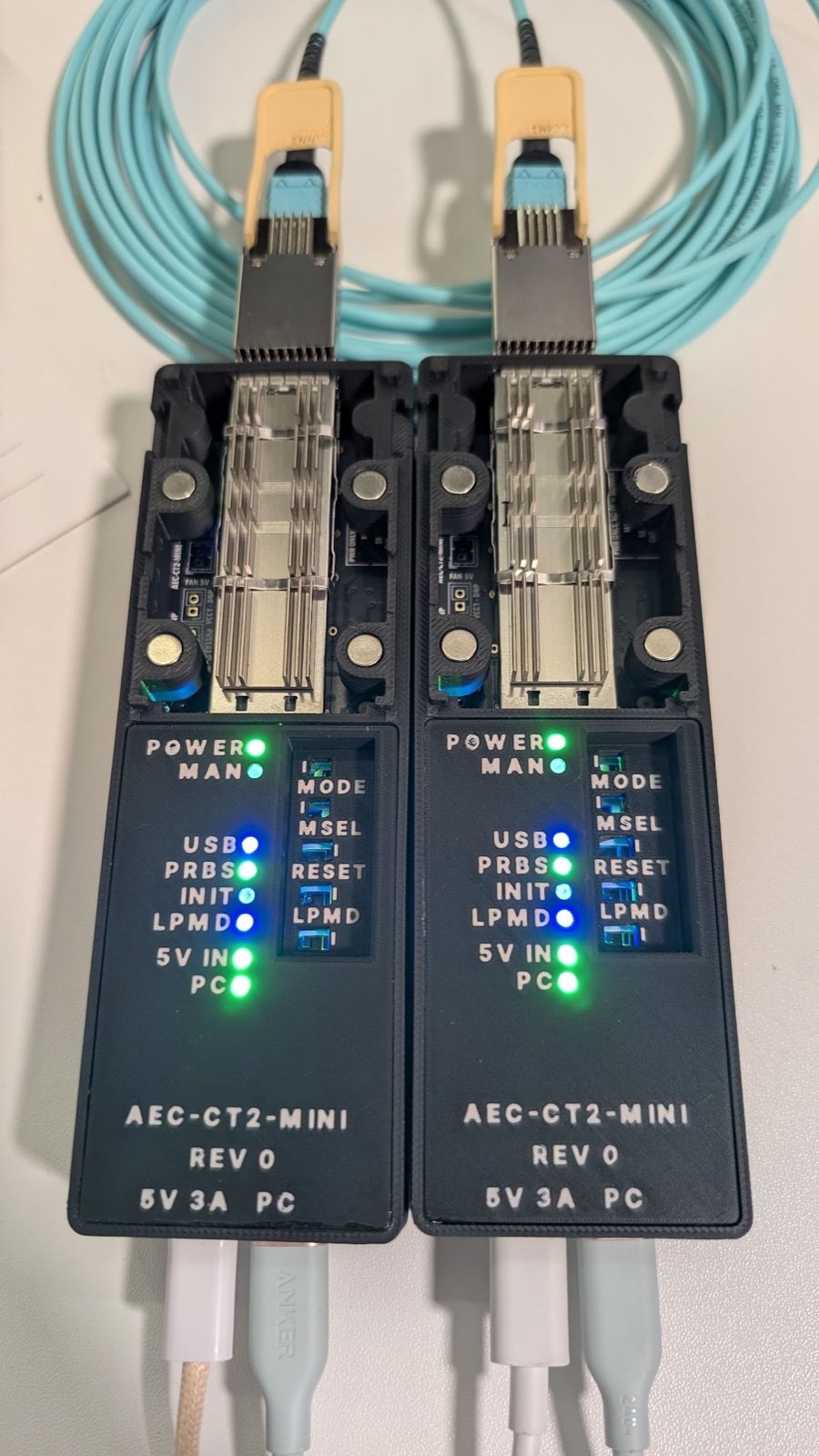
The AEC-CT2-MINI rev 0: two units in their home-printed cases, with an optical module pair on OM4 fibre and the status LEDs lit through the light pipes.
1. Why I wanted one
Active cables connector ends and optical transciever modules hve powerful DSPs, firmware, a temperature sensor, power classes and a register map with hundreds of fields with interesting data, and it behaves differently at low power, at full power, warm, cold, half-inserted, or right after a firmware update. I wanted to see all of that for myself: read every register, push a module to full power and watch it heat up, update its firmware, and run its built-in pattern tests across a real cable.
The usual ways of doing that are not very friendly if all you have is a bench and some curiosity. You can plug the cable into a switch or a server, which shows you whatever the host decides to show you and hides the rest. Or you can use a very expensive lab cable tester or a bit error rate tester (BERT), which is the right tool for qualification work and lives in a lab rather than on a desk. I wanted something in between, a small and cheap platform where I plug in a cable and explore every parameter it has from a laptop, with every step recorded.
There was a second itch as well. As with everyone else in the industry, I have been using AI extensively for work and personal projects. I wront about a few in the previous blogs, like the TinyTapeout VGA chip I developed with AI agents and Passbook recently. This project follows a similar vein, but is much more extensive.
The Idea: give AI agents a written brief and let them take a piece of hardware all the way to a filled-in order, with me providing some extensive initial guardrails and stepping in only where judgment is needed and to pay where an order gets placed.
I also set myself one more constraint, which is that every design tool, from EDA and CAD to simulation, slicing, the test tool, the viewer and this blog, had to be free and open source. Here’s the whole kit and what each one did:
| Tool | What it did here |
|---|---|
KiCad |
Schematic capture and PCB layout. Its command line, kicad-cli, runs the electrical and design rule checks and writes the fab files without opening the GUI. |
Freerouting |
An autorouter. It routed most of the board from a script, headless. |
Python |
The glue. Scripts read the design YAML and generate the schematic, the placement and the fab package, and the test tool is Python too. |
OpenSCAD |
Code-first CAD. The whole printed case is generated from parameters, never drawn by hand. |
CadQuery |
Reads the vendor’s 3D models of the cage and heat sink, so the case is checked against the real parts. |
Gmsh, fTetWild, scikit-fem |
Meshing and finite-element solving, for the case’s stress and heat checks. |
trimesh |
Loads the printed meshes for the thin-wall and clearance checks. |
Bambu Studio |
The slicer that turns the case into printer toolpaths. |
pyftdi |
A pure-Python driver for the FTDI USB chip on the board. It’s how the laptop speaks I2C to the module. |
three.js |
The interactive 3D case viewer in this post. |
Jekyll |
This blog. |
The AI tools themselves are not open source: Claude Code, plus Cursor’s agent command line and the Gemini app for reviews. JLC’s online manufacturability checks and DigiKey’s parts API are free web services, and the connector drawings sit behind a vendor’s sign-in and licence. The tool, the case and the method are public. The board’s generator scripts and the licensed drawings stay private.
This first part of teh sries stays with the finished unit, what it does, what it found on real cables and how it was built. The five parts after it go deep on each piece.
2. What I ended up with
Each unit is basically a QSFP-DD cage on a stick. You plug a cable or a module into the cage, connect the unit to a laptop over USB-C, and power the module from a USB-C charger (5 V / 3 A) on a second USB-C port. One unit is enough to read, power and update a module. With two units, one at each end, you can drive both ends of a cable and run an end-to-end pattern test when the modules carry their own generators and checkers.
It is really three things, a board, a printed case and the software that drives them, so I’ll go through them in that order.
The board is a 42 × 136 mm four-layer PCB with a press-fit QSFP-DD cage, an FTDI FT2232H acting as the I2C master and pin driver, two buck converters (one for the logic and one for the module), slide switches for a human to flip, and eight status LEDs. I left out the microcontroller on purpose, so there is no firmware on the board and every decision lives in software on the laptop. JLC made five bare boards and assembled four of them.
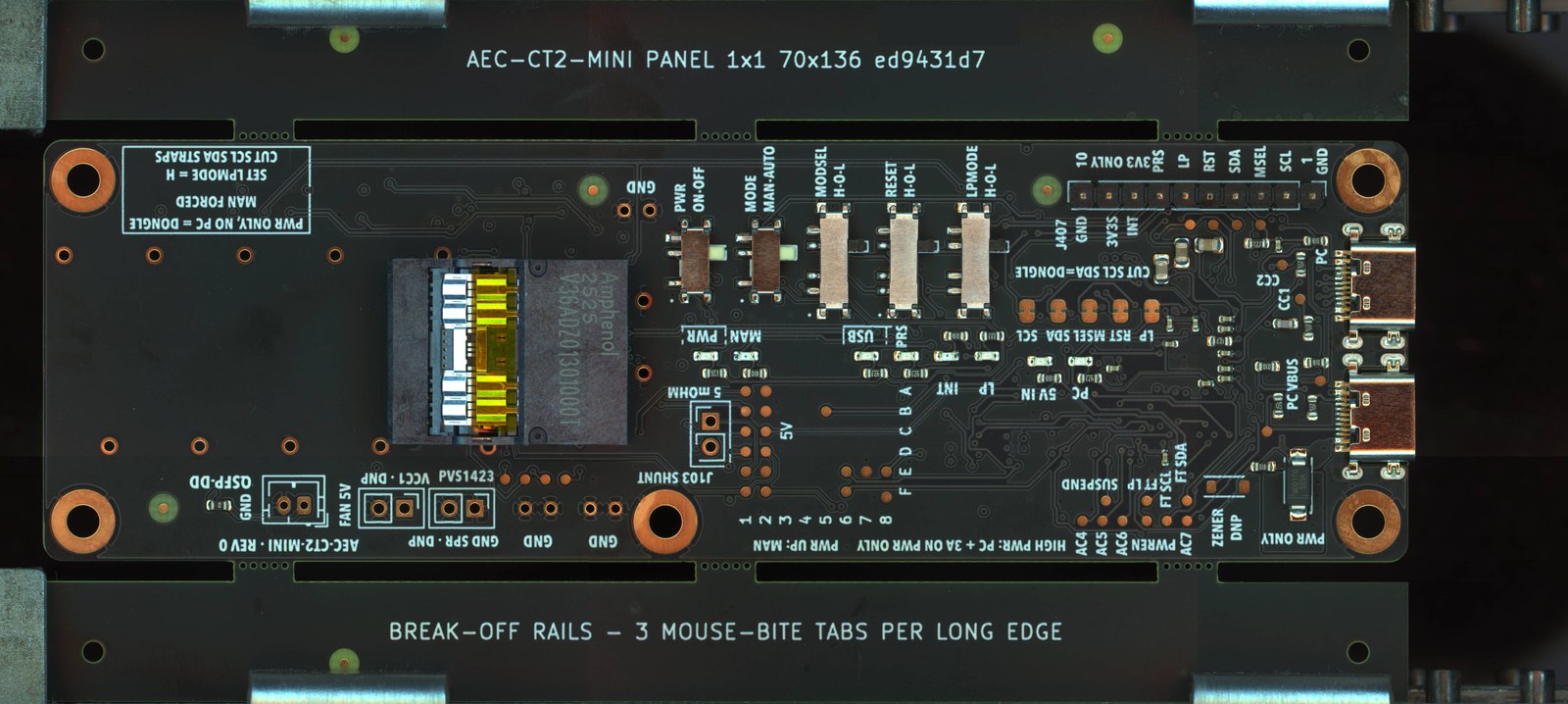
A real rev 0 board in its assembly panel, in JLC's production photo before shipping. The cage is pressed on by hand after delivery.
The case prints at home on a Bambu Lab P2S, in a handful of parts: a tray, a body, a deck that carries the labels, and a hood over the cage. The parts that sit near the hot metal are specified in PETG, and the units on my bench so far are PLA prints. It has eight light pipes that carry the LEDs up to labels on the lid, a hood over the cage, and magnets that hold the hood in place. You can take it apart in the viewer below. It animates on its own, and if you click it you get a larger view that you can turn and explode yourself.

aectest is the Python package with a command line and a browser UI that was built for this tool. The browser UI has a guided “Test a cable” flow for someone who just wants a verdict, and an Advanced page for those of us who want to poke at registers. Every run writes a record that can be judged again later.
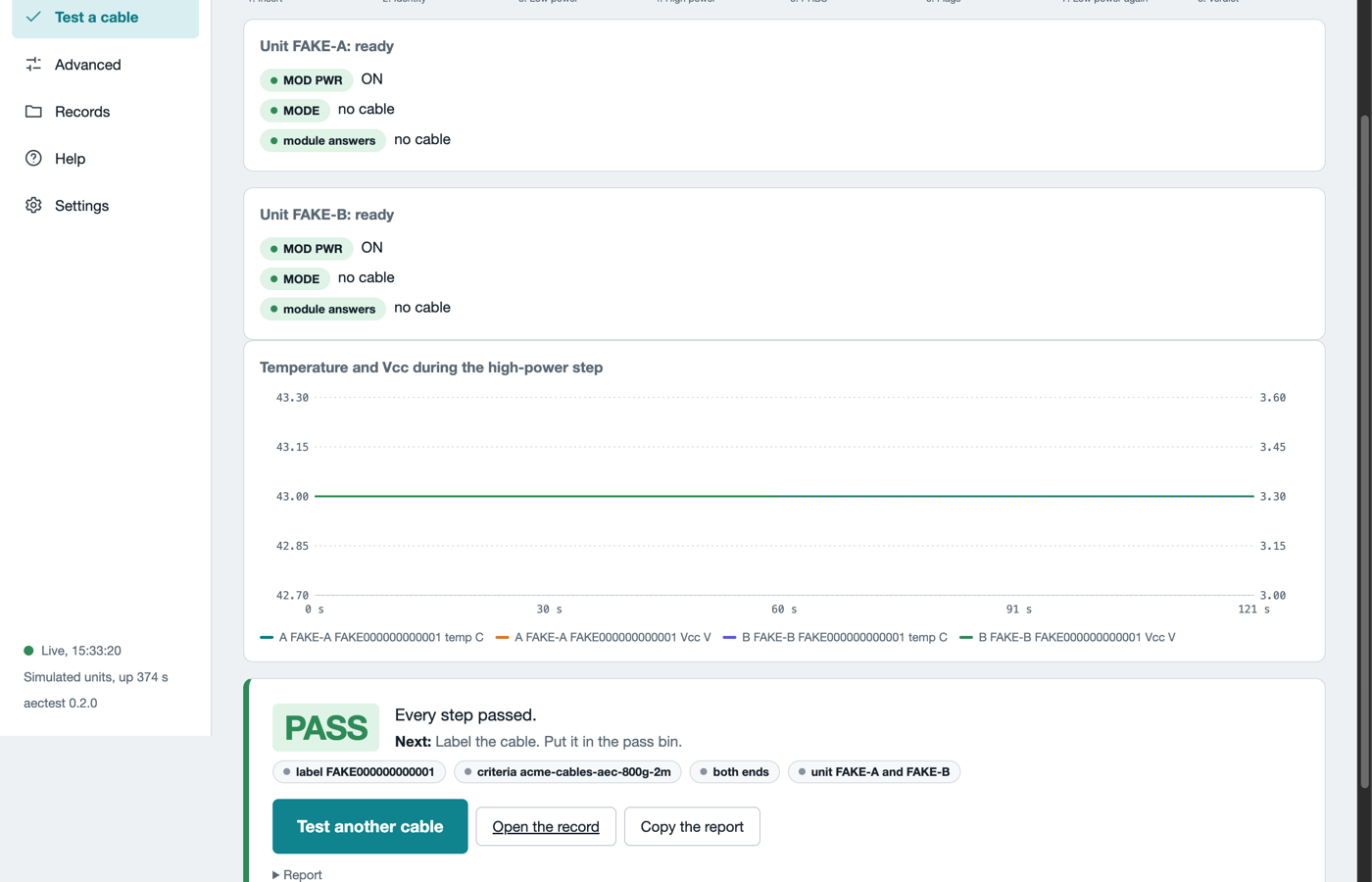
The guided test in the web UI, here in simulation mode with two simulated units: live temperature and supply during the high-power step, then the verdict card with its record and report.
The software, its docs and the case files are public at vppillai/aec-ct2-mini, with pages at vppillai.github.io/aec-ct2-mini. The agent workflow that built it is packaged as a Claude Code skill at vppillai/hw-from-spec.
3. What it can do
Here is what the platform does, roughly in the order you’d use it on a new cable.
- Identify and decode. Read the module’s identity and every page of the Common Management Interface Specification (CMIS) that it advertises: vendor, part, firmware, power class, supported applications, alarm thresholds, and live temperature and supply. An audit then checks the module against the required CMIS fields.
- Drive the pins. Each control pin (reset, low-power mode, module select) can be driven from software or by hand with a slide switch. The LEDs show
PWR,MAN,USB,PRS,INT,LP,5V INandPC; reset and module select have none. - Take it to full power, under software interlocks. The software releases a module into high power only after a pre-flight check and a power budget check. It then watches temperature and supply every
1 sand drops the module back to low power if it gets too hot. - Measure heat. A hold at high power records the temperature curve, which gives you a fair idea of how hot the module would run in your own setup.
- Update firmware. The update goes through the module’s command channel in steps you can stop between: download to the inactive bank, run it, then commit it.
- Test the signal path. Many modules carry their own pattern generator and checker. Two units drive the generator in one module and the checker in the far module across the cable, in both directions, and count the errors in short windows.
- Keep a cable database. Whatever the tool knows about each cable type lives in small YAML files rather than in the code, so adding a new cable means adding a file instead of writing a patch.
Each of these is also a single command from a terminal. My first look at a new cable is these three read-only commands:
aectest bringup id       # vendor, part, serial, firmware, power class
aectest bringup decode   # every advertised page, decoded by field
aectest bringup audit    # the CMIS compliance checks, A01 to A19
Anything that takes a module to high power needs two explicit permission flags, and the software refuses to go ahead without them. Part 2 explains why, along with the board and the safety rules.
4. What it found on real cables
The four boards came up one step at a time, and both 3.3 V rails I measured sat within 15 mV of 3.3 V. Then I started plugging in real cables.
The first real cable was a Credo 400G active electrical cable (AEC). It went to high power and held a 10 min run without raising a single flag, peaking at 48 °C on a bare board with no fan. I also moved its firmware from 5.1 to 5.6 through the tester, which is a nice thing to be able to do on a desk. What rev 0 can’t do is run a pattern test on this cable. Its DSP waits for a signal from a real host before it brings the data path up, and this board has no host side. That gap ended up shaping the next revision.
Next came a pair of 400G optical modules over fibre, and here the pattern tests did run in both directions. Once I had the right fibre in, the runs looked wonderful, and the modules reported numbers that read like excellent bit error ratios. Then the tool started checking those numbers against the raw counters it read, and they didn’t add up. Every checked run since then comes back INCONCLUSIVE with a reason attached, instead of a clean number. I had wanted clean bit error ratios. What I got instead was the tool catching its own instrument misbehaving before I published a wrong answer, and that turned out to be the most useful thing it did. Part 5 tells that detective story.
On a bare board with no fan, the AEC settles near 50 °C. The optical modules advertise 8 W, which is above this board’s 6.6 W nominal ceiling. I ran them anyway as a one-off characterisation (Part 2 owns up to that), and they were still climbing when the 70 °C throttle stopped them.
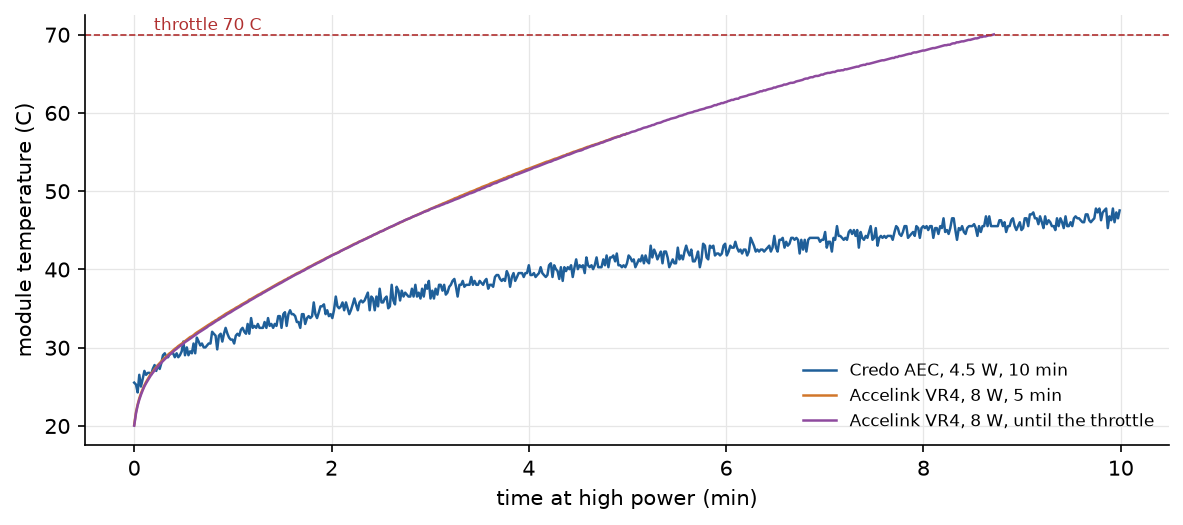
Module temperature at high power on a bare board with no fan. A fit puts the AEC's steady state near 50 °C. The 8 W-class optical module is still climbing when the 70 °C throttle stops it; the fitted curve heads for about 75 °C. This plot changed the next revision.
The throttle stopped runs exactly as designed. Later runs had a desk fan aimed at the cages, and that fan failed on two occasions without me noticing. The first outage caused three throttle trips in one session, and the second stopped one soak in the first unattended campaign, Campaign A. Every one of those runs still ended with both modules back in low power.
What is and isn’t proven: the boards power, manage and update modules, and the thermal throttle works. None of the signal-path measurements are validated yet, since rev 0 can’t pattern-test the AEC without the cable DSP FW supporting it. The 8 W optics ran above the board’s nominal ceiling.
5. How it was built
The build process was the other half of the experiment. The first stretch took the brief to a filled-in board order, and the work after that turned the board into the system you saw above, with the case, the software and the manuals.
I wrote the brief and a CLAUDE.md with the project rules, made the calls that needed judgment, and reviewed each step. AI agents in Claude Code did the design and ordering work, many of them in parallel: the spec, part selection against live JLC stock, generated schematics, scripted placement and routing, the fab outputs, the case, the test software and the manuals. One coordinating agent handed out the jobs and merged the results. The git history has 1,617 commits from about 150 commit identities, and nearly all of those are agents, since each job commits under its own name.
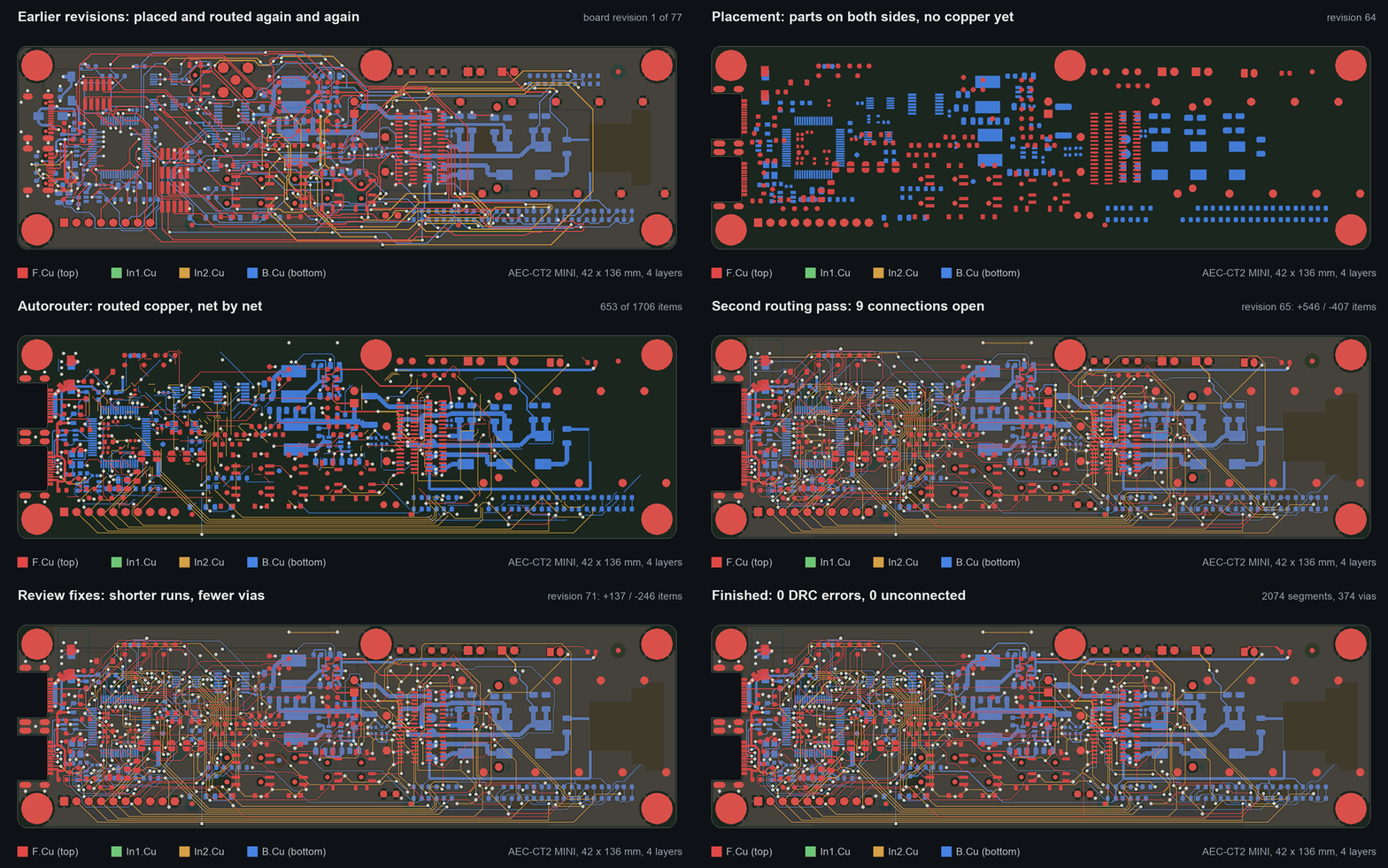
The routing, replayed from the board's git history. Placement and routing are scripts with their data in files, so every change is a reviewable diff.
A handful of rules carried the whole thing. The agents never use a part number from memory and always fetch it live. Everything is generated and nothing is hand-edited, so a review finding changes a script and the design gets rebuilt. Reviews are blind, so no reviewer sees another reviewer’s notes. The outside reviewers ran through Cursor’s agent command line, plus one case review through the Gemini app in a browser. And every decision gets logged, because agents forget. By the end, the decision log held 96 of my calls and 356 agent proposals, and it is the only reason a fresh agent could pick up where the previous one stopped.
This specific version of the board wasn’t the originalplan. The initial was for a bigger dual-port tester with a microcontroller, and this small board was supposed to be a cheap footprint coupon to prove out the cage footprint first. Early on, I looked at the renders and wrote “it is no longer just a footprint coupon”, and from then on it was the product.
Before the order went in, the agent ran the design-rule, manufacturability and traceability checks, filled in the JLC quote in my signed-in browser up to the Save to Cart button, and stopped there. I clicked Save to Cart and Checkout, picked the shipping and placed the order. No agent ever signs in to a vendor or clicks an order button, and the clicks that place an order are always mine. The licensed downloads, the vendor replies, the assembly and all of the bench time were also mine.
6. What I learned
I still had to make the calls. The agents produced an absurd amount of careful work and carried the board all the way to a filled-in order. The project still turned on a handful of calls I made from experience or from a real part on a real bench: live part data only, everything generated, and no waivers on printed parts after a batch of nylon trays cracked exactly where a waiver said they’d be fine. Once a call was in the log, the agents never forgot it, which is more than I can say for myself ;)
Write it all down, because nobody else will remember. A decision log, a learnings log and a diary sound like bureaucracy, and I expected to resent them. With about 150 commit identities in one repository, though, the log was how a fresh agent knew what the last one had decided, and it is also why this series can quote exact numbers.
Check the numbers a module hands you. The optics reported lovely bit error ratios, and publishing them would have been the easy thing to do. Checking them against the raw counters cost a few hundred lines of Python and saved me from a wrong answer more than once.
7. What’s next
Most of the rev 1 list came straight from the bench. The AEC that sat waiting in DPInit for a host gets a swappable cage board with a host loopback, so it can finally run a pattern test, and the fan that failed twice becomes one the board powers, controls and watches. Rev 1 also adds protection on every line that faces the controller, LEDs that look equally bright through the pipes, and one cable per unit instead of two, because with rev 0, two units on a desk means four USB-C cables. To get there it brings back a microcontroller, an ESP32-S3 that talks Wi-Fi, which reverses the no-firmware rule; the measurement logic stays on the laptop.
8. The rest of the series
Each part goes deep on one piece of the picture above.
- Part 2: the cable, CMIS and the board. Why copper cables grew a DSP, what CMIS actually is, the block diagram, how each part was picked and why every part sits where it does.
- Part 3: the design flow and making it. Schematics from YAML, placement and routing as scripts you can rerun in CI, how DRC and ERC waivers were handled, and what JLC’s engineers asked before they built it.
- Part 4: the case. The cracked trays that made the no-waiver rule, a case generated from code and checked like a part, PETG, light pipes, magnets and the fan hood.
- Part 5: bring-up and the bench. First power from a phone charger, the Credo firmware update, what a PRBS run can and can’t prove, and the counters that didn’t add up.
- Part 6: the method, the tool and what comes next. Blind reviews across several AI models, how
aectestkeeps cable knowledge in data, the published skill, the case, and the rev 1 plan.



Leave a comment